CLI Proxy API Management Center: the admin screen for a proxy you run yourself
This is a WebUI interface based on CLI-Proxy-API, designed to simplify configuration modifications and runtime status monitoring.
At a glance
- What is it?
- A single-file React dashboard for editing the config of your own CLI Proxy API v8 instance, with a YAML diff before save and quota and log views. It is a control panel, not a proxy: it needs a running backend and a management key, and it refuses anything older than version 8.
- Who is it for?
- Adopt it if you run a single CLI Proxy API v8 instance on your own hardware and would rather click through settings than edit config.yaml over an SSH session. Skip it if your proxy sits behind a team auth layer, if you are still on v7 and cannot take the config migration window, or if a remembered management key in browser storage violates your policy.
- Can I use it commercially?
- Yes. MIT is a permissive licence: you can use, modify and sell software built on it, as long as you keep its copyright and licence notices.
- Is it still maintained?
- Yes. The repository received new commits within the last day.
- What is it written in?
- Mainly TypeScript, according to GitHub's language statistics.
Answers come from the project's GitHub data, last synced on November 22, 2026, and from our analysis. They are not legal advice.
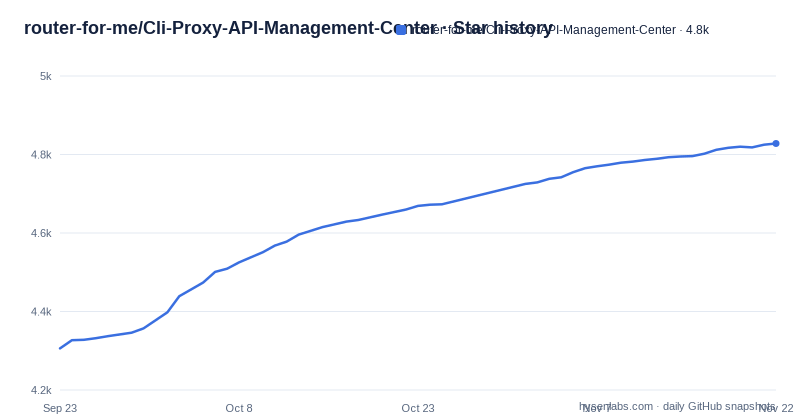
Star history
- router-for-me/Cli-Proxy-API-Management-Center4,828 ★ · +522
| Repository | 2026-09-23 | 2026-11-22 |
|---|---|---|
| router-for-me/Cli-Proxy-API-Management-Center | 4.3k | 4.8k |
522 Stars in the last 60 days, measured from the daily GitHub snapshot. Compare with other projects
Editorial analysis
A management screen for a proxy it does not run
CLI Proxy API Management Center ships exactly one artefact that matters: a single HTML file with JavaScript, CSS and bundled assets inlined. It is not a proxy and it does not pretend to be one. The README states the boundary in a single line, that this repository is the management UI, not the proxy, and that it does not forward traffic. Everything you see in the browser is a request to an API that some other process is already answering.
That framing tells you who the audience is. The person who benefits is a solo operator or a two-person team running one CLI Proxy API instance, on a laptop or a small VPS, holding a handful of upstream provider keys and a set of OAuth credential files. Before this project, that person had two options: ssh into the box and edit config.yaml in a terminal editor, or accept that changing a provider key means a restart and a hand-typed YAML diff with no preview. This UI is aimed squarely at the first kind of operator. Someone running a fleet of proxies behind a shared gateway wants a different tool, and the dashboard's per-instance login model is a poor fit for that.
Two key spaces that a v7 user will mix up
The v8 configuration layout puts two different lists of keys under names that collide in a way worth reading twice. `access.api-keys` holds the client keys that authorize calls to the proxy. The top-level `api-keys` holds upstream provider groups. The names read almost identically, they mean opposite sides of the request, and the editor writes only v8 fields.
Then there is the management key, which is a third thing again. It is what signs you into the interface, sent on every management request as `Authorization: Bearer <MANAGEMENT_KEY>`, and it is not interchangeable with any client key. Remote use additionally depends on `management.allow-remote: true` on the server, and the README warns that repeated authentication failures can get your IP temporarily blocked by the server. For an editor, that failure mode matters: repeated wrong keys on a locked-down instance can cost you a wait, and the page gives you a 401 with no way to distinguish wrong key from wrong address.
Editing YAML through CodeMirror and showing the diff before the write
Configuration changes take two routes. One is a visual form for common settings and client keys. The other is a YAML editor built on `@uiw/react-codemirror` with `@codemirror/lang-yaml` for highlighting and `@codemirror/merge` for the save preview. You get search, syntax colouring, and a diff of what the file will become before anything is sent to `/v8/management`. That preview is the single most valuable thing in the project, because the alternative is a blind write to a file the proxy is actively reading.
The upgrade path is where the design gets sharp and slightly dangerous. The backend always returns the v8 layout on reads, and a successful v8 configuration write migrates the stored file on disk. So the moment you save, `config.yaml` is rewritten in a new shape. The README's own instruction is to upgrade the backend first and back up `config.yaml` before touching the editor. On the client side, Axios carries the requests, Zustand holds the state, React Router 7 runs on hash routing, and the build targets ES2020, which is why the output works as one file behind a plain static path.
First use: open management.html, paste the management key
There is no install step for the standard setup, because the UI is bundled with CLI Proxy API and served by the proxy. You start your CLI Proxy API service, open `http://<host>:<api_port>/management.html`, and enter the management key. The API address is detected from the page URL and can be changed by hand, which matters when the dashboard is served from somewhere other than the API host. Addresses such as `localhost:8317`, `https://example.com:8317` or `http://example.com:8317/v8/management` are all accepted, and the management suffix is stripped automatically.
What you should see on the first screen is the dashboard: connection status, the server version the backend reports, its build date, and which models are available. If that panel fills in, the key is valid and the address is right. The remaining tabs map to the rest of the surface: AI providers for Gemini, Codex, Claude, Vertex and OpenAI-compatible endpoints with their keys, headers, proxies and model mappings, auth files for uploading and downloading credentials and running OAuth or device flows, quotas for providers including Claude, Codex, Kimi and xAI/Grok, and a log view with auto-refresh, search, an option to hide management traffic, and a download of request error logs.
Bun 1.3.14, vite-plugin-singlefile and dist/index.html
Building your own copy is a two-command affair, and the repository pins the toolchain: `packageManager` is `[email protected]`, and `vite-plugin-singlefile` is what inlines everything into one document. Install with the frozen lockfile so the dependency graph matches what CI tested, then run the production build, which is `tsc && vite build`, meaning type errors fail the build rather than ship.
bun install --frozen-lockfile
bun run build
The output lands at `dist/index.html`. The release workflow renames that file to `management.html` for backend hosting, so a self-build is not drop-in without that rename. For iterating on the frontend itself, the dev server serves the app separately and expects you to point it at a real backend instance.
bun install --frozen-lockfile
bun run dev
That runs on `http://localhost:5173`. One catch worth planning for: opening the built file through `file://` can hit browser CORS restrictions, so use `bun run preview` over an HTTP server. The version string shown in the interface is injected at build time from `VERSION`, then git tags, then the package version, with `dev` as the final fallback, which means an untagged local build reports itself as dev.
The remembered management key is obfuscated, not encrypted
The security section states the thing many dashboards bury. When remember password is on, the management key is written to browser storage using reversible obfuscation, and the README calls that out as not encryption. Anyone with access to that browser profile, or a copy of its storage, can recover a key that unlocks configuration writes and credential uploads on your proxy. The stated mitigations are a trusted device or a dedicated browser profile, and enabling remote management only after you have evaluated the exposure of your server.
Two more limits sit alongside it. The Plugins tab appears only when the connected backend advertises support, so the feature list is conditional on a backend you do not control. And there is no compatibility floor below v8: the project requires CLI Proxy API 8.0.0 or later, uses the v8 Management API at `/v8/management`, and has no v0 fallback. Plugin resources and custom extensions keep whatever paths the backend declares, which means a plugin's URL is not something you can predict from this repository alone.
Against editing config.yaml over SSH by hand
The honest alternative is the one that existed before this project: ssh in, open config.yaml in a terminal or a synced local editor, change it, restart the service. The difference in approach is where the truth lives. The file on disk is the state. Nothing runs in the browser, nothing needs the proxy to be up while you edit, and your existing secret management still applies.
What the dashboard buys is the diff preview and typed forms. You see the exact YAML delta before it is written, and form fields remove the chance of a mistyped indent in a file the proxy parses at startup. What it costs is a dependency on the backend being reachable and on the management key being held by whoever opens the page.
Editorial conclusion
Adopt it if you run a single CLI Proxy API v8 instance on your own hardware and would rather click through settings than edit config.yaml over an SSH session. Skip it if your proxy sits behind a team auth layer, if you are still on v7 and cannot take the config migration window, or if a remembered management key in browser storage violates your policy. Verify first that GET /v8/management on your instance returns the v8 layout before you point the UI at anything you care about, and back up config.yaml before the first write.
Frequently asked questions
Where can I find the management key for the CLI Proxy API Management Center?
The README describes the key as what signs you into the UI, sent on management requests as a bearer token, and keeps it distinct from the client keys listed under `access.api-keys`.
Do I have to deploy the CLI Proxy API Management Center separately?
No. The UI is bundled with CLI Proxy API, and no separate frontend deployment is needed for the standard setup: you start the service and open `http://<host>:<api_port>/management.html`.
Which CLI Proxy API versions does the Management Center work with?
It requires CLI Proxy API 8.0.0 or later, using the v8 Management API at `/v8/management` and the v8 configuration layout. There is no fallback for older backends, and the editor writes only v8 fields.
Is the remembered management key stored securely in the browser?
No. The README states that with remember password enabled the key is persisted in browser storage using reversible obfuscation, which is not encryption. It recommends a trusted device or a dedicated browser profile.
Official sources
Add this badge to your README
If you maintain this project, the badge below links readers to this analysis and shows its maintenance status from the daily GitHub snapshot. Paste the markdown into your README; add ?metric=license or ?metric=stars to the image URL for a different field.

[](https://hysenlabs.com/projects/router-for-me-cli-proxy-api-management-center)Star history chart for your README
[](https://hysenlabs.com/projects/router-for-me-cli-proxy-api-management-center)Was this useful?