VecturaKit, three libraries from one package and one dependency for its command line tools
Swift-based vector database for on-device RAG using MLTensor and MLX Embedders
At a glance
- What is it?
- VecturaKit is a Swift vector database for apps that run on Apple hardware, and it is unusually broad for its size: it builds for five operating systems, mixes dense vector similarity with a lexical ranker, and exposes three protocols so the embedder, the storage layer, and the search algorithm are each replaceable. What the readme does not do is finish the job. The one package dependency exists for two executables it barely documents, the vector width is inferred rather than recorded, the weight between the two rankers has no default, and the storage mode that scales to millions of documents lives behind a link.
- Who is it for?
- Use VecturaKit if you are writing a Swift app on Apple hardware and want retrieval to stay on the device, and if you are willing to pick your embedder carefully. Four things to know.
- Can I use it commercially?
- Yes. MIT is a permissive licence: you can use, modify and sell software built on it, as long as you keep its copyright and licence notices.
- Is it still maintained?
- Yes. The repository last received commits 76 days ago.
- What is it written in?
- Mainly Swift, according to GitHub's language statistics.
Answers come from the project's GitHub data, last synced on November 15, 2026, and from our analysis. They are not legal advice.
Star history
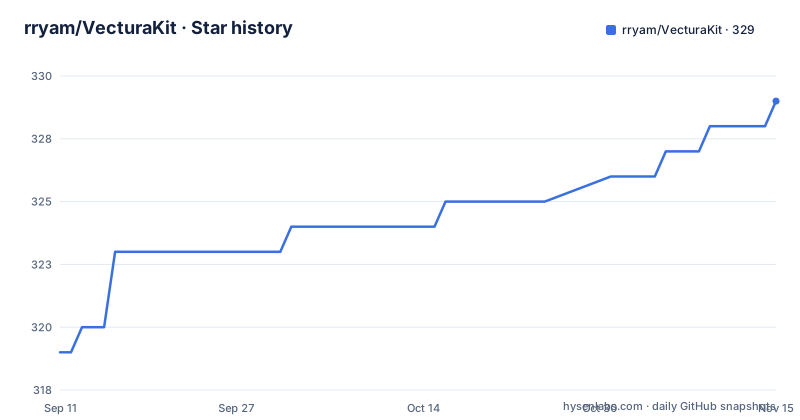
- rryam/VecturaKit329 ★ · +10
| Repository | 2026-09-11 | 2026-11-15 |
|---|---|---|
| rryam/VecturaKit | 319 | 329 |
10 Stars in the last 65 days, measured from the daily GitHub snapshot. Compare with other projects
Editorial analysis
Three libraries and four embedder types ship across three repositories
The package publishes three products. The core vector database is one. A second exposes OpenAI-compatible embedding support and a third exposes contextual embedding through Apple's own NaturalLanguage framework. You link the ones you want, and the readme's target example lists all three.
The embedder is a protocol, so you can supply your own. Four are named, and they do not all live in this repository. Contextual embedding through the system framework and embedding through an OpenAI-compatible endpoint are both here. A wrapper for a third-party Swift embeddings library lives in a separate package, and a wrapper for GPU-accelerated embedding on Apple's MLX framework lives in a third.
So the package you add to your project may pull in two more, and the readme's installation section gives each of them its own version floor. The main package's floor matches its newest release, which is more version discipline than most projects manage.
What is missing is a decision guide. Four embedder types with different requirements, different platforms, and different model ecosystems are presented as a list, and nothing tells you which one to pick for an offline app, an app with a network call, or an app that needs to run a model on the GPU.
The one dependency exists for the two executables
The dependency section lists one Swift package, and it is the argument parser used to build command line interfaces.
That is a well-chosen dependency. It is also the only one, and it is there for the two executables rather than for the library. So a developer writing an app, linking the core product and one embedder product, and never touching the command line tools still resolves the argument parser into their build graph.
The readme makes a zero dependency claim in the same document, and the claim is about the embedder rather than the package: the contextual embedder uses the system framework and has no external dependencies. Both statements are true. A reader who takes the second as a description of the package has been misled, and the feature list is where the claim appears, while the dependency section is eleven lines further down under a subheading of the installation section.
For a library whose pitch is on-device retrieval, dependency count is a selling point rather than an implementation detail. Saying clearly that the one dependency is CLI-only would cost a sentence, and the sentence is not there.
The vector width is inferred from the embedder and never recorded
One feature is automatic dimension detection: the database works out how many dimensions an embedding has by asking the configured embedder. There is no dimension parameter in the configuration example.
That is a good default for the common case, where you initialise a database and immediately start inserting. It creates a question the readme does not answer, and persistent storage is a separate feature, so the two are meant to be used together.
A persisted vector index is bound to the width it was built at. If you later swap the embedder for a different model with a different output size, the stored vectors no longer match the dimension the database infers at load. The readme does not say whether the width is written into the stored database, whether it is validated when the database is reopened, whether a mismatch is an error or a silent reinitialisation, or whether existing documents are re-embedded.
There is a document management section in the contents, so the API for deleting and re-adding documents exists. Nothing connects it to this problem, and nothing in the readme raises the possibility that changing embedder is a supported operation with a cost.
Hybrid search blends two rankers and the weight has no default
Search is not purely vector similarity. The feature list says it combines vector similarity with a lexical text ranking algorithm, and the configuration section says search behaviour is customisable with adjustable thresholds, result limits, and hybrid search weights.
So there are three dials and no numbers attached to any of them. No default weight, no range, no statement of which side wins at the midpoint, and no guidance on when to favour one ranker over the other. That last one is the substantive gap: dense retrieval and lexical retrieval fail in opposite directions, and the weight between them is the setting that determines which failure you get.
The search algorithm is a protocol, so the whole hybrid path is replaceable, and the readme names custom search engines as a supported extension point. What it does not say is what the default engine does with the weight internally, whether the two rankers' scores are normalised before they are combined, and whether the threshold applies before or after blending.
For a library whose headline is configurable search, three dials with no calibration is the gap worth closing first, and it is a documentation change rather than a code change.
Three storage modes and the one that scales is behind a link
The memory management feature offers three modes, named in a single clause: an automatic one, a full-memory one, and an indexed one. The claim attached to them is that they cover datasets from thousands to millions of documents, and the whole explanation is a link to a guide in the repository's documentation directory.
That guide is the right place for the detail. The readme is the wrong place to state a capability this large and elaborate on it not at all, because the difference between loading everything into memory and indexing it is the difference between a toy and something usable on a phone.
The word automatic is doing the work in the first mode's name, and nothing says what automatic decides or how. A document count is the obvious candidate, but the readme does not say, and the threshold at which a database silently changes strategy is exactly the kind of number that belongs in the feature list rather than in a separate document.
The storage layer is also a protocol, and three example backends are named: two Apple data frameworks and a SQL database. A fourth is described only as cloud storage, which is a category rather than an implementation.
The install snippet appears three times and the third is a merge
The installation section gives the package manager dependency twice. The first time it is the core package on its own, at a floor matching the newest release:
dependencies: [
    .package(url: "https://github.com/rryam/VecturaKit.git", from: "6.3.0"),
],
The second time it appears in a block that also contains the GPU acceleration package, with its own version floor, introduced by a sentence saying to add it as well.
Read literally, the second block is a second complete example rather than an addition, and a reader who wants both ends up with two dependency arrays and has to work out that the first is a subset of the second. The third package, for the third-party embeddings library, gets its own block and its own floor again.
So three version floors in three code blocks, one of which duplicates another, and no statement of which products each package makes available beyond the target example.
The rest of the repository is disciplined in ways worth noting. A resolved dependency file is committed, so the build graph is pinned. A lint configuration is committed. A configuration file for a hosted Apple build service is committed, which is the only continuous integration the repository mentions. There is a test directory and no documented way to run it, and the readme has no contributing section content despite listing one in its contents.
Two executables with no invocation anywhere in the readme
The package ships two command line tools. One drives local workflows using the contextual embedder. The other is for trying OpenAI-compatible embedding providers, and is described in the feature list as being for database management and testing.
The readme gives neither of them a single command. The quick start is library code, inside a task, constructing a configuration and an embedder and a database. The contents list has two subsections, one per tool, and neither is a usage example in the visible text.
That is a real omission for the second tool in particular, because its stated purpose is trying a provider from a terminal. A developer evaluating whether a hosted embedding endpoint is compatible with this library is the exact user that tool is for, and the fastest way to find out is a command, not a Swift snippet.
The readme also does not say what either tool can do that the library cannot, whether they share a database format with it, whether they accept a remote endpoint on the command line, or where a database created by one of them lives on disk.
One line of credit and no statement of what changed
The second paragraph of the readme names its inspiration and links to it: a separate vector database for Swift, by a different author, under a different account.
That is one line, and it is the right thing to do. What it does not do is say what changed. A reader who knows the inspiration has no way to tell whether this is a fork, a rewrite, a subset, or a different design that took an idea, and a reader who has never seen it has no idea what the credit is crediting or what the credited project does that this one does not.
The single dependency and the two satellite packages are the same kind of gap in a different place. The readme says the Swift embeddings wrapper and the GPU acceleration wrapper live in separate repositories, and it does not say whether either is maintained on the same schedule, whether the main package's tests exercise them, or whether a version floor on one implies a floor on the other.
The licence is its own small gap. The repository carries a permissive licence file and the readme names a licence, and the inspired project is credited without a note about its terms. For a project whose stated origin is another project, that is the one sentence a licensing reviewer would want.
Editorial conclusion
Use VecturaKit if you are writing a Swift app on Apple hardware and want retrieval to stay on the device, and if you are willing to pick your embedder carefully. Four things to know. That the vector width is taken from the embedder at initialisation, so a database built with one embedder is not obviously reusable with another and the readme does not say what is checked on load. That hybrid search blends a dense ranker with a lexical one and the blend weight is yours to set, with no default and no range given. That the two command line tools exist and have no example invocation anywhere in the readme. And that the dependency you inherit is an argument parser for those tools, which you get whether or not you use them.
Frequently asked questions
What is VecturaKit and what is a vector database example like it?
VecturaKit is a Swift vector database for on-device applications, storing and searching embeddings locally without uploading anything. It combines vector similarity with a lexical text ranking algorithm for hybrid results, indexes documents in parallel, persists state across app sessions, and exposes protocols so the embedder, the storage backend, and the search algorithm can each be replaced.
Is SQL a vector database, and can VecturaKit use one?
Not as shipped. VecturaKit's default storage is its own, and SQL is named as one of three example backends a developer could implement by conforming to the storage protocol, alongside two Apple data frameworks. The readme also names cloud storage as a category rather than an implementation, so none of the three is provided out of the box.
What platforms and versions does VecturaKit support?
Five: macOS 15 and later, iOS 18 and later, tvOS 18 and later, visionOS 2 and later, and watchOS 11 and later. Distribution is through the Swift package manager only, at version 6.3.0 or later, with the two satellite packages for third-party and GPU-accelerated embeddings carrying their own floors of 1.1.0 and 3.0.2.
How many dependencies does VecturaKit have?
One, the Swift argument parser, and it is used to build the two command line tools the package ships rather than the library itself. The contextual embedder, which uses Apple's NaturalLanguage framework, is described as having no external dependencies of its own. A developer linking only the library still resolves the argument parser.
Official sources
Add this badge to your README
If you maintain this project, the badge below links readers to this analysis and shows its maintenance status from the daily GitHub snapshot. Paste the markdown into your README; add ?metric=license or ?metric=stars to the image URL for a different field.

[](https://hysenlabs.com/projects/rryam-vecturakit)Star history chart for your README
[](https://hysenlabs.com/projects/rryam-vecturakit)Was this useful?