curxy solves one problem: Cursor's server cannot see your laptop
Simple proxy worker for using ollama in cursor
At a glance
- What is it?
- A single-file-scale Deno worker that forwards requests to ollama and exposes it through a Cloudflare quick tunnel, which is the whole fix and also its main risk: the tunnel is public unless you set a key.
- Who is it for?
- Use curxy if you already run ollama locally and want Cursor to use it, and you are willing to publish that port to the internet for the length of a session. The project is three TypeScript files with no test suite, its last release was v0.3.4 in May 2025, and the one thing it does not do by default is authenticate anyone.
- Can I use it commercially?
- Yes. MIT is a permissive licence: you can use, modify and sell software built on it, as long as you keep its copyright and licence notices.
- Is it still maintained?
- Yes. The repository last received commits 39 days ago.
- What is it written in?
- Mainly TypeScript, according to GitHub's language statistics.
Answers come from the project's GitHub data, last synced on October 22, 2026, and from our analysis. They are not legal advice.
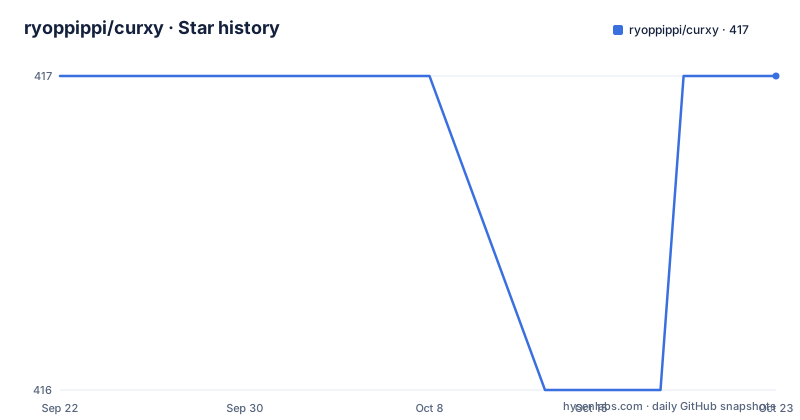
Star history
- ryoppippi/curxy417 ★ · +0
| Repository | 2026-09-22 | 2026-10-22 |
|---|---|---|
| ryoppippi/curxy | 417 | 417 |
0 Stars in the last 30 days, measured from the daily GitHub snapshot. Compare with other projects
Editorial analysis
The request never originates on your machine
The problem curxy addresses is a routing fact about how the Cursor editor handles local model endpoints. When you ask for a completion in the editor, the editor sends the data to the official Cursor server, and the Cursor server is what sends data to the ollama server. Your localhost setting is a setting on their side of the connection.
That is why pointing Cursor at localhost does nothing. The address that matters is resolved on Cursor's infrastructure, which has no route to a port on your desk.
curxy is the smallest thing that bridges the gap: a simple server that forwards requests to the ollama server and returns the response. Everything else in the repository follows from that one sentence, including the parts that will make you hesitate.
The requirements are correspondingly small. Deno, and a running ollama server. Nothing else is needed on the host, because the worker itself is fetched from JSR at run time rather than installed.
A local port becomes a random Cloudflare subdomain
Running the worker binds a loopback port and then starts a tunnel to it, which is why the tool can be reached from Cursor's servers at all:
deno run -A jsr:@ryoppippi/curxyThe sample session in the README shows both ends of that move. The worker reports a local listener on port 62192, starts a cloudflared tunnel pointed at it, and prints a public address on a trycloudflare.com subdomain. That subdomain is generated per run, which means the endpoint Cursor is configured against stops working the next time you restart the worker, and has to be pasted in again.
The README does not say whether the port is configurable, and it does not say what happens when cloudflared is not installed or when the tunnel cannot be created. What it does establish is that the tunnel is the mechanism, not an option, and that the public hostname comes from Cloudflare rather than from you.
There is a help message for the flags it does accept:
deno run -A jsr:@ryoppippi/curxy --helpAccess restriction is the optional step, not the default
Read the ordering of the setup steps, because it tells you what the author considers important. Launch ollama, launch curxy, paste the URL, add model names. Only at step five, marked optional, does authentication appear: setting OPENAI_API_KEY as an environment variable enables access restrictions based on the key.
So the default state, after four steps, is a working local ollama server reachable through a public HTTPS address with no credential on it. The tunnel subdomain is random, which is obscurity rather than access control, and obscurity is the kind that expires the moment the URL appears in a screenshot, a log, or a config file synced somewhere.
The README also frames the key as protection for the ollama server itself, not only for the proxy. Both readings point the same way: if you expose the port, set the key first, and treat the printed URL as a secret until you have.
One environment variable guards two different hops
OPENAI_API_KEY does double duty in this setup, and that is worth untangling because the two jobs are not the same. The README first mentions it in the context of limiting access to the ollama server, then repeats it in the optional step as the way to restrict access to the proxy server.
Behind the name is the OpenAI-compatible protocol both ends speak. Cursor is configured to treat the endpoint as an OpenAI-style API and send an API key with requests. curxy checks whatever key arrives against the value you set in its own environment, and the same variable is what ollama sees when the worker forwards the call. One secret, two checkpoints.
The name is inherited from the protocol rather than from a relationship with OpenAI. There is no OpenAI account involved in using this, and nothing in the repository sends your prompts anywhere except to the ollama server you started and the tunnel you agreed to open.
Cursor needs the /v1 suffix and a model list you type by hand
The client side of the setup is two fields in Cursor's configuration. First, the address curxy printed, with /v1 appended, goes into the field the README calls the Override OpenAI Base URL section, spelled with a lowercase l in the original text. The suffix is the OpenAI-compatible path prefix, and curxy is not translating paths, so the URL you paste has to be the one it expects.
Second, the model names you want go into the Model Names section. Nothing in the repository enumerates the models ollama has pulled, so this is a manual list. A model you started in ollama but did not name here is not available to Cursor.
Neither field is scripted in this repository, which means the loop of restart, copy URL, edit config is the real workflow. For a tool whose purpose is removing friction from local model use, that loop is the part you will feel most often.
Three TypeScript files and no tests
The repository is main.ts, proxy.ts, util.ts, deno.json, deno.lock, a LICENSE, a README, and .github/. There is no test directory, no fixtures, and no example configuration to copy. The dependency lockfile is committed, which pins the worker's own imports, but the runtime dependency that matters most, ollama itself, lives outside the project.
The command needs the -A flag, which grants the process every permission Deno offers rather than an enumerated set. The README does not say which permission the worker actually requires, so the flag is the only documented path and there is no narrower alternative written down.
The package is published to JSR under @ryoppippi/curxy, which is why the run command takes a jsr: specifier and needs no install step of its own. The author also links a Japanese write-up on Zenn, which the README offers as related reading rather than as documentation.
Three releases in four days, then a year of commits without tags
The release history is short and then stops. v0.3.2 was published on 2025-05-23, v0.3.3 and v0.3.4 both on 2025-05-26, and nothing since. The last push to the main branch was 2026-09-13, so work has continued on the branch without producing a new tag.
Nothing in the repository explains the gap. It may be that the changes since then are small enough not to need a version, or that the tagged releases track a different milestone than the commits. For someone deciding whether to depend on it, the practical difference is that pinning v0.3.4 and running the current main are different code, and only one of them has a date attached.
The licence is MIT, which is about as permissive as it gets for a tool that sits between an editor and a model server. The homepage is the JSR package page, and there is no separate documentation site, so the README is the whole manual.
Editorial conclusion
Use curxy if you already run ollama locally and want Cursor to use it, and you are willing to publish that port to the internet for the length of a session. The project is three TypeScript files with no test suite, its last release was v0.3.4 in May 2025, and the one thing it does not do by default is authenticate anyone. Before you start it, set OPENAI_API_KEY, because the README marks access restriction as an optional fifth step while the tunnel URL is generated for you and is reachable by anyone who has it.
Frequently asked questions
What does curxy actually do?
It is a simple server that forwards requests to an ollama server and returns the response. The point is that Cursor's own server makes the request, so a localhost endpoint configured in the editor cannot be reached without something in between.
How do I run curxy?
You need Deno and a running ollama server, then run `deno run -A jsr:@ryoppippi/curxy`. The package is published on JSR at jsr.io/@ryoppippi/curxy, so no install step is required. `deno run -A jsr:@ryoppippi/curxy --help` prints the help message.
How do I stop other people using my curxy proxy?
Set OPENAI_API_KEY as an environment variable when starting the worker, which the README describes as enabling access restrictions based on the key. It is listed as an optional step, and the same variable also restricts access to the ollama server.
What URL do I put into Cursor for curxy?
The public URL curxy prints, with /v1 appended, goes into the Override OpenAI Base URL field in the Cursor editor configuration. You also add the model names you want in the Model Names field, since curxy does not list the models ollama has.
Is curxy still being worked on?
The main branch was last pushed on 2026-09-13, and the project is MIT licensed. The most recent release is v0.3.4 from 2025-05-26, following v0.3.3 the same day and v0.3.2 on 2025-05-23, so there have been commits without new tags.
Official sources
Add this badge to your README
If you maintain this project, the badge below links readers to this analysis and shows its maintenance status from the daily GitHub snapshot. Paste the markdown into your README; add ?metric=license or ?metric=stars to the image URL for a different field.

[](https://hysenlabs.com/projects/ryoppippi-curxy)Star history chart for your README
[](https://hysenlabs.com/projects/ryoppippi-curxy)