salt-bootstrap: getting Salt onto a machine before Salt can manage it
Generic Salt Bootstrap Script
At a glance
- What is it?
- salt-bootstrap is the script that solves the bootstrap paradox in Salt: a single shell script that detects the operating system and version, then installs the Salt binaries using the right method for that platform, with install types for stable, testing, git and onedir builds and a published SHA256 sum for every release.
- Who is it for?
- Use salt-bootstrap if you are standing up Salt on machines that do not have it yet, since it removes the per-distribution installation work and lets you pin a version or a git ref, and the project tags a release every few days with a published SHA256 sum. Do not use it to install Salt versions older than 3006, which the README says are no longer supported, and do not assume the onedir-only limitation is cosmetic, because that rules out the standalone package layout.
- Can I use it commercially?
- Check first. The repository uses a licence we do not classify automatically, so read its LICENSE file before any commercial use.
- Is it still maintained?
- Yes. The repository last received commits 9 days ago.
- What is it written in?
- Mainly Shell, according to GitHub's language statistics.
Answers come from the project's GitHub data, last synced on November 7, 2026, and from our analysis. They are not legal advice.
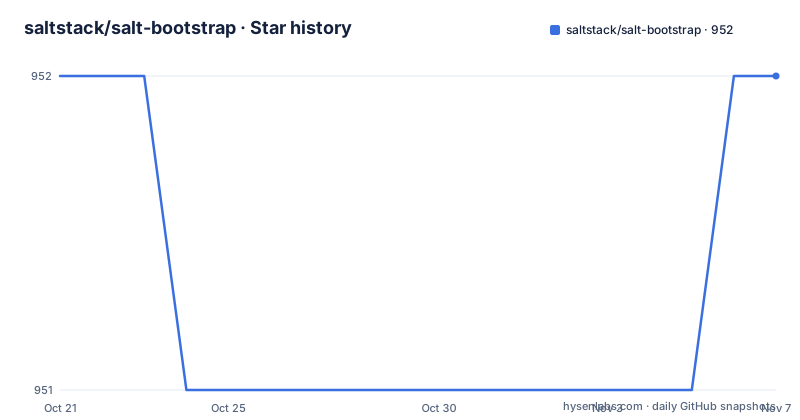
Star history
- saltstack/salt-bootstrap952 ★ · +0
| Repository | 2026-10-21 | 2026-11-07 |
|---|---|---|
| saltstack/salt-bootstrap | 952 | 952 |
0 Stars in the last 17 days, measured from the daily GitHub snapshot. Compare with other projects
Editorial analysis
The bootstrap paradox and what the script actually does
Salt is a configuration management tool that provisions machines. Before Salt can provision anything, Salt has to exist on the target machine, and every distribution ships it differently. That is the problem salt-bootstrap solves, and the README states it in plain terms: before Salt can be used for provisioning on the desired machine, the binaries need to be installed, and because Salt supports many different distributions and versions of operating systems, the installation process is handled by this shell script, bootstrap-salt.sh.
The mechanism is a series of checks. The script determines the operating system type and version, then installs the Salt binaries using the appropriate methods for that platform. It is a detection script with a platform-specific installation branch behind it, not a wrapper around a package manager.
Windows is handled separately, by bootstrap-salt.ps1, which the README names explicitly.
The scope of the project is narrow on purpose, and the README is unusually candid about documentation. It says the README file is not the absolute truth as to what the bootstrap script is capable of, and that for that you should read the generated help by passing -h to the script, or better, read the source. That is an unusual thing for a README to say, and it is a good one: the option surface is large enough that the help output is the real reference.
The audience is operators and automation engineers who need a repeatable way to install Salt across a mixed estate, whether by hand or from a configuration management tool that is not Salt yet.
Install types decide which Salt you get
The install type is the first argument and it controls where the binaries come from. The generated help lists them.
stable installs the latest stable release, and it is the default install type. stable with a branch argument installs the latest version on that branch, and stable with a version argument installs a specific version. Both of those narrower forms are only supported for packages available at packages.broadcom.com, and the help explains that to pin a 3xxx minor version you specify it as 3xxx.0.
testing is RHEL-family specific and configures the EPEL testing repository.
git installs from the head of the master branch, and git with a ref installs from any git ref, such as a branch, tag or commit. The examples in the README show the range:
bootstrap-salt.sh git
bootstrap-salt.sh git 3006.7
bootstrap-salt.sh git v3007.1
bootstrap-salt.sh git 06f249901a
That last form, a bare commit hash, is what you use when you need the exact tree a particular run used.
Then there are the onedir variants: onedir installs the latest onedir release, onedir with a version installs a specific onedir version, and onedir_rc and onedir_rc with a version handle release candidate builds. The version-pinned onedir forms are also restricted to packages available at packages.broadcom.com.
The onedir restriction deserves a note, because the README states that only onedir-based architecture versions of Salt are supported by the bootstrap script, and that Salt versions prior to 3006 are no longer supported as they have reached their end of life.
Verifying the download against a published SHA256 sum
This project takes the integrity of the installer seriously, and the mechanism is a checksum list maintained in the README itself.
For every release the README lists the SHA256 sum of the bootstrap-salt.sh file. The newest entries are 2026.10.08 with d78bff355ac2cad508201acc6a83c94ff9182292abff0e321ed8c87b4ad7fc3a, 2026.10.02 with f14c2333ca6730a806fa73ac42949c0602c521a016e40998ccc9bd3bc6bb1fba, and 2026.09.28 with a320303167987719d89a97399f50526e572a319ae51336b0aea679b74710375c. The list goes back to 2023.04.06.
The README's guidance for every two-step installation example is that you would be well served to verify against the SHA256 sum of the downloaded bootstrap-salt.sh file. There are also .sha256 files for verifying against in the repo for the stable branch, and the correct sum for the stable release can be fetched from the release assets at releases/latest/download/bootstrap-salt.sh.sha256 and releases/latest/download/bootstrap-salt.ps1.sha256.
That last pair matters for the Windows path, since the PowerShell script gets the same treatment as the shell script.
The fact that the checksums are published in the README rather than only in release assets gives you two independent places to compare, which is the point of the exercise. A checksum list inside the artefact you are trying to verify would prove nothing.
The insecure one-liner and what it gives up
The README ends with a pointer: if you are looking for a one-liner to install Salt, scroll to the bottom and use the instructions for Installing via an Insecure One-Liner.
The naming is the documentation. The project describes its own one-liner as insecure, and puts the two-step path with checksum verification first in the document.
That ordering matters for anyone automating this. A one-liner that fetches a shell script and executes it as root is the standard convenience in this space, and it is also a supply chain decision you are making on behalf of every machine in the fleet. The bootstrap script is by definition running with enough privilege to install system packages, and it fetches further content during the install, so the trust boundary is wide.
The checksum route closes one gap, the possibility that the file you downloaded was not the file that was published. It does not close the question of whether the published script does what you expect, which is why the README points at the source and the generated help rather than asking you to trust the document.
The same section carries a related instruction for operators: to secure a Salt installation, check out the instructions for hardening Salt.
The Dockerfile shows the option surface in practice
The repository's Dockerfile is a compact worked example of how the script is invoked, and it is more informative than the README's own examples.
The image is Ubuntu 20.04, and two environment variables carry the configuration:
ENV BOOTSTRAP_OPTS='-M -x python3'
ENV SALT_VERSION=stable
The install line is where the option letters become visible:
RUN sudo sh /tmp/bootstrap-salt.sh -U -X -d $BOOTSTRAP_OPTS $SALT_VERSION && \
    apt-get clean
The -M flag installs the Salt master, the -x flag selects the Python 3 variant, and -U and -X are passed before the install type. The build then handles the udev package specially, holding it so that dpkg does not fail while configuring it, and it sets up the service defaults with update-rc.d for salt-minion and salt-master.
The image exposes 4505 and 4506, which are the ports a Salt master uses for its publish and request interfaces.
The build copies only bootstrap-salt.sh into the image, which confirms the shape of the tool: a single script, invoked with flags, against a target platform. Everything the script needs to decide, it decides at run time.
The repository also ships salt-bootstrap.sh and bootstrap-salt-minion.sh alongside the main script, plus quick start shell and PowerShell helpers, so the naming is not entirely uniform and it is worth checking which file a given piece of documentation refers to.
Date named releases, a develop branch and a custom licence
The release cadence is visible in the tag names. The recent releases are v2026.10.08, v2026.10.02 and v2026.09.28, and the checksum list in the README runs back through 2026.10.08, 2026.10.02, 2026.09.28, 2026.09.03, 2026.08.03, 2026.07.23 and 2026.07.10. These are date-stamped tags rather than semantic versions, which fits a project whose output is a script whose behaviour changes with the Salt versions it knows about.
The repository is not archived, and the last push was on 2026-10-08, the same day as the newest tag.
The default branch is develop, and the README says the contributing guidelines contain information about the bootstrap release cadence and the process. That tells you the branching model is documented rather than folklore, and that releases are cut from that branch on a schedule a maintainer maintains.
The tooling in the tree supports that process. There is a .shellspec file for shell testing, a .pre-commit-config.yaml for linting before commit, a tests/ directory, a tools/ directory, a requirements/ directory, and both a CHANGELOG.md and a ChangeLog file alongside a RELEASE.md.
The licence is recorded as a custom one that GitHub cannot classify, with a LICENSE file in the repository root. For a script that runs as root on every machine you provision, the licence text is worth reading directly rather than assuming it matches a permissive standard, and how the terms treat redistribution of a modified bootstrap script in your own configuration management repository is exactly the question a legal reader will ask first.
Editorial conclusion
Use salt-bootstrap if you are standing up Salt on machines that do not have it yet, since it removes the per-distribution installation work and lets you pin a version or a git ref, and the project tags a release every few days with a published SHA256 sum. Do not use it to install Salt versions older than 3006, which the README says are no longer supported, and do not assume the onedir-only limitation is cosmetic, because that rules out the standalone package layout. Before you run it in anger, verify two things: that the SHA256 sum of the downloaded file matches the one published for your release, and that the install type you choose actually has the package available at packages.broadcom.com, since branch and version pinning are restricted to it.
Frequently asked questions
How do I install Salt with salt-bootstrap?
Run the script with an install type, for example bootstrap-salt.sh stable for the latest stable release, which is the default, or bootstrap-salt.sh git for the head of the master branch. The generated help from ./salt-bootstrap.sh -h lists every option.
Which Salt versions does salt-bootstrap support?
The README states that Salt versions prior to 3006 are no longer supported because they have reached their end of life, and that only onedir-based architecture versions of Salt are supported by the bootstrap script.
How do I verify the bootstrap script I downloaded?
Compare it against the SHA256 sum published in the README for that release. There are also .sha256 files in the repo for the stable branch, and the sum for the latest stable release can be fetched from releases/latest/download/bootstrap-salt.sh.sha256 and bootstrap-salt.ps1.sha256.
Can salt-bootstrap install a specific Salt version or branch?
Yes, with restrictions. stable with a version or branch argument and the pinned onedir forms are only supported for packages available at packages.broadcom.com, and a 3xxx minor version is pinned by specifying it as 3xxx.0. The git install type accepts a branch, tag or commit.
How is Salt installed on Windows?
The README points to a separate PowerShell script, bootstrap-salt.ps1, for Windows, and a matching bootstrap-salt.ps1.sha256 checksum is published alongside the shell script checksum for verifying the download.
Official sources
Add this badge to your README
If you maintain this project, the badge below links readers to this analysis and shows its maintenance status from the daily GitHub snapshot. Paste the markdown into your README; add ?metric=license or ?metric=stars to the image URL for a different field.

[](https://hysenlabs.com/projects/saltstack-salt-bootstrap)Star history chart for your README
[](https://hysenlabs.com/projects/saltstack-salt-bootstrap)Was this useful?