gollama: the feature list ends by admitting it has cool bugs
Go manage your Ollama models
At a glance
- What is it?
- A macOS and Linux terminal interface for managing Ollama models, built on bubbletea and importing the Ollama Go module directly. Its author removed the integration he used most, said development had slowed, and then published three more releases anyway.
- Who is it for?
- gollama earns a look if your day includes pruning old Ollama models, reading a Modelfile, or working out why a quantised model will not fit in memory, because those are the jobs the key bindings and the vRAM estimator are built around. Check three things first.
- Can I use it commercially?
- Yes. MIT is a permissive licence: you can use, modify and sell software built on it, as long as you keep its copyright and licence notices.
- Is it still maintained?
- Yes. The repository last received commits 32 days ago.
- What is it written in?
- Mainly Go, according to GitHub's language statistics.
Answers come from the project's GitHub data, last synced on November 21, 2026, and from our analysis. They are not legal advice.
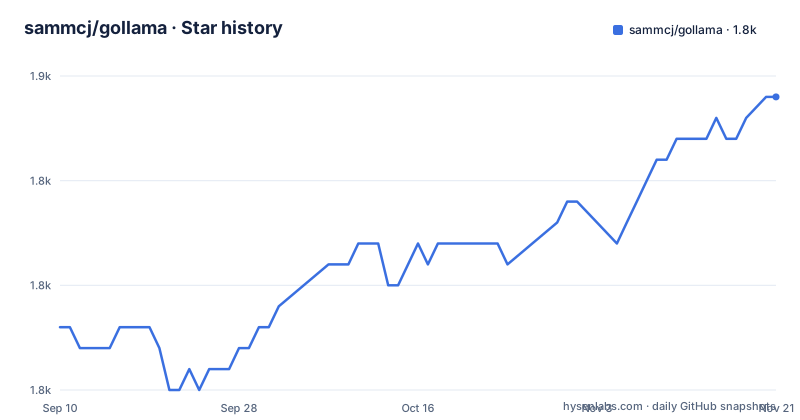
Star history
- sammcj/gollama1,849 ★ · +11
| Repository | 2026-09-10 | 2026-11-21 |
|---|---|---|
| sammcj/gollama | 1.8k | 1.8k |
11 Stars in the last 72 days, measured from the daily GitHub snapshot. Compare with other projects
Editorial analysis
The author removed the integration he used most, then shipped three more releases
A dated section at the top of the page reads like an exit note and then behaves like a changelog. It announces that as of v2.0.1, LM Studio linking is gone, with the reason given plainly: linking from and to LM Studio became more hassle to maintain than it was worth, and catering for each user's local configuration meant investing too much time in a feature he rarely used. He writes that he is simply not dog-fooding with Ollama enough, that development has slowed as he focuses on other projects, and that the value he got from Ollama diminished through 2025 to the point where he rarely uses it. He names what he moved to: llama.cpp with llama-swap for serving, LM Studio for both MLX and GGUF models, and oMLX for MLX models used with agentic coding. The releases then keep coming anyway, three of them after that note.
The feature list ends by admitting it has cool bugs
Twelve bullets describe what the tool does: list models, show size, quantisation level, family and modified date, edit a Modelfile, sort by several fields, delete, run, unload, inspect, estimate vRAM, copy and rename, push to a registry, and show what is currently running. The last bullet reads, in full, Has some cool bugs. It is written as a feature. Elsewhere the introduction says the tool is in active development with some bugs and missing features, and that the author finds it useful every day, especially for cleaning up old models. That combination is worth reading carefully as a maintenance statement: the primary use case is deletion and inspection of things you already have, and the interface around running and serving models is where the rough edges are.
Six letters sort the list, and one of them is also a pull shortcut
The key bindings are single letters for almost everything. Space selects, Enter runs a model, i inspects, t shows running models, D deletes, e edits, c copies, U unloads everything, P pushes, and q quits. Sorting takes six more: n by name, s by size, m by modified date, k by quantisation, f by family, and B by parameter size. Two details sit awkwardly in that table. k is both a sort key and half of ctrl+k, which pulls a model while preserving user configuration, while plain p pulls an existing model and ctrl+p gets a new one, so pulling has three bindings across three scopes. And r, rename, is the only binding carrying a status marker, marked work in progress, which lines up with copy being listed as a feature while rename is presented as unfinished.
-h sets the host, and no help flag appears in the documented list
The command line duplicates most of what the interface does, and that is the useful part for scripting. -l lists all available models and exits without entering the interface, -e edits the Modelfile for a named model, -u unloads everything running, and -v prints the version and exits. Two flags are worth noting because they do not mean what their letters suggest. -h and --host set the host for the Ollama API, and -H is a shortcut for -h pointed at http://localhost:11434, so the conventional help letter has been reassigned to configuration. The host flag has a companion for the data directory, --ollama-dir, which lets gollama read a non-default Ollama install, and --log or --log-level overrides the level with debug, info, warn or error.
Search takes a pipe for either and an ampersand for both
The -s flag filters models by name and documents two operators inside a single quoted term. A pipe returns models matching either side, and an ampersand returns models matching both:
gollama -s my-model # returns models that contain 'my-model'

gollama -s 'my-model|my-other-model' # returns models that contain either 'my-model' or 'my-other-model'

gollama -s 'my-model&instruct' # returns models that contain both 'my-model' and 'instruct'
The same three-line shape is given without a terminal prefix for each variant. The operators are the useful detail: they are ordinary characters typed into one argument rather than separate flags, so a search for a name containing either of two fragments is a single invocation, and combining a family name with a quantisation or instruct marker is also one argument. Nothing in the interface hotkey table offers the equivalent, so this is the one place where the command line is strictly more capable than the interface.
Three install routes, and the author names the one that ages badly
The recommended route is a Go install of the versioned module path:
go install github.com/sammcj/gollama/v2@latestThe module carries a major version suffix, so the path is not the repository URL. The second route pipes a script into a shell, and the documentation says outright that it is not recommended because it is not as easy to update. The third is manual: download the most recent release, strip the binary out of the archive with a zip command, and move it into a directory on your PATH. That route has its own documented failure, and it has its own troubleshooting section, because a Go install puts the binary under your Go bin directory rather than on your PATH. The fix appends an export of your Go bin directory to your shell profile and reloads it. Reading a TUI with these three options is deciding how you will keep it current.
The Makefile builds its own menu by parsing its own target list
Rather than listing its targets twice, the build file extracts them at parse time with an awk pattern over its own lines, filters out the internal names it does not want listed, and hands the result to a menu target. The menu runs fzf when fzf is installed and writes the choice to a temporary file, and falls back to a numbered list read from standard input when it is not. The default goal is build, and the clean target removes the dist directory, the binary, any zip archives and log files. Two debugging targets use Delve over a fixed loopback address: one starts a headless server on port 43000 with a pinned API version, the other attaches a client to it. That fixed port is worth knowing before starting two sessions.
A module pinned to a patch release, importing Ollama as a library
The module is named with a major version suffix and its go directive carries a patch number, 1.26.4, rather than a bare minor version, which pins contributors to one toolchain line. The dependency list shows what the interface is made of: the bubbletea toolkit with its bubbles and lipgloss components, viper for configuration, zerolog with lumberjack for rotating logs, fsnotify for watching, gopsutil for system information, tablewriter for output, and the Ollama Go module itself at a 0.30.x version, imported as a library rather than driven over HTTP alone. The source layout is flat, with the bulk of the application spread across root level files for the model, operations, views, styles and progress, alongside separate directories for configuration, logging, themes, utilities and the vRAM estimator.
Editorial conclusion
gollama earns a look if your day includes pruning old Ollama models, reading a Modelfile, or working out why a quantised model will not fit in memory, because those are the jobs the key bindings and the vRAM estimator are built around. Check three things first. Read the December note about LM Studio linking being removed, and judge the tool as the single-backend manager it now is, since the author no longer uses Ollama day to day and serves models elsewhere. Assume interface quirks rather than a defect list: the documentation itself lists having some cool bugs as a feature, and renaming a model is marked work in progress. And if you install with go install, remember the binary lands in your Go bin directory rather than your PATH, which is the one setup step the documentation has a troubleshooting section for.
Frequently asked questions
how to use gollama
Install it, recommended with go install github.com/sammcj/gollama/v2@latest, then run gollama with no arguments. Inside the interface, Space selects, Enter runs a model, i inspects it, t shows running models, D deletes, e edits the Modelfile, U unloads everything, P pushes to a registry, and q quits. Without the interface, gollama -l lists models and exits.
Can gollama still link models to LM Studio?
No. A dated section of the documentation states that as of v2.0.1 LM Studio linking is no longer available, because maintaining it against local configuration on both sides took more time than the author spent on the feature. The same section says development has slowed as the author moved to serving models through other tools.
What are the disadvantages of Ollama?
Nothing in this repository answers that, because it manages Ollama rather than reviewing it. What the project does say about Ollama is from the maintainer's own experience: it became less useful to him through 2025, he rarely uses it now, and for serving he moved to llama.cpp with llama-swap, LM Studio for MLX and GGUF, and oMLX for MLX models.
How does gollama estimate vRAM for a model?
The --vram flag estimates vRAM for a model, accepting an Ollama model name such as a tagged model or a HuggingFace model id in author/name form. Three options shape the estimate: --fits for available memory in gigabytes, --vram-to-nth or --context for the maximum context length to analyse, and --quant to override the quantisation level.
Does gollama work on Windows?
The documentation describes gollama as a macOS and Linux tool. The install and troubleshooting steps are written for Unix shells, with a zshrc example and a move into a directory on PATH, and no Windows instructions appear anywhere on the page.
Official sources
Add this badge to your README
If you maintain this project, the badge below links readers to this analysis and shows its maintenance status from the daily GitHub snapshot. Paste the markdown into your README; add ?metric=license or ?metric=stars to the image URL for a different field.

[](https://hysenlabs.com/projects/sammcj-gollama)Star history chart for your README
[](https://hysenlabs.com/projects/sammcj-gollama)Was this useful?