HRM-Text: two published runs, and a requirements file whose first line is a placeholder
HRM-Text is a 1B text generation model based on the HRM architecture, strengthened by task completion and latent space reasoning.
At a glance
- What is it?
- A 1B text generation model shipped with the whole pretraining pipeline around it: a data sampling stage, a distributed launch line, evaluation and a checkpoint converter. Two reference runs are published with costs and benchmark scores, the bigger model is quoted above the headline figure and finishes in fewer hours than the smaller one, and the dependency list opens with a package called coolname that does not look like a dependency at all.
- Who is it for?
- This is one of the few model repositories that treats pretraining as an engineering task rather than a research artefact, and the published reference runs are the reason to read it: cost, wall clock and scores for two sizes, with the arithmetic to check them. Three things to weigh.
- Can I use it commercially?
- Yes. Apache-2.0 is a permissive licence: you can use, modify and sell software built on it, as long as you keep its copyright and licence notices.
- Is it still maintained?
- Yes. The repository last received commits 55 days ago.
- What is it written in?
- Mainly Python, according to GitHub's language statistics.
Answers come from the project's GitHub data, last synced on November 15, 2026, and from our analysis. They are not legal advice.
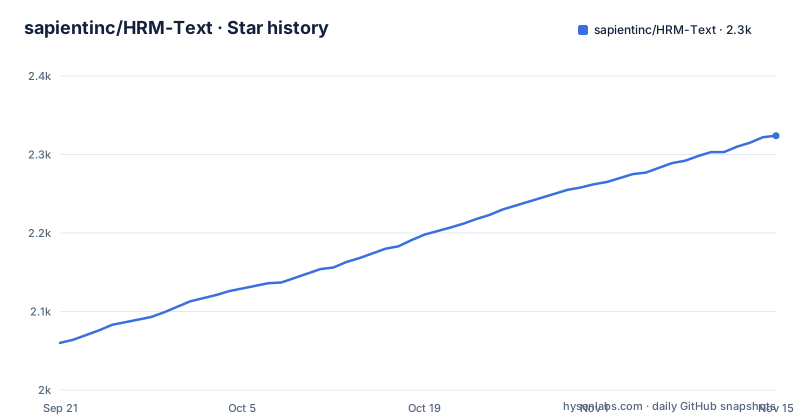
Star history
- sapientinc/HRM-Text2,324 ★ · +264
| Repository | 2026-09-21 | 2026-11-15 |
|---|---|---|
| sapientinc/HRM-Text | 2.1k | 2.3k |
264 Stars in the last 55 days, measured from the daily GitHub snapshot. Compare with other projects
Editorial analysis
Two published runs, and the headline understates one of them
The resource table is the centre of the repository. The small size, at 0.6B parameters, runs on eight H100s on a single node for about fifty hours, quoted at roughly eight hundred dollars. The large size, at 1B, runs on sixteen H100s across two nodes for about forty-six hours, quoted at roughly fourteen hundred and seventy-two dollars, with the price basis stated as two dollars per H100 hour. Both figures are internally consistent when you multiply them out. Two things are worth noticing. The larger model finishes in fewer hours than the smaller one, which only makes sense as a wall-clock figure across two nodes rather than total node hours. And the page headline promises to pretrain a foundation model from scratch for about a thousand dollars, which the small run meets and the large one exceeds.
One benchmark table, two rows, no repeats
Scores are given for eight tasks for each size, and they are described as coming from the reference runs, which means there is one measurement per configuration rather than a spread. The small model reaches 77.6% on grade school maths, 51.2% on the competition maths set, 78.6% on reading comprehension, 56.6% on the broad multi-task set, 75.9% on the challenge set, 52.7% on sentence completion, 67.6% on pronoun resolution and 85.0% on boolean questions. The large model is between two and six points higher on every one of them, reaching 84.7% and 56.5% on the two maths sets and 60.7% on the broad set. Read the table as a reproduction target rather than a leaderboard position, since nothing here states a seed count or a variance.
Sampling runs per node so the nodes agree
Training does not read a corpus. It reads sampled, tokenized data produced by a companion pipeline held in a separate repository, which cleans, tokenizes and stratified-samples, and the recommendation is to set that up first and point the training run at its output. The sampling step is deliberately duplicated per node rather than shared once. On a single node the sampled data goes into shared memory at a fixed path. Across nodes, the tokenized data lives on shared storage, every training node sees it, and each runs stratified sampling independently, with the file's justification being that sampling is fast and deterministic, so every node ends up with the same in-memory data. That is a real design choice rather than an optimisation: it avoids a bottleneck at the start of every run and puts the determinism requirement on the sampler instead of on shared reads.
Data epochs and training epochs have to be edited in two places
The pretraining default is four epochs, and the connection to the data stage is explicit: if you change the epoch count in the training configuration, change the sampling command to match. The sampling invocation passes the same value as an argument and redirects its output into a file, so the analytics end up in a Markdown file next to you. The supervised stage repeats the coupling with a different rationale. Its data preparation script takes an epoch count, and the file states it must equal the training epochs because there is one pre-shuffle per epoch. So there are two independent places where a single number has to agree, and nothing in the code appears to check it, which makes it the most likely cause of a fine-tuning run that quietly differs from its pretraining run.
Docker with host networking and host IPC
The recommended environment is a published image containing everything, run so the host's processors are visible:
docker run --gpus all --ipc=host --network=host -it \
  -v "$PWD":/workspace \
  sapientai/hrm-text:latest
Both host integrations exist for reasons: shared memory for the sampler, host networking so multi-node processes can find each other. They also mean the container is not isolated from the machine in the ordinary sense, which is normal for this kind of training and worth stating before you run it somewhere shared. The multi-node layout guidance is precise about the rest. Mount the same shared workspace on every node, and keep the code, the tokenized data and the checkpoint directory at identical paths, because mismatched paths cause version drift between ranks and complicate the checkpoint format the run writes. A shared layout with the repository, a checkpoints directory and the data pipeline side by side is the shape given.
The first dependency is called coolname
The dependency file opens with a package called coolname, listed above the real ones, and then continues with nineteen entries that carry no version constraints at all. That first line looks like a placeholder that was never replaced, and it will either fail to resolve or install something unrelated, which makes it the first thing anyone running from source will hit. The rest of the list is coherent and explains the repository's shape: a distributed attention kernel package that pins the hardware to Hopper-class cards, a training framework with its configuration library, an evaluation harness with two backends enabled, a serving engine, a maths verification library, and the experiment tracker. Every one of them is unpinned, so two people following the same instructions a month apart should not expect identical environments.
Evaluation wants a large GPU and downloads its own benchmarks
Evaluation runs as a module that loads the latest checkpoint epoch automatically when no epoch is given, and a subset of tasks can be requested by appending a list of task names to the command. The resource expectation is stated plainly: one 80 GB GPU typically, and if it runs out of memory the batch size is lowered through a configuration key rather than a flag. The benchmark data itself is fetched on demand because the scripts use the datasets library from the model hub, so an offline evaluation is not possible without pre-caching. Export to the hub format is a separate module taking a checkpoint path and an output directory, and both evaluation and export use the exponential moving average weights when the checkpoint contains them, which is a detail that changes your numbers if you do not know it.
Training logs to a hosted service before it starts
One step in the setup is a login to a hosted experiment tracker, and the file is clear that it comes before launching training. You sign in with the normal command, or, for a headless cluster, obtain an API key and pass it on the command line. There is no mention of an offline mode, an environment variable to disable it, or what happens if the machine cannot reach the service. For a two-day run on eight accelerators, that is a small but real dependency: the training script expects to be able to talk to a third-party endpoint from inside the container, and the container was just given host networking. The metrics it sends are training metrics, not the model, but the default is worth knowing about before you point it at confidential data or an air-gapped cluster.
Editorial conclusion
This is one of the few model repositories that treats pretraining as an engineering task rather than a research artefact, and the published reference runs are the reason to read it: cost, wall clock and scores for two sizes, with the arithmetic to check them. Three things to weigh. The compute claim of 130 to 600 times less rests entirely on those two runs and on what they are compared against, which the repository does not spell out. The recommended Docker path binds host networking and host IPC, which is normal for this kind of training but worth knowing before you run it anywhere shared. And the dependency file lists a package called coolname, unpinned entries beside it, and a hosted experiment tracker that training logs to by default, so read that file before you trust the environment.
Frequently asked questions
What is HRM-Text?
A 1B text generation model based on the HRM architecture, strengthened by task completion and latent space reasoning, shipped with a full pretraining framework around it: a hierarchical recurrent architecture, PrefixLM sequence packing, FlashAttention 3 kernels, PyTorch FSDP2 training, evaluation and checkpoint conversion tooling.
How much compute does pretraining HRM-Text take?
Two reference runs are published. The small size at 0.6B parameters uses eight H100s on one node for about fifty hours, quoted at roughly eight hundred dollars; the large size at 1B uses sixteen H100s across two nodes for about forty-six hours, quoted at roughly fourteen hundred and seventy-two dollars. Both are priced at two dollars per H100 hour.
Which GPUs does HRM-Text need?
Hopper-class cards are the expected target, because the attention path depends on FlashAttention 3. The recommended route is the published container image, run with the host processors visible to it, and the alternative from-source route expects PyTorch, CUDA and FlashAttention 3 installed first with tested versions recorded in the container file.
How is pretraining data prepared for HRM-Text?
A companion pipeline in a separate repository cleans, tokenizes and stratified-samples the corpus. On one node the sampled output goes to shared memory at a fixed path; across nodes the tokenized data lives on shared storage and each node runs sampling independently, which the file says is safe because sampling is fast and deterministic.
How do you fine-tune HRM-Text?
Full-parameter only. You prepare JSONL with one instruction and response object per line, run the preparation script against your tokenizer and output path, then resume from the pretraining checkpoint using the supervised configuration. Resume loads weights and optimizer state including the moving average unless you ask for weights only with a fresh optimizer.
Official sources
Add this badge to your README
If you maintain this project, the badge below links readers to this analysis and shows its maintenance status from the daily GitHub snapshot. Paste the markdown into your README; add ?metric=license or ?metric=stars to the image URL for a different field.

[](https://hysenlabs.com/projects/sapientinc-hrm-text)Star history chart for your README
[](https://hysenlabs.com/projects/sapientinc-hrm-text)Was this useful?