frp: A Reverse Proxy for NAT Traversal with a Long Road to v2
A fast reverse proxy to help you expose a local server behind a NAT or firewall to the internet.
At a glance
- What is it?
- frp is a Go-based reverse proxy that exposes local servers behind NAT or firewalls to the internet, supporting TCP, UDP, HTTP, HTTPS, and P2P mode. Its current version is mature for practical use, but the promised v2 rewrite remains unfinished and incompatible with v1.
- Who is it for?
- Adopt frp v0.71.1 if you need a proven, configurable reverse proxy for NAT traversal, especially for TCP, UDP, HTTP, or HTTPS with features like custom domains, load balancing, and health checks. Avoid it if you require a modern, extensible proxy core or long-term API stability, because v2 is explicitly incompatible and still under development.
- Can I use it commercially?
- Yes. Apache-2.0 is a permissive licence: you can use, modify and sell software built on it, as long as you keep its copyright and licence notices.
- Is it still maintained?
- Yes. The repository last received commits 3 days ago.
- What is it written in?
- Mainly Go, according to GitHub's language statistics.
Answers come from the project's GitHub data, last synced on November 13, 2026, and from our analysis. They are not legal advice.
Star history
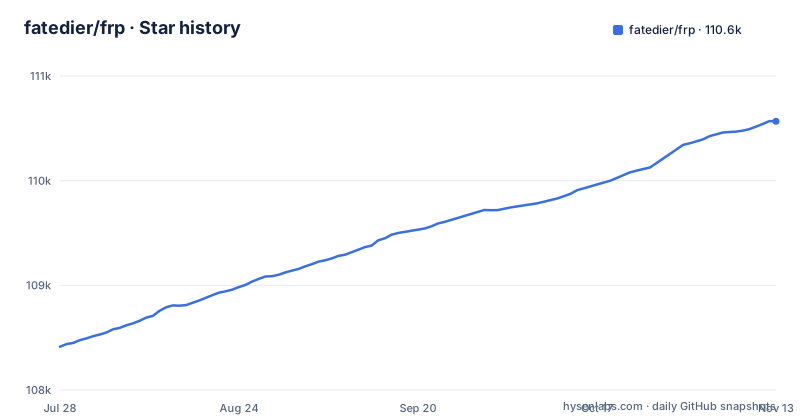
- fatedier/frp110,567 ★ · +2,153
| Repository | 2026-07-28 | 2026-11-13 |
|---|---|---|
| fatedier/frp | 108.4k | 110.6k |
2,153 Stars in the last 108 days, measured from the daily GitHub snapshot. Compare with other projects
Editorial analysis
The Problem frp Solves and Who Needs It
frp solves a specific problem: making a server that sits behind a NAT or firewall reachable from the internet. Without a public IP, you cannot simply point a domain at your machine. frp works by having a client (frpc) maintain an outbound connection to a server (frps) that has a public address. The server then forwards incoming traffic over that connection to the local service. This matters for developers exposing a local web server for testing, for remote SSH access to a home computer, or for running a service on a machine that only has a private IP. The README lists example usages like accessing a LAN computer via SSH, forwarding DNS queries, and exposing an HTTP file server. The audience is anyone who needs a self-hosted, configurable alternative to commercial tunnel services.
Architecture: Client-Server Tunnels with Protocol Options
The architecture is a classic reverse proxy split into two binaries: frps runs on the public server, frpc runs on the local machine. The client initiates a connection to the server, which avoids the need for inbound ports on the client side. Over that connection, frp multiplexes multiple proxies. The README describes support for TCP, UDP, HTTP, HTTPS, and a P2P mode. For HTTP and HTTPS, the server can route by domain name, which lets you expose multiple internal services on the same port. The data flow is straightforward: a request hits frps, frps looks up the matching proxy configuration, and forwards the bytes through the existing tunnel to frpc, which then delivers them to the local service. The documentation also mentions TCP stream multiplexing, which means multiple logical connections share a single underlying stream, reducing overhead.
Getting Running: Commands and Configuration Keys
You get frp running by downloading the release binaries from the GitHub releases page. You configure frps with a server configuration file and frpc with a client configuration file. The README has sections on configuration files and an SSH example for reaching a LAN computer. There is also a feature for splitting configs into different files, which helps when you have many proxies. Hot-reloading is available, so you can change frpc's config without restarting the process.
Feature Depth: Beyond Basic Tunneling
The README lists a long set of features, which is where frp shows its maturity. For authentication, you can use a shared token or OIDC. For security, you can enable TLS between frpc and frps, and you can also encrypt and compress the traffic. The server dashboard and client admin UI give you visibility into connections and proxy status. Dynamic proxy management is possible through the client admin UI, which lets you add or remove proxies on the fly. Load balancing is supported across multiple frpc instances for the same service. Health checks can automatically remove a proxy if the local service goes down. You can also set bandwidth limits per proxy, which is useful for controlling usage. Port multiplexing and port range mapping are advanced features that let you expose many ports with a single configuration. These features make frp more than a simple tunnel; it is a full-featured reverse proxy for edge use cases.
Limitations and Failure Modes
The most obvious limitation is the v2 situation. The README states that v2 is under development but is not compatible with v1. The author admits that v2's complexity is higher than anticipated and that development is slow due to fragmented time. This means if you build on frp v1, you may face a migration path that does not exist yet. Another limitation is that frp is not a full-featured HTTP reverse proxy like nginx. The README mentions rewriting the HTTP Host header and setting other headers, but it does not promise the depth of a dedicated web server. Also, P2P mode, while useful, requires additional setup and may not work in all NAT environments. Any reverse proxy over a single outbound connection has a single point of failure: if the frpc connection drops, all proxies go down. The health check feature helps detect local service failures, but it does not handle network instability between frpc and frps.
Alternatives and How They Differ
A common alternative is ngrok, which offers a hosted tunneling service with a different approach: you use their cloud endpoint, and they handle the server side. frp is self-hosted, so you control the server and the data. That is a key difference. Another alternative is WireGuard or a VPN, which creates a network layer tunnel rather than an application-layer reverse proxy. VPNs are better for full network access but do not give you domain-based routing or per-proxy features. If you need HTTP-level control, tools like nginx or Caddy can reverse proxy to internal services, but they require a public IP and do not solve NAT traversal. frp's unique value is that it combines NAT traversal with a configurable proxy layer, which those tools cannot do without extra components.
Maintenance and Upgrade Cost
The repository is actively maintained, with recent releases v0.71.1, v0.71.0, and v0.70.1. The default branch is 'dev', which suggests ongoing development. The README states that the project will transition from version 0 to version 1 at an appropriate time, and after that, only bug fixes and improvements will be accepted, not big features. This signals that the API and configuration format are likely to change, especially with v2. The v2 rewrite is explicitly incompatible, so an upgrade to v2 would require reconfiguration and possibly code changes if you use the API. The license is Apache-2.0, which is permissive and allows commercial use, but you should check the license file for any notices. The README mentions sponsors, which indicates some financial backing, but the development pace is limited by the author's availability. For maintenance cost, you need to track releases and test upgrades, but the project's stability in v0.x suggests that upgrades are incremental.
Editorial conclusion
Adopt frp v0.71.1 if you need a proven, configurable reverse proxy for NAT traversal, especially for TCP, UDP, HTTP, or HTTPS with features like custom domains, load balancing, and health checks. Avoid it if you require a modern, extensible proxy core or long-term API stability, because v2 is explicitly incompatible and still under development. Before adopting, verify your exact use case against the feature list, test the hot-reload and dynamic proxy management, and confirm that the Apache-2.0 license fits your distribution plans.
Frequently asked questions
What is FRP (Fast Reverse Proxy)?
frp is a reverse proxy written in Go that exposes a local server behind a NAT or firewall to the internet. It supports TCP and UDP as well as HTTP and HTTPS, forwarding requests to internal services by domain name, and it also offers a P2P connect mode.
What is the FRP code?
The code is Go, module github.com/fatedier/frp, with a go 1.26.0 directive. The tree is split into client/, server/, pkg/, cmd/, web/ and hack/ directories, plus a Makefile, a Makefile.cross-compiles, a package.sh and goreleaser configuration.
Which frp branch should I build from?
Not the default one. The default branch is dev, which carries work in progress, while the project points you at the master branch for the latest release. Releases v0.70.1, v0.71.0 and v0.71.1 shipped between 2026-07-23 and 2026-10-14, and the last push was 2026-11-02.
Does a frp build from source include the dashboard?
Not necessarily. The Makefile appends a noweb build tag when the web/frps/dist or web/frpc/dist directories are missing, and a build that never ran the web targets therefore leaves out the Server Dashboard and the Client Admin UI.
What does the frp project not test for compatibility?
The end to end compatibility target stops at version 0.61.0, which is the default for FRP_COMPAT_FLOOR_VERSION, and it runs eight baselines by default through FRP_COMPAT_BASELINE_COUNT. Servers older than that floor are outside what the suite examines.
Why does a valid frp client config fail to open a tunnel?
One documented reason is server port policy. frp has a section called Only allowing certain ports on the server, so a client configuration that is correct in every other respect can still be refused when the server will not bind the requested port.
Official sources
Add this badge to your README
If you maintain this project, the badge below links readers to this analysis and shows its maintenance status from the daily GitHub snapshot. Paste the markdown into your README; add ?metric=license or ?metric=stars to the image URL for a different field.

[](https://hysenlabs.com/projects/fatedier-frp)Star history chart for your README
[](https://hysenlabs.com/projects/fatedier-frp)Was this useful?