SEED Labs: two decades of hands-on security exercises for university courses
SEED Labs developed in the last 20 years.
At a glance
- What is it?
- SEED Labs is the core repository of the SEED project, a collection of hands-on security exercises grouped by category, plus the setup scripts and manuals that let an instructor run them in a class.
- Who is it for?
- SEED Labs fits an instructor who needs ready-made security exercises with the supporting setup material, and it does not fit a commercial training vendor whose materials cannot carry a non-commercial clause, or a learner looking for a self-paced toolchain to run alone.
- Can I use it commercially?
- Check first. The repository uses a licence we do not classify automatically, so read its LICENSE file before any commercial use.
- Is it still maintained?
- Yes. The repository last received commits 74 days ago.
- What is it written in?
- Mainly Python, according to GitHub's language statistics.
Answers come from the project's GitHub data, last synced on November 7, 2026, and from our analysis. They are not legal advice.
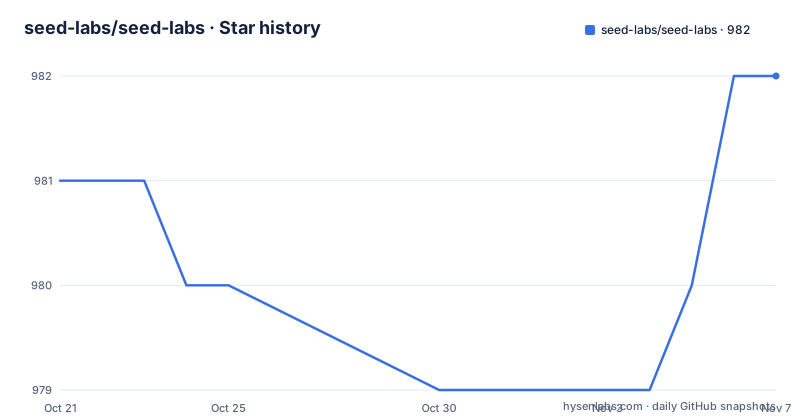
Star history
- seed-labs/seed-labs982 ★ · +1
| Repository | 2026-10-21 | 2026-11-07 |
|---|---|---|
| seed-labs/seed-labs | 981 | 982 |
1 Stars in the last 17 days, measured from the daily GitHub snapshot. Compare with other projects
Editorial analysis
SEED Labs is course material, not a tool you install
It is easy to mistake this repository for a security toolkit. It is not. SEED Labs is the core of the SEED project, and it consists of all the labs developed and maintained since 2002. Each lab is an exercise designed to be handed to students, and the repository is organised the way an instructor needs it to be rather than the way a developer needs a package to be. The stated vision is to develop hands-on labs that achieve learning by doing in cybersecurity education, and to build the platforms that support them. The audience is stated as universities, colleges and high schools around the world, which can use the material freely because the labs and platforms are open source. That framing explains the structure: you are not installing SEED Labs, you are picking exercises out of a catalogue and preparing a class around them.
Six categories in the prose, seven folders on disk
There is a small inconsistency that tells you the repository grew faster than its own description. The introduction says the SEED labs are divided into 6 categories, and then it lists seven of them: blockchain, crypto, hardware, mobile, network, software and web. The folder names on disk match those seven names as category-blockchain, category-crypto, category-hardware, category-mobile, category-network, category-software and category-web, so the count in the prose is simply stale. There is also a category-ctf directory at the top level that the category list does not mention at all. The practical consequence for an instructor is small but real: the directory listing is the accurate map, and a category folder may hold exercises that the summary paragraph leaves out. The naming is consistent and mechanical, so sorting labs by subject is a directory listing exercise rather than a search problem.
Manuals, lab-setup and common-files carry the classroom logistics
The interesting engineering content is not in the category folders alone. Four top-level directories carry the material that turns an exercise into a teachable session. The manuals directory holds the written guidance that accompanies the labs. lab-setup holds the scripts that prepare a machine for an exercise. common-files holds assets shared across labs, so a student or a virtual machine image does not need to fetch the same file once per exercise. A sample-lab directory provides a template, which is the piece that matters most for an institution that wants to add its own exercise without reverse engineering the conventions of somebody else's. Taken together, these directories describe a workflow: pick a lab, read the manual, run the setup, teach. That workflow is the product. The exercises themselves are the visible part of it.
A 2002 NSF grant grew into a community-maintained catalogue
The history section explains why this repository reads the way it does. The SEED project started in 2002 by Wenliang Du, a professor at Syracuse University, and was funded by a total of 1.3 million dollars from the US National Science Foundation. SEED stands for SEcurity EDucaton. The project description says the labs are now used by over a thousand institutes around the world. For its first two decades the maintenance was done by Professor Du with help from his students, and the repository says plainly that while that worked, individual efforts can no longer meet the growing needs, which is why community contribution is now invited. The contribution guide is a separate CONTRIBUTING.md file, and there is a CODE_OF_CONDUCT.md at the root. For anyone planning to depend on this material over several years, the funding history and the stated shift to community maintenance are more informative than the star count on the repository.
Adding a lab of your own starts from sample-lab
Since the repository is a teaching corpus rather than a program, the first real use of it is preparation rather than execution. The practical sequence is short. Start in sample-lab to see how one exercise is laid out, then read the manuals directory for the format the accompanying documentation is expected to follow, then check lab-setup for the scripts that configure the environment for a given exercise, and only then bring in a category folder as the source of student handouts. Because the repository has no tagged releases and no package index, there is nothing to install and nothing to pin. You clone or download the repository, read the exercise, and prepare the machines your students will use. The content lives in text, scripts and images rather than in an API, which means the classroom workflow is the integration surface, and it is a manual one.
The CC BY-NC-SA badge and the LICENSE.md do not say the same thing
Licensing here needs a closer look than most. The README carries a badge for the Creative Commons Attribution-NonCommercial-ShareAlike 4.0 licence, and GitHub cannot classify the licence field, pointing instead at the LICENSE file. The licence section in the README says all the SEED labs in this repository use open-source licences and directs you to LICENSE.md for details. Those statements are not contradictory in the way a licence mismatch usually is, but they are different in an important way for adopters. Creative Commons with a NonCommercial clause and ShareAlike is a fine choice for a university classroom and a poor fit for a commercial training company that wants to reuse an exercise in a paid course. The licence field on the repository itself, however, is recorded as a custom licence that GitHub cannot classify, and the exact terms per lab are not spelled out in the README. Anyone using these labs outside a teaching context should read LICENSE.md in the repository itself rather than rely on the badge.
No releases, a master branch and a push from August 2026
The project is maintained on the master branch and has no GitHub releases, so there is no version history to cite when you pin a lab for a semester. What you can date is the last push, which was on 2026-08-26. The license file is LICENSE.md, and the repository also carries a .gitignore at the root. Two facts about the upstream project frame what to expect from this one. The first is the age of the corpus: exercises developed from 2002 onwards span two decades of security practice, so a lab can be a historical artefact rather than a description of a current weakness. The second is the direction of travel described in the history section, from a single professor and his students toward a community effort. Neither fact changes what a lab file contains. Both change how you should treat an exercise you find in a category folder, since the surrounding environment it was written for may have moved on while the repository stayed in place.
Editorial conclusion
SEED Labs fits an instructor who needs ready-made security exercises with the supporting setup material, and it does not fit a commercial training vendor whose materials cannot carry a non-commercial clause, or a learner looking for a self-paced toolchain to run alone. Before you adopt a lab, verify three things: what the LICENSE.md in the repository actually permits for your classroom, whether the lab-setup scripts match the platform your students use, and whether the exercise still reflects the current state of the vulnerability it teaches. The repository has no tagged releases and its last push was on 2026-08-26.
Frequently asked questions
What is SEED Labs and who is it for?
SEED Labs is the core repository of the SEED project, holding all the labs developed and maintained since 2002. The labs and platforms are open source so that universities, colleges and high schools can use them to enhance their curricula.
How are the SEED labs organised?
The labs are split into category folders such as category-blockchain, category-crypto, category-hardware, category-mobile, category-network, category-software and category-web. The manuals, lab-setup, common-files and sample-lab directories sit alongside them.
Can I use SEED Labs in a commercial training course?
The README carries a badge for CC BY-NC-SA 4.0, which includes a NonCommercial clause, and it points to LICENSE.md in the repository for the exact terms of each lab. Check that file before reusing material in paid training.
How do I contribute a new lab to SEED Labs?
The README asks contributors to read CONTRIBUTING.md first. A sample-lab directory provides the template for a new exercise, and the repository root also holds a CODE_OF_CONDUCT.md.
Official sources
Add this badge to your README
If you maintain this project, the badge below links readers to this analysis and shows its maintenance status from the daily GitHub snapshot. Paste the markdown into your README; add ?metric=license or ?metric=stars to the image URL for a different field.

[](https://hysenlabs.com/projects/seed-labs-seed-labs)Star history chart for your README
[](https://hysenlabs.com/projects/seed-labs-seed-labs)Was this useful?