SSSegmentation: re-implemented segmentation models under one benchmark
SSSegmentation: An Open Source Supervised Semantic Segmentation Toolbox Based on PyTorch.
At a glance
- What is it?
- SSSegmentation is a PyTorch toolbox that re-implements a long list of semantic segmentation architectures behind a single module layout, so the same training and evaluation code covers DeepLab, PSPNet, Mask2Former, the Segment Anything family and a set of transformer backbones. It ships on PyPI and Read the Docs, and its model weights live in a separate model store repository.
- Who is it for?
- Use SSSegmentation when you want to compare segmentation architectures on the same data pipeline rather than in the abstract, since the re-implemented models are unified into a few modules and trained and tested on shared benchmarks, and the model zoo documents where each backbone and head lives in the tree. Do not treat it as a finished inference service, because it is a research toolbox with no GitHub releases and a documentation site rather than a versioned API contract.
- Can I use it commercially?
- Yes. Apache-2.0 is a permissive licence: you can use, modify and sell software built on it, as long as you keep its copyright and licence notices.
- Is it still maintained?
- Yes. The repository last received commits 101 days ago.
- What is it written in?
- Mainly Python, according to GitHub's language statistics.
Answers come from the project's GitHub data, last synced on November 7, 2026, and from our analysis. They are not legal advice.
Star history
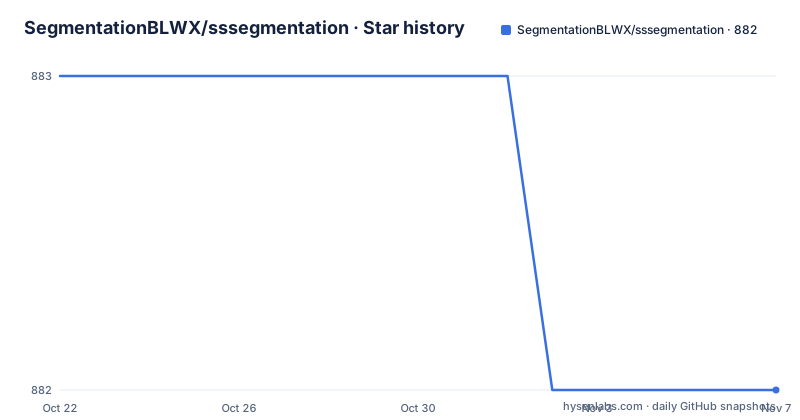
- SegmentationBLWX/sssegmentation882 ★ · -1
| Repository | 2026-10-22 | 2026-11-07 |
|---|---|---|
| SegmentationBLWX/sssegmentation | 883 | 882 |
-1 Stars in the last 16 days, measured from the daily GitHub snapshot. Compare with other projects
Editorial analysis
A toolbox organised around modules, not around papers
SSSegmentation is described as an open source supervised semantic segmentation toolbox based on PyTorch, and the interesting claim in its feature list is the second one: a modular design with a unified benchmark. Various segmentation methods are unified into several specific modules, and the stated benefit is that the toolbox can integrate a large number of popular and contemporary semantic segmentation frameworks and then train and test them on unified benchmarks. That is the difference between a collection of repositories and a comparison harness. When the data loading, augmentation, loss, optimizer schedule and evaluation protocol are shared, a difference in the reported numbers means something about the architecture rather than about somebody's preprocessing. The third feature is fewer dependencies, described as trying its best to avoid introducing more dependencies when reproducing novel semantic segmentation approaches.
The model zoo maps backbones to files in the tree
The backbone table is the most concrete description of the repository's shape. Each row names a backbone, links to a model zoo page, links to the paper, and links to a specific file under ssseg/modules/models/backbones/. ConvNeXtV2 points at convnextv2.py and CVPR 2023, MobileViTV2 at mobilevit.py and ArXiv 2022, ConvNeXt at convnext.py, MAE at mae.py, MobileViT also at mobilevit.py, BEiT at beit.py, Twins at twins.py, SwinTransformer at swin.py, VisionTransformer at vit.py, and BiSeNetV2 at bisenetv2.py. The pattern matters for maintenance: the backbone code is not vendored into a single blob, it sits in one directory with one file per family, and each family has its own documentation page under docs/modelzoo with the results. The repository topics list also names DeepLab, DeepLabV3, PSPNet, OCRNet, MCIBI, MaskFormer and Mask2Former, so the segmentation heads live in the same kind of module layout.
Segment Anything arrived in several waves
The What's New section is a dated log, and it shows how much of the toolbox is about prompt-based segmentation rather than classic semantic segmentation. Support for SAM was added on 2023-09-27, MobileSAM on 2023-10-15, EdgeSAM and SAMHQ on 2023-12-20, and SAMV2 on 2024-08-05. Each entry links to a section in the AdvancedAPI documentation page for the specific variant, and the repository includes an examples directory with a samv2 example. So the architecture here is a two-layer library: a set of dense semantic segmentation models trained normally, and a set of prompt-driven models that take points, boxes or masks as input and are invoked through a separate inference API. That second layer is what makes the toolbox more than a benchmark script, and it is also where the dependency footprint grows, since the Segment Anything code has to be present.
Some architectures are reimplemented by the project itself
Not everything is a reimplementation of someone else's release. On 2023-10-17 the project released the source code of IDRNet, described as an Intervention-Driven Relation Network for Semantic Segmentation and accepted by NeurIPS 2023, with its own model zoo page. The distinction is worth noting because the two categories carry different risks. A reimplementation of a published architecture is judged by whether it reproduces the published numbers, and the project claims the performance of the re-implemented segmentation algorithms is better than or comparable to other codebases, with a model zoo page per model to back that up. Original code has no reference implementation to compare against, so its numbers rest on the paper and on the shared benchmark the toolbox provides. That shared benchmark is the reason the project is useful even when you do not plan to train anything.
Installation goes through setup.py with an optional extension
The package is published on PyPI as sssegmentation and the documentation is hosted on Read the Docs. The repository ships a setup.py that does the work, and a Makefile with the three workflows.
python setup.py installpython setup.py developThe publish target installs twine, builds the source distribution and wheel, and uploads them, which is the maintainer's release path rather than something a user runs.
pip install 'twine>=1.5.0' --upgrade
python setup.py sdist bdist_wheel
twine upload dist/*
The interesting detail in setup.py is the optional CUDA extension. It tries to import BuildExtension and CUDAExtension from torch.utils.cpp_extension, and if that fails it prints a warning telling you to install torch and torchvision if you want to set up with ext_modules, setting both names to None. The extension is then gated by an environment variable, SSSEG_WITH_OPS, which is read from the environment with a default of 0, and if the extension classes are None the script asserts that SSSEG_WITH_OPS is off. So the accelerated path is opt-in and fails loudly if you ask for it without torch installed.
Requirements are split into files behind one include
The dependency declaration is deliberately thin at the top. The requirements.txt file contains a single line, an include of requirements/basic.txt, and the repository holds a requirements directory alongside it. The setup script contains a small requirements parser that handles three cases: a line starting with -r pulls in another file, a line starting with -e is treated as an editable install, and a line containing @git+ is used verbatim as the package specification. Version specifiers are split on the operators >=, == and >, and a semicolon in the remainder is read as an environment marker separating version from platform-specific dependencies. This is a few dozen lines of packaging code that lets one file reference many, and it also means the actual dependency list lives in files you have to open separately. There is also a .readthedocs.yaml for the documentation build and a CITATION.cff file for citation metadata.
Where this toolbox is the wrong choice
Four situations argue against it. If you want a small, maintained inference library for one segmentation model, this is the opposite of that: it is a research toolbox with a large surface, and the repository has no GitHub releases, so there is no version history to pin and no release notes to check when behaviour changes. The last push to the repository was on 2026-07-30, so the code moves without tagged versions. If you need a model that is not on the supported list, the backbone table and the What's New log are the only catalogue, and there is no general architecture registry. If you cannot accept the dependency footprint of the prompt-based models, importing SAM into your environment pulls in a different stack from the dense segmentation models. And if you need a training pipeline with a single opinionated path, the modular design that makes the toolbox good for comparison also means you configure it yourself.
Weights live apart from the code
The badge row at the top of the README points at a separate repository, SegmentationBLWX/modelstore, with a release downloads badge. That separation is the standard pattern for this kind of project: the code goes on PyPI as a Python package, and the trained weights go to a download location with their own versioning. For a user the consequence is that installing the package does not give you a model, and the checkpoint you need may be a separate download whose filename and format you have to match to the configuration in the code. The repository also tracks issue resolution and open issues through badges, and the docs site is the primary reference for the API surface, with the model zoo pages for per-architecture results. The licence field on the repository says Apache-2.0.
Editorial conclusion
Use SSSegmentation when you want to compare segmentation architectures on the same data pipeline rather than in the abstract, since the re-implemented models are unified into a few modules and trained and tested on shared benchmarks, and the model zoo documents where each backbone and head lives in the tree. Do not treat it as a finished inference service, because it is a research toolbox with no GitHub releases and a documentation site rather than a versioned API contract. Verify first that your GPU environment matches what the optional CUDA extension needs, since the setup script only builds it when SSSEG_WITH_OPS is set to 1 and prints a warning when torch and torchvision are missing, and that the model weights you want are available from the separate model store repository rather than bundled in the package.
Frequently asked questions
What is SSSegmentation and what is it for?
It is an open source supervised semantic segmentation toolbox based on PyTorch. Its stated purpose is to unify various segmentation methods into specific modules so that popular and contemporary frameworks can be integrated and then trained and tested on unified benchmarks.
How do I install SSSegmentation?
The repository ships a setup.py and a Makefile with an install target that runs python setup.py install and a develop target that runs python setup.py develop. The package is also published on PyPI as sssegmentation, and the documentation is at sssegmentation.readthedocs.io.
Which segmentation architectures does SSSegmentation support?
The backbone table lists ConvNeXtV2, MobileViTV2, ConvNeXt, MAE, MobileViT, BEiT, Twins, SwinTransformer, VisionTransformer and BiSeNetV2, each with a model zoo page and a file under ssseg/modules/models/backbones. The What's New log adds SAM, MobileSAM, EdgeSAM, SAMHQ and SAMV2 support, plus Mask2Former, MobileViT, ConvNeXtV2 and the IDRNet source release.
How do I enable the optional CUDA extension?
The setup script reads the SSSEG_WITH_OPS environment variable, which defaults to 0, and asserts that it is off when the torch extension classes could not be imported. When torch and torchvision are present it can build the extension modules, and it prints a warning asking you to install torch and torchvision if you want to set up with ext_modules.
Where do I get the trained model weights?
The weights are not bundled with the package. The README links a separate model store repository, SegmentationBLWX/modelstore, with a release downloads badge, so the checkpoint is a separate download to match against the configuration in the code.
Official sources
Add this badge to your README
If you maintain this project, the badge below links readers to this analysis and shows its maintenance status from the daily GitHub snapshot. Paste the markdown into your README; add ?metric=license or ?metric=stars to the image URL for a different field.

[](https://hysenlabs.com/projects/segmentationblwx-sssegmentation)Star history chart for your README
[](https://hysenlabs.com/projects/segmentationblwx-sssegmentation)Was this useful?