Serial Studio's GPL build stops at serial, BLE and network sockets
Open-source telemetry dashboard. Supports UART, BLE, MQTT, Modbus, CAN Bus and more.
At a glance
- What is it?
- Serial Studio parses a device's frames from a project file and draws plots, gauges, maps and 3D views around it, on Windows, macOS, Linux and Raspberry Pi. The judgement for engineers is the GPL boundary: serial, Bluetooth LE and network sockets are free, while MQTT, Modbus, CAN bus, OPC UA and every output widget sit behind a paid Pro license.
- Who is it for?
- Serial Studio earns its place on a bench where a device speaks serial, Bluetooth LE, or a network socket, and where the answer has to travel back to that device as well as up onto a screen (sending commands back is a Pro feature).
- Can I use it commercially?
- Check first. The repository uses a licence we do not classify automatically, so read its LICENSE file before any commercial use.
- Is it still maintained?
- Yes. The repository received new commits within the last day.
- What is it written in?
- Mainly C, according to GitHub's language statistics.
Answers come from the project's GitHub data, last synced on November 14, 2026, and from our analysis. They are not legal advice.
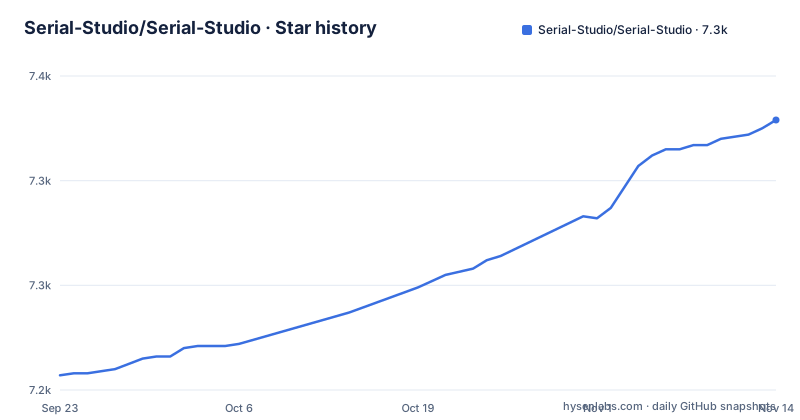
Star history
- Serial-Studio/Serial-Studio7,329 ★ · +122
| Repository | 2026-09-23 | 2026-11-14 |
|---|---|---|
| Serial-Studio/Serial-Studio | 7.2k | 7.3k |
122 Stars in the last 52 days, measured from the daily GitHub snapshot. Compare with other projects
Editorial analysis
The GPL build stops at serial, BLE and network sockets
Serial Studio ships as two builds from one codebase, and the split falls along protocol lines rather than feature lines. The GPL build covers Serial/UART, Bluetooth LE, and network sockets over TCP, UDP, WebSocket and HTTP. Everything industrial is Pro: MQTT, Modbus TCP and RTU, CAN bus, OPC UA, Siemens S7comm, EtherNet/IP, IEC 60870-5-104, audio input, raw USB through libusb, HID through hidapi, and Process I/O. Holding more than one device in a single project is also Pro.
That boundary settles the question for most hardware before anything else matters. A bench with one ESP32 on USB, or an nRF-based sensor advertising Bluetooth LE, is fully served by the free build. A single Modbus meter or a CAN bus adapter is not, and the paid list is where most plant equipment lives. The widget split follows the same line: 17 widgets in the GPL build, with 3D Plot, Waterfall, Image View, Canvas and every output widget in Pro. So a free install can read a live value and plot it, then stops at the point where you would push a command back.
S7comm reads absolute addresses, EtherNet/IP reads tag names
The direct PLC drivers do not interrogate controllers the same way, and the difference decides how much work a project file is. S7comm polls absolute addresses on Siemens S7-300, S7-400, S7-1200 and S7-1500 hardware, written in the form `DB5.DBD20:REAL` or `MW10`, so someone has to already know where the value sits in block memory. EtherNet/IP polls symbolic tag names on Allen-Bradley ControlLogix, CompactLogix, MicroLogix, Micro800, SLC 500 and PLC-5 controllers, plus Omron NJ and NX, so the project refers to names instead of offsets. IEC 60870-5-104 interrogates RTUs and substation gateways, streams their spontaneous reports, and generates the project from the station's own database rather than from a file written by hand.
OPC UA is the exception because there is nothing to import. You browse the server's address space, tick the tags you want, and Serial Studio generates the project from them. Covering that many controller families directly is what removes a KEPServer-class gateway from between the dashboard and the plant.
All three of the direct drivers are read-only clients, and the stated reason is deliberate: connecting Serial Studio to a running machine cannot change its state. On a plant network that is a property you want. It also closes the door on anyone who pictured the dashboard issuing setpoints to the controller.
Built-In C++ parsers, JavaScript, or LuaJIT 2.1
Frame parsing comes in three flavors, and the default is the one that asks nothing of you. Built-In templates are compiled C++ parsers configured through a form, with no code, and they are the default for new projects. JavaScript and Lua are the alternatives, with Lua running on LuaJIT 2.1 and accepting 5.1 syntax through compatibility shims. Twenty-eight script templates ship for those two languages, covering MAVLink, NMEA 0183 and 2000, UBX, SiRF, RTCM, MessagePack, TLV, COBS, SLIP, JSON, XML, YAML, INI and Modbus.
Transforms sit downstream of the parser and run on every frame: EMA, scaling, calibration and unit conversion, written as short JavaScript or Lua snippets against the dataset they change. Variables act as a shared bus, so one transform can derive a computed dataset from another transform's output. That is how a derived channel gets built without a second wire format on the device.
The price of that design is that your per-frame code sits on the hot path: a snippet that allocates, or a variable chain that grows a derived dataset, is charged to every single frame.
Gauge, Bar, Compass and Meter each swipe to a second page
Four of the 17 free widgets render as a two-page swipe view, and the mechanism is worth knowing before you lay out a screen. Bar, Gauge, Compass and Meter put the analog face on page 0 and a large digital readout on page 1, so one tile carries both the trend and the exact number. On a wide monitor that is a deliberate tradeoff against packing in more channels, and it means any value you need precisely costs a swipe.
Pro adds the widgets that need computation or a camera: 3D Plot, Waterfall for spectrograms, Image View for a live camera feed, the Canvas widget, and the output set of buttons, sliders, knobs, an Output Panel and a Notification Log. Canvas is the sharpest edge in that group. It is a JavaScript `paint(ctx, w, h)` callback against a Canvas2D-style API, with 18 templates including oscilloscope, polar plot, artificial horizon, audio VU, dial gauge, heatmap, sparklines and vector field. Writing your own means owning the draw code, including whatever your paint function allocates on every call.
Port 7777 takes commands, port 8888 mirrors them in protobuf
Automation runs over two listening ports. A TCP API on port 7777 exposes more than 360 commands. A gRPC server on port 8888 mirrors the same command set using protobuf and adds live frame streaming. An MCP server wraps that same surface for Claude Desktop or any other MCP host, and the tree carries .mcp.json at the root next to examples/MCP Client/, so a host can be pointed at a running instance.
The README's feature list describes what each port speaks and how many commands sit on it. Check which interface the API binds to on your own network before pointing a script or an MCP host at it, and read the command count as an exposed surface rather than a feature tally.
macOS ships a DMG, Windows wants the VC++ x64 redistributable first
Official precompiled binaries cover Windows, macOS and Linux, published as a latest stable release plus a separate pre-release channel carrying continuous builds. On macOS the app is a universal DMG that you open and drag into Applications. The README also offers a Homebrew install for macOS.
Windows asks for one prerequisite, the Microsoft Visual C++ Redistributable for x64. The first launch then raises a warning about an unknown developer, and the documented way through is More Info followed by Run Anyway. That is the prompt Windows raises when it cannot match the publisher, so settle your own policy on unsigned software before the first launch rather than after.
For a first real session the tree ships project files under examples/, and the simulators are the ones worth opening first: examples/Modbus PLC Simulator/, examples/OPC UA PLC Simulator/, examples/IEC 104 Example/ and examples/EtherNet-IP Example/. Modbus and OPC UA both sit in the paid build, so opening those on a GPL install is the fastest way to find out which side of the line your hardware falls on.
Grafana takes a time-series stream, Serial Studio parses the wire
The project's own comparison page sets Serial Studio against the Arduino IDE Serial Plotter, Processing, MATLAB, LabVIEW and Grafana, and the real split is where the data gets parsed. The Arduino Serial Plotter and Processing both start at the drawing step: your sketch prints delimited text and something else renders it. Serial Studio starts upstream, holding the connection, the frame parser and the project file in one process, which is also why it can record what it parsed and write a PDF report about the session.
Grafana is the opposite shape. It draws dashboards from time-series data something else already stores, and it has no idea what a Modbus register or an NMEA sentence is. Serial Studio acknowledges that arrangement instead of arguing with it: a live sink streams every frame into InfluxDB 2.x as line protocol, which is exactly the handoff Grafana wants. For a fleet with InfluxDB and Grafana already in place, that sink is the integration point and the local CSV export is a spare. On a bench with one microcontroller attached over USB, Grafana is the wrong shape of tool.
A continuous channel publishes beside v4.1.0 on a tree split across app, core and lib
The repository is not archived, and the last push was on 2026-11-01, with v4.2.1 released on 2026-10-28 and v4.2.0 on 2026-10-16. A continuous build channel sits beside the tagged releases, so a fix reaches the pre-release page before it reaches a version number. Pin the tag you build against rather than tracking that channel.
This is a large codebase for a desktop dashboard. The primary language is C, and the tree divides into app/, core/, lib/, cmake/, scripts/, tests/, doc/ and examples/, with .clang-format and .clang-tidy at the root for the C++ sources and a LICENSES/ directory driven by REUSE.toml. Two root-level documents matter before you build anything yourself: EULA.md and TRADEMARKS.md sit beside LICENSE.md, and the store link in the README is where the Pro side is purchased. Repository metadata does not resolve to a named license identifier here, so read LICENSE.md rather than trusting a package listing to tell you what you may ship. What you may ship is a question for your own counsel, not for this article.
Editorial conclusion
Serial Studio earns its place on a bench where a device speaks serial, Bluetooth LE, or a network socket, and where the answer has to travel back to that device as well as up onto a screen (sending commands back is a Pro feature). It is the wrong tool when the hardware is a Modbus meter or a CAN bus adapter, because those drivers are Pro, and wrong when you mean to command a running PLC, because the S7comm, EtherNet/IP and IEC 60870-5-104 drivers are read-only clients that cannot change a machine's state. Before you commit, install the v4.2.1 build and check two things: which of your connections sit on the Pro list, and whether the TCP API on port 7777 needs to be reachable from anywhere other than the machine under the desk.
Frequently asked questions
what is serial studio
Serial Studio is an open source telemetry dashboard that turns data from your hardware into a live dashboard. You describe the data format once in a project file and it draws plots, gauges, maps and 3D views around it, on Windows, macOS, Linux and Raspberry Pi.
how to use serial studio
Connect a device over Serial/UART, Bluetooth LE, or a network socket (TCP, UDP, WebSocket, HTTP), then use the Project Editor to define groups, datasets and widgets through forms. If your device already prints CSV, Quick Plot draws it without a project file at all. Sending commands back with buttons and sliders is a Pro feature.
is serial studio free
Partly. The GPL build covers Serial/UART, Bluetooth LE, TCP, UDP, WebSocket and HTTP connections, 17 widgets and CSV export. MQTT, Modbus, CAN bus, OPC UA, Siemens S7comm, EtherNet/IP, IEC 60870-5-104, the output widgets, session recording into SQLite and the InfluxDB 2.x sink are Pro, as is holding more than one device in a project.
Official sources
Add this badge to your README
If you maintain this project, the badge below links readers to this analysis and shows its maintenance status from the daily GitHub snapshot. Paste the markdown into your README; add ?metric=license or ?metric=stars to the image URL for a different field.

[](https://hysenlabs.com/projects/serial-studio-serial-studio)Star history chart for your README
[](https://hysenlabs.com/projects/serial-studio-serial-studio)Was this useful?