Ecoute writes two live transcripts into one Windows textbox
Ecoute is a live transcription tool that provides real-time transcripts for both the user's microphone input (You) and the user's speakers output (Speaker) in a textbox.
At a glance
- What is it?
- Ecoute is a Python desktop tool that transcribes your microphone input, labelled You, and your speaker output, labelled Speaker, into one textbox as a conversation happens. It is written for Windows, it runs either a small local Whisper model or the Whisper API, and the local path is capped at one English tiny model.
- Who is it for?
- Ecoute suits someone who wants to read their own conversation as it happens on a Windows desktop, and who can accept the local model's ceiling: the tiny English model, one default microphone, one default speaker, and response suggestions that the file mentions without documenting. Turn on the API flag only if the credit cost is a decision you are making deliberately, since it is the same tool with a different bill and a different language range.
- Can I use it commercially?
- Yes. MIT is a permissive licence: you can use, modify and sell software built on it, as long as you keep its copyright and licence notices.
- Is it still maintained?
- Activity is slowing. The repository last received commits 7 months ago.
- What is it written in?
- Mainly Python, according to GitHub's language statistics.
Answers come from the project's GitHub data, last synced on November 15, 2026, and from our analysis. They are not legal advice.
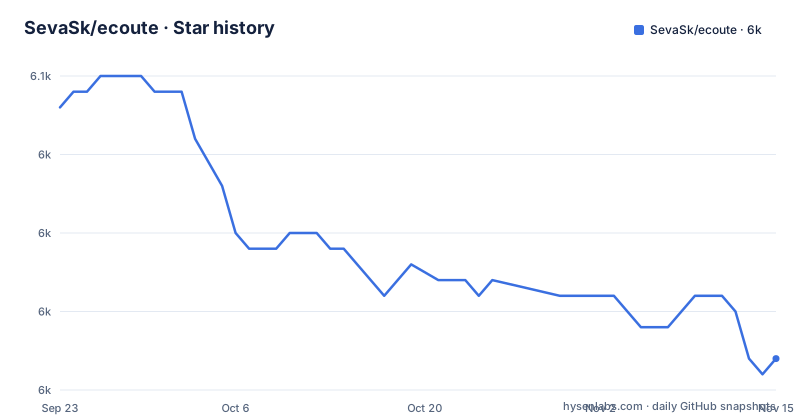
Star history
- SevaSk/ecoute6,032 ★ · -16
| Repository | 2026-09-23 | 2026-11-15 |
|---|---|---|
| SevaSk/ecoute | 6k | 6k |
-16 Stars in the last 53 days, measured from the daily GitHub snapshot. Compare with other projects
Editorial analysis
One textbox carries two labels, You and Speaker
The mechanism at the centre is a single textbox fed by two audio streams: your microphone input, labelled You, and your speakers output, labelled Speaker. Ecoute is designed to help people in their conversations by providing live transcriptions, and the limitations section also credits it with response suggestions. Once started, it begins transcribing both streams in real time, with one caveat stated up front: the system may take a few seconds to warm up before the transcription becomes real time. What you get is a live view, not an archive. Nothing in the file describes saving, exporting, searching or timestamping what was said, so anyone expecting a meeting record to return to later is looking at the wrong shape of tool.
Windows is the only tested platform and FFmpeg arrives by Chocolatey
The prerequisites are Python >=3.8.0, FFmpeg, an optional OpenAI API key that can reach the Whisper API, and Windows, which the file marks as not tested on others. FFmpeg is installed through Chocolatey: open PowerShell as Administrator, install Chocolatey itself, then install FFmpeg in that same privileged window.
choco install ffmpegThe instructions ask you to run these in a PowerShell window with administrator privileges and to visit the official Chocolatey and FFmpeg websites if the installation gives trouble. In practice the documented route to a working environment assumes a Windows machine you are willing to administer, and the assumption runs deeper than that one step: PyAudioWPatch in the dependency list is a Windows audio capture library, so capture on Linux or macOS is not merely undocumented, it is not what the dependency set is built around.
main.py runs local, the api flag moves transcription to OpenAI
There are two entry points and they differ in who does the transcription:
python main.pypython main.py --apiWithout the flag the model runs on your machine. With --api the Whisper API does the work, which the file says significantly enhances transcription speed and accuracy, works in most languages rather than English only, and is expected to become the default option in future releases. The cost is stated just as plainly: the API path consumes more OpenAI credits than the local model, which the file attributes to the advanced features and capabilities the API brings. So the trade is speed, accuracy and language range against credit spend, and it is settled by one command line flag rather than by a configuration file you can tune.
Without the flag the model is tiny.en.pt and English only
Two ceilings arrive together whenever you skip the flag. The first is the model: the 'tiny' version of the Whisper ASR model is used, chosen because of its low resource consumption and fast response times, and the file concedes it may not be as accurate as the larger models on accents or uncommon words. The repository also carries a tiny.en.pt file at the top level. The second ceiling is language: without the flag the model is set to English, so non-English speech and dialects may come out wrong, and multi-language support is named as work intended for future versions rather than something present now. Both limits come from the same choice, a model small enough to keep pace with a live conversation.
Only the default microphone and default speaker are captured
Audio capture is restricted to one device pair. Ecoute is configured to listen only to the default microphone and the default speaker set in your system, and it will not detect sound from other devices or systems. Using anything else means making it the default device in your system settings first, which is an operating system change rather than an application preference. The consequence is concrete for anyone with a headset and external speakers, a USB interface, or a room with a mixer attached: choosing an input means leaving the tool and reconfiguring the machine, and there is no documented device picker to do it from inside the app. No per-stream routing is described either, so the You line and the Speaker line cannot be pointed at separate hardware independently.
The API key is a literal string in a keys.py file
Installing is three steps: clone the repository, move into the ecoute directory, install the requirements.
git clone https://github.com/SevaSk/ecoutecd ecoutepip install -r requirements.txtThe OpenAI key is optional and only needed for the API path. You either let Python write the file for you:
python -c "with open('keys.py', 'w', encoding='utf-8') as f: f.write('OPENAI_API_KEY=\"API KEY\"')"or open a text editor and save the same single line as keys.py inside the ecoute directory. Either way the result is a plain assignment holding your key as text in the middle of your checkout, and the instructions say nothing about excluding that file from version control or about rotating a key that leaks.
torch points at the cu121 wheel index and ctranslate2 is pinned
The whole dependency set is eight lines, and each one narrows something:
numpy
faster-whisper
Wave
openai
customtkinter
PyAudioWPatch
torch>=2.2.0 --extra-index-url https://download.pytorch.org/whl/cu121 --no-cache-dir
ctranslate2==3.24.0
numpy and faster-whisper back the local path, openai exists for the API path, customtkinter provides the window, and PyAudioWPatch captures the audio. torch asks for 2.2.0 or newer and adds the cu121 wheel index with caching disabled, which is what decides where torch looks for a GPU build. ctranslate2 is the only exact pin, at 3.24.0, sitting underneath the model. So a fresh install resolves most of the stack to whatever is current today while one runtime stays fixed, and a machine without a matching CUDA setup falls back on whatever torch resolves to there.
Four flat modules, one vendored folder, a sponsor block on top
The repository is flat. main.py sits at the top beside AudioRecorder.py, AudioTranscriber.py and TranscriberModels.py, with a custom_speech_recognition/ directory, requirements.txt, the tiny.en.pt model file, LICENSE, README.md and a .github directory. There is no package layout, no declared entry points and no published release. Licensing is the MIT License. Above the project description the README opens with a sponsorship block for Recall.ai, a meeting transcription API that works with Zoom, Google Meet and Microsoft Teams and pulls speaker data plus separate audio streams from those platforms to diarize speakers. That is a different job from this desktop tool: it transcribes meetings held inside other people's applications, while Ecoute captures audio on your own machine. Contributions are invited through issues or pull requests. The last push to main is dated 2026-04-08.
Editorial conclusion
Ecoute suits someone who wants to read their own conversation as it happens on a Windows desktop, and who can accept the local model's ceiling: the tiny English model, one default microphone, one default speaker, and response suggestions that the file mentions without documenting. Turn on the API flag only if the credit cost is a decision you are making deliberately, since it is the same tool with a different bill and a different language range. Before you rely on it, check that PyAudioWPatch and the cu121 torch wheel work on your machine, and keep your OpenAI key out of the checkout you created for it. The project is MIT licensed, takes issues and pull requests, has no published releases, and its last push to main is dated 2026-04-08.
Frequently asked questions
What does Ecoute actually do on Windows?
Ecoute is a live transcription tool that puts real-time transcripts of your microphone input, labelled You, and your speakers output, labelled Speaker, into a textbox, and it also provides response suggestions. It takes a few seconds for the system to warm up before the transcription becomes real time.
What do I need installed before running Ecoute?
Python 3.8.0 or newer, FFmpeg installed through Chocolatey in a PowerShell window with administrator privileges, and Windows, since the file marks other systems as not tested. An OpenAI API key that can access the Whisper API is optional and only needed for the API path.
Should I run Ecoute with the api flag?
Without the flag a local model runs, using the tiny Whisper model set to English. With --api the Whisper API does the transcription, which the file says significantly enhances speed and accuracy and works in most languages, at the cost of more OpenAI credits than the local model.
Can Ecoute capture a second microphone or speaker?
No. It is configured to listen only to the default microphone and the default speaker set in your system, and does not detect sound from other devices or systems. To use a different one you have to set it as the default device in your system settings.
How do I give Ecoute my OpenAI API key?
You create a keys.py file in the ecoute directory holding the single line OPENAI_API_KEY with your key, either by running the given python -c command or by typing it into a text editor and saving it there. The key is optional and only needed when you use the Whisper API.
Official sources
Add this badge to your README
If you maintain this project, the badge below links readers to this analysis and shows its maintenance status from the daily GitHub snapshot. Paste the markdown into your README; add ?metric=license or ?metric=stars to the image URL for a different field.

[](https://hysenlabs.com/projects/sevask-ecoute)Star history chart for your README
[](https://hysenlabs.com/projects/sevask-ecoute)Was this useful?