Veldra: an agent is a versioned Postgres row, and the license says TBD
Veldra — talk an agent into existence, then watch it grow. A self-hostable, local-first agent platform: describe what you need in plain language and it compiles a working agent tools, MCP, RAG, teams. The more you use it, the better it gets agents learn from your feedback and reshape as you talk.
At a glance
- What is it?
- The repository named customizable-gpt-chatbot ships Veldra, a self-hostable agent platform that compiles plain language into a validated AgentSpec stored in Postgres and interpreted by a pure runtime. The architecture is unusually disciplined, and the packaging metadata is unfinished: license TBD, version 0.1.0, no releases.
- Who is it for?
- Veldra is worth reading if you want an agent platform where every change is an approved patch on a versioned document rather than generated code, and you have Docker plus Ollama to spend on a five-service stack. Do not adopt it as a dependency yet: the license is still TBD, the version is 0.1.0, there are no releases, and make build and make migrate are declared without recipes.
- Can I use it commercially?
- Not without permission. GitHub finds no licence file in the repository, and without a licence all rights are reserved by default: you may read the code but not reuse it. Check the README, or ask the authors, before using it.
- Is it still maintained?
- Yes. The repository last received commits 150 days ago.
- What is it written in?
- Mainly Python, according to GitHub's language statistics.
Answers come from the project's GitHub data, last synced on November 15, 2026, and from our analysis. They are not legal advice.
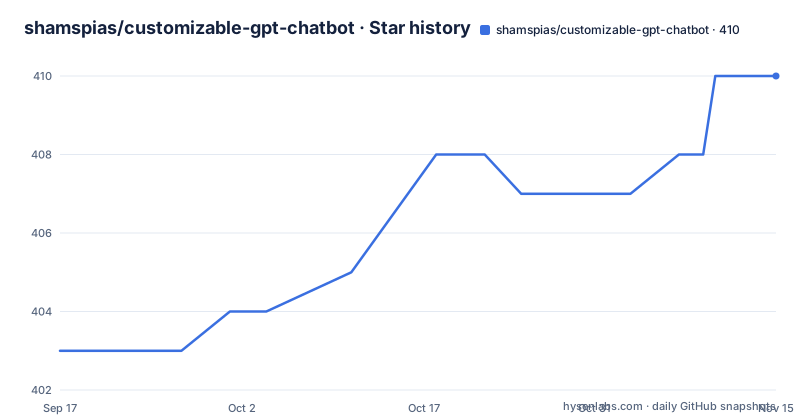
Star history
- shamspias/customizable-gpt-chatbot410 ★ · +7
| Repository | 2026-09-17 | 2026-11-15 |
|---|---|---|
| shamspias/customizable-gpt-chatbot | 403 | 410 |
7 Stars in the last 59 days, measured from the daily GitHub snapshot. Compare with other projects
Editorial analysis
An agent is a versioned Postgres row, not a file
The load-bearing idea sits in a block quote near the top of the documentation: an agent is data, not code, a versioned `AgentSpec` row in Postgres. Building an agent compiles natural language into a validated `AgentSpec`. Changing one applies a JSON-Patch you approve. The runtime is a pure interpreter of that spec.
The architecture section says the same thing from the storage side: an agent is a stable `agents` row plus an append-only stack of immutable `AgentSpec` versions, and the runtime interprets only the current version. Nothing in that design writes Python. The self-modifying behavior the platform advertises is a patch against a versioned document, which is why `jsonpatch>=1.33` appears in the dependency list under a comment headed self-mod.
That commitment buys real things. Every edit to an agent's policy, tools or reasoning method becomes a row you can diff, and every edit is something the orchestrator proposed and a person approved. The cost is that the runtime has nothing to fall back on. The quick start never says what happens to a chat that is already running when the current version changes underneath it, and the workflow and self-modify paths both depend on that answer.
make build and make migrate are declared but have no recipe
The Makefile is the documented control surface, and its phony list is longer than its recipes:
.PHONY: up down logs ps restart build migrate dev help quickstartNine names. The file defines recipes for help, quickstart, the `.env` bootstrap, up, down, logs, ps, restart and dev. `build` and `migrate` are declared phony with nothing after them, so `make build` produces an empty target rather than an image, and `make migrate` does nothing even though migration is clearly part of the system: the dev recipe runs `uv run python -m veldra_app.db migrate`, and the container command runs `python -m veldra_app.db migrate` on every boot, described as idempotent.
`make help` drifts the other way. Its echo lines advertise quickstart, up, down, logs, restart and dev, and skip `ps`, which does have a working recipe. The `.env` rule is wired only where it is genuinely needed, with up and dev depending on it, so example.env is copied to .env on first use along with a note to edit it for your provider and keys.
The image builds the SPA on Node 22 while the dev docs ask for 20.19
The Dockerfile has two stages. The first builds the web assets:
FROM node:22-alpine AS web
WORKDIR /web
COPY apps/web/package.json apps/web/package-lock.json* ./
RUN npm install --no-fund --no-audit
COPY apps/web/ ./
RUN npm run build
The second is the runtime, `FROM python:3.12-slim AS app`, which installs uv, copies pyproject.toml, README.md and alembic.ini along with the packages, services, cli, evals and deploy directories, runs `uv pip install --system -e .`, drops the built SPA into apps/web/dist, exposes 8000 and serves `uvicorn veldra_app.main:app --host 0.0.0.0 --port 8000`.
Two version numbers disagree with the prose. The dev prerequisites ask for Node 20.19 or newer while the image builds on node:22-alpine, so the documented floor and the shipped toolchain are different things. And pyproject.toml declares `requires-python = ">=3.11"` while the image runs Python 3.12. The editable install is deliberate, with a comment saying it is editable so veldra_app can locate apps/web/dist at runtime.
One wheel assembled from seven package roots
The distribution is a single wheel built by hatchling from a monorepo. The `[tool.hatch.build.targets.wheel]` packages list names seven roots: packages/spec-schema/veldra_spec, packages/llm-providers/veldra_llm, packages/mcp-client/veldra_mcp, packages/mcp-servers/veldra_mcp_servers, packages/thinking-methods/veldra_thinking, services/app/veldra_app and cli/veldra_cli. Spec schema, provider adapters, MCP client and servers, thinking methods, the app and the CLI all ship as one importable distribution, and `[tool.uv] package = true` makes uv treat the repository root as that package.
The Dockerfile copies two directories that are absent from that list, evals/ and deploy/, which fits their role as migration and compose files rather than importable code. The root also carries a Taskfile.yml next to the Makefile, so the repository has two task runners while the documentation only ever names the Makefile.
The rest of the layout follows the same monorepo logic: apps/, cli/, deploy/, docs/, evals/, packages/, scripts/ and services/ as directories, with alembic.ini and example.env as loose files at the root. The single-image Dockerfile exists to flatten all of that into one process serving the SPA and the API together.
The license field is still TBD
One line of packaging metadata decides whether you may redistribute any of this:
license = { text = "TBD" }There is no LICENSE file among the top-level entries, the version is 0.1.0, and the repository has published no GitHub releases. For a platform whose entire pitch is self-hostable and local-first, that is the first thing to settle, because self-hosting means copying the source into an environment you control, and anyone who modifies it then has to guess what they owe. The project is careful about other rights: the README states that platform names, trademarks and third-party documentation belong to their respective owners.
Nothing else in the metadata blocks a release. The build backend is hatchling, the Python floor is 3.11, the entry point is declared as `veldra = "veldra_cli.main:app"`, and the dependency list is long but unremarkable: FastAPI, uvicorn, pydantic, SQLAlchemy with asyncpg, pgvector, qdrant-client, redis, boto3 for MinIO, the MCP and Anthropic SDKs, httpx, typer and rich, and the OpenTelemetry API, SDK and OTLP exporter.
Connector tools need credentials, a connection test and per-agent approval
MCP connectors are the extension point, and the route to one is deliberately manual. An admin opens Plugins, picks Add connector and chooses a template: Shopify, Alibaba, or any Streamable-HTTP, SSE or stdio server. Credentials are configured, the connection is tested, and the connector is enabled per agent. Side-effecting connector tools require explicit approval before an agent can use them at all.
Built-in tools are always on and come from a named catalog: `kb.search`, `calc.eval`, `web.scrape`, `http.fetch`, `time.now`, `fs.*`, `json.query` and `regex.extract`. The orchestrator decides which of them a compiled agent receives. Two dependency comments mark where the sharp edges sit: `regex>=2024.0` is annotated as a ReDoS-safe regex engine with a real per-match timeout for the regex.extract tool, and jsonpatch serves the self-modification path.
The architecture diagram puts builtins and plugin tools in one registry, which means a granted MCP tool and a granted built-in are granted through the same mechanism. That is convenient, and it is also why the explicit-approval rule for side effects matters: the grant does not know which half of the catalog a tool came from.
Local-first means Ollama plus four more services
The quick start is a single command, with Docker and, for the local-first default, Ollama as prerequisites:
make quickstartThat target runs a script which checks prerequisites, pulls the local models, creates .env, brings up the whole stack (Postgres with pgvector, Redis, MinIO and the app) and waits for it to be healthy. The models it expects are named in the by-hand variant:
ollama pull qwen3.5:0.8b          # agent model (tools + thinking)
ollama pull nomic-embed-text      # embeddings (768-dim)
make up                           # = docker compose -f deploy/docker-compose.yml up --build -d
The app then answers on http://localhost:8000, where the install wizard names your workspace, tests the provider connection and creates the admin account, after which a sign-in gate applies and teammates are invited with admin, member or viewer roles. `make down` stops everything and `make logs` tails the app.
The 768-dim embedding model is the number that matters when you configure a knowledge base, since each one picks pgvector or Qdrant as its vector store and semantic, keyword or hybrid as its retrieval mode, with its own embedding model and reranker.
The CLI can be run with authentication switched off
The last quick start path is a command line interface, and it comes with an explicit way to turn authentication off:
uv run veldra kb add ./whitepaper.pdf
uv run veldra build "answer from my docs with citations"
uv run veldra ask "what does section 3 say about pricing?"
The text above those commands says to set `VELDRA_AUTH_ENABLED=false` for local use, or to supply a `VELDRA_SERVICE_TOKEN`. So the same binary that ships the install wizard, the sign-in gate and the three roles can also be driven with no session at all, which is convenient on a laptop and worth understanding before the port is exposed, because the wizard, the role checks and the Faust admin bot with its audited tools all sit on the other side of that flag.
Those three commands also show the intended order: add documents, build an agent from one sentence, then ask a question whose answer should cite a section. Faust itself does the administrative work in chat, renaming, tagging, re-policying and deleting agents, inspecting and clearing logs, and managing documents, all through audited admin tools rather than through the UI.
Editorial conclusion
Veldra is worth reading if you want an agent platform where every change is an approved patch on a versioned document rather than generated code, and you have Docker plus Ollama to spend on a five-service stack. Do not adopt it as a dependency yet: the license is still TBD, the version is 0.1.0, there are no releases, and make build and make migrate are declared without recipes. Before you deploy it, settle the license, read the two published Makefile gaps, and decide whether turning off authentication with VELDRA_AUTH_ENABLED is acceptable for the machine you are putting it on.
Frequently asked questions
What does make quickstart do in Veldra?
It runs a script that checks prerequisites, pulls the local models, creates .env, brings up Postgres with pgvector, Redis, MinIO and the app, and waits until the stack is healthy. You then open http://localhost:8000, where the install wizard names your workspace, tests the provider connection and creates your admin account.
How does Veldra store an agent?
As a stable agents row plus an append-only stack of immutable AgentSpec versions in Postgres. Building compiles natural language into a validated AgentSpec, changing one applies a JSON-Patch you approve, and the runtime only interprets the current version.
Which models does the Veldra local-first default use?
qwen3.5:0.8b as the agent model for tools and thinking, and nomic-embed-text for 768-dim embeddings, both pulled through Ollama. The provider layer also names Ollama, OpenAI and Anthropic.
How are MCP connectors added in Veldra?
An admin opens Plugins, chooses Add connector and picks a template such as Shopify or Alibaba, or any Streamable-HTTP, SSE or stdio server, then configures credentials, tests the connection and enables it per agent. Side-effecting connector tools require explicit approval.
What license does Veldra ship under?
None is declared. pyproject.toml still carries license = { text = "TBD" }, the repository has no LICENSE file at the top level, and there are no GitHub releases, so nothing states the redistribution terms for a self-hosted deployment.
Official sources
Add this badge to your README
If you maintain this project, the badge below links readers to this analysis and shows its maintenance status from the daily GitHub snapshot. Paste the markdown into your README; add ?metric=license or ?metric=stars to the image URL for a different field.

[](https://hysenlabs.com/projects/shamspias-customizable-gpt-chatbot)Star history chart for your README
[](https://hysenlabs.com/projects/shamspias-customizable-gpt-chatbot)Was this useful?