Cube Composer: a browser puzzle built around PureScript functions
A puzzle game inspired by functional programming
At a glance
- What is it?
- Cube Composer presents colored cube walls as puzzles whose available actions are functions in the PureScript type `Wall -> Wall`. It suits players who want to reason about transformations in a small browser game, and contributors who want to extend its chapter and level definitions.
- Who is it for?
- Cube Composer fits players who enjoy mapping transformations onto visible cube layouts and contributors who are comfortable editing PureScript data. It is a poor fit for users expecting a modern release process, documented rollback, or a game with a conventional movement model.
- Can I use it commercially?
- Yes. MIT is a permissive licence: you can use, modify and sell software built on it, as long as you keep its copyright and licence notices.
- Is it still maintained?
- Yes. The repository last received commits 11 days ago.
- What is it written in?
- Mainly PureScript, according to GitHub's language statistics.
Answers come from the project's GitHub data, last synced on October 23, 2026, and from our analysis. They are not legal advice.
Star history
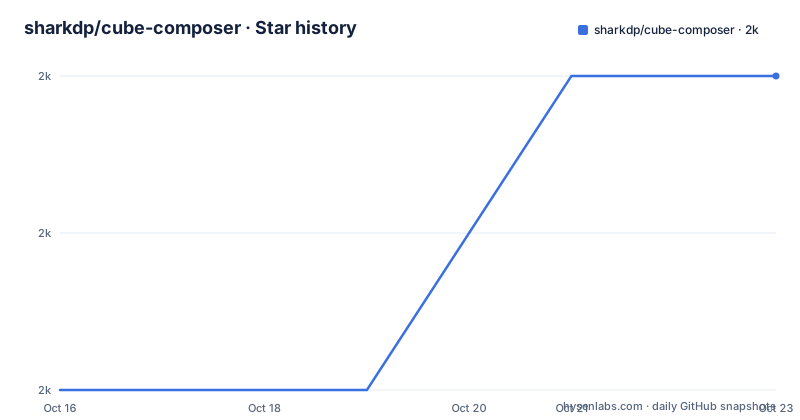
- sharkdp/cube-composer2,049 ★ · +2
| Repository | 2026-10-16 | 2026-10-23 |
|---|---|---|
| sharkdp/cube-composer | 2k | 2k |
2 Stars in the last 7 days, measured from the daily GitHub snapshot. Compare with other projects
Editorial analysis
Cube Composer's function-shaped puzzle problem
Cube Composer is designed for players who learn by manipulating explicit transformation rules rather than controlling a character. Each puzzle presents an `initial` arrangement of colored cubes and a `target` arrangement. The player must reach the target using the finite set of transformers available in the current chapter. Those transformers are described as functions, so the game connects an everyday visual operation, such as replacing one color with another, to the structure of functional programming.
The game is also aimed at contributors who want to author puzzles. Chapter files live under `src/Levels/`, and each level contains its title, optional help text, difficulty, initial wall and target wall. Difficulty can be `Easy`, `Medium` or `Hard`. This is a narrow and clear use case. Cube Composer does not attempt to cover branching narratives, adjustable difficulty systems or live competitive play based on the repository information.
The most direct route is the documented online version at `https://david-peter.de/cube-composer`. Local development matters when someone wants to inspect the source, change levels or add new transformation rules. The distinction is important because the README documents a browser game as the end product, while the repository exposes enough structure for source-level modifications.
From colored cubes to typed wall transformations
The central model is compact. `Stack` is a list of cubes, and `Wall` is a list of stacks. A `Transformer` has the type `Wall -> Wall`, meaning it accepts one cube wall and returns another. The displayed transformer name can include color placeholders. For example, the chapter defines an internal transformer identifier for a mapping operation, displays that operation as `map {Yellow}↦{Red}`, and connects it to `replaceSingle Yellow Red`.
This separation gives a level three distinct concerns: the internal identifier used by code, the player-facing label and the function that performs the transformation. The initial and target arrays provide the puzzle state. The chapter determines which transformations can be used. Basic transformer implementations are kept in `src/Transformer.purs`, which is the natural first file to inspect when changing the operation set.
The mechanism is more direct than a general-purpose functional programming environment. There is no documented interpreter for arbitrary user-written functions during play. Instead, chapter data exposes a controlled collection of functions. That constraint makes levels easier to compare and validate, but it also means puzzle variety depends on the available transformer list and the arrangement of colors. A contributor cannot assume that any imaginable `Wall -> Wall` function is usable without adding or defining it in the project.
Installing Cube Composer for local browser play
The README provides a complete local installation path. Clone the repository, install the npm and Bower dependencies, and run the Gulp build. The commands below must be run from a suitable parent directory for the clone operation.
Building a local Cube Composer browser session
git clone https://github.com/sharkdp/cube-composer.git
cd cube-composer
npm install
bower install
gulp
If the commands complete without errors, open `index.html` in a browser as stated in the README. The repository does not document a separate server command, port or production hosting procedure for local play. The README also does not say which browsers are supported, so compatibility cannot be inferred from the README.
The installation path reflects the repository's older JavaScript tooling. `package.json` includes Bower through the documented command, while the build chain uses Gulp plugins for concatenation, LESS, PureScript and minification. The exact runtime prerequisites for Node.js and Bower are not stated. That omission matters because `purescript` is fixed at 0.11.6. A developer should treat the successful `gulp` invocation, not the existence of `index.html`, as the first compatibility check.
Checking every level through Cube Composer's CLI
Cube Composer includes a verification path for contributors rather than requiring new levels to be checked only by opening them in a browser. Run the production build and then the generated CLI. This is the README's documented way to view all levels together with their shortest solutions. The output can be used to confirm that newly introduced puzzles have an intended solution and do not admit another solution that removes their point.
Verifying Cube Composer levels with shortest solutions
gulp prod
node dist/cli.js
This is a concrete alternative to manually checking every puzzle in the browser. Manual browser play can reveal whether a level is understandable and enjoyable, but the CLI is the documented option for inspecting solutions systematically. The repository layout includes a `cli/` directory, and the README points to `dist/cli.js` as the built executable.
The documentation does not specify the CLI's exact output format, exit status, failure conditions or handling of levels without a solution. It also does not claim that the command replaces playtesting. Therefore, `gulp prod` followed by `node dist/cli.js` should be understood as a solution-inspection tool, not a complete editorial approval process.
Adding a chapter and transformer to Cube Composer
New chapters are grouped by file under `src/Levels/`. The documented procedure is to copy an existing chapter file, increase the chapter number and add the new chapter to `allChapters` in `src/Levels.purs`. Each chapter receives its own transformer list, and basic transformation implementations belong in `src/Transformer.purs`.
A transformer record has an internal identifier, a display name and a `function` field. Color placeholders in the display name are replaced by small colored cubes in the game. The `function` field must conform to `Transformer`, which is `Wall -> Wall`. A level is then identified by a `Chapter.Level` key and records `name`, `help`, `difficulty`, `initial` and `target`. The help field is optional because the example uses `Just "..."`.
This is a source-level contribution process, not an in-browser level editor. The README asks contributors who want to add puzzles to send a pull request. It does not document a runtime level format for modders, a separate schema file or a graphical editor. Authors therefore need to work with PureScript records and keep chapter registration consistent with the `allChapters` list.
Cube Composer maintenance, licensing and adoption limits
The repository is not archived, and the last push was on 2026-10-11. Those are the available maintenance facts. The repository has no GitHub releases, so there is no documented release channel or versioned upgrade path. The README presents a Travis build badge, but it does not describe badge behavior, supported branches or release automation.
The maintenance cost falls mainly on contributors who change PureScript source, chapter files or build configuration. The project pins an older PureScript compiler at 0.11.6 and relies on npm, Bower and Gulp. Upgrading those dependencies could require code or build changes, but the README gives no upgrade procedure, compatibility matrix or migration notes. It also does not document rollback, deployment rollback or a supported browser baseline.
The project uses the MIT license. That identifier permits broad use under the license's terms, but this article does not provide legal advice. Users who need formal compliance guidance should read the repository's `LICENSE` file and retain notices as required. For ordinary project selection, the practical limitation is the old, tightly specified build stack, not the MIT identifier itself.
Online Cube Composer versus local source development
The online game and a local checkout serve different needs. The online version is the shortest path for playing the existing puzzles because the README provides a direct Play it online link. A local checkout is the relevant alternative for contributors because it exposes `src/`, chapter definitions, transformer code, the Gulp build and the generated CLI.
The local workflow is not a drop-in replacement for the hosted experience based on the documentation. It requires dependency installation and a successful `gulp` build before `index.html` is opened. The online link does not require the reader to install npm or Bower, while the source path supports modifications that the hosted version may not reflect until a new deployment. The README does not document how deployments are triggered, so contributors should not assume that a pull request automatically changes the online game.
For a player deciding whether to use Cube Composer, the online version is the lower-friction option. For a PureScript contributor evaluating its architecture, the local repository is the meaningful option because the level model and transformer type definitions are part of the project's design.
Editorial conclusion
Cube Composer fits players who enjoy mapping transformations onto visible cube layouts and contributors who are comfortable editing PureScript data. It is a poor fit for users expecting a modern release process, documented rollback, or a game with a conventional movement model. Before adoption, verify that the pinned PureScript 0.11.6 toolchain still builds on the intended system, then inspect `gulp prod` and `node dist/cli.js` for level verification. The project is not archived, and its last push was on 2026-10-11, but it has no GitHub releases.
Frequently asked questions
How do I install and play Cube Composer locally?
Clone the repository, run `npm install`, `bower install` and `gulp`, then open `index.html` if the build completes without errors. The README does not document a separate local server command.
Where are Cube Composer's levels and transformers defined?
Chapters are stored in dedicated files under `src/Levels/`, while basic transformer implementations are in `src/Transformer.purs`. A new chapter must also be added to `allChapters` in `src/Levels.purs`.
How can I verify that a new Cube Composer level is solvable as intended?
Run `gulp prod` and then `node dist/cli.js`. The README says this displays all levels and their shortest solutions, which can help check whether a new puzzle has an unintended alternative solution.
Does Cube Composer have GitHub releases?
No. The repository has no GitHub releases, and the README does not provide a separate release or upgrade procedure.
Official sources
Add this badge to your README
If you maintain this project, the badge below links readers to this analysis and shows its maintenance status from the daily GitHub snapshot. Paste the markdown into your README; add ?metric=license or ?metric=stars to the image URL for a different field.

[](https://hysenlabs.com/projects/sharkdp-cube-composer)Star history chart for your README
[](https://hysenlabs.com/projects/sharkdp-cube-composer)Was this useful?