phone-harness: iPhone by window capture and OCR, Android by adb and the accessibility tree
let your agent control your phone
At a glance
- What is it?
- phone-harness lets a coding agent drive a real phone, and it does the two platforms by genuinely different means. An Android phone is driven over the same debugging bridge any developer uses, with its accessibility tree as the source of text. An iPhone has no such interface available to a Mac application, so the harness captures the mirroring window, reads it with the system OCR framework, and posts HID-level events into it. The page is also candid about what that buys and what it costs, and its limits section is the most useful paragraph in it.
- Who is it for?
- phone-harness fits someone testing a mobile app with an agent on a device they own, and it is honest about the limits that follow from how it works. Three things to understand before you point an agent at a phone.
- Can I use it commercially?
- Yes. MIT is a permissive licence: you can use, modify and sell software built on it, as long as you keep its copyright and licence notices.
- Is it still maintained?
- Yes. The repository last received commits 6 days ago.
- What is it written in?
- Mainly Python, according to GitHub's language statistics.
Answers come from the project's GitHub data, last synced on November 15, 2026, and from our analysis. They are not legal advice.
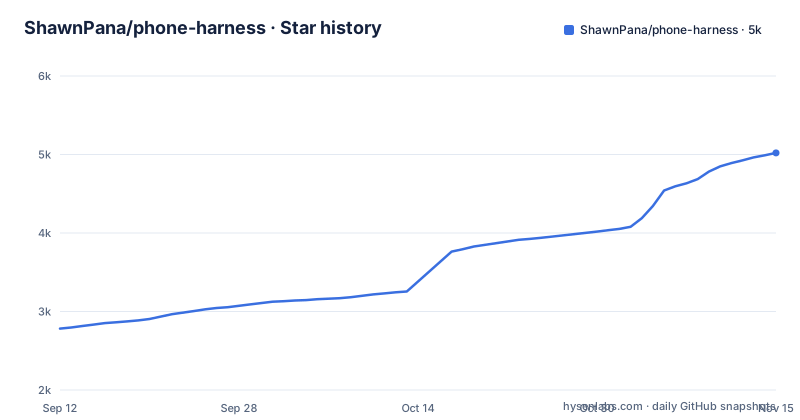
Star history
- ShawnPana/phone-harness5,020 ★ · +2,238
| Repository | 2026-09-12 | 2026-11-15 |
|---|---|---|
| ShawnPana/phone-harness | 2.8k | 5k |
2,238 Stars in the last 64 days, measured from the daily GitHub snapshot. Compare with other projects
Editorial analysis
The iPhone path is a captured window, OCR, and HID events
There is no supported way for a Mac application to read and drive an iPhone screen, so the harness works through the one that exists. iPhone Mirroring renders the phone as a Mac window and forwards mouse and keyboard input as touches. The harness captures that window, runs optical character recognition over the capture using Apple's Vision framework to recover text together with tap-ready coordinates, and posts HID-level events to deliver taps, swipes and typing. Three consequences follow from that chain. Text is found by reading pixels rather than by asking the system what is on screen, so anything the OCR misses is invisible. Coordinates come from the recognition result, which means a misread label sends a tap somewhere plausible but wrong. And the window has to exist, which is why pairing the mirroring feature is a step the user has to complete by hand.
The Android path reads the accessibility tree instead of pixels
Android gets the treatment a developer would expect. The debugging bridge is the transport, the standard screenshot command is how a frame is captured, the phone's accessibility tree is the source of text, and the input command is how taps and typing are delivered. It works over a cable or over the network, and no window is involved at any point. The difference matters more than the wording suggests: the accessibility tree carries semantics, so a control that has a label exposes that label, whereas the iPhone path has to recognise the same label as a shape of pixels. The consequence is that a helper written once behaves better on Android, and the page's own example sequence, finding a piece of text and then tapping the coordinate it returned, is a demonstration of the weaker of the two paths.
The interface is a script on standard input, not a list of subcommands
The usage section is worth reading closely because it defines the shape of the tool. You pipe a block of Python into the command, the helper functions are already imported, and the block is executed:
phone-harness <<'PY'
open_app("Notes")
tap_text("New Note")
type_text("hello from the harness")
print([o["text"] for o in ocr()][:10])
PY
So the agent writes Python rather than calling a fixed set of verbs, and the library is a small set of primitives: open an app, tap something identified by its text, type, and read what is on screen. Two documents keep that surface honest, one described as the agent's day-to-day guide and one as the full list of helpers in the source. A doctor flag checks the whole chain at once, which matters because a failure can be in the pairing, in the permissions, or in the transport, and the three produce the same symptom from the agent's point of view.
Installation is delegated to the agent, and the skill body is a command's output
There is no install command on the page. Instead there is a prompt to paste into a coding agent, which clones the repository into a dot-directory in your home folder, tells the agent to read a setup document first, install it so the command is on your path, and register it as an agent skill whose body is the output of a subcommand that prints the skill text. Then the agent reads a second document and walks you through it. Two details are deliberate. The skill text is also forced into the wheel at build time, with a comment saying that is so the skill command works from an installed package and not only from a checkout. And the parts that need your hands are enumerated rather than automated: pairing the mirroring feature and granting Accessibility and Screen Recording on the Mac, or enabling developer options and approving the debugging bridge on Android.
Off macOS the package installs no dependencies at all
The manifest has four dependencies and every one of them is behind a platform marker for macOS: the Objective-C bridges for Quartz, for the Vision framework, for Cocoa and for Application Services. The comment above them explains why, namely that iPhone control needs macOS while Android is just the debugging bridge and installs everywhere, so those packages are skipped elsewhere. The practical result is that on Linux and Windows an install pulls nothing, which matches the classifiers listing macOS, Linux and Windows as supported and the page describing Android as reachable from all three. The build backend is a separate Rust-based one, the console script is a single entry point, and the source distribution is assembled to include the setup and onboarding documents alongside the package.
The device is locked out by design, and unlocking pauses the session
The limits section is four bullets and every one of them is a mechanism rather than a caveat. Unlocking an iPhone pauses mirroring, so the harness loses the window it was reading, and a PIN-locked Android needs the user rather than the agent. There is no multi-touch, no camera flow and no Face ID flow, so anything that needs a biometric confirmation or a two-finger gesture is out of reach. Protected video renders black, which means streaming content cannot be read or captured at all. And the last line is the one that governs the whole design: connecting the phone is always the user's job. An agent can drive a phone that a person has already unlocked and paired, and it stops at the lock screen.
OCR sees text, so unlabelled controls need a different model
One limit is about recognition rather than access, and it has a practical consequence for how you write the prompts. Optical character recognition reads text and not icons, so a control drawn as a symbol, with no label, has nothing for it to find and has no coordinates for a tap. The page's answer is to take a screenshot and hand it to a model that can see, which is a different dependency from the harness itself and a different cost profile, since it needs a vision-capable model in the loop. The other consequence is that the text-positioning path is as good as the recognition behind it, which on the iPhone side means every interaction that depends on a label depends on the OCR getting that label right first.
Release titles carry the platform, and the status is alpha
The version history is three releases in five weeks, and their titles are where the scope lives. The first is numbered plainly, the second names Android, and the third names a cloud Android offering, which tells you the project grew by adding a hosted path rather than by extending the local one. The manifest agrees about where it is: the development status classifier calls it alpha, the version is a zero-point line, and the supported Python floor is stated once. The commercial side is a single sponsor link with one sentence behind it, saying the project is free and maintained in the author's own time. The cloud offering itself is described on the project's own site rather than in the repository, with hosted phones advertised as including stealth, real numbers, two-factor capability and unlimited devices.
Editorial conclusion
phone-harness fits someone testing a mobile app with an agent on a device they own, and it is honest about the limits that follow from how it works. Three things to understand before you point an agent at a phone. That the two platforms are not equally capable, because the Android path reads real semantics from the accessibility tree while the iPhone path reads pixels and guesses coordinates, so unlabelled controls behave differently on the two. That the device stays locked out, since unlocking an iPhone pauses the mirroring and a PIN-locked Android needs a human. And what you are granting, which on macOS is Accessibility and Screen Recording and on Android is developer options plus approval of the debugging bridge, with the page stating plainly that connecting the phone is always your job.
Frequently asked questions
How do I install ShawnPana's phone-harness?
The page asks you to paste a prompt into a coding agent rather than run a command. The prompt clones the repository into a dot-directory in your home folder, tells the agent to read the setup document first, install it so the phone-harness command is on your path, register it as an agent skill using the output of phone-harness skill as the body, and then walk you through a second onboarding document. A doctor flag checks the whole chain.
How does phone-harness control an iPhone?
Through the Mac's iPhone Mirroring window. The harness captures that window, runs optical character recognition over the capture with Apple's Vision framework to get text with tap-ready coordinates, and posts HID-level events for taps, swipes and typing. Nothing is installed on the phone and no jailbreak is needed, but the user has to pair the mirroring feature and grant Accessibility and Screen Recording.
How does phone-harness control an Android phone?
The debugging bridge is the transport: the standard screenshot command captures a frame, the phone's accessibility tree provides the text, and the input command delivers taps and typing. It works over a cable or over the network with no window involved, and the four macOS-only Objective-C dependencies in the manifest are skipped on other platforms.
What can phone-harness not do?
The page lists the limits: unlocking an iPhone pauses mirroring and a PIN-locked Android needs the user; optical character recognition sees text and not icons, so unlabelled controls need a screenshot and a vision-capable model; there is no multi-touch, no camera flow and no Face ID flow; protected video renders black; and connecting the phone is always the user's job.
What is the cloud option in phone-harness?
Hosted phones reached over the debugging bridge, so every helper works unchanged with nothing to export or select. The page gives commands to log in and approve in the browser, start a phone whose apps and logins are kept, stop it so billing ends while the phone is saved, list, watch, show history, and start a throwaway phone. The cloud Android offered during setup includes the first hundred minutes free.
Official sources
Add this badge to your README
If you maintain this project, the badge below links readers to this analysis and shows its maintenance status from the daily GitHub snapshot. Paste the markdown into your README; add ?metric=license or ?metric=stars to the image URL for a different field.

[](https://hysenlabs.com/projects/shawnpana-phone-harness)Star history chart for your README
[](https://hysenlabs.com/projects/shawnpana-phone-harness)Was this useful?