time-tracker-4-browser: track your browsing, then limit it
A browser extension that helps you track time, analyze your habits and block addictive sites
At a glance
- What is it?
- Time Tracker for Browser is an extension that records where your browsing time goes, turns that into dashboards and habit reports, and then does something with the answer, by setting daily, weekly and per-visit limits, blocking pages when those limits are reached, and running focus or Pomodoro sessions. It ships for Firefox, Chrome and Edge from one codebase, with an optional Safari build.
- Who is it for?
- Adopt this extension if you want your browsing history turned into limits you can actually enforce, and start with the limits and blocking features rather than the reports, since the blocking is what changes behaviour. Do not adopt it if you need an organisational time tracker with team reporting, since this is a personal habit tool that runs in your own browser profile.
- Can I use it commercially?
- Yes. MIT is a permissive licence: you can use, modify and sell software built on it, as long as you keep its copyright and licence notices.
- Is it still maintained?
- Yes. The repository last received commits 2 days ago.
- What is it written in?
- Mainly TypeScript, according to GitHub's language statistics.
Answers come from the project's GitHub data, last synced on November 7, 2026, and from our analysis. They are not legal advice.
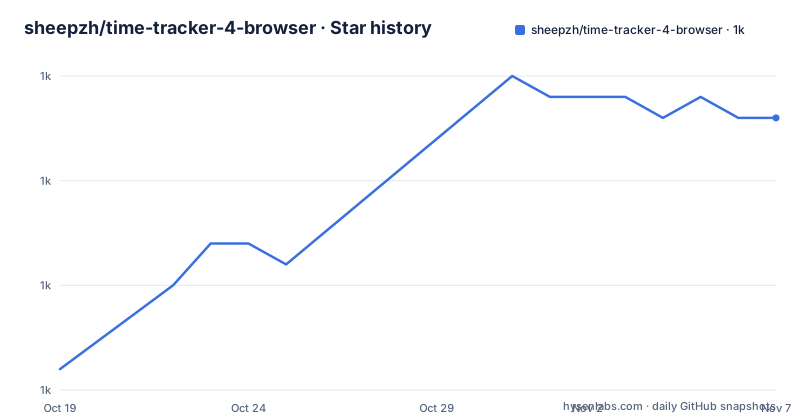
Star history
- sheepzh/time-tracker-4-browser1,028 ★ · +12
| Repository | 2026-10-19 | 2026-11-07 |
|---|---|---|
| sheepzh/time-tracker-4-browser | 1k | 1k |
12 Stars in the last 19 days, measured from the daily GitHub snapshot. Compare with other projects
Editorial analysis
The extension that records first and restricts second
Time Tracker for Browser is a browser extension that tracks the time you spend on websites and helps you understand your browsing habits. The README's framing, with the subtitle Web Habit Builder, is more precise than the usual time tracker pitch, and the feature list explains why.
The first group is measurement. It tracks browsing time and visit counts, keeps detailed records and daily activity, and produces dashboards, website analysis and habit reports. The second group is management: managing websites, configuring whitelist and merge rules, so that several domains count as one site rather than inflating the numbers.
The third group is the part that makes it a habit tool rather than a spreadsheet. It sets daily, weekly and per-visit website limits, blocks pages when the configured limits are reached, and offers focus and Pomodoro sessions. The blocking is the enforcement mechanism, and it is what turns a report into a change in behaviour.
The last group is about the data itself, which is where the interesting engineering decisions sit. It can export and import settings, synchronise data through the supported browser account, and back up the data with GitHub Gist, WebDAV or the Obsidian Local REST API. There are also data migration, storage information and record-clearing tools, and a large set of customisation options covering appearance, tracking, accessibility, limits, backups and notifications.
The official guide at time-tracker-4-browser.app covers the details, and the README offers an English version and a Simplified Chinese one.
One codebase, three stores and a manual Safari build
The extension is built with Rspack, TypeScript, Vue 3, Element Plus and ECharts, and you can install it for Firefox, Chrome and Microsoft Edge. There are store listings for all three, with the Chrome Web Store, the Microsoft Edge Addons and the Firefox Browser Add-ons, and the README also links a manual installation guide for Safari.
The Safari route is the interesting one, because it is not a store listing. The project publishes a separate document for installing it manually on Safari, which is what you would expect from a browser whose extension support arrived late and with a different packaging model. A team that standardises on Safari needs to read that document before anything else, because the installation story is not the same as the other three.
The screenshots in the README show the shape of the product, a popup with the daily browsing percentage, the main dashboard, and an analysis view. The popup is the important one, because the daily percentage is the number a user sees every time they open the browser, and it is the same number the limits are measured against.
There is a Discord server, a Crowdin badge for translations, and a coverage badge from codecov. The repository also carries a LICENSE_ANTI_996 file next to the MIT LICENSE, which is the extra licence file some projects include to make a statement about jurisdiction.
The build matrix, one rspack config per target
The repository is a good example of how a browser extension is set up when it has to build for several engines, and the scripts are the clearest evidence.
There are separate rspack configurations for the development server, for Firefox, for Safari, for the end to end bundle, for analysis, and for production, with Firefox and Safari each having a dev and a prod variant. The scripts that matter are:
npm run build
npm run build:firefox
npm run test
The test script runs rstest with a configuration under test/, and there is a test-c variant that adds coverage through istanbul and reports in JUnit format, which is the shape you want when the results are consumed by a CI dashboard. A separate test-e2e script uses its own configuration under test-e2e/.
There is also a pure-install script, npm install --include=optional --ignore-scripts, which is a small but telling piece of engineering. Running install scripts during a dependency install means running third-party code on a developer's machine, and a project that cares about that will provide a path that skips it.
The rest of the tooling is the usual modern set. Husky for the git hooks, commitlint for commit message format, knip for finding unused code, a .codebeatignore for the code analysis service, and separate TypeScript configurations for the extension and for the Node-side tooling.
The examples/ directory holds the integration points, with subdirectories for the Gist backup, the host application, and notifications, plus their own package.json, which tells you that the data export and the notification paths are designed as separate pieces rather than as one lump.
Where the data lives, and the options for keeping it
The data handling is the part of the feature list with the most consequences, and it is worth reading as a set of choices rather than as a list of integrations.
Synchronisation through the supported browser account means the data can follow you between a browser and its sync service. Backups to GitHub Gist, WebDAV or the Obsidian Local REST API mean the data can also be kept somewhere you control, and the Obsidian option in particular suggests a user base that keeps their notes in Obsidian and wants their tracking data alongside them.
Export and import of settings is separate from the data, which is a sensible division. Settings describe how the extension behaves and are worth syncing; records are personal data with a retention question attached.
And there is a set of tools for data migration, storage information and record clearing. Record clearing is the one to notice. A tool that records every page you visit accumulates sensitive data, and a tool that lets you wipe it is a basic requirement rather than a nicety. The storage information tool is the other half of that, because an extension that holds a browsing history needs to be able to tell you where it is keeping it and how much of it there is.
The privacy side is handled by the extension being local-first, with sync and backup as opt-in routes rather than a requirement. The feature list also includes customisation for tracking itself, which is where you decide what is recorded in the first place.
Where this extension is the wrong tool
The first wrong-tool case is a team or a business that needs time tracking. This is a personal habit tool. It runs in your browser profile, it has a popup with your daily percentage, and the reports are about your own browsing. An organisation that needs billable hours, a manager who needs a dashboard of a team, or a compliance requirement around recording activity, needs something else entirely.
The second is a user who wants a general-purpose blocker rather than a tracker. If the goal is to stop opening a distracting site, a dedicated blocker gives you a smaller surface, fewer permissions and a clearer promise. This extension is built around the loop of measuring, analysing and then limiting, and for somebody who only wants the limiting, the measuring and the history are cost without benefit.
The third is a browser that is not supported. Firefox, Chrome and Edge have listings, and Safari has a manual installation path. A browser without an extension framework, or a locked-down managed browser where extensions cannot be installed at all, is out of reach, and the tracking of a managed browser is usually a platform feature rather than an extension anyway.
There is a fourth consideration, which is that the release history and the package version tell different stories. The listed GitHub releases stop at v2.5.0 in October 2024, while the package.json declares version 4.6.4. For a user installing from a store, the store version is the one that matters, and the changelog in the repository is where to look for what changed.
Editorial conclusion
Adopt this extension if you want your browsing history turned into limits you can actually enforce, and start with the limits and blocking features rather than the reports, since the blocking is what changes behaviour. Do not adopt it if you need an organisational time tracker with team reporting, since this is a personal habit tool that runs in your own browser profile. Before you install, decide where the data lives, because the extension can synchronise through your browser account and back up to GitHub Gist, WebDAV or the Obsidian Local REST API, and read the Safari manual installation notes if you are on Safari, where there is no store listing.
Frequently asked questions
What does the Time Tracker for Browser extension do?
It tracks the time you spend on websites and helps you understand your browsing habits. It records browsing time and visit counts, keeps detailed records and daily activity, and produces dashboards, website analysis and habit reports, with website management, whitelist and merge rules, daily, weekly and per-visit limits, page blocking, focus and Pomodoro sessions, and settings for export, import, synchronisation and backup.
Which browsers does the time-tracker-4-browser extension support?
Firefox, Chrome and Microsoft Edge, with store listings for each. There is also a separate manual installation guide for Safari, since it is not distributed through a store. The extension is built with Rspack, TypeScript, Vue 3, Element Plus and ECharts from a single codebase.
Can time-tracker-4-browser back up its data elsewhere?
Yes. The README lists backup with GitHub Gist, WebDAV or the Obsidian Local REST API, synchronisation of data through the supported browser account, and export and import of settings, along with data migration, storage information and record-clearing tools.
How do the website limits work in this extension?
You set daily, weekly and per-visit limits for websites, and pages are blocked when the configured limits are reached. A whitelist and merge rules let you group several domains as one site so the counting stays honest.
What licence is time-tracker-4-browser released under?
MIT, with the LICENSE file at the repository root and an additional LICENSE_ANTI_996 file alongside it. The package is published as tt4b at version 4.6.4, the last listed GitHub release is v2.5.0 from 2024-10-18, and the last push was on 2026-10-15.
Official sources
Add this badge to your README
If you maintain this project, the badge below links readers to this analysis and shows its maintenance status from the daily GitHub snapshot. Paste the markdown into your README; add ?metric=license or ?metric=stars to the image URL for a different field.

[](https://hysenlabs.com/projects/sheepzh-time-tracker-4-browser)Star history chart for your README
[](https://hysenlabs.com/projects/sheepzh-time-tracker-4-browser)Was this useful?