Tailscale on UniFi OS: Installation, Management, and Device Limits
Run Tailscale on your UniFi OS device
At a glance
- What is it?
- SierraSoftworks/tailscale-unifi packages Tailscale as a persistent service on supported UniFi OS devices. It is a practical option for compatible gateways, but its userspace-only support on NVR and Storage hardware brings meaningful trade-offs.
- Who is it for?
- Adopt tailscale-unifi when the target is a supported UniFi OS 2.x or later device and persistent Tailscale management is required. Do not choose it for excluded hardware, UniFi OS 1.x systems that cannot be upgraded, or workloads that require kernel networking on NVR and Storage devices.
- Can I use it commercially?
- Yes. MIT is a permissive licence: you can use, modify and sell software built on it, as long as you keep its copyright and licence notices.
- Is it still maintained?
- Yes. The repository received new commits within the last day.
- What is it written in?
- Mainly Shell, according to GitHub's language statistics.
Answers come from the project's GitHub data, last synced on November 7, 2026, and from our analysis. They are not legal advice.
Star history
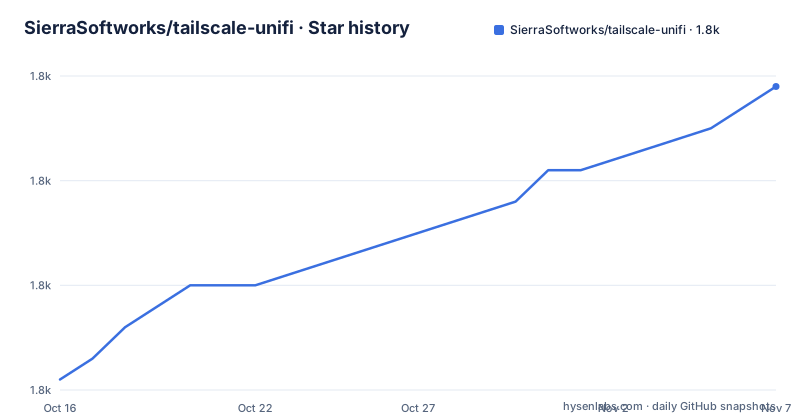
- SierraSoftworks/tailscale-unifi1,789 ★ · +28
| Repository | 2026-10-16 | 2026-11-07 |
|---|---|---|
| SierraSoftworks/tailscale-unifi | 1.8k | 1.8k |
28 Stars in the last 22 days, measured from the daily GitHub snapshot. Compare with other projects
Editorial analysis
What tailscale-unifi Adds to Compatible UniFi Gateways
tailscale-unifi solves a packaging and persistence problem. Tailscale normally runs as a network service, but UniFi devices have their own operating system and update mechanisms. This repository supplies the scripts needed to install Tailscale on UniFi Cloud Gateways and keep it available as a service. According to the README, the package provides a persistent service, automatic updates, and a default configuration intended to work on most supported UniFi Cloud Gateways without further setup.
The intended users are operators of UniFi hardware who want Tailscale access to a device or the network behind it. The supported scope includes UniFi Cloud Gateway, UniFi Control Plane, UniFi Independent Gateway, and other devices running UniFi OS 2.x or later. It also covers UniFi Next-Gen NVR and Next-Gen Storage devices, but those families are restricted to userspace networking because their kernels do not support the modules required for the other mode.
The exclusion list is equally important. The package does not support UCK-G1, USG, UTR, BusyBox-based devices, UniFi OS 1.x systems, or devices that have reached end-of-life and are not otherwise listed. Compatibility is therefore tied to both the UniFi OS generation and the device family. The project expects broad compatibility among eligible devices, but its own instructions ask users to include the device, UniFi OS version, installation steps, and errors when reporting a problem.
Service Architecture and Tailscale Configuration Flow
The package runs the Tailscale daemon as `tailscaled` under `systemd`, using the same service model as a Linux host. After installation, `tailscale up` starts Tailscale and accepts the normal Tailscale options. A typical routing configuration advertises both a local subnet and an exit node, which allows policy decisions about remote access to be made in Tailscale rather than through a device-specific configuration interface.
The installer and package helper place management files under `/data/tailscale`. This is reflected in the documented paths for `manage.sh`, `tailscale-env`, and package upgrades. The README says the service is persistent and that automatic updates are included, while also documenting explicit update commands for operators who want to trigger package installation themselves.
There is no separate controller exposed by tailscale-unifi in the documentation. Its role is to package and manage Tailscale on the UniFi device, not to replace Tailscale administration or authentication. The usual `tailscale up` and `tailscale status` commands remain the operational interface. This distinction matters for evaluation: the repository solves deployment and lifecycle management, while authentication, route advertisement, exit-node selection, and tailnet policy remain part of Tailscale's normal workflow.
For devices that support only userspace networking, the daemon does not create the `tailscale0` interface associated with TUN mode. The README specifically reports that there is no `tailscale0` interface and that local-network access to tailnet addresses or advertised subnets can be unavailable in that mode.
Installing on UniFi OS 2.x and Later
The documented installation path downloads and runs the repository's installer. The README recommends first confirming the UniFi OS version with the following command:
/usr/bin/ubnt-device-info firmware_detailIf the output shows UniFi OS 2.x or later and the device is not on the exclusion list, install the latest package with:
curl -sSLq https://raw.githubusercontent.com/SierraSoftworks/tailscale-unifi/main/install.sh | shThe command retrieves `install.sh` from the repository's `main` branch and pipes it into `sh`. The README then directs the operator to start Tailscale, complete the on-screen configuration, and check connectivity:
tailscale up
tailscale status
A route and exit-node configuration can be applied during startup when that is the intended network design:
tailscale up --advertise-routes=10.0.0.0/24 --advertise-exit-nodeThe operator should follow the authentication and network steps shown by Tailscale, then confirm that the device appears in the tailnet and that the desired peers or advertised routes are visible in `tailscale status`. The README does not describe a separate firewall configuration step for the supported gateways.
Service Management, Upgrades, and Removal Choices
The daemon can be restarted through the system service manager:
systemctl restart tailscaledFor package upgrades, the README documents two approaches. `apt` performs a normal package update and installation:
apt update && apt install -y tailscaleThe `manage.sh` helper uses the repository's own package-management path:
/data/tailscale/manage.sh updateThat helper is also documented for an update initiated over an existing Tailscale connection:
nohup /data/tailscale/manage.sh update!The exclamation mark is part of the documented helper syntax in this command. The README says this variant is for updating while connected over Tailscale. By contrast, the `apt` command updates the package through the device's package manager. The difference is operational rather than functional: one path uses the project's helper and its `/data/tailscale` layout, while the other invokes the available `apt` package operation.
Removal is handled by the same helper:
/data/tailscale/manage.sh uninstallThe README does not document a rollback command or a separate procedure for restoring a previous package version. For older UniFi OS 1.x systems that cannot be upgraded, the project directs users to `v2.8.0` from the `legacy` branch, but it also states that support for UniFi OS 1.x is no longer maintained. That is an explicit maintenance boundary, not a current compatibility path.
Known Failure Modes on Cloud Gateways and NVR Devices
A documented Cloud Gateway issue affects subnet-router use in TUN mode. Tailscale peers can send traffic to LAN hosts at unusably slow TCP rates, with heavy retransmits, even though `ping` succeeds and userspace networking remains fast. The README attributes this to TSO packet handling between Tailscale and UniFi OS: Tailscale may coalesce decrypted TCP segments into GSO super-packets, while the Cloud Gateway LAN port can mishandle those forwarded packets.
The README recommends confirming the cause before changing the persistent configuration. After replacing `br0` with the affected bridge, disable TSO at runtime:
ethtool -K br0 tso offIf throughput recovers, the persistent workaround is to add this setting to `/data/tailscale/tailscale-env`:
echo 'TS_TUN_DISABLE_TCP_GRO=1' >> /data/tailscale/tailscale-envApply it with the helper while `tailscaled` is running:
/data/tailscale/manage.sh install!The setting disables the Tailscale-side batching and persists across reboots and package upgrades. It is not free on unaffected hardware, because individual segment processing can raise CPU use and reduce peak tunnel throughput. The README also requires re-enabling TSO after the test with `ethtool -K br0 tso on`, since the runtime change affects all routed traffic on that bridge, disappears after reboot, and can be reverted by UniFi bridge configuration.
NVR and Storage users face a different limitation. Their userspace-only mode means there is no `tailscale0` interface, and the README documents that local machines may be unable to reach tailnet addresses or subnets advertised by other nodes. This makes the package less suitable when kernel-level integration or transparent TUN-mode behavior is required.
Compatibility Checks, Notices, and Upgrade Boundaries
Before adoption, check the exact device against the README's compatibility categories. UniFi OS 2.x or later is the stated baseline for the current package, but the device still must not be BusyBox-based, a UCK-G1, a USG, a UTR, an end-of-life device outside the listed set, or a UniFi OS 1.x system. The fact that a device is branded as a gateway is not sufficient evidence of compatibility.
The installer and `manage.sh status` can print device-specific `NOTICE:` messages for known hardware issues. These messages are informational and, according to the README, do not change configuration. Operators can suppress them by setting `TAILSCALE_ADVISORIES="false"` in `/data/tailscale/tailscale-env`. Suppression affects notice output only; it does not remove the underlying device limitation.
Maintenance is recent based on the repository record. The last push was on 2026-10-11, matching release `v3.3.9`. Releases `v3.3.8` and `v3.3.7` were published on 2026-10-05 and 2026-09-06 respectively. The project is not archived, and the documented update mechanisms reduce the operational cost of keeping the package current. The tradeoff is that package changes are tied to the compatibility rules and device-specific workarounds described by the project. The repository is MIT licensed, so its source carries that license, while Tailscale itself and the surrounding UniFi OS environment have separate terms that should be reviewed separately.
Editorial conclusion
Adopt tailscale-unifi when the target is a supported UniFi OS 2.x or later device and persistent Tailscale management is required. Do not choose it for excluded hardware, UniFi OS 1.x systems that cannot be upgraded, or workloads that require kernel networking on NVR and Storage devices. Verify the UniFi OS version with `/usr/bin/ubnt-device-info firmware_detail`, confirm that the exact device is not on the exclusion list, and run `/data/tailscale/manage.sh status` before configuring routes or exit-node behavior.
Frequently asked questions
How do I install tailscale-unifi on a UniFi device?
The README documents running `curl -sSLq https://raw.githubusercontent.com/SierraSoftworks/tailscale-unifi/main/install.sh | sh`, then running `tailscale up` and `tailscale status`. Confirm UniFi OS 2.x or later first.
Which UniFi devices does tailscale-unifi support?
The project supports listed UniFi Cloud Gateway, Control Plane, Independent Gateway, Next-Gen NVR, and Next-Gen Storage families, plus compatible UniFi devices running UniFi OS 2.x or later. UCK-G1, USG, UTR, BusyBox devices, UniFi OS 1.x systems, and excluded end-of-life devices are unsupported.
How do I update or remove Tailscale on UniFi?
The README documents `/data/tailscale/manage.sh update` for the project helper and `apt update && apt install -y tailscale` for package-manager upgrades. Use `/data/tailscale/manage.sh uninstall` to remove it.
Official sources
Add this badge to your README
If you maintain this project, the badge below links readers to this analysis and shows its maintenance status from the daily GitHub snapshot. Paste the markdown into your README; add ?metric=license or ?metric=stars to the image URL for a different field.

[](https://hysenlabs.com/projects/sierrasoftworks-tailscale-unifi)Star history chart for your README
[](https://hysenlabs.com/projects/sierrasoftworks-tailscale-unifi)Was this useful?