execa's dependency list is its feature list
Process execution for humans
At a glance
- What is it?
- A process runner for Node built on the child_process core module, MIT licensed, ESM only, requiring Node 22 or newer. Its twelve runtime dependencies line up with many of the features the readme advertises, which makes the manifest the most compact documentation in the repository.
- Who is it for?
- execa fits a Node codebase that runs many subprocesses and cares about their output, their pipelines and their cleanup, particularly in scripts and tooling where shell quoting is a recurring source of bugs. It does not fit a CommonJS project or a Node version below 22, and it is heavier than the core module for a one-off spawn.
- Can I use it commercially?
- Yes. MIT is a permissive licence: you can use, modify and sell software built on it, as long as you keep its copyright and licence notices.
- Is it still maintained?
- Yes. The repository last received commits 23 days ago.
- What is it written in?
- Mainly JavaScript, according to GitHub's language statistics.
Answers come from the project's GitHub data, last synced on November 15, 2026, and from our analysis. They are not legal advice.
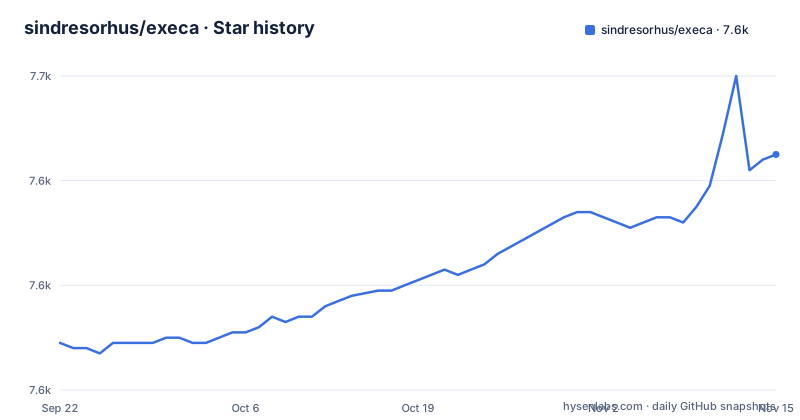
Star history
- sindresorhus/execa7,645 ★ · +36
| Repository | 2026-09-22 | 2026-11-15 |
|---|---|---|
| sindresorhus/execa | 7.6k | 7.6k |
36 Stars in the last 54 days, measured from the daily GitHub snapshot. Compare with other projects
Editorial analysis
Thirteen dependencies, one per advertised behaviour
The runtime dependency list is short enough to read as a specification. get-stream and a merge-streams package cover streaming, including the interleaved output you get when a process writes to both streams at once. human-signals is what produces the detailed errors the readme advertises, and pretty-ms formats durations inside them.
Three entries exist for behaviour that is easy to miss. npm-run-path and which-command together implement the option that runs locally installed binaries without going through a package runner. strip-final-newline removes trailing newlines from captured output. And signal-exit is the mechanism behind the promise that subprocesses still exit even when they intercept termination signals or when the current process ends abruptly.
The remainder are small utilities: a colour helper for terminal output, a Unicode figure library, a plain-object check for object mode, a stream check, and a shell command lookup.
Reading the manifest, you can account for every feature claim without opening the documentation.
ESM only, Node 22, and no side effects
Three packaging fields decide whether you can install this at all.
The package type is module. The exports map contains exactly two entries, types and default, and there is no require condition. So execa 10 is an ESM-only package: CommonJS cannot require it, and a project still on a CommonJS toolchain has to change before it can use this version.
The engine requirement is Node 22 or newer, which is a floor rather than a suggestion.
The third field is sideEffects set to false, so a bundler may drop an import it believes is unused.
The published file list matches the source layout: the entry point and its declarations, everything under lib as JavaScript, and everything under types as TypeScript. There is no compiled output directory and no separate CommonJS build, which is consistent with a package that stopped supporting the older module system rather than one that still emits both.
The template tag is what removes quoting
Execa runs commands in your script, application or library, and unlike a shell it is optimised for programmatic use. The syntax that follows from that is a tagged template rather than a string.
The readme's own example of why this matters is a directory name containing a space:
const directoryName = 'foo bar';
await $`mkdir /tmp/${directoryName}`;
There is no escaping and no quoting, and the feature list states plainly that there is no risk of shell injection as a result. That is a property of the design rather than a filter applied afterwards, because the value is passed as an argument rather than interpolated into a command string.
The readme also compares the approach to shells and to a similar tool in a document of its own, and the keywords in the manifest include the name of that tool, so the positioning is deliberate rather than accidental.
pipedFrom is how you read the middle of a pipeline
Piping is the feature the readme claims works better than in shells, and the improvement is not the piping itself but the results. A chain is built by chaining the tag:
const {stdout, pipedFrom} = await execa`npm run build`
	.pipe`sort`
	.pipe`head -n 2`;
The final output is in stdout, and the intermediate stages are reachable through pipedFrom. The example walks the chain backwards, printing the output of the sort stage and then the output of the original build, which a shell pipeline gives you no way to do after the fact.
There are companion features for multiple sources and multiple destinations, and a way to unpipe. So the pipeline is an object you can inspect rather than a side effect you have to instrument.
Output arrives as a string, an array of lines, or a stream
Three shapes for the same output are offered, and the choice is per invocation.
By default you get a string. Asking for lines gives you an array, with the unnecessary newlines stripped, and the example slices the first ten entries and joins them to print.
const {stdout} = await execa({lines: true})`npm run build`;
// Print first 10 lines
console.log(stdout.slice(0, 10).join('\n'));
Iterating the subprocess itself gives a stream of lines, so a long build can be processed as it produces output rather than buffered to the end.
For streaming you can also pass Node.js streams or web streams in, and convert a subprocess into a stream. Two smaller options round it out: interleaved output from both streams in terminal order, and an output setting that captures a value while also printing it, which the example shows as an array of a pipe and an inherit destination.
So the same call can be quiet, verbose, or both without changing the subprocess itself.
Input accepts almost anything, including an object
The input side is described as accepting any type, and the examples show four distinct shapes.
A string is passed with an input option. A file is passed by giving stdin an object with a file property. Binary input is supported. Iterables and streams work, and so do objects in what the documentation calls object mode.
Output has the same symmetry: almost any type can be returned, or redirected to a file by giving stdout a file object.
Between input and output there are transforms, simple functions that filter or rewrite data as it passes through, which is how you post-process a subprocess without writing a stream pipeline by hand. And messages can be exchanged with the subprocess, which is the inter-process communication feature listed separately in the documentation index.
Taken together, the design is that a subprocess is not a terminal you attach to but a function call with a typed input and output.
The Windows support is a feature list of its own
Windows gets its own documentation page and four named items in the feature list: shebang handling, respect for the PATHEXT environment variable, graceful termination, and more.
That is more attention than most libraries give the platform.
The other platform-adjacent feature is local binary execution. Installing a package as a development dependency and then running it through the option that prefers local paths means you do not need a package runner for every invocation, which the example shows by installing a linter and running it directly.
For anyone whose scripts run on both platforms, this is the part of the readme most worth reading before deciding, because it is where the difference from the core module is largest.
v9.6.1 to v10.0.0 took eight months
The release history is three entries: v10.1.1 on 13 October 2026, v10.2.0 on 18 October and v10.2.1 on 23 October. The last push to main is the same day as the newest tag.
So the 10.x line is receiving minor and patch releases days apart.
Installation is one command, npm install execa. The repository layout then reflects a package with a documentation-first habit. The docs directory is large enough that the readme's documentation section is organised as three groups, execution, input and output, and advanced usage, with twenty-two separate pages including a document on the difference with a shell and on small packages. There are separate directories for the source, hand-written types, type tests, tests and media, and the readme itself is stored in lowercase.
The test script runs three things in order: linting, unit tests under a coverage tool with asynchronous merging, and type checking with both a declaration tester and the compiler.
Editorial conclusion
execa fits a Node codebase that runs many subprocesses and cares about their output, their pipelines and their cleanup, particularly in scripts and tooling where shell quoting is a recurring source of bugs. It does not fit a CommonJS project or a Node version below 22, and it is heavier than the core module for a one-off spawn. Before adopting, read the difference-with-bash document, because the tag syntax changes what your existing shell habits mean, and check whether your pipeline needs the intermediate results rather than only the final output.
Frequently asked questions
How does execa compare with child_process?
Execa is built on top of the child_process core module rather than replacing the operating system interface, and adds what the core module leaves to application code: promises and template-string syntax with no escaping, detailed errors, output split into lines or streamed, pipeline results that include intermediate stages, local binary resolution without a package runner, and cleanup of subprocesses that intercept termination signals.
What alternatives to execa exist?
The readme names zx as a similar tool and compares execa with Bash and zx in its own documentation, pointing out that execa is optimised for programmatic use rather than interactive use.
Why does execa say it is not a function?
Version 10 is ESM only. The package declares type module and its exports map contains only types and default entries with no require condition, and it requires Node 22 or newer. A CommonJS setup, or an older Node, will not resolve it the way the older versions did.
Official sources
Add this badge to your README
If you maintain this project, the badge below links readers to this analysis and shows its maintenance status from the daily GitHub snapshot. Paste the markdown into your README; add ?metric=license or ?metric=stars to the image URL for a different field.

[](https://hysenlabs.com/projects/sindresorhus-execa)Star history chart for your README
[](https://hysenlabs.com/projects/sindresorhus-execa)Was this useful?