smart-splits.nvim: resizing splits by direction, and moving between Neovim and the multiplexer
🧠 Smart, seamless, directional navigation and resizing of Neovim + terminal multiplexer splits. Supports Zellij, Tmux, Wezterm, and Kitty. Think about splits in terms of "up/down/left/right".
At a glance
- What is it?
- smart-splits.nvim is a MIT licensed Neovim plugin that replaces the wider and narrower mental model of split resizing with left, right, up and down, and it treats the terminal multiplexer as a first class space you can move into. The core plugin and the multiplexer backends are separate packages, the edge behaviour is configurable down to a function, and the repository runs busted, stylua, selene and the Lua language server in one command.
- Who is it for?
- Adopt smart-splits.nvim if you split Neovim windows and a terminal multiplexer panes in the same session and want the same directional keys to work in both, since that navigation model is the feature and the backends are separate plugins you can pick one at a time.
- Can I use it commercially?
- Yes. MIT is a permissive licence: you can use, modify and sell software built on it, as long as you keep its copyright and licence notices.
- Is it still maintained?
- Yes. The repository last received commits 1 day ago.
- What is it written in?
- Mainly Lua, according to GitHub's language statistics.
Answers come from the project's GitHub data, last synced on November 6, 2026, and from our analysis. They are not legal advice.
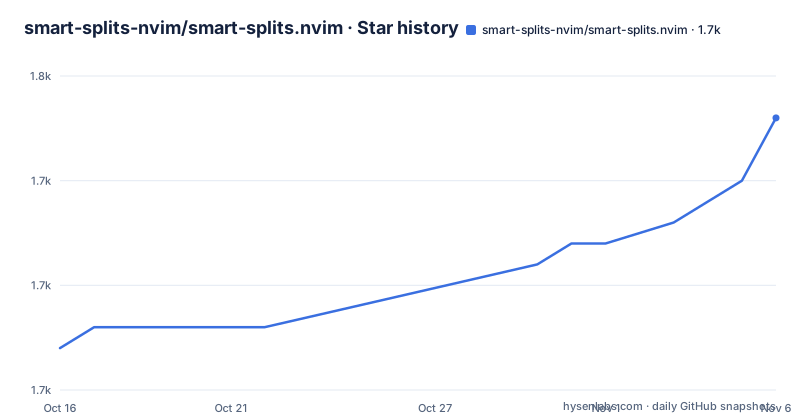
Star history
- smart-splits-nvim/smart-splits.nvim1,748 ★ · +11
| Repository | 2026-10-16 | 2026-11-06 |
|---|---|---|
| smart-splits-nvim/smart-splits.nvim | 1.7k | 1.7k |
11 Stars in the last 21 days, measured from the daily GitHub snapshot. Compare with other projects
Editorial analysis
The resize model is the point
smart-splits.nvim describes itself as smarter and more intuitive split pane management for Neovim, and the specific change is in the vocabulary. You resize splits using a mental model of left, right, up and down instead of wider, narrower, taller and shorter.
That is a small change in naming and a large change in behaviour, because the two models disagree about what a resize should do at the edge. Making a window wider is not the same as making the window to the right smaller, and in a layout with more than two splits the difference is not cosmetic. Once the operation is expressed directionally, the same key can mean the same thing in a Neovim window and in a multiplexer pane, which is the second half of the plugin's value.
The key features list puts it as an intuitive resize model that matches how you think about splits, seamless navigation between Neovim and multiplexer panes, a modular architecture where multiplexer support lives in separate plugins, configurable edge behaviour of wrap, stop, split or custom logic, ignore lists for buffers and filetypes, and count aware resizing with `v:count1` support.
The plugin is the core, and the multiplexer backends for Zellij, Ghostty and the others are separate plugins you install alongside it. That separation is why the plugin is described as backend-driven, and there is a `PROTOCOL.md` at the root describing the contract a backend implements.
The core plugin and the backends are separate packages
The installation section makes the split explicit. smart-splits.nvim is the core plugin, and the multiplexer backends, Zellij, Ghostty and the rest, are separate plugins you install alongside it. The requirements are Neovim 0.11 or newer, and optionally a terminal multiplexer with a supported backend plugin.
With lazy.nvim, the core plugin carries a version constraint and the backend is a dependency:
return {
  'smart-splits-nvim/smart-splits.nvim',
  version = '^3.0.0',
  dependencies = {
    {
      'smart-splits-nvim/backend-zellij-lua',
      main = 'smart-splits-backend-zellij-lua',
      opts = {
        --[[ backend-specific options go here ]]
      },
    },
  },
  opts = {
    mux = { backend = 'smart-splits-backend-zellij-lua' },
  },
}
Note the `main` key. The backend is a separate repository with a different module name to the repository name, and the plugin configuration passes the backend under the `mux` key.
Calling `setup()` is optional. Without it you get the defaults and no multiplexer integration, which is a sensible default for a plugin whose second half only makes sense if you have a multiplexer running.
The backend setting itself is more flexible than a single name. It can be a backend, a list of backends in priority order, or a function returning either, and there is a `warn_if_unusable` option that warns when backends are configured but none of them is detected, which is a thoughtful touch for a plugin that silently does nothing when the multiplexer is not running.
Edge behaviour and ignore lists are where the configuration lives
The defaults are documented in full, and two of them carry the design.
require('smart-splits').setup({
  ignored_buftypes = { 'nofile', 'quickfix', 'prompt' },
  ignored_filetypes = { 'NvimTree' },

  resize = {
    amount = 3,
    ignored_events = { 'BufEnter', 'WinEnter' },
  },

  move = {
    at_edge = 'wrap',
    same_row = false,
  },

  swap = {
    move_cursor = false,
  },

  mux = {
    backend = nil,
    warn_if_unusable = true,
  },

  log = {
    level = 'info',
    file = true,
  },
})
The edge behaviour is the interesting one. `move.at_edge` decides what happens when there is no Neovim window in the direction you moved and the multiplexer backend did not handle it either, and the options are `stop`, `wrap`, `split` or a function taking a context. So the same directional key can stop at the edge, wrap around to the other side, split and move into a new window, or run your own logic. The default is `wrap`.
The ignore lists mark windows the plugin should leave alone, and they are skipped when working out resize geometry, and `at_edge = 'split'` will not split them. The per feature override semantics are precise and worth reading, because they are the kind of thing that surprises people. A bare list replaces the top level list, so resizing can ignore only Trouble while moving still ignores only NvimTree. Setting `inherit = true` adds to the top level list instead of replacing it, so resizing can ignore NvimTree, neo-tree and Trouble while the top level list is unchanged.
`move.same_row` keeps the cursor on the same screen row when moving horizontally, which is off by default, and `swap.move_cursor` decides whether the cursor follows the buffer into its new window.
Count aware resizing and the eventignore trick
Two implementation details in the defaults are worth explaining because they affect how the plugin feels.
The first is the resize amount. The `amount` is 3 cells, multiplied by `v:count1`, which is the count you typed before the key. So three is the default step and typing a count before the resize key multiplies it. That is the Neovim convention, applied to a plugin that implements its own resizing rather than delegating to a built-in command, and honouring it is the difference between a plugin that feels native and one that does not.
The second is `ignored_events`. The comment says these are added to `eventignore` for the duration of a resize, and the defaults are `BufEnter` and `WinEnter`.
That is a neat piece of engineering. Resizing a window fires `WinEnter` and often `BufEnter` as Neovim moves through the layout, and any autocommand listening for those would fire repeatedly during a resize, which produces the stutter and the stray side effects people complain about in window management plugins. Suppressing those events for the duration of the operation keeps the resize from looking like a sequence of window changes to the rest of the editor, and it is why the plugin can be aggressive about resizing without fighting the user's autocommands.
The keymap surface: resize, move, swap
The API is three verbs applied in four directions, and the Lua function names read the way the keys are usually bound.
keys = {
  {
    '<A-h>',
    function()
      require('smart-splits').resize_left()
    end,
    desc = 'Resize left',
  end,
  {
    '<C-h>',
    function()
      require('smart-splits').move_cursor_left()
    end,
    desc = 'Move left',
  },
  {
    '<leader><leader>h',
    function()
      require('smart-splits').swap_buf_left()
    end,
    desc = 'Swap left',
  end,
}
`resize_left` shrinks or grows the current window in the leftward direction, `move_cursor_left` moves the cursor into the neighbouring window, and `swap_buf_left` swaps the buffer with the one to the left. The modifier pattern in the example is the conventional one, with Alt for resizing, Control for moving and a leader sequence for swapping, but the plugin does not impose it, since every call is a plain Lua function you can bind however you like.
The plugin also ships a Lua API and a set of commands, so a configuration can drive it directly rather than through keybindings, which is what you want if your layout changes or if you generate the mappings from a table.
The check command runs four tools in sequence
The justfile is short and the `check` target is the interesting one, because it composes the whole toolchain: `check: fmt-check lint typecheck test`.
The formatting check is not a single formatter. It runs `stylua --check` over the Lua directories, `yamlfmt` in dry run mode, `prettier --check` over the JSON and JSONC files, `tombi format --offline --check` for the TOML, and `nixfmt --check` over the Nix files. So the project accepts YAML, JSON, TOML, Lua and Nix in one tree and expects each to be formatted by the tool that owns it.
Linting is three tools as well. `selene` over the Lua source and tests, `actionlint` for the GitHub Actions workflows, and `statix check`, which is the linter for Nix code. The actionlint step is a detail that says the project treats its own CI configuration as code worth checking.
Type checking is done with the Lua language server, and the script is careful about the environment. It creates a temporary directory, and it sets `VIMRUNTIME` by asking a headless Neovim for the value, with `--clean` and no shada file, and then runs `lua-language-server --check=.` with a warning level, the pretty check format, the project's own `.luarc.json` as the configuration and the temporary directory as the log path. Getting `VIMRUNTIME` right is the classic difficulty with Neovim Lua projects, and asking Neovim itself is the reliable way to do it.
Tests are run with busted, and the repository has a `.busted` configuration file for it.
Where this is the wrong plugin
The first wrong case is a Neovim setup with one window and no multiplexer. The plugin's entire value is the coordination between a Neovim window layout and a multiplexer layout, and with neither present the directional commands duplicate what Neovim already does with `Ctrl-h` and friends.
The second is a team that does not use a multiplexer at all, or uses one without a backend plugin. The `mux` section of the configuration would then be empty, and the plugin becomes the resize model alone, which is a nice idea but not a big one.
The third is an environment on an older Neovim. The requirement is 0.11 or newer, which is recent, and a plugin that depends on recent window APIs is not going to backport to an older release.
The fourth is a user who dislikes the default edge policy. The default is `wrap`, so moving past the last window goes around to the other side, and a lot of people find that surprising the first time. It is one option in a configuration, but it is worth knowing before the first time it happens.
On the state of the project, the current release is v3.0.0, published on 2026-10-08, alongside v2.1.1-final the same day and v2.1.0 from 2026-04-14, and the last push to the repository was on 2026-10-16. The licence is MIT, and the repository has recently moved to a new `smart-splits-nvim` GitHub organisation, with the note at the top of the README pointing at two issues for the details, so an existing installation pinned to the old `mrjones2014` path needs updating. There is a migration section for the v2 line, and the tree includes `PROTOCOL.md` for backend authors, `types/` for the type definitions, a `flake.nix` with a lock file, and a `vim.yaml`.
Editorial conclusion
Adopt smart-splits.nvim if you split Neovim windows and a terminal multiplexer panes in the same session and want the same directional keys to work in both, since that navigation model is the feature and the backends are separate plugins you can pick one at a time. Do not adopt it if you are happy with the built in window commands, since the default behaviour of moving between splits is already directional and the plugin earns its place through the multiplexer integration and the edge policy. Verify first that you are on Neovim 0.11 or newer, that the backend plugin you install matches the multiplexer you actually use, and that you read the migration notes if you are coming from the v2 line, since v3 is a major release and the plugin has moved to a new GitHub organisation.
Frequently asked questions
What does smart-splits.nvim do?
It gives Neovim and terminal multiplexer splits a single directional model, so that resizing uses left, right, up and down rather than wider and narrower, and so that navigation moves seamlessly between Neovim windows and multiplexer panes. It supports Zellij, Tmux, Wezterm and Kitty through separate backend plugins.
How do I install smart-splits.nvim with lazy.nvim?
Add `smart-splits-nvim/smart-splits.nvim` with a version constraint, list the backend plugin you want in `dependencies` with its `main` module name, and set `opts = { mux = { backend = '...' } }`. The core plugin requires Neovim 0.11 or newer, and calling `setup()` is optional, since without it you get the defaults and no multiplexer integration.
What happens when I move past the last split?
It depends on `move.at_edge`, which can be `stop`, `wrap`, `split` or a function taking a context, and the default is `wrap`. The behaviour applies when there is no Neovim window in that direction and the multiplexer backend did not handle it either.
How do the ignore lists work?
`ignored_buftypes` and `ignored_filetypes` mark windows the plugin leaves alone, and they are skipped when working out resize geometry. A bare list in a per feature block replaces the top level list, while setting `inherit = true` adds to the top level list instead of replacing it.
How is the project tested and checked?
The justfile has a `check` target that runs formatting checks with stylua, yamlfmt, prettier, tombi and nixfmt, linting with selene, actionlint and statix, type checking with the Lua language server using a VIMRUNTIME obtained from a headless Neovim, and the test suite with busted.
Official sources
Add this badge to your README
If you maintain this project, the badge below links readers to this analysis and shows its maintenance status from the daily GitHub snapshot. Paste the markdown into your README; add ?metric=license or ?metric=stars to the image URL for a different field.

[](https://hysenlabs.com/projects/smart-splits-nvim-smart-splits-nvim)Star history chart for your README
[](https://hysenlabs.com/projects/smart-splits-nvim-smart-splits-nvim)Was this useful?