pg_lake: PostgreSQL queries and transactions for Iceberg and object storage
pg_lake: Postgres with Iceberg and data lake access
At a glance
- What is it?
- pg_lake adds Iceberg tables, external Parquet, CSV, and JSON files, spatial formats, and a DuckDB-backed server to PostgreSQL. It fits lakehouse workloads that need SQL access and PostgreSQL transactions, but its multi-process setup adds operational complexity.
- Who is it for?
- pg_lake is a practical choice for PostgreSQL users that manage transactional Iceberg data beside Parquet, CSV, JSON, or geospatial files. It is less suitable for a team that needs a single-process PostgreSQL installation with no separate pgduck_server, object storage, or credential-chain management.
- Can I use it commercially?
- Yes. Apache-2.0 is a permissive licence: you can use, modify and sell software built on it, as long as you keep its copyright and licence notices.
- Is it still maintained?
- Yes. The repository received new commits within the last day.
- What is it written in?
- Mainly Python, according to GitHub's language statistics.
Answers come from the project's GitHub data, last synced on October 23, 2026, and from our analysis. They are not legal advice.
Star history
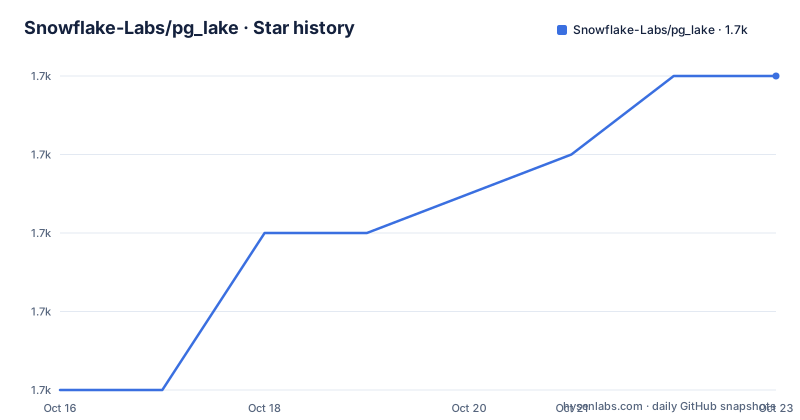
- Snowflake-Labs/pg_lake1,661 ★ · +4
| Repository | 2026-10-16 | 2026-10-23 |
|---|---|---|
| Snowflake-Labs/pg_lake | 1.7k | 1.7k |
4 Stars in the last 7 days, measured from the daily GitHub snapshot. Compare with other projects
Editorial analysis
Why pg_lake connects PostgreSQL to a lakehouse
pg_lake addresses a specific gap between PostgreSQL and data-lake storage. Teams can create and modify Apache Iceberg tables through ordinary PostgreSQL SQL while retaining transactional behavior, then make those tables available to engines that read Iceberg metadata. The same server can query raw Parquet, CSV, JSON, and Iceberg files in object stores such as S3 without first copying every file into a PostgreSQL heap table.
The intended users are PostgreSQL developers and data engineers who already want SQL as their primary interface but also need access to files that do not fit PostgreSQL's native storage model. A database workload may contain conventional heap tables, managed Iceberg tables, and external Parquet, CSV, or JSON files. pg_lake presents them through PostgreSQL queries and states that these sources can be combined in the same SQL operations without SQL limitations.
The project also covers data that is awkward to normalize immediately. Its extensions support geospatial formats available through GDAL, including GeoJSON and Shapefiles, plus the built-in pg_map type for semi-structured or key-value data. Type inference can derive columns and types from Iceberg, Parquet, JSON, and CSV sources. These features reduce a separate conversion and schema-discovery layer, although they do not remove the need to configure object storage and credentials.
This is not simply a PostgreSQL foreign-data wrapper around arbitrary files. Its main design goal is to combine external lake data with PostgreSQL transactions and modifications. That distinction matters when a workflow needs more than read-only federation, such as creating an Iceberg table in PostgreSQL, inserting rows, querying the result, and later changing committed data through the same interface.
Inside pg_lake's extensions and pgduck_server architecture
The repository is divided into several PostgreSQL extension targets, including pg_lake, pg_lake_table, pg_lake_engine, pg_extension_base, pg_lake_iceberg, and pg_lake_copy. The umbrella pg_lake extension installs required components through PostgreSQL's CASCADE mechanism. The Makefile also lists targets such as pg_lake_spatial, pg_map, pg_extension_updater, pgduck_server, duckdb_pglake, and avro, showing that installation can involve compiled components and related subprojects rather than a single Python package.
Query execution has an additional process boundary. pgduck_server is a standalone process that listens locally with the PostgreSQL wire protocol. DuckDB executes queries underneath it. PostgreSQL clients still use SQL and the familiar wire interface, but pgduck_server is not the main PostgreSQL or pg_lake server. The README specifically warns operators to distinguish a connection on the default port `5332` from a connection to the PostgreSQL server hosting pg_lake.
That separation has direct configuration consequences. The server accepts controls such as `--memory_limit`, `--cache_dir`, and `--init_file_path`. Its default memory limit is documented as 80 percent of system memory, which is unlikely to be an appropriate starting point on every production host. Remote S3 files can be cached under `--cache_dir`. DuckDB settings can be supplied in an initialization file or changed through a connection to pgduck_server.
Object-storage access uses DuckDB's secrets manager and follows the default AWS and GCP credential chains. The README cites credentials in `~/.aws/credentials` as one possible AWS configuration. Iceberg storage is not fully determined by cloud authentication, because PostgreSQL also needs `pg_lake_iceberg.default_location_prefix` to identify where Iceberg table data and metadata are written.
Based on the repository layout, pg_lake is primarily a PostgreSQL extension system with Python as its primary language, compiled extension targets, DuckDB integration, and a separate server process. Operators should not treat it as a conventional library that can be enabled in an empty PostgreSQL directory without planning that build.
Setting up pg_lake and creating an Iceberg table
The README offers Docker as a ready-to-run test environment and source builds for manual setup or development. It does not include a complete installation command sequence in the root README. It directs readers to `docker/README.md` for Docker and `docs/building-from-source.md` for required components and source installation. The commands below therefore begin only after those documented prerequisites have been built and installed.
After starting `pgduck_server`, launch `psql` against its local socket. The documentation uses port `5332` and host `/tmp`; the resulting query reports the DuckDB version through `version()`.
pgduck_serverThe expected startup message identifies a Unix socket directory of `/tmp` and port `5332`. In a separate terminal, connect and run the version query.
psql -p 5332 -h /tmpselect version() as duckdb_version;Connect to the PostgreSQL server that will host the extensions and create the extension tree. The NOTICE messages list `pg_lake_table`, `pg_lake_engine`, `pg_extension_base`, `pg_lake_iceberg`, and `pg_lake_copy`.
CREATE EXTENSION pg_lake CASCADE;For S3-backed Iceberg tables, configure the AWS or GCP credential chain first, then set the storage prefix in PostgreSQL.
SET pg_lake_iceberg.default_location_prefix TO 's3://testbucket/pglake';Create and populate a small Iceberg table using `USING iceberg`. The following example generates 100 rows through `generate_series`.
CREATE TABLE iceberg_test USING iceberg
AS SELECT i AS key, 'val_' || i AS val
   FROM generate_series(0, 99) i;
A successful query should return 100 rows. The catalog table `iceberg_tables` can then be queried for the table name and generated `metadata_location`.
Querying Parquet, CSV, and JSON through PostgreSQL
pg_lake can treat object-store files as queryable tables without first loading them into PostgreSQL heap storage. A foreign table points to a path through `pg_lake`, and PostgreSQL SQL can aggregate the result. The following example uses a wildcard Parquet path under an S3 bucket.
CREATE FOREIGN TABLE clicks () SERVER pg_lake
OPTIONS (path 's3://mybucket/clicks/*.parquet');
The empty column list delegates schema inference to the external source. The README states that columns and types can be inferred from Iceberg, Parquet, JSON, and CSV data. That is useful when file layouts evolve, but users still need a dependable schema contract before production queries depend on inferred names and types.
Results can be written back to object storage with PostgreSQL `COPY`. The destination extension determines the format automatically, and explicit `COPY` options are available when needed.
COPY (SELECT page, count(*) FROM clicks GROUP BY page)
TO 's3://mybucket/reports/clicks.csv';
Supported exports are Parquet, CSV, and newline-delimited JSON. Imports use the same SQL interface. The documentation also names `WITH (format 'csv', compression 'gzip')` as an example of explicit format selection. Credentials must already be available to pgduck_server through the applicable secrets or credential chain.
pg_lake can also start an Iceberg table directly from a public Parquet file. The `load_from` table option is part of table creation rather than a separate ingestion command.
CREATE TABLE trips () USING iceberg
WITH (load_from = 'https://d37ci6vzurychx.cloudfront.net/trip-data/yellow_tripdata_2024-01.parquet');
This approach can make remote data queryable through PostgreSQL and expose it as an Iceberg table. It does not imply that every remote file behaves like a compact heap table. Query cost still depends on file formats, object-store access, inferred schemas, selected filters, DuckDB memory settings, and network transfer.
Transactions, modifications, and geospatial access
The central reason to choose pg_lake over a basic file-query extension is its support for PostgreSQL transactions across supported table types. The README says users can create and modify Iceberg tables directly from PostgreSQL with full transactional guarantees, then query those tables from other Iceberg-aware engines. It also describes combining heap, Iceberg, and external Parquet, CSV, or JSON files in the same SQL queries and modifications.
An Iceberg table uses the normal PostgreSQL table-writing surface. The README's first example declares `measurements` with `USING iceberg`, inserts a row, and later shows a `DELETE` against a loaded `trips` table. This avoids a separate application-specific write API for basic DML.
CREATE TABLE measurements (
  sensor_id int,
  recorded_at timestamptz,
  value double precision
) USING iceberg;

INSERT INTO measurements VALUES (1, now(), 21.5);
That convenience does not eliminate lakehouse design questions. A successful SQL statement confirms compatibility with the project's supported operation path, but it does not by itself answer organization-specific requirements such as isolation across unrelated systems, schema evolution policy, concurrent writers, compaction schedules, or recovery procedures. The README does not document rollback behavior or define the project's coordination model for external engines.
Geospatial access broadens the query surface through GDAL-supported formats such as GeoJSON and Shapefiles. The separate `pg_lake_spatial` extension target in the Makefile indicates that spatial support is organized as its own component. The root README states that these formats are readable, but it does not provide a complete configuration or command example for GDAL setup. Applications should verify the documented spatial guide against their file format, coordinate expectations, and deployment environment before depending on it.
The built-in pg_map type is a separate model for semi-structured or key-value data. It may avoid treating every variable document as a relational schema, but the README does not document its query operators or persistence behavior in enough detail to replace the project reference documentation.
Operational limits and maintenance signals
The largest limitation is architectural rather than a single missing feature. A deployment involves PostgreSQL, several extensions, pgduck_server, DuckDB execution, and usually S3-compatible storage with cloud credentials. `pgduck_server` must be running and reachable through its Unix socket. Its memory, cache, and initialization behavior require separate attention from PostgreSQL configuration. A failure can therefore occur outside the PostgreSQL connection even when the SQL client appears correctly configured.
Memory control is especially concrete. The documented default allows pgduck_server to use 80 percent of system memory, while `--memory_limit` can impose a lower limit. Because pgduck_server is a separate process, setting PostgreSQL memory parameters does not automatically set its DuckDB limit. Remote file caching under `--cache_dir` also makes storage placement and cache behavior part of production planning.
The project is under the Apache-2.0 license. That identifier permits use and modification under the license's stated terms, but this review does not interpret legal obligations or compatibility with a particular distribution model. Operators should review the repository `LICENSE` file and their own compliance requirements.
Maintenance activity is recent in the recorded project history. The last push was on 2026-10-16, and releases v3.5.7, v3.5.6, and v3.5.5 were published on 2026-10-12, 2026-10-09, and 2026-10-06. This indicates current release work, but the README does not provide an upgrade procedure, extension-version compatibility matrix, or rollback guidance. Upgrading from source can also involve compiled targets, and the Makefile exposes dedicated upgrade, end-to-end, and PostgreSQL test targets rather than documenting a one-command production upgrade.
pg_lake is the wrong tool when the requirement is a self-contained PostgreSQL extension with no extra server process. It is also a poor fit for object-store workloads that do not benefit from Iceberg metadata, transactional DML, schema inference, or DuckDB query execution. The added components would be operational overhead without matching the workflow.
pg_lake compared with read-only PostgreSQL file federation
A direct alternative is to expose Parquet, CSV, or JSON through PostgreSQL's existing foreign-data facilities and read those files without adopting pg_lake. That approach keeps object files queryable through SQL, but it does not by itself provide pg_lake's stated managed Iceberg table workflow, DuckDB-backed `pgduck_server`, schema inference across the listed formats, built-in pg_map type, or single SQL surface for transactional changes to Iceberg tables.
The practical difference is where write capability and execution live. pg_lake adds PostgreSQL-managed Iceberg tables using `USING iceberg`, supports DML such as `INSERT` and `DELETE`, and states that transactions can span its supported heap, Iceberg, and external-file sources. It also moves file execution into a dedicated DuckDB process. A read-only foreign-data design may add fewer project-specific components, but it does not turn the same object-storage operation into an Iceberg table and does not provide pg_lake's exact transaction guarantees.
Another boundary is format coverage. pg_lake supports Parquet, CSV, newline-delimited JSON, and Iceberg for import and query, with exports in Parquet, CSV, and JSON. Its geospatial path adds GDAL-supported formats. An alternative should be selected based on whether the requirement is simply remote query access or managed Iceberg lifecycle behavior.
For an organization already standardized on PostgreSQL and seeking one SQL contract for transactional tables and lake files, pg_lake offers a more specific answer than generic file federation. For an isolated reporting query against a few immutable files, that breadth may exceed what the deployment needs.
Editorial conclusion
pg_lake is a practical choice for PostgreSQL users that manage transactional Iceberg data beside Parquet, CSV, JSON, or geospatial files. It is less suitable for a team that needs a single-process PostgreSQL installation with no separate pgduck_server, object storage, or credential-chain management. Before adoption, verify the required object store, confirm how pg_lake_iceberg.default_location_prefix maps table metadata, and test the documented install path for the intended PostgreSQL environment. The first adoption gate is a successful CREATE EXTENSION pg_lake CASCADE deployment with pgduck_server reachable on its local PostgreSQL wire-protocol socket.
Frequently asked questions
How do I install pg_lake for a first local test?
The README points to `docker/README.md` for a ready-to-run Docker environment. For a manual setup, follow `docs/building-from-source.md`, build the required components, start `pgduck_server`, and create the extensions with `CREATE EXTENSION pg_lake CASCADE`.
How do I connect to DuckDB through pg_lake?
Start `pgduck_server`, then connect with `psql -p 5332 -h /tmp`. This connection targets pgduck_server rather than the PostgreSQL server hosting pg_lake.
Can pg_lake query files in S3 and write results back?
Yes. Create a foreign table with `SERVER pg_lake` and an object-storage `path`, then query it through PostgreSQL. `COPY` can export results as Parquet, CSV, or newline-delimited JSON, provided pgduck_server has access to the required credentials.
Official sources
Add this badge to your README
If you maintain this project, the badge below links readers to this analysis and shows its maintenance status from the daily GitHub snapshot. Paste the markdown into your README; add ?metric=license or ?metric=stars to the image URL for a different field.

[](https://hysenlabs.com/projects/snowflake-labs-pg-lake)Star history chart for your README
[](https://hysenlabs.com/projects/snowflake-labs-pg-lake)Was this useful?