soulteary/ssh-config v3: round-trip ssh_config through YAML without losing bytes
1 MB size. Manage your SSH config with YAML or JSON for easier maintenance.
At a glance
- What is it?
- A Go command-line tool that reads classic ssh_config files, hands them to you as YAML or JSON, and writes them back while keeping comments, directive order and repeated directives. v3 defaults to the lossless schema, and -legacy is the flag that turns the old lossy format and directory scanning back on.
- Who is it for?
- Take soulteary/ssh-config if you review or generate config changes as text, and stay on the v3 defaults so comments and repeated directives survive the round trip. Treat -legacy as a compatibility escape hatch rather than a default, because values the old map format dropped cannot be rebuilt.
- Can I use it commercially?
- Yes. Apache-2.0 is a permissive licence: you can use, modify and sell software built on it, as long as you keep its copyright and licence notices.
- Is it still maintained?
- Yes. The repository last received commits 1 day ago.
- What is it written in?
- Mainly Go, according to GitHub's language statistics.
Answers come from the project's GitHub data, last synced on October 22, 2026, and from our analysis. They are not legal advice.
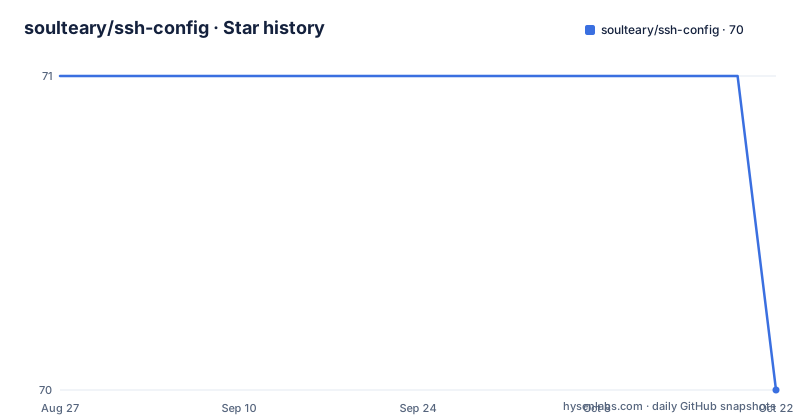
Star history
- soulteary/ssh-config70 ★ · -1
| Repository | 2026-08-27 | 2026-10-22 |
|---|---|---|
| soulteary/ssh-config | 71 | 70 |
-1 Stars in the last 56 days, measured from the daily GitHub snapshot. Compare with other projects
Editorial analysis
v3 writes back only the bytes you changed
Since v3.0.0 the default conversion path is lossless, so a config that you export, edit by hand, and write back keeps everything you did not touch: comments, directive ordering, repeated directives, quoting, line endings, and unknown directives. The round trip is two commands.
ssh-config -to-yaml -src ~/.ssh/config -dest config.v3.yaml
# Edit directive fields in config.v3.yaml. Unchanged lines retain their exact bytes.
ssh-config -to-ssh -src config.v3.yaml -dest ~/.ssh/config
Files written before v3 remain readable and are migrated to schema v3 on the way in, so output produced by the previous format does not need a separate converter. What you give up in exchange for editability is nothing the format had thrown away already, which is the main argument for leaving the default mode alone. Node shapes, byte-preservation rules, editing behavior, API examples, and the migration limits are spelled out in the lossless schema v3 specification that the project links from the README at docs/lossless-schema-v3.md.
-legacy is the switch that re-enables the old lossy formats
`-legacy` selects the previous map and array output formats, and it is also the flag that turns directory scanning on. Reach for it when an existing consumer still requires the old map/array shape; nothing else needs it. The loss is one way. Repeated values and directive ordering that are already absent from a legacy document cannot be reconstructed, because the bytes holding them were discarded when that document was written. `-lossless` still parses as an alias and now does nothing, since lossless conversion is the v3 default. `-document-path` picks a single document out of a multi-document v3 schema when `-to-ssh` reads one, so a config split across several YAML documents does not have to be converted in separate passes. The flag set is deliberately small, and `-version` is the one that reports release, commit, build, and tree-state metadata.
What -src picks up when you leave it off
An explicit `-src` path takes precedence over piped standard input. Omit it and lossless mode reads `~/.ssh/config`, while legacy mode scans the `~/.ssh` directory and reads only `config` and `config.d/*` there, so unrelated files kept alongside the configuration are not pulled in. A directory named explicitly with `-src` is scanned in full, whatever its files are called. Piped standard input that contains no non-whitespace bytes is rejected, so a failed upstream command cannot replace `-dest` with an empty file. The parent directory of `-dest` must already exist, and with `-dest` omitted the converted result goes to standard output. Input format is detected automatically across YAML, JSON, and SSH config syntax, so the direction flags are the only thing you choose.
One output format per run
`-to-yaml`, `-to-json`, and `-to-ssh` pick the output format, and only one of them can be specified at a time. Every invocation is therefore a single conversion in a single direction.
ssh-config -to-ssh -src input.yaml -dest output.confssh-config -to-json -src ~/.ssh/config -dest output.jsoncat input.conf | ssh-config -to-yaml > output.yamlLinux pipes carry a file in on standard input and take the result back out on standard output, which makes the tool usable inside a chain without touching the filesystem. `-help` and `-h` print the command-line help, which is the same list of flags as the README options table.
Four ways to install, each with its own catch
Go 1.27 or newer is the floor, and go.mod declares go 1.27.0. Homebrew installs from the soulteary tap:
brew tap soulteary/tap
brew install soulteary/tap/ssh-config
Go users can install the v3 command directly:
go install github.com/soulteary/ssh-config/v3@latestContainer images are published twice, on Docker Hub and on GitHub Container Registry:
docker pull soulteary/ssh-config:latest
# or
docker pull ghcr.io/soulteary/ssh-config:latest
A prebuilt binary for your system and CPU architecture sits on the GitHub release page, and `go build` compiles from a checkout. The catch for anyone embedding this is the module path: it carries the major version, so imports written against the v2 path stop compiling after the upgrade, and the project ships a v2 to v3 migration guide for exactly that case. v2.0.0 shipped 2026-03-02, v3.0.0 and v3.1.0 both landed on 2026-08-27, and the last push to main is dated 2026-09-28.
The image runs as 65532, so bind mounts need your uid
The image runs as the unprivileged numeric user `65532:65532` by default and its home is `/home/ssh-config`. Files written into a bind mount therefore land owned by that number, so the documented run passes the host identity:
docker run --rm -it --user "$(id -u):$(id -g)" -v "$(pwd):/ssh" soulteary/ssh-config:latest -to-yaml -src /ssh/test.yaml -dest /ssh/abc.yamlThe host UID and GID are not required when the result is written only to standard output. To use the default source path without `-src`, mount an SSH directory read-only at the container home:
docker run --rm --user "$(id -u):$(id -g)" -v "$HOME/.ssh:/home/ssh-config/.ssh:ro" soulteary/ssh-config:latest -to-yamlThe host UID/GID is required for the usual private `~/.ssh` permissions, a `0700` directory and a `0600` config. A pipeline can skip the bind mount entirely with `-i`:
cat test.yaml | docker run --rm -i soulteary/ssh-config:latest -to-yamlThe Dockerfile pins Alpine 3.24.1 by digest, copies in ca-certificates from a builder stage, creates the 65532 ssh-config group and user, and sets the entrypoint to `/usr/bin/ssh-config`.
The v1 and v2 guide needs a flag added to its commands
The project still links an older guide on soulteary.com and states that its directory-scan and legacy-schema commands need `-legacy` added before they behave as written under v3. Anyone who copies from that page without the flag gets different behaviour, because the default mode no longer scans directories and no longer emits the map and array shapes. Next to it sit the v2 to v3 migration guide and the lossless schema v3 specification under docs/, a Chinese translation at README_CN.md, and a security process in SECURITY.md for private vulnerability reports instead of public issues. The tree splits Go code into cmd/, internal/, pkg/, integration/, and testdata/, with main.go at the root, main_test.go beside it, a .goreleaser.yaml driving release builds, and a single Dockerfile. License is Apache-2.0. The credit for the definition of configuration file syntax goes to the OpenSSH man page for ssh_config and to sshush. Before scripting against this, check whether your pipeline depends on repeated directives or on comment text, because those are the values the legacy format drops and the default v3 mode is what keeps them.
Editorial conclusion
Take soulteary/ssh-config if you review or generate config changes as text, and stay on the v3 defaults so comments and repeated directives survive the round trip. Treat -legacy as a compatibility escape hatch rather than a default, because values the old map format dropped cannot be rebuilt. Before wiring it into a script or a container job, confirm the parent directory of -dest already exists, remember that empty piped input is rejected, and pass your host UID and GID to the image whenever it writes into a bind mount.
Frequently asked questions
What is an SSH config?
For this tool it is the classic ssh_config syntax that lives at ~/.ssh/config. Run with no arguments, ssh-config exports that file as lossless v3 YAML on standard output, keeping comments, directive ordering, repeated directives, quoting, line endings, and unknown directives.
How do I check my SSH config?
Run ssh-config with no arguments to export ~/.ssh/config as lossless v3 YAML on standard output and read the result. The -version flag is the other diagnostic, printing release, commit, build, and tree-state metadata.
how to use ssh config file
Export it first, then convert it back. ssh-config -to-yaml -src ~/.ssh/config -dest config.v3.yaml writes the v3 representation to disk, and ssh-config -to-ssh -src config.v3.yaml -dest ~/.ssh/config turns the edited file back into classic syntax with unchanged lines byte for byte.
how to set ssh config file
Choose one output format per run, since -to-yaml, -to-json, and -to-ssh cannot be combined. Point -src at the file or pipe it in, give -dest a path whose parent directory already exists, and with no -dest the converted result is written to standard output.
Official sources
Add this badge to your README
If you maintain this project, the badge below links readers to this analysis and shows its maintenance status from the daily GitHub snapshot. Paste the markdown into your README; add ?metric=license or ?metric=stars to the image URL for a different field.

[](https://hysenlabs.com/projects/soulteary-ssh-config)Star history chart for your README
[](https://hysenlabs.com/projects/soulteary-ssh-config)