Dumplings: WinGet manifest automation with a licence boundary
Dump remote resources and lint outdated packages
At a glance
- What is it?
- Dumplings runs thousands of PowerShell package tasks that watch for new releases, validate WinGet manifests without shelling out to winget validate, and submit guarded pull requests. Its three submodules are split so GPL installer parsers stay behind a JSON child process.
- Who is it for?
- Dumplings suits a maintainer of Windows packages who wants release detection, installer analysis and manifest updates in one PowerShell runner, and who can supply GitHub credentials when submission is needed. It does not suit a Linux or macOS workflow, since Windows and PowerShell 7.4 or later are hard requirements, and it does not replace the WinGet client because manifest validation is its own implementation.
- Can I use it commercially?
- Yes. MIT is a permissive licence: you can use, modify and sell software built on it, as long as you keep its copyright and licence notices.
- Is it still maintained?
- Yes. The repository received new commits within the last day.
- What is it written in?
- Mainly PowerShell, according to GitHub's language statistics.
Answers come from the project's GitHub data, last synced on October 21, 2026, and from our analysis. They are not legal advice.
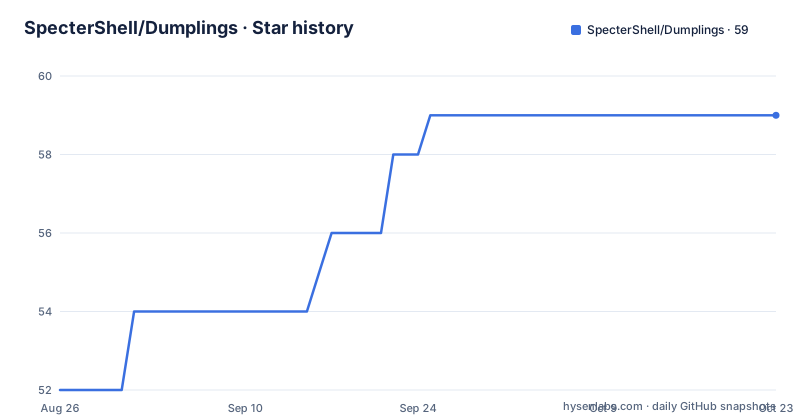
Star history
- SpecterShell/Dumplings59 ★ · +7
| Repository | 2026-08-26 | 2026-10-21 |
|---|---|---|
| SpecterShell/Dumplings | 52 | 59 |
7 Stars in the last 56 days, measured from the daily GitHub snapshot. Compare with other projects
Editorial analysis
Thousands of tasks behind one runner
Dumplings is a PowerShell automation project for monitoring Windows package releases, updating package state, generating and validating WinGet manifests, and submitting changes to microsoft/winget-pkgs. The repository holds thousands of independent package tasks, and the feature that ties them together is a concurrent runner with explicit dependency ordering and configurable concurrency. The core entry point is a single script, and the same command covers one task, several tasks or the whole set:
.\Core\Index.ps1 -Name Adobe.WorkfrontProof
.\Core\Index.ps1 -Name Adobe.WorkfrontProof, Mozilla.Firefox -ThrottleLimit 4
.\Core\Index.ps1
Requirements are narrow and stated up front: Windows, PowerShell 7.4 or later, Git with submodule support, and network access for release checks and installer downloads. GitHub credentials, and optionally a local winget-pkgs checkout, are needed only when submission is turned on.
The licence boundary is a process, not a promise
The architecture diagram is really a licensing diagram. Core and the tasks sit above PackageModule, which is Apache-2.0, while the installer parsers are GPL-2.0 and GPL-3.0 and are reached across a JSON child process boundary. Nothing GPL is linked into the Apache-2.0 module; it is invoked as a separate process that speaks JSON. Core, PackageModule and InstallerParsers are Git submodules, and each is usable as an independently versioned project, so a parser change does not force a runner release. PackageModule has one supported standalone entry point, Modules/PackageModule/PackageModule.psd1, and Core imports that manifest through Modules/PackageModule/Index.ps1 to load the task model classes. The parsers exist as a separate repository precisely because their implementations use GPL-compatible licences.
Persisted state is what separates new from rollback
The runner compares each release against persisted task state and sorts the outcome into four states: new, changed, updated and rollback. That distinction is the point of storing state at all, because a version moving backwards is a different event from a version moving forwards and should not be treated as an ordinary update. State.yaml points at the most recent timestamped state log, and the next run reads it. Writing is off by default, which is why a first run reports without persisting anything:
# Re-evaluate a task regardless of its persisted state.
.\Core\Index.ps1 -Name Vendor.Package -Force

# Persist State.yaml and a timestamped log after a detected change.
.\Core\Index.ps1 -Name Vendor.Package -EnableWrite
So -Force and -EnableWrite are separate decisions. Forcing a re-evaluation is safe and read-only; persisting is what creates the baseline that later runs compare against.
Manifests are validated without calling winget validate
The manifest tooling reads, updates, formats and validates multi-file WinGet manifests itself, and the README is explicit that it does so without invoking `winget validate`. That removes a dependency on the WinGet client from the pipeline, and it means the validation rules live in this project. Installer analysis is a separate layer on top: the runner detects and statically analyses many Windows installer and bootstrapper formats, which is what populates the metadata a manifest needs. -SkipInstallerAnalysis removes that layer, with an important boundary. It skips static parser and detector work but not installer hashing or manifest validation, so a run with the flag still produces validated manifests, just with existing installer metadata preserved. The flag can be set globally as a preference override or per task as `SkipInstallerAnalysis: true` in its Config.yaml, and either setting has the same effect.
Side effects are opt-in, and the dry run shows the path
Two switches cause external effects: -EnableMessage, which sends queued notifications, and -EnableSubmit without -Dry, which opens pull requests. The guidance is to enable them only after configuring their credentials and reviewing the selected tasks. There is a middle setting worth knowing, because it exercises the submission logic without a pull request:
# Exercise manifest generation and submission logic without opening a PR.
.\Core\Index.ps1 -Name Vendor.Package -Force -EnableSubmit -Dry
Notifications go out over Telegram or Matrix, and the pull requests are described as guarded rather than raw. Reporting is automated too: a task status dashboard is published to GitHub Pages after each Automation workflow run, so a run that changed nothing is still visible to the people watching the repository.
Secrets come from three places, two of them ignored
Configuration is split between defaults and credentials. Preference.yaml holds non-secret runner and module defaults, and anything passed on the command line overrides it. Secrets load in a defined order: first YAML supplied through the DUMPLINGS_SECRET environment variable, then values from a local Secret.yaml file, which override matching environment values. The runner also reads an ignored .env file, but it does not replace environment variables that already exist, so an explicit environment value wins over the file. The warning is unambiguous: never commit .env, Secret.yaml, tokens, cookies or installer credentials. The named variables are GH_DUMPLINGS_TOKEN and GITHUB_TOKEN for GitHub API, repository and submission authentication, TG_BOT_TOKEN with TG_CHAT_ID for Telegram, MT_BOT_TOKEN with MT_ROOM_ID for Matrix, and DUMPLINGS_SECRET for task-specific values.
A task is a directory, a script and a state log
A directory under Tasks/ becomes a task only when it contains Config.yaml, and a typical package task starts with three lines naming the type, the WinGet identifier and whether it is skipped:
Type: PackageTask
WinGetIdentifier: Vendor.Package
Skip: false
Script.ps1 then populates `$this.CurrentState`, calls `$this.Check()`, and conditionally uses `$this.Print()`, `$this.Write()`, `$this.Message()` and `$this.Submit()`. Dependencies are never implicit; they are declared with DependsOn, and tasks whose names begin with `#` commonly populate `$Global:DumplingsStorage` for the package tasks below them. Core validates those declarations, orders them deterministically, and blocks a dependent whose provider failed, so one broken publisher does not produce a half-updated set of manifests. The guidance for writing a new task is to read nearby tasks from the same publisher but verify their current behaviour rather than copying assumptions.
Editorial conclusion
Dumplings suits a maintainer of Windows packages who wants release detection, installer analysis and manifest updates in one PowerShell runner, and who can supply GitHub credentials when submission is needed. It does not suit a Linux or macOS workflow, since Windows and PowerShell 7.4 or later are hard requirements, and it does not replace the WinGet client because manifest validation is its own implementation. Before enabling it, clone with submodules, keep -EnableMessage and non-dry -EnableSubmit off until the credentials and task list are reviewed, and remember that -SkipInstallerAnalysis also stops parser work you may be relying on for new installer formats.
Frequently asked questions
What does Dumplings do for Windows packages?
It monitors package releases, compares them against persisted task state to distinguish new, changed, updated and rollback states, statically analyses Windows installer and bootstrapper formats, reads and validates multi-file WinGet manifests without invoking winget validate, and submits guarded pull requests to microsoft/winget-pkgs.
What are the requirements for running Dumplings?
Windows, PowerShell 7.4 or later, Git with submodule support, and network access for release checks and installer downloads. GitHub credentials and optionally a local winget-pkgs checkout are required only when submission is enabled.
How do I run a single package task in Dumplings?
Clone with submodules, then run .\Core\Index.ps1 -Name Adobe.WorkfrontProof. The same script with no arguments runs every task, and -ThrottleLimit sets the concurrency, for example .\Core\Index.ps1 -Name Adobe.WorkfrontProof, Mozilla.Firefox -ThrottleLimit 4.
Why are the Dumplings installer parsers a separate submodule?
Because the parser implementations use GPL-compatible licences while PackageModule is Apache-2.0. The parsers live in Modules/InstallerParsers, are reached across a JSON child process boundary, and Core, PackageModule and InstallerParsers are submodules that are also usable as independently versioned projects.
How do I pass secrets to Dumplings?
Secrets load in order from YAML in the DUMPLINGS_SECRET environment variable, then from the ignored local Secret.yaml file, which overrides matching environment values. An ignored .env file is also read without replacing variables that already exist, and none of these files should ever be committed.
Official sources
Add this badge to your README
If you maintain this project, the badge below links readers to this analysis and shows its maintenance status from the daily GitHub snapshot. Paste the markdown into your README; add ?metric=license or ?metric=stars to the image URL for a different field.

[](https://hysenlabs.com/projects/spectershell-dumplings)Star history chart for your README
[](https://hysenlabs.com/projects/spectershell-dumplings)