esProc SPL puts structured data computation in spreadsheet cells
esProc SPL is a JVM-based programming language designed for structured data computation, serving as both a data analysis tool and an embedded computing engine.
At a glance
- What is it?
- esProc SPL is a JVM language whose scripts are grids of cells rather than lines of text, built around set operations on structured data. Open source distribution is a ZIP you unpack by hand, and there is no package index, no release stream and no command line install.
- Who is it for?
- esProc SPL fits teams that already write Java and want one language for structured data work across relational and NoSQL sources without bolting on a second runtime. It does not suit a team that wants a package manager entry or a documented release cadence.
- Can I use it commercially?
- Yes. Apache-2.0 is a permissive licence: you can use, modify and sell software built on it, as long as you keep its copyright and licence notices.
- Is it still maintained?
- Yes. The repository last received commits 3 days ago.
- What is it written in?
- Mainly Java, according to GitHub's language statistics.
Answers come from the project's GitHub data, last synced on November 15, 2026, and from our analysis. They are not legal advice.
Star history
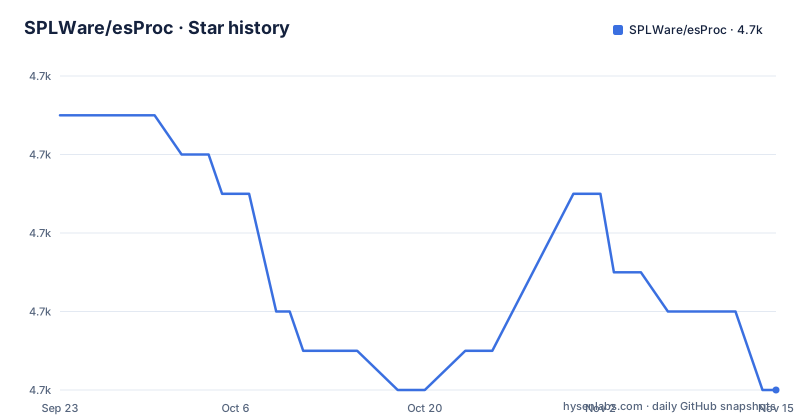
- SPLWare/esProc4,676 ★ · -7
| Repository | 2026-09-23 | 2026-11-15 |
|---|---|---|
| SPLWare/esProc | 4.7k | 4.7k |
-7 Stars in the last 53 days, measured from the daily GitHub snapshot. Compare with other projects
Editorial analysis
Scripts are grids, so a step is a cell you can read
The defining difference from a text language is the shape of the source. SPL code is written in a grid like Excel, and each cell shows its own execution result as it runs, which is why a beginner can follow a script without already understanding control flow. The language itself carries the usual features: branching, looping and recursion are all there, so the grid layout is a presentation choice rather than a restricted model. Practical consequence for a team: reading and reviewing an SPL script looks like reading a spreadsheet, with intermediate values visible in place, so debugging does not mean adding print statements and re-running to find which line went wrong.
Set operations carry the weight that libraries carry elsewhere
The claim behind the grid is discreteness: structured data tables are manipulated with set operations rather than row-by-row loops, which is what keeps scripts short. The project illustrates the point with the eight queens puzzle, solved in a few lines. The argument is positioned against SQL directly. SPL stands for Structured Process Language and targets structured data computation as its main goal; the stated position is that SQL carries enough limitations that a full computational task often needs outside help such as Python, and that SPL folds the shared advantages of SQL and Java together so the equivalent of SQL plus Python stays inside one language. Whether that holds for your workload depends on which set operations you actually need.
Distribution is a ZIP file, not a package
Open source users get no automatic installation package. What is offered is a ZIP file, and the actual steps live in a separate instruction page rather than in the repository. Other editions are the opposite case: installation packages are downloaded from the vendor site and the process is described as straightforward with no further instructions. So there are two distribution paths with different costs. The open source one costs you a manual unpack and a separate setup article; the other editions cost you a download from the vendor. The repository publishes no releases at all, so the last recorded push on 2026-11-02 is the only freshness signal a reader has.
Eclipse users add the ide module by hand
Source code distribution is a second manual step. Eclipse developers download the source and are told that the `com.scudata.ide` module lives in the `ide` directory and that its folder has to be added under Source folders in the IDE configuration. The repository's top level includes `bin/`, `classes/`, `config/`, `database/`, `doc/`, `ide/`, `importlibs/`, `jdbc/`, `lib/` and `src/`. A Maven `pom.xml` sits at the root next to `CONTRIBUTING.md`, `LICENSE` and `NOTICE`.
Java embedding is the reason to look at it
esProc is written in Java, which is what makes it usable inside an existing Java application rather than beside one. The intended shape is an embedded computing engine for report queries: script logic runs inside the host process instead of a separate analytics server. On data access, the stated scope covers relational databases, NoSQL sources and other kinds, and the design goal is lightweight hybrid computation across those sources without standing up a full logical data warehouse. The trade is explicit in the positioning: you get a library you can call from application code and lighterweight multi-source computation, and in exchange you accept a language whose syntax differs from both SQL and the rest of your Java codebase.
Samples ship in two languages, and the docs live off the repository
The example tree is bilingual, with `demo/en/` and `demo/zh/` directories. The learning material the README points to is off the repository. Syntax is taught by a book, `SPL Programming`, which is pitched at readers with no programming experience and points veterans at section 4.4 on object understanding. Concepts, beginner operations, database connections, reads and writes, structured text file access, calling a script from Java and the architectural question and answer page all live on a blog.
Performance advice starts with storage, not with syntax
The project's own guidance on speed is not a benchmark table. It is a sequence: high performance computation is described as relatively difficult, and a separate book on algorithms is offered for that part, with the explicit claim that those algorithms are not unique to SPL and can be implemented in another language once learned. The stated key is the algorithm rather than the syntax. Storage is called the cornerstone of high performance computing, and a post on the proprietary storage schema used in SPL is recommended for beginners, with the remark that designing an appropriate storage schema is usually the first optimization step. Consequence for a reader: expect to learn a storage model, not just a query language.
No releases, no tags to follow, and one essay doing the arguing
Be clear about what this repository is and is not. It is a Java codebase with a grid language, a bilingual demo set, a Maven build and an Apache 2.0 license. It is not a package on a public index, it publishes no GitHub releases, and the case for the language is argued in blog posts and one essay on grouping operations rather than in tests or benchmarks you can run from a clone. If a decision hinges on proof rather than on language design, the evidence you need is not here, and the vendor site and the community channels are where you would have to look.
Editorial conclusion
esProc SPL fits teams that already write Java and want one language for structured data work across relational and NoSQL sources without bolting on a second runtime. It does not suit a team that wants a package manager entry or a documented release cadence. Before committing, unpack the ZIP and confirm the grid syntax fits the way your team reasons about sets, and read the performance book plus the storage schema post, because the project points at those as the real path to speed rather than any built-in accelerator.
Frequently asked questions
How do I install esProc SPL from the open source repository?
There is no automatic installation package for open source users. You download a ZIP file and follow the separate instruction page linked from the README, while other editions are installed from packages on the vendor download page with no extra steps.
What makes esProc SPL different from SQL for structured data work?
SPL scripts are written as grids of cells like Excel, and the language leans on set operations over structured data tables. The stated goal is to cover the equivalent of SQL plus Python in one JVM language, with branching, looping and recursion available.
Can esProc be embedded in an existing Java application?
Yes. esProc is developed entirely in Java and is positioned as an embedded computing engine for report queries and other application systems, aimed at lightweight hybrid computation across relational and NoSQL sources rather than a full logical data warehouse.
Where do I set up the esProc source code in Eclipse?
Download the source code, then note that the com.scudata.ide module is located in the ide directory and its corresponding folder has to be added under Source folders in the Eclipse configuration.
Official sources
Add this badge to your README
If you maintain this project, the badge below links readers to this analysis and shows its maintenance status from the daily GitHub snapshot. Paste the markdown into your README; add ?metric=license or ?metric=stars to the image URL for a different field.

[](https://hysenlabs.com/projects/splware-esproc)Star history chart for your README
[](https://hysenlabs.com/projects/splware-esproc)Was this useful?