spring-ai-alibaba examples: twenty-five modules, six run commands, seven API keys
Examples demonstrating usage of Spring AI & Spring AI Alibaba 📜
At a glance
- What is it?
- An examples repository for two Spring AI distributions whose quickstart table documents six of its twenty-five module directories, loses variable names exactly where the required services get harder, names two different environment variables for the same vendor's API, admits that some modules ship no env template, and keeps every real build target in four makefiles included from a root file that defines none.
- Who is it for?
- Treat this repository as a menu rather than a tutorial. It is valuable precisely because it is broad, with modules for chat, images, audio, video, retrieval, graphs, tool calling, agents, evaluation, observability and structured output, and the quickstart table gives the same one-line maven command shape for the six modules it lists.
- Can I use it commercially?
- Yes. Apache-2.0 is a permissive licence: you can use, modify and sell software built on it, as long as you keep its copyright and licence notices.
- Is it still maintained?
- Yes. The repository last received commits 136 days ago.
- What is it written in?
- Mainly Java, according to GitHub's language statistics.
Answers come from the project's GitHub data, last synced on November 14, 2026, and from our analysis. They are not legal advice.
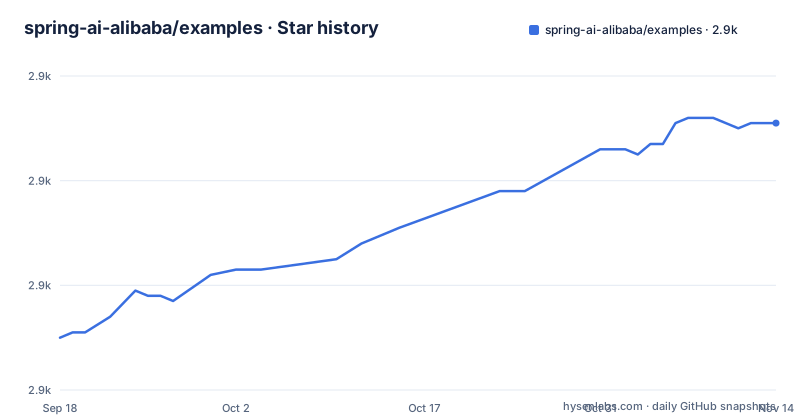
Star history
- spring-ai-alibaba/examples2,931 ★ · +41
| Repository | 2026-09-18 | 2026-11-14 |
|---|---|---|
| spring-ai-alibaba/examples | 2.9k | 2.9k |
41 Stars in the last 57 days, measured from the daily GitHub snapshot. Compare with other projects
Editorial analysis
Twenty-five module directories and six documented commands
The root of the repository holds twenty-five directories named after individual examples, spanning chat, images, audio, video, retrieval, graphs, tool calling, agents, evaluation, observability, prompt management, memory, natural language to SQL, structured output, sandboxing and platform playgrounds. Two of them break the naming pattern the rest follow: the hello world and the playground directories carry no example suffix. The quickstart table at the top of the readme documents six of the twenty-five. For those six the run command has one shape.
mvn -pl spring-ai-alibaba-helloworld spring-boot:runThe table is an index of what exists, not the full set of instructions. The other nineteen directories have no entry in it, and a reader has to find their own readme to learn how to start them.
The table loses precision where the services get harder
Read the environment column down the six rows and the pattern is clear. The first three, for basic chat, provider chat and image generation, name one exact variable, required services listed as none, and an env template column holding a dash. The last three, for the protocol demo, retrieval and tool calling, replace the variable name with prose: model api key, then model api key plus an embedding model, then model api key plus a map api key. Their service column grows at the same time, from none to an optional local tool, to a vector database that is optional depending on profile. So the entries that need the most setup are the ones that tell you least about what to set. All six do link a per-module readme, which is where the actual variable names are supposed to come from.
Seven keys and two conventions for naming them
A second table is a cheat sheet of the configuration keys used across the whole repository, and it is the most useful page content here. Seven variables are listed, each mapped to the modules that read it. One key covers the hello world, the provider chat and image examples, tool calling, evaluation and a long list of graph and retrieval examples, and is described as the most common key for compatible models. The rest are per-vendor: one for the OpenAI-compatible chat modules including a self-hosted variant, one for image generation on the same vendor, one for a DeepSeek module and a memory module, and one each for two other chat providers. The naming is inconsistent in two directions. Three keys carry an AI prefix and four do not, and the OpenAI-compatible chat and OpenAI image examples read two different variable names for the same vendor.
Some modules ship no env template and the fix is to read the config
The troubleshooting section is four items long and each is bilingual in its heading, which tells you the readme is written for two audiences. Two items are mechanical: confirm the key has taken effect in the current shell or editor and restart, and, for a port conflict, look up the port in that module's application configuration and change it. The third names the modules that need something running first, listing retrieval, the protocol demo, vector store work and anything Docker related as needing middleware or a container started in advance. The fourth is the honest one. Some modules have no env template yet, and the instruction is to consult the module readme and the application configuration under the module's main resources directory to confirm the real variable names and required services. That file is the authority in this repository, not the table above it.
The root Makefile defines nothing on purpose
The makefile at the repository root is short, a licence header followed by about ten lines, and contains no build target. It defines one private recipe that re-invokes make with warnings enabled for undefined variables, passing four makefiles from a tools directory, and then forwards whatever goals the caller asked for. A conditional pattern rule at the end makes any target the user types route through that recipe. So every real command lives in one of the four included fragments, and reading the root file tells you nothing about what you can run. The readme does not use any of it, since every documented start command is a plain maven invocation with a module flag. The makefile also carries its own Apache licence header and a copyright range covering two years, which agrees with both the licence file at the root and the value in the repository metadata.
The primary readme is Chinese and English is a second file
The top line of the documentation is a language switch, and the file you land on is the Chinese one, with English in a separate readme beside it. That ordering is worth knowing before you conclude a page is empty, because the section headings in the Chinese file are themselves a mix of Chinese and English, which makes the document look machine-translated in either direction. The header also points at three places outside this repository: the main project repository under one organisation name, the project website, and the website's own repository under a different organisation name. The two spellings of the organisation are not a typo in this readme; they are what the two repositories use, and they are not the same string.
One Python module among the Java ones, and no releases at all
One of the twenty-five directories is not a Java module: an agent example written in Python sits alongside the rest, which suggests the protocol it demonstrates is the point rather than the language. A docker-compose directory sits at the root, and an agent instruction file and configuration directory are committed alongside a conduct document and a contribution document. That contribution file is named without the ing that contributors look for, which is the kind of thing that hides a guide from a tool searching for it. The repository is not archived and its last commit is dated 2026-07-01, but it has no GitHub releases, so there is no version to point an example at.
Editorial conclusion
Treat this repository as a menu rather than a tutorial. It is valuable precisely because it is broad, with modules for chat, images, audio, video, retrieval, graphs, tool calling, agents, evaluation, observability and structured output, and the quickstart table gives the same one-line maven command shape for the six modules it lists. Pick a module, then read that module's own readme and its application configuration, because the root table is a starting index and not a specification. Expect to set a key by hand, since two naming conventions are in use and some modules ship no env template yet. Start the vector store or container yourself for retrieval and MCP modules. And use maven directly rather than make, since the root makefile delegates every target to fragments you would have to go and find.
Frequently asked questions
How do I run a spring-ai-alibaba example?
From the repository root, use maven with a module flag, in the form mvn -pl <module> spring-boot:run. The quickstart table gives the exact module path for six modules. Each module also has its own readme with the details.
Which API key does the spring-ai-alibaba hello world example need?
One key, named in the table as the most common key for compatible models. The same variable is used by the hello world module, the provider chat and image examples, tool calling, evaluation, and many of the graph and retrieval examples.
Why does a spring-ai-alibaba example fail with a missing key or a port conflict?
For a missing key, confirm the variable has taken effect in the current shell or editor and then restart the example. For a port conflict, check the port setting in that module's application configuration and free or change it before retrying.
Does every spring-ai-alibaba example ship an env template?
No. Only three of the six modules in the quickstart table link an env template file, and the troubleshooting notes state that some modules do not have one yet, directing you instead to the module readme and to the application configuration under its main resources directory for the real variable names.
Which spring-ai-alibaba examples need local services running?
The retrieval example is marked as needing a vector database, optional depending on profile, and the protocol demo as needing a local tool or nothing. The troubleshooting notes add that retrieval, protocol, vector store and Docker related examples usually need the corresponding middleware or container started first, and a compose directory sits at the repository root.
Official sources
Add this badge to your README
If you maintain this project, the badge below links readers to this analysis and shows its maintenance status from the daily GitHub snapshot. Paste the markdown into your README; add ?metric=license or ?metric=stars to the image URL for a different field.

[](https://hysenlabs.com/projects/spring-ai-alibaba-examples)Star history chart for your README
[](https://hysenlabs.com/projects/spring-ai-alibaba-examples)Was this useful?