sqldef: schema migrations written as the schema you want
Idempotent schema management for MySQL, PostgreSQL, SQLite, and SQL Server
At a glance
- What is it?
- One SQL file per database, four commands for MySQL, PostgreSQL, SQLite and SQL Server, and a diff engine that turns an edit into DDL. The interesting parts are the rename annotation and offline mode.
- Who is it for?
- sqldef is a good fit for teams that already think in SQL and are tired of a migration framework with its own DSL, since the desired state is the same file your database already exports and there is nothing new to learn. It is a weaker fit when your migrations need data backfills with logic, or when a rename happens without you noticing it in the diff, since inference mistakes are exactly the class of problem declarative tools create.
- Can I use it commercially?
- Check first. The repository uses a licence we do not classify automatically, so read its LICENSE file before any commercial use.
- Is it still maintained?
- Yes. The repository last received commits 1 day ago.
- What is it written in?
- Mainly Go, according to GitHub's language statistics.
Answers come from the project's GitHub data, last synced on November 7, 2026, and from our analysis. They are not legal advice.
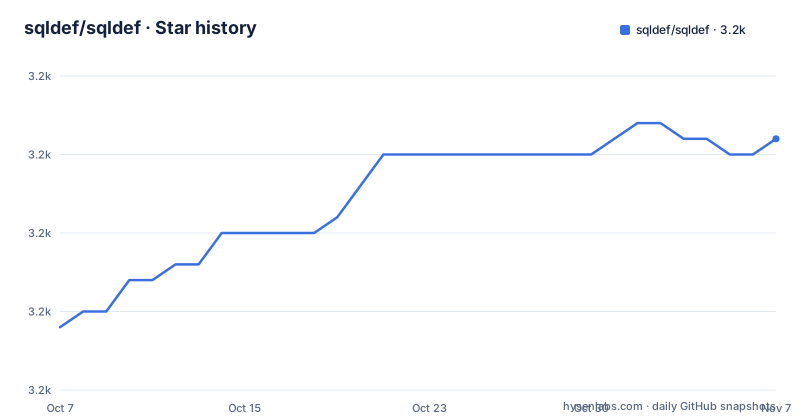
Star history
- sqldef/sqldef3,186 ★ · +12
| Repository | 2026-10-07 | 2026-11-07 |
|---|---|---|
| sqldef/sqldef | 3.2k | 3.2k |
12 Stars in the last 31 days, measured from the daily GitHub snapshot. Compare with other projects
Editorial analysis
The model: one SQL file, four commands
The README's opening claim is that sqldef is the easiest idempotent schema management tool for MySQL, PostgreSQL, SQLite3 and SQL Server that uses plain SQL DDL. Define the desired schema in SQL and the tool generates and applies migrations to reach it.
The mental model is worth restating because it is the whole design. You maintain a single SQL file with your complete schema. To add a column, change a constraint or create an index, you edit that file. sqldef compares desired against current and generates the DDL, so the database converges on the desired state from whatever starting point it happens to be in.
There is one binary per database, and they share a name pattern: `mysqldef` for MySQL, MariaDB and TiDB, `psqldef` for PostgreSQL, `sqlite3def` for SQLite3, and `mssqldef` for SQL Server. Each mimics the connection options of its native client, so the connection string you already use keeps working. The README says the tool ships as a single binary with no dependencies and that operations are idempotent, meaning you can run them repeatedly.
The project is explicitly inspired by Ridgepole, which takes the same declarative approach through a Ruby DSL. The difference sqldef sells is that you use plain SQL, so the only thing you need to remember is SQL.
Four steps, identical across every database
The basic workflow does not change between databases, which is the feature that makes the tool learnable in one sitting.
$sqldef [connection-options] --export > schema.sqlStep one exports the current schema so you have a starting point. Step two is you editing `schema.sql`, adding a column, dropping one, adding an index.
Step three is the part you should never skip, and it is the reason to adopt a declarative tool at all:
$sqldef [connection-options] --dry-run < schema.sqlThat prints the migrations without executing them. An added column comes back as an `ALTER TABLE users ADD COLUMN age INTEGER`. You get to read the DDL before it runs.
Step four applies:
$sqldef [connection-options] --apply < schema.sqlRun it a second time and it reports no changes needed. That is the idempotency claim made concrete, and it is what lets you put `--apply` in a deploy script without tracking which migrations have already run.
The rename annotation solves the hardest declarative problem
Any declarative schema tool has the same weak spot: if you rename a table in the schema file, how does the tool know it is a rename rather than a drop and a create? Dropping and recreating loses your data, and sqldef handles this with a SQL comment annotation.
CREATE TABLE users ( -- @renamed from=user_accounts
  id INTEGER PRIMARY KEY,
  username TEXT,
  age INTEGER
);
That produces a rename rather than a drop and recreate:
ALTER TABLE user_accounts RENAME TO users;The annotation works for columns, indexes and ENUM values as well as tables, which covers most of the cases where a naive diff would destroy data.
The honest caveat is that this is opt-in. Nothing detects a rename on its own; you have to write the annotation. If you rename a column in the file and forget the comment, the diff proposes dropping the old column and adding a new one, and on a large table that is a slow, destructive migration. That is the deal with declarative tooling: safer defaults, at the cost of you having to annotate intent.
Offline mode is the feature CI actually wants
sqldef can compare two SQL files without connecting to a database at all. You pass a `.sql` file as the database argument:
# Compare current.sql with desired.sql
$sqldef current.sql < desired.sql
The README names three uses for it: CI/CD pipelines, schema validation, and generating migration scripts. That third one is the interesting one for a team that wants reviewed migration files checked into version control without letting a tool write to a production database during a deploy.
So there are two distinct workflows here, and they are not interchangeable. Database mode talks to a live server and applies changes. Offline mode is pure file comparison. The example scripts show both, with `./example/run.sh` for database mode and `./example/run-offline.sh` for offline, each taking a tool name as its argument.
This also makes sqldef usable in a language or framework you are not writing. Because the contract is a SQL file on stdin, you can drive it from a shell script, a Makefile, or a CI job without any SDK.
Installing: binaries, Docker, Homebrew, no Debian packages
Pre-built single-binary executables are published on the releases page, and Docker images are on Docker Hub. On Linux the README is explicit about a gap: Debian packages are not currently available, so you use the pre-built binaries or the images instead.
# psqldef
wget -O - https://github.com/sqldef/sqldef/releases/latest/download/psqldef_linux_amd64.tar.gz \
  | tar xvz
Each tool has its own archive name, so you download the one matching your database rather than a single bundle.
On macOS there is a Homebrew tap with a separate formula per tool, for example `brew install sqldef/sqldef/psqldef`. That is the path most people on a Mac will take.
There is also a separate GitHub Action, `sqldef-preview-action`, whose purpose is to preview schema changes rather than apply them. For a team that wants migrations reviewed in pull requests, that is a more useful entry point than installing anything locally.
One inconsistency to note: the repository reports no license, which means none was detected, while a `LICENSE` file sits in the repository root. Both statements are true and neither settles the other, so read that file yourself before assuming terms.
Four databases, one parser, and a lot of grammar edge cases
The dependency list in `go.mod` explains the architecture. Each database driver is a separate library, but the PostgreSQL side is unusual: it pulls in both `pganalyze/pg_query_go` and `wasilibs/go-pgquery`, which are the compiled PostgreSQL parser exposed to Go. That means psqldef parses SQL with PostgreSQL's own grammar rather than an approximation of it.
SQLite is handled by `modernc.org/sqlite`, a pure Go implementation, which is what lets `sqlite3def` build with `CGO_ENABLED=0`. MariaDB and TiDB share the MySQL binary, as the README lists.
The release history shows where the real difficulty is, and it is not the diffing, it is the SQL grammar. Recent versions include allowing `STRICT`, `WITHOUT` and `PRAGMA` as identifiers, treating MySQL-only `UNUSED` keywords as identifiers, accepting an unquoted `key` as a column reference, parsing `ALTER TABLE ONLY UNIQUE` constraints, making `IS NOT DISTINCT FROM` idempotent in CHECK constraints, fixing TRIM expression normalisation in CHECK constraints, emitting the operator class before `ASC`/`DESC` on index columns, stopping quote-aware mode from losing index clauses, and adding bracket-quoted identifiers for `sqlite3def`.
That list is a fair summary of what working on a cross-database migration tool involves. If you are evaluating this, read three or four of those release notes rather than the README, because they tell you what actually breaks.
The module path is `github.com/sqldef/sqldef/v3` while the release tags are patch-versioned at `3.11.x`, and the most recent release is v3.11.23 from 2026-09-17 with the last push on 2026-09-23.
Editorial conclusion
sqldef is a good fit for teams that already think in SQL and are tired of a migration framework with its own DSL, since the desired state is the same file your database already exports and there is nothing new to learn. It is a weaker fit when your migrations need data backfills with logic, or when a rename happens without you noticing it in the diff, since inference mistakes are exactly the class of problem declarative tools create. Note the licensing ambiguity before you build on it: the repository reports no license while a `LICENSE` file sits at the root. Start by exporting a schema with `--export`, editing one column, and reading the `--dry-run` output before you let `--apply` touch a database.
Frequently asked questions
What is sqldef?
It is an idempotent schema management tool for MySQL, PostgreSQL, SQLite3 and SQL Server that takes plain SQL DDL rather than a DSL. You keep one SQL file describing the complete schema, and sqldef diffs it against the live database and generates the DDL needed to converge.
How do I rename a column or table in sqldef without losing data?
Add the `-- @renamed from=old_name` annotation as a SQL comment on the definition, for example `CREATE TABLE users ( -- @renamed from=user_accounts`. sqldef then generates an `ALTER TABLE ... RENAME TO ...` instead of a drop and create. The annotation also works for columns, indexes and ENUM values.
Can sqldef work without a database connection?
Yes, in offline mode. Pass a `.sql` file as the database argument, as in `sqldef current.sql < desired.sql`, and it compares the two files instead of querying a server. The README points at CI pipelines, schema validation and generating migration scripts as the uses for it.
How do I install sqldef, and is there a Debian package?
Pre-built binaries are on the releases page and Docker images are on Docker Hub, but the README states that Debian packages are not currently available, so on Linux you use one of those two. On macOS a Homebrew tap provides a formula per tool, such as `brew install sqldef/sqldef/psqldef`.
Official sources
Add this badge to your README
If you maintain this project, the badge below links readers to this analysis and shows its maintenance status from the daily GitHub snapshot. Paste the markdown into your README; add ?metric=license or ?metric=stars to the image URL for a different field.

[](https://hysenlabs.com/projects/sqldef-sqldef)Star history chart for your README
[](https://hysenlabs.com/projects/sqldef-sqldef)Was this useful?