SQLFlow turns SQL scripts into a column-level lineage graph
Document, sample code and other materials for SQLFlow
At a glance
- What is it?
- SQLFlow is a data lineage tool that parses SQL from more than 20 database vendors and produces a column-level graph you can explore in a diagram or pull through REST APIs and SDKs. The public repository holds the documentation and sample code, and the last push was on 2026-08-11.
- Who is it for?
- SQLFlow suits a data team that needs to know where a column's value came from, whether for an audit, a migration or a debugging session, and it is the wrong tool if you need only table-level lineage or a lightweight open source parser, because the on-premise edition is a commercial product rather than a library. Before evaluating it, read the terms file and the privacy policy, since the licence is a custom one and the hosted service has its own conditions.
- Can I use it commercially?
- Check first. The repository uses a licence we do not classify automatically, so read its LICENSE file before any commercial use.
- Is it still maintained?
- Yes. The repository last received commits 90 days ago.
- What is it written in?
- Mainly Python, according to GitHub's language statistics.
Answers come from the project's GitHub data, last synced on November 8, 2026, and from our analysis. They are not legal advice.
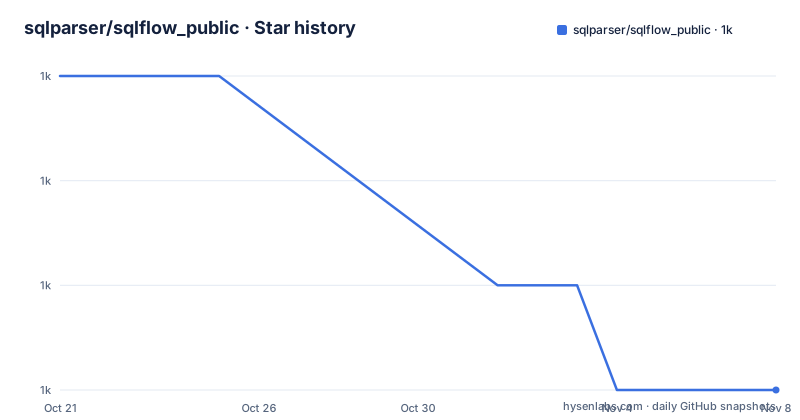
Star history
- sqlparser/sqlflow_public1,039 ★ · -3
| Repository | 2026-10-21 | 2026-11-08 |
|---|---|---|
| sqlparser/sqlflow_public | 1k | 1k |
-3 Stars in the last 18 days, measured from the daily GitHub snapshot. Compare with other projects
Editorial analysis
Column level, not table level
SQLFlow is a tool that tracks column-level data lineage for more than 20 major databases, including Snowflake, Hive, SparkSQL, Teradata, Oracle, SQL Server, AWS Redshift and BigQuery.
The granularity is the whole point, and it is worth being clear about the difference. Table-level lineage tells you that a query reads from one table and writes to another, which is a graph you can usually draw by hand once you know the pipelines. Column-level lineage shows that `emp.postal_code` comes from `emp_addr.postal_code`, while `emp.ph` comes from `emp_ph.ph`; the query joins the source tables on `id`.
The example in the README shows what that looks like:
insert into emp (id,first_name,last_name,city,postal_code,ph)
  select a.id,a.first_name,a.last_name,a.city,a.postal_code,b.ph
  from emp_addr a
  inner join emp_ph b on a.id = b.id;
From that statement, the tool derives that the ph column in the target comes from the ph column of emp_ph, and that the other five come from emp_addr, with the join condition recorded as part of the relationship. The README describes the output as a graph that tells you where the data came from, what transformations it underwent along the way, and what other data items are derived from this data value.
That derivation is the hard part, and it is what a lineage tool is for. Deciding that a.select column maps to a target column requires understanding the projection list, the aliases, the join structure and, in a view definition several layers deep, the nesting. Doing that by reading SQL across a warehouse with hundreds of views is not a job anyone finishes.
The description in the repository header is short, document, sample code and other materials for SQLFlow, so what is in the repository is the documentation and examples around a product rather than the parser itself.
Four ways to get the SQL in front of it
The README lists the sources it can read from, and the range matters more than it might look.
You can scan your database and discover the data lineage instantly. You can automatically collect SQL scripts from GitHub or Bitbucket, or from the local file system. You can paste SQL script from query history. And you can read from remote databases directly.
Those four are different problems with different failure modes. A live scan of a warehouse gives you the queries that ran, which is accurate for what happened and expensive to collect. A repository scan gives you the SQL your team believes they run, which is often not the same thing, since anything ad hoc is missing. The query history route sits between them.
The build and visualize phrasing covers the two halves of the workflow: build the lineage, then visualize it. The exploration is an interactive diagram, reachable either on the hosted site at sqlflow.gudusoft.com or through the REST APIs, and there is also a set of SDKs linked from the README, with the Java library called out on the vendor's site.
The output formats are also specified, because that is what decides whether the lineage can be consumed by another tool. You can get lineage in CSV, JSON and Graphml. GraphML is the interesting one, since it is an XML format for graph structures with a standard schema, which means a lineage graph can be opened in a graph tool or fed to a graph database rather than living only in a picture.
And there is a path for the other direction of integration: incorporate the lineage metadata decoded from the complex SQL script into your own metadata database for further processing. So the lineage is not locked inside the product, it can be pushed into a catalogue you already run.
Impact analysis and root cause analysis are the queries you actually want
The feature list describes what a lineage graph lets you do that a schema diagram does not.
Perform impact analysis and root-cause analysis by tracing lineage backwards or forwards with several mouse click. That is the operational payoff. Impact analysis answers, if I change this column or drop this table, what breaks downstream. Root cause analysis answers, this number in the report is wrong, where did the wrong value enter. Both are graph traversals, and they are the reason a column-level graph is worth building when a table-level one is not.
Visualize the metadata already existing in your database to release the power of data is a slightly different claim. It is about a database that already has metadata in it, tables, columns, comments, and about using the lineage view to make sense of what is there rather than only to document transformations.
Provide a nice clean diagram to the end-user to understand the data lineage quickly is worth pausing on, because it identifies the audience. The diagram is aimed at an end-user, not only at the engineers who wrote the SQL. That is a design constraint with real consequences, because the same graph has to be readable by someone who does not know what a foreign key is, and an engineer debugging a pipeline wants a different view of the same data.
The repository has a sqlflow_guide.md and a sqlflow_guide_cn.md, so the user guide is bilingual, and there is a sqlflow_faq.md alongside it. The architecture is documented in sqlflow_architecture.md with a diagram, and sqlflow_components.md with its own, which is the kind of documentation you find when a project has more than one deployment shape to explain.
The repository is documentation, docs tooling and client samples
The top level of the repository shows what kind of project this is, and it is not a Python library.
The files at the root are the documentation set, and they are numerous. There is sqlflow_architecture.md, sqlflow_components.md, sqlflow_guide.md, sqlflow_guide_cn.md, sqlflow_faq.md, sqlflow_introduce.md, sqlflow_privacy-policy.md, sqlflow_terms.md, sqlflow-team-system.md, sqlflow-userid-secret.md, sqlflow-search-table-column.md, and use_sqlflow_in_your_flavor_ways.md. There is also data-lineage-xml-elements.md, dbobjects_relationship.md and a v1 of that file, and json_output_objects_coordinate.md.
The last two are worth noting for what they reveal. A file about the XML elements of the lineage data and a file about the coordinates of objects in the JSON output describe the actual wire format of the product, which means an integration against it is a real engineering task rather than a call to a black box.
Then the directories. There is api/ with the API document and a C# client under api/client/csharp, databases/ with the per-vendor readme the README links to, demos/, doc/, integration/, grabit/, gudu_sql_omni/, linux/, mac/, platforms/, site-docs/, widget/, and windows/ for the platform builds. There is an install_sqlflow.md for the on-premise edition, with separate install_sqlflow_on_mac.md and install_sqlflow_on_windows.md.
The requirements.txt is the giveaway about the primary language. It pins mkdocs 1.5.3, mkdocs-material 9.4.8, pymdown-extensions 10.3.1 and pygments 2.16.1, and nothing else. So the Python in this repository is there to build the documentation site, and the repository's actual product is the documentation, the sample client and the platform packages.
The hosted service and the on-premise edition are different products
The how to use section names three ways in, and the distinction between them is the commercial shape of the project.
Open the official website of the SQLFlow and paste your SQL script or metadata to get a nice clean lineage diagram. Call the RESTful API of the SQLFlow in your own code to get data lineage metadata decoded by the SQLFlow from the SQL script. And the on-premise version of SQLflow enables you to use it on your own server to keep the data safer.
The first is a hosted service where you paste SQL into a web page. The second is a hosted API. The third is a self-hosted deployment, and the reason the README gives for it, to keep the data safer, tells you that the hosted path involves your SQL going to someone else's server.
That is a meaningful consideration for a lineage tool, because the SQL you would paste is often production SQL containing table names, column names and literals that describe your business. Some of that is sensitive in a way that the tool's output, a graph of column names, is less so. The self-hosted option exists precisely for that reason, and the fact that there are separate install documents for Linux, macOS and Windows tells you it is a real deployment rather than a container image.
The legal side is documented in the repository rather than only on the website. There is sqlflow_terms.md, sqlflow_privacy-policy.md and sqlflow-userid-secret.md, and the licence file at the top of the tree is one GitHub cannot classify, which is consistent with a commercial product whose source is public in this limited form.
The release history is also narrower than the product. The listed releases are sqlflow-ingester versions, 1.3.2 in May 2024, 1.3.3 in December 2024 and 1.3.5 in April 2025, so a component named the ingester is versioned separately, and the main product's own version is not what the tags track. The last push was on 2026-08-11.
Where SQLFlow is the wrong choice
The first limit is that this is not an open source parser you can vendor. The repository is documentation, sample code and platform packages, the licence is custom, and the parsing engine is the product. If you want a column-level lineage library to embed in your own tooling with no vendor relationship, this is the wrong shape of answer.
The second is the cost of getting the SQL in. Lineage quality depends entirely on how complete your source of SQL is. A repository scan sees committed scripts, a query history scan sees what ran, and a live scan of a warehouse may be expensive. Any of the three leaves gaps, and a lineage graph with gaps is worse than no graph, because people trust the arrows that are present. A team with several hundred ad hoc queries and no script management is not going to get a complete picture from any of the sources listed.
The third is that column-level lineage is genuinely hard, and the tool's output reflects the difficulty. The example in the README is a simple insert with a join. Real pipelines have views on views, CTEs, window functions, subqueries, and dialect specific functions, and a lineage graph over that is only as good as the parser's dialect coverage. The databases directory lists more than 20 vendors, which is impressive breadth, but the README does not say how deep the per-dialect support goes for the constructs that make lineage hard.
The fourth is the trust question for a hosted service. You are sending production SQL to a third party to get a graph back. The self-hosted edition removes that, at the cost of running the product yourself, and the README does not describe the resource requirements, so the operational cost of the private deployment is something you would have to establish yourself.
The fifth is scope. SQLFlow does lineage. It is not a data catalogue, not a quality checker, not a scheduler and not a governance tool with access control and lineage policies. It is the graph that answers where did this value come from, which is genuinely valuable and genuinely narrow.
Editorial conclusion
SQLFlow suits a data team that needs to know where a column's value came from, whether for an audit, a migration or a debugging session, and it is the wrong tool if you need only table-level lineage or a lightweight open source parser, because the on-premise edition is a commercial product rather than a library. Before evaluating it, read the terms file and the privacy policy, since the licence is a custom one and the hosted service has its own conditions. Verify first that the database vendor and dialect you care about appear in the databases list, and that the ingestion path you need, a script, a query history or a live scan, is one the tool actually supports.
Frequently asked questions
What is SQLFlow?
It is a tool that tracks column-level data lineage for more than 20 major databases including Snowflake, Hive, SparkSQL, Teradata, Oracle, SQL Server, AWS Redshift and BigQuery. It builds and visualizes lineage from SQL scripts, query history, ETL scripts, GitHub or Bitbucket, the local file system and remote databases.
How do I use SQLFlow?
You can paste SQL into the official website to get a lineage diagram, call the RESTful API from your own code to get decoded lineage metadata, or run the on-premise version on your own server to keep the data safer, with install documents for Linux, macOS and Windows in the repository.
What output formats does SQLFlow support?
You can get lineage programmatically in CSV, JSON and Graphml format through the REST APIs or the SDKs, and the repository documents the XML elements of the lineage data and the coordinates of objects in the JSON output.
What is in the sqlflow_public repository?
It holds the documentation, sample code and other materials for SQLFlow rather than the product itself. The top level contains the architecture, guide, FAQ, terms and privacy documents, an api/ directory with the API document and a C# client, a databases/ directory of per-vendor notes, install documents for the on-premise edition and per-platform directories.
Does SQLFlow support table-level lineage only?
It is column-level, tracing which source column produced which target column through a join, which is what allows impact analysis and root-cause analysis to be done by tracing the graph backwards or forwards. It can also incorporate the decoded lineage metadata into your own metadata database.
Official sources
Add this badge to your README
If you maintain this project, the badge below links readers to this analysis and shows its maintenance status from the daily GitHub snapshot. Paste the markdown into your README; add ?metric=license or ?metric=stars to the image URL for a different field.

[](https://hysenlabs.com/projects/sqlparser-sqlflow-public)Star history chart for your README
[](https://hysenlabs.com/projects/sqlparser-sqlflow-public)Was this useful?