sshuttle: a transparent proxy that needs nothing installed on the remote network
Transparent proxy server that works as a poor man's VPN. Forwards over ssh. Doesn't require admin. Works with Linux and MacOS. Supports DNS tunneling.
At a glance
- What is it?
- sshuttle carries a whole remote network over one ordinary ssh login, which is why it needs no admin rights and no VPN server on the far side. It is a Python tool with a hard 3.10 floor, a single Windows-only runtime dependency, pydivert, and a front page that never tells you how to install it.
- Who is it for?
- sshuttle fits a specific gap: a remote network you can log into over ssh but cannot reconfigure, where standing up a VPN server is not an option. Before adopting v2.0.0, confirm your interpreter is Python 3.10 or newer, take install steps from the hosted documentation rather than from any command a third party handed you, and work out how DNS is handled inside the tunnel, because the front page leaves that undefined.
- Can I use it commercially?
- Yes, with conditions. LGPL-2.1 is a weak copyleft licence: you can use it inside commercial and closed-source software, but if you distribute changes to its own files, you must publish those changes under the same licence.
- Is it still maintained?
- Yes. The repository last received commits 3 days ago.
- What is it written in?
- Mainly Python, according to GitHub's language statistics.
Answers come from the project's GitHub data, last synced on November 15, 2026, and from our analysis. They are not legal advice.
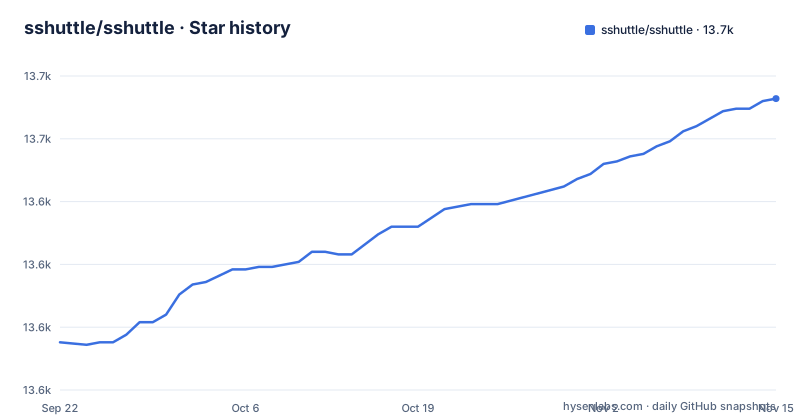
Star history
- sshuttle/sshuttle13,666 ★ · +97
| Repository | 2026-09-22 | 2026-11-15 |
|---|---|---|
| sshuttle/sshuttle | 13.6k | 13.7k |
97 Stars in the last 54 days, measured from the daily GitHub snapshot. Compare with other projects
Editorial analysis
One ssh session in place of a port forward per host
sshuttle exists because of a specific complaint about ssh. Keeping a port forward alive for every single host and port on a remote network is tedious, and the README puts the accusation plainly: openssh port forwarding is randomly slow and/or stupid. sshuttle answers by running a transparent proxy on your machine and carrying the traffic over a single ssh connection to a remote host. Nothing has to be installed over there. The remote side is explicitly allowed to be a network with no VPN at all, or one running only the protocols the README calls stupid or complex, such as IPsec and PPTP. The tool also covers the other case: you are the administrator, and you have simply lost patience with the state of VPN software.
PermitTunnel and TCP-over-TCP are the two things it refuses to build on
The project names the ssh feature it will not depend on: PermitTunnel. Two reasons are given. It is disabled by default on OpenSSH servers, so on a host you do not administer you cannot count on finding it enabled. And it does TCP-over-TCP, which the project links to a page about terrible performance. That nesting is the design constraint behind everything here, since a stream carried inside another stream repeats its own retransmissions whenever the outer layer stalls. sshuttle therefore never asks for a tunnel device and never needs a server capability switched on. What it needs instead is a plain ssh login, and the limit that follows from the design is reach: anything your remote account cannot open stays closed through the tunnel, no matter how the traffic is wrapped.
A 3.10 floor and an empty dependency list
pyproject.toml sets requires-python to <4.0,>=3.10 and declares a single runtime dependency, pydivert, only on Windows (sys_platform == 'win32'). The floor closes the door on any older interpreter, which means a machine whose system Python predates 3.10 needs a new interpreter before the tool can even be installed. The sole entry point declared is sshuttle.cmdline:main, hatchling builds the distribution, the license is LGPL-2.1, and the author of record is Brian May. One inconsistency is worth knowing: the classifiers list Python 3.10, 3.11 and 3.12, so a 3.13 interpreter satisfies the version constraint without appearing anywhere in the classifier list.
The front page has no install command, only a hosted documentation link
There is no installation command in the README to copy. The README says to see the documentation and links to the installation page for the stable version, with a separate site carrying the latest development version. The README names no package manager, pip invocation, per platform step or distro package. That matters because installing is the first thing anyone wants to do, and the answer lives on the hosted documentation site. The practical consequence is narrow but annoying: if a tutorial hands you a command for installing sshuttle, that command did not come from this project, so check it against the hosted documentation before you run it as root.
DNS tunneling is advertised, then never explained
The package description lists DNS tunneling among the supported features. The README never mentions DNS, a resolver, or what happens to name lookups once traffic is inside the tunnel, which leaves the documentation as the place to look. For anyone planning a real deployment the cost is concrete: the README does not define resolver behaviour. You cannot tell from it whether lookups inside the tunnel are answered by the remote host, by your own machine, or by a resolver you configure yourself, and that choice decides which names the remote side can resolve at all. Treat DNS as an open question to answer before rollout, not as a settled feature.
Service mode is documented by an outside article, not by the project
Running as a service gets one paragraph, and that paragraph points away from the repository. sshuttle can be run as a service and configured using a config management system, and the only example given is a Medium article written by somebody outside the project. The root directory holds no service unit, no configuration schema, no service definitions folder, and no named config management product, so nothing at the top level tells you which keys such a configuration may contain or where sshuttle would look for them. The consequence for operators is that automating a fleet of these tunnels means reconstructing the setup from a third party writeup whose age and correctness you cannot judge from here, with no in repo changelog entry to catch you if that format later moves underneath you.
A 2.0.0 tagged the same day as the last commit, and two changelogs
Version 2.0.0 was tagged on 2026-09-28, and the last push to the repository was on 2026-11-02. Before that, 1.3.2 shipped on 2025-08-10 and 1.3.1 on 2025-03-25, so roughly four and a half months separate the two point releases while about thirteen and a half months separate 1.3.2 from the major version. Two changelog files sit side by side in the root, CHANGELOG.md and CHANGES.rst, and nothing states which one is authoritative, so a reader cannot tell where the breaking changes for a major release were recorded without opening both. The test and documentation toolchains are opt in as well, since tool.uv sets default-groups to an empty list, leaving pytest, flake8, black and ruff unpulled until you ask for them.
Editorial conclusion
sshuttle fits a specific gap: a remote network you can log into over ssh but cannot reconfigure, where standing up a VPN server is not an option. Before adopting v2.0.0, confirm your interpreter is Python 3.10 or newer, take install steps from the hosted documentation rather than from any command a third party handed you, and work out how DNS is handled inside the tunnel, because the front page leaves that undefined. Skip it if you need a service deployment with configuration kept inside the repository, or if a maintained VPN client is available to you.
Frequently asked questions
What is a sshuttle used for?
It forwards a remote network over a single ssh session as a transparent proxy, with no admin access needed on that network. The project positions it as the answer to a place where you cannot install a VPN server and do not want one port forward per host.
Is sshuttle safe?
The project's own material makes no security claim either way. What it does state is that sshuttle needs no admin rights on the remote network, so the tunnel inherits exactly what the ssh account can already reach, and the repository does carry a bandit.yml for static security checks of the code.
Can I install sshuttle on Windows?
Windows is named among the client machines the project targets, and the package is classified Operating System :: OS Independent, while the description says it works with Linux and MacOS. The README marks Windows support as experimental and links to a Windows page in the hosted documentation.
how to install sshuttle on mac
There is no macOS specific command in the README. Installation is delegated to the hosted documentation for the stable version, and the only hard requirement stated in the project itself is requires-python of <4.0,>=3.10.
sshuttle vs ssh tunnel
A plain ssh tunnel forwards the individual ports you name. sshuttle carries a whole remote network as a transparent proxy over one session, and it rules out OpenSSH's PermitTunnel because that feature is disabled by default on servers and does TCP-over-TCP.
Official sources
Add this badge to your README
If you maintain this project, the badge below links readers to this analysis and shows its maintenance status from the daily GitHub snapshot. Paste the markdown into your README; add ?metric=license or ?metric=stars to the image URL for a different field.

[](https://hysenlabs.com/projects/sshuttle-sshuttle)Star history chart for your README
[](https://hysenlabs.com/projects/sshuttle-sshuttle)Was this useful?