Stellar Core: a C++20 ledger node with a Rust crate inside it
Reference implementation for the peer-to-peer agent that manages the Stellar network.
At a glance
- What is it?
- Stellar Core is a replicated state machine that keeps a local copy of a cryptographic ledger and processes transactions against it in federated consensus. The document is short and hands you to four files; the interesting detail is in the tree, where a C++ autotools build, a single-member Rust workspace, four test baseline directories and two licence files sit side by side.
- Who is it for?
- Stellar Core fits an operator who intends to run a validating node rather than a developer looking for a library, and the honest test of fit is the protocol work: the consensus implementation, the transaction metadata baselines, and the paired current and next test directories all point at a codebase where behaviour is versioned deliberately. Three things to settle before you build it.
- Can I use it commercially?
- Check first. The repository uses a licence we do not classify automatically, so read its LICENSE file before any commercial use.
- Is it still maintained?
- Yes. The repository last received commits 1 day ago.
- What is it written in?
- Mainly C++, according to GitHub's language statistics.
Answers come from the project's GitHub data, last synced on November 15, 2026, and from our analysis. They are not legal advice.
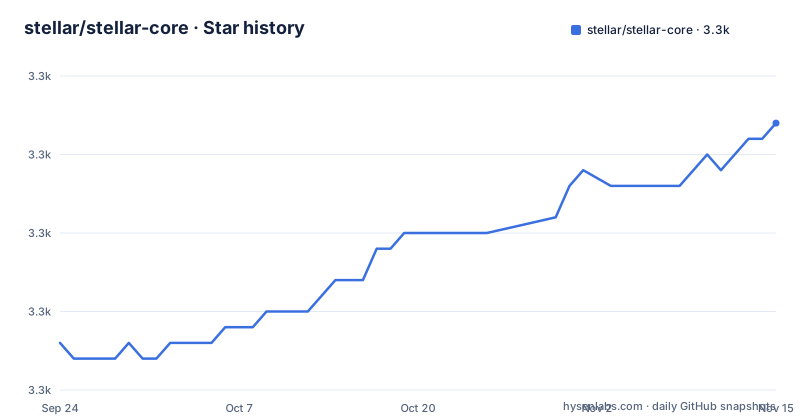
Star history
- stellar/stellar-core3,317 ★ · +14
| Repository | 2026-09-24 | 2026-11-15 |
|---|---|---|
| stellar/stellar-core | 3.3k | 3.3k |
14 Stars in the last 52 days, measured from the daily GitHub snapshot. Compare with other projects
Editorial analysis
The program is a state machine in consensus with its peers
The description is three clauses long and each one is load bearing. Stellar Core is a replicated state machine. It maintains a local copy of a cryptographic ledger. It processes transactions against that copy, in consensus with a set of peers.
The consensus protocol has its own identity and its own document. It is described as the Stellar Consensus Protocol and characterised as federated, and the pointer to it is not the general documentation but a file inside the source tree, at src/scp/README.md. Federated is the word that decides what kind of system this is: agreement is reached among a set of validators rather than by a single authority, which is also why the node needs a view of who its peers are.
Beyond that, the readme does two things: it names the language standard and the platforms, C++20 running on Linux, OSX and Windows, and it points at an overview document for learning more. Everything else a reader needs lives in ./docs, which the document describes as covering both the layout and the abstractions of the code and the functionality available.
An autotools build with a Rust workspace beside it
The build system is the older kind. At the root there is an autogen.sh, a configure.ac, a Makefile.am, a shared common.mk, an m4 directory for macros, a make-mks directory and a Builds directory for platform definitions. That is a GNU autotools project, which means the build starts by generating configure and ends with a Makefile, and it is the reason the installation instructions live in their own document rather than in the readme.
Alongside it sits a Cargo workspace. The manifest declares a single member, src/rust, and the root carries a Cargo.lock and a rust-toolchain.toml, so the Rust toolchain version is pinned rather than taken from whatever the machine has. Two shell scripts at the root install Rust and install the project, so a build has to arrange its own toolchain before it can compile anything.
So a checkout is two build systems that meet in one directory. The C++ side uses autotools and the Rust side uses Cargo, and the workspace configuration shows the Rust half is one component rather than a set of them, which is the opposite of how a polyglot repository usually looks.
The release profile carries a paragraph about debug information
The Cargo manifest has an unusually commented release profile, and the comment is the interesting part.
[profile.release]
codegen-units = 1
lto = true
debug = true
Turning on debug information in a release profile looks like a mistake until you read the note underneath it. The comment says this only produces debug info for polymorphic functions inlined from sub-crates and for functions defined in the top-level crate, and not for the Soroban sub-crates, which need debug enabled in their own manifests, or a build with make RUST_PROFILE=dev to get them built with debug info and no optimisation.
So the setting is deliberate, the author knew its limit, and the workaround is documented in the same file. The second profile is the fast one: it inherits the release profile, turns link time optimisation off, limits debug info to line tables, raises codegen units to sixteen, and unpacks the debug information. A profile that trades optimisation for build speed, with the inheritance keeping the rest of the release settings in one place.
Four test baseline directories, paired current and next
Two sets of directories at the root come in matched pairs, one for the current behaviour and one for what comes next.
There is a test directory for the light client mode in each form, test-lcm-current and test-lcm-next, and a pair of transaction metadata baselines, test-tx-meta-baseline-current and test-tx-meta-baseline-next. Four directories whose names pair a present state with a future one is not an accident of naming: it is how a protocol upgrade gets prepared, with the new expected results written next to the current ones so both can be compared.
The same pattern appears in the tooling. There is a build-fuzz.sh script and two suppression files, one for the fuzzer and one for the thread sanitizer, which means both fuzzing and sanitiser runs are part of the workflow rather than an aspiration. A performance-eval directory sits alongside them for measurement work.
Taken together, the root says something specific about how this project is validated: recorded expected outputs, sanitised runs, and a separate harness for performance. It is not a repository whose confidence rests on the unit tests alone.
Two licence files at the root and no name in the metadata
The licence situation is not stated cleanly, and the honest thing is to say so rather than pick one.
The recorded licence for the repository names nothing at all, while the tree carries two licence files at the root: a file named COPYING and a file named LICENSE-APACHE.txt. Nothing visible here says which of them governs the code, whether they cover different components, or whether one is historical. Both are in the checkout and both are small enough to read, which is the fastest way to settle it.
There is a related policy file for the Rust side. deny.toml is the configuration for a dependency licence and advisory checker, which is how a project with a Cargo workspace usually enforces what its transitive dependencies are allowed to be licensed under. That file is worth reading before adding a Rust dependency, and it is also the best available hint about which licence the project intends to operate under.
For anyone shipping this in a product, treat the two files as the source of truth and the metadata field as absent.
The newest tag is an internal build
Three releases are visible, and the highest number is not the one you would install.
The newest tag by date is v29.0.0-internal, created on 2026-10-01. The suffix is the point: it is marked as an internal build rather than a release, which in most release schemes means it exists for continuous integration and staging rather than for operators. Below it sit v28.0.1 from 2026-09-01 and v28.0.0 from 2026-08-13, so the newest ordinary release is one major version behind the highest number in the repository.
The last recorded push to master is dated 2026-10-02, one day after that internal tag. The repository is not archived, so the branch is receiving work, and the distance between the branch head and the newest ordinary release is the number to keep in mind when you decide what to run.
Nothing in the readme discusses version policy, so which of these to deploy is a decision you make from the release notes rather than from the front page.
The readme contains no commands and hands you to four files
There is not a single command line in the readme, and for a project of this size that is a deliberate choice rather than an omission.
Installation is delegated to a file called INSTALL.md, and the tree carries a second one, INSTALL-Windows.md, which is consistent with the stated support for Linux, OSX and Windows and implies the main installation document does not cover the third. Contributing is delegated to CONTRIBUTING.md, and running tests is delegated to a heading inside that same file rather than to a document of its own. Documentation is delegated twice, once to a directory and once to an overview document inside it.
Two details in the root are worth a look while you are there. There are two readme files, one named README and one named README.md, which is either a historical pair or two documents for different audiences. And there is a link to a third party wiki, which suggests the layout questions that the repository does not answer are answered there.
The practical consequence for a newcomer is that the first ten minutes are spent reading documents rather than running anything, and that is fine, as long as you know the four files to read.
What a newcomer assembles before anything runs
Put the pieces together and the path into this repository looks like this.
For understanding: the overview document in docs for the architecture, the consensus readme inside the source tree for the protocol, and the docs directory for the abstractions and the available functionality. For building: autogen and configure from the autotools files, with the Rust toolchain arranged first because the workspace member is part of the build, and a pinned toolchain file to tell you which version. For running: the scripts directory and the continuous integration build script at the root, a docker directory if you would rather not build, and a development container configuration if you want an environment handed to you.
The two things that surprise people are the Rust component inside a C++ project and the baseline directories. The first is a design decision about what should be written in which language. The second is a reminder that a ledger node's correctness is argued with recorded expected outputs, and that those outputs are versioned by protocol phase.
None of that is visible from the readme, which is the strongest argument this repository has for reading docs before running commands.
Editorial conclusion
Stellar Core fits an operator who intends to run a validating node rather than a developer looking for a library, and the honest test of fit is the protocol work: the consensus implementation, the transaction metadata baselines, and the paired current and next test directories all point at a codebase where behaviour is versioned deliberately. Three things to settle before you build it. The readme contains no commands at all, so installation comes from a separate document and there is a second one for Windows. The highest version tag available is an internal prerelease, with the newest ordinary release one major behind it. And two licence files sit at the root while the recorded licence field names nothing, so read those files before you build on it rather than assuming. Anyone looking for a Rust or Python ledger library will find neither here.
Frequently asked questions
What is Stellar Core?
A replicated state machine that maintains a local copy of a cryptographic ledger and processes transactions against it in consensus with a set of peers. It implements the Stellar Consensus Protocol, described as a federated consensus protocol, and is written in C++20 to run on Linux, OSX and Windows.
Which languages does Stellar Core use?
The main program is C++20, and there is a Cargo workspace alongside it whose single member is src/rust, with the toolchain pinned in rust-toolchain.toml and a script to install it. The C++ build itself uses GNU autotools, with autogen.sh, configure.ac and Makefile.am at the root.
Where are the Stellar Core installation instructions?
The readme has no commands in it and points to INSTALL.md instead, and the repository tree also carries INSTALL-Windows.md. Running tests is documented under a running tests heading inside CONTRIBUTING.md.
What is the newest Stellar Core version?
The highest-numbered tag is v29.0.0-internal, dated 2026-10-01, which is marked as an internal build rather than a release. The newest ordinary tags are v28.0.1 from 2026-09-01 and v28.0.0 from 2026-08-13.
How is Stellar Core licensed?
The recorded licence field names nothing, while the repository root carries both COPYING and LICENSE-APACHE.txt, so the text of those two files is what settles the question. A deny.toml configuration governs licences for the Rust dependencies pulled in through Cargo.
Official sources
Add this badge to your README
If you maintain this project, the badge below links readers to this analysis and shows its maintenance status from the daily GitHub snapshot. Paste the markdown into your README; add ?metric=license or ?metric=stars to the image URL for a different field.

[](https://hysenlabs.com/projects/stellar-stellar-core)Star history chart for your README
[](https://hysenlabs.com/projects/stellar-stellar-core)Was this useful?