Package Control for Sublime Text: the installer, the fallback script, and the gaps between them
The Sublime Text package manager
At a glance
- What is it?
- Package Control is the Python package manager for Sublime Text, and its own instructions are thinner than its install history: a three step palette installer that lands on version 3.4.1 up to ST4200, a one line fallback script, and a troubleshooting path that runs through the editor console.
- Who is it for?
- Package Control is the package manager this editor has, and for interactive work it is enough: the palette installer, the fallback script and the list command cover getting packages installed and diagnosed. Treat it as the wrong dependency when you need pinned versions, scripted installs or a channel of your own, because none of those have documented instructions here.
- Can I use it commercially?
- Yes. MIT is a permissive licence: you can use, modify and sell software built on it, as long as you keep its copyright and licence notices.
- Is it still maintained?
- Yes. The repository last received commits 14 days ago.
- What is it written in?
- Mainly Python, according to GitHub's language statistics.
Answers come from the project's GitHub data, last synced on November 15, 2026, and from our analysis. They are not legal advice.
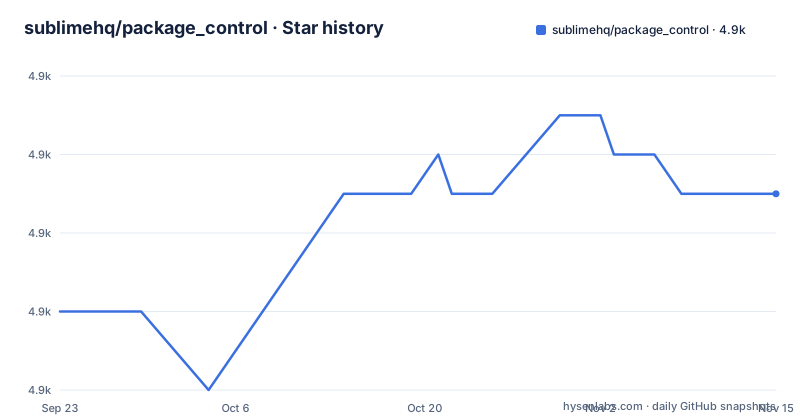
Star history
- sublimehq/package_control4,891 ★ · +3
| Repository | 2026-09-23 | 2026-11-15 |
|---|---|---|
| sublimehq/package_control | 4.9k | 4.9k |
3 Stars in the last 53 days, measured from the daily GitHub snapshot. Compare with other projects
Editorial analysis
The easy installer quietly lands you on 3.4.1
The documented easy path takes three steps inside the editor. Open `Command Palette` with `Ctrl+Shift+P` or use the menu item `Tools`, then `Command Palette...`, choose `Install Package Control`, and press `Enter`. The warning printed directly under those steps says what that choice actually installs: Package Control 3.4.1, installed up to ST4200, which may fail loading on some modern operating systems when the required OpenSSL 1.1.1 libraries are missing. So the first minutes on a new machine can leave you with a package sitting in the installed packages directory that refuses to load at startup. Two escapes are documented, and they are different jobs. One is the manual install path. The other is `Package Control: Upgrade/Overwrite All`, or simply restarting Sublime Text, which updates you to Package Control 4.
One urlretrieve line is the documented fallback
When the installer produced something that will not load, the fallback is Sublime Text's own console. Open the console, paste one line, run it. The destination is computed instead of typed, because the script calls `sublime.installed_packages_path()` and appends `/Package Control.sublime-package`, so the file lands wherever your build keeps installed packages. The source is the vendor download endpoint, and the file it writes is the same one the installer tool would have fetched.
from urllib.request import urlretrieve; urlretrieve(url="https://download.sublimetext.com/Package%20Control.sublime-package", filename=sublime.installed_packages_path() + '/Package Control.sublime-package')Two consequences come out of that single line. It carries no version argument, no checksum and no mirror, so the command itself cannot tell you which build you ended up with. And the instructions stop after running it, with no restart step, so if the editor is already open the result depends on when it rescans the installed packages directory.
Every primary action is a Command Palette entry
Package Control has no documented command line of its own. All primary features are exposed through the Command Palette, and installing a package repeats the same three movements used to install the manager: open `Command Palette` with `Ctrl+Shift+P` or the `Tools` menu, choose `Package Control: Install Package`, select a package from the list, press `Enter`. The repository root shows how that surface is wired: `Default.sublime-commands`, `Main.sublime-menu` and `Package Control.sublime-settings` sit at the top level, with `plugin.py` as the entry point beside the `package_control/` directory. The consequence for anyone outside a mouse driven session is plain. Provisioning a fresh editor image, pinning a build for a teammate, or scripting a check in continuous integration is not covered by these instructions, and the usage pages at packagecontrol.io/docs/usage and docs.sublimetext.io/guide/package-control/usage.html are where you would have to find out more.
Troubleshooting means editing settings and restarting twice
Reporting a broken install starts with finding out what you actually have. Open `Command Palette`, run `Package Control: List Packages`, search `Package Control`. Then open the Sublime Text Console (ctrl+`) and read the Python errors it prints, then review the list of open issues on the repository, and do not comment on a closed issue, reference it from a new one instead. The deeper diagnostic costs more: set the `debug` key to `true` in the Package Control user settings file under `Preferences`, `Package Settings`, `Package Control`, restart Sublime Text, reproduce the failure, then copy the full contents of the console into the issue. Those steps name no log file on disk to read afterwards. A useful bug report is therefore a pasted console transcript, and collecting it costs a restart before the attempt.
Four example JSON files with no schema in the docs
Four files in the repository root exist to be copied: `example-channel.json`, `example-dependencies.json`, `example-messages.json` and `example-repository.json`. Between them they are the templates for a private channel, its dependency list, its release messages and its repository entries. What the readme does not give you is the shape of any of them. No field names, no required keys, no worked channel with a real URL, no statement about which keys a version 4 channel must carry. The documented path to hosting your own packages therefore stops at four filenames. Building an internal channel means reading the Python under `package_control/` or trial and error,. Two further root files point at how the project itself is worked on: `tox.ini` for the test run and `.python-version` for the interpreter, neither of which is explained in prose.
No documented way to pin, roll back, or uninstall
Here is the part of a package manager's life that its own instructions leave out. There is no documented way to remove a package, no documented way to hold a package at a single version, and no documented rollback for a release that broke your setup. The command palette entries that appear by name are the installer, the lister and the upgrade or overwrite action, and the settings file has exactly one documented key, the debug switch. That leaves a package you regret to whatever Sublime Text's own package handling does rather than to a named Package Control command, and leaves a bad update to be repaired by reinstalling from the list. If your workflow depends on the same package set appearing on several machines, resolve that outside this project, and check it against your own policy before you depend on it.
Two copyright lines and two documentation homes
Ownership has two names on one license. The MIT text carries `Copyright (c) 2011-2025 Will Bond <[email protected]>` and `Copyright (c) 2026 Sublime HQ Pty Ltd, Woollahra, Sydney.`, which lines up with the project sitting under the Sublime org rather than its original author. Activity on the default branch `master` is current: the last push landed on 1 November 2026, and the recent tags are 4.2.8 from 19 May 2026, 4.2.7 from 3 April 2026 and 4.2.6 from 2 April 2026, so the 4.2.x line is where fixes are arriving. Documentation is split across two homes, packagecontrol.io/docs for the original text and docs.sublimetext.io for the community driven version, with a usage page linked on each. Check which site you are reading before you trust a step, since the two do not have to change on the same day.
Editorial conclusion
Package Control is the package manager this editor has, and for interactive work it is enough: the palette installer, the fallback script and the list command cover getting packages installed and diagnosed. Treat it as the wrong dependency when you need pinned versions, scripted installs or a channel of your own, because none of those have documented instructions here. Before you build on it, confirm the installed version with `Package Control: List Packages` and check that the documentation site you are reading matches your build.
Frequently asked questions
Why can't I install Package Control in Sublime Text?
The installer tool drops Package Control 3.4.1, installed up to ST4200, and that build may fail loading on some modern operating systems when the required OpenSSL 1.1.1 libraries are missing. The documented fixes are the manual install script, or `Package Control: Upgrade/Overwrite All`, or a restart that updates you to Package Control 4.
how to install package control in sublime text
Open `Command Palette` with `Ctrl+Shift+P` or the `Tools` menu, choose `Install Package Control`, press `Enter`. That path installs 3.4.1, so pair it with the manual urlretrieve script or `Package Control: Upgrade/Overwrite All` to reach Package Control 4.
how to install package control in sublime text 3
The same palette steps apply, and the ST4200 note is the part that bites here: 3.4.1 is the version installed up to that build, and it may fail to load on a modern operating system when the OpenSSL 1.1.1 libraries are missing. The manual install path is the documented fallback.
what is package control
It is the package manager for Sublime Text, written in Python and released under the MIT license, and its stated job is letting users find, install and keep packages up to date. Every primary feature is reached from the Command Palette, and the project site is packagecontrol.io.
how to use package control
Open `Command Palette`, choose `Package Control: Install Package`, select a package from the list and press `Enter`. Past that, the readme sends you to packagecontrol.io/docs/usage and to docs.sublimetext.io/guide/package-control/usage.html.
How do I check what package manager I have?
Open `Command Palette`, run `Package Control: List Packages` and search `Package Control`. Those same three steps are the first item of the bug report checklist, because the version you hold decides whether the OpenSSL 1.1.1 loading failure applies to you.
Official sources
Add this badge to your README
If you maintain this project, the badge below links readers to this analysis and shows its maintenance status from the daily GitHub snapshot. Paste the markdown into your README; add ?metric=license or ?metric=stars to the image URL for a different field.

[](https://hysenlabs.com/projects/sublimehq-package-control)Star history chart for your README
[](https://hysenlabs.com/projects/sublimehq-package-control)Was this useful?