lgogdownloader: a GOG.com downloader for the platform GOG skipped
LGOGDownloader is unofficial downloader to GOG.com for Linux users. It uses the same API as the official GOG Galaxy.
At a glance
- What is it?
- LGOGDownloader is an unofficial open source C++ downloader for GOG.com that uses the same API as GOG Galaxy, the official client with no Linux support. It is aimed at Linux users who have bought games on GOG and want a command line way to list, download and repair their library.
- Who is it for?
- Adopt lgogdownloader if you own GOG games and want a scriptable Linux download path, especially if you need to filter by platform or language or to verify and repair files against the store's own checksums. Skip it if you want a supported client with a graphical library, since this project is unofficial and explicitly a community tool, and consider whether GOG's own terms cover third party API use before you rely on it in a shared environment.
- Can I use it commercially?
- Yes. WTFPL is a permissive licence: you can use, modify and sell software built on it, as long as you keep its copyright and licence notices.
- Is it still maintained?
- Yes. The repository last received commits 15 days ago.
- What is it written in?
- Mainly C++, according to GitHub's language statistics.
Answers come from the project's GitHub data, last synced on November 6, 2026, and from our analysis. They are not legal advice.
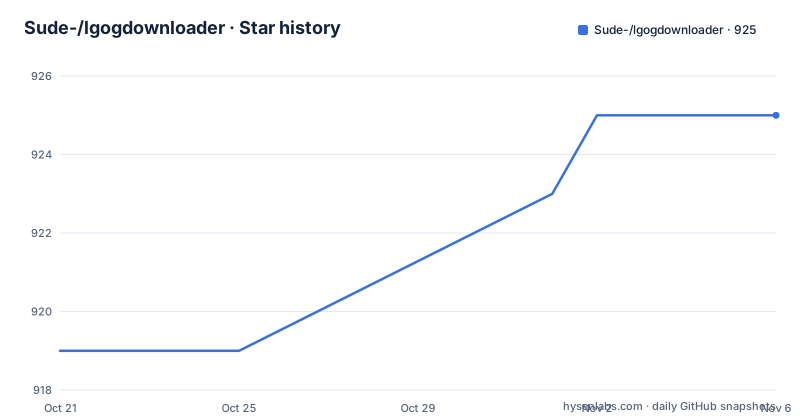
Star history
- Sude-/lgogdownloader925 ★ · +6
| Repository | 2026-10-21 | 2026-11-06 |
|---|---|---|
| Sude-/lgogdownloader | 919 | 925 |
6 Stars in the last 16 days, measured from the daily GitHub snapshot. Compare with other projects
Editorial analysis
The gap is a missing platform, not a missing feature
LGOGDownloader is described as an unofficial downloader for GOG.com for Linux users, and it uses the same API as the official GOG Galaxy. The README states the reason plainly: GOG Galaxy, the official client, does not have Linux support at the moment.
That framing is worth keeping in mind throughout, because it defines what this project is. It is not a competing storefront and it does not provide games. It is a client for an existing catalogue, built against the same API the official client uses, so that the same account and the same library work on a platform the vendor does not ship for.
The codebase is C++, and the repository layout is compact: `main.cpp` at the root, `src/` and `include/` for the code, `cmake/` for the build helper modules, `man/` for the man page, and a `CMakeLists.txt` and `COPYING` beside them.
Two facts frame every other consideration. It is unofficial, so it has no support relationship with the store, and it is a community project that depends on a third party API. Both are normal for this category of tool, and both are reasons to keep your account credentials to yourself and to understand how the tool stores them before you log in.
A dependency list that tells you what the code touches
The README lists the runtime dependencies, and reading them tells you a lot about how the tool works.
libcurl at 7.55.0 or newer is the HTTP client. librhash is the hashing library, which is what makes the repair mode possible, since a downloader that can verify checksums needs a hash implementation. jsoncpp handles the API responses, since the Galaxy API speaks JSON. libtidy and tinyxml2 handle the HTML and XML that come back from the store's web pages, which is a reminder that not everything the client touches is the API.
Boost is the largest single dependency, and the README names exactly which parts are used: regex, date-time, system, filesystem, program-options and iostreams. That last one is telling, since iostreams is what handles the download and decompression pipeline. zlib completes the set.
The build tools are equally specific: cmake at 3.18.0 or newer, and ninja.
The theme running through the list is that the tool does both API work and file work, and it does its own verification. That combination is what separates it from a page scraper, and it is also why the dependency list is as long as it is.
Building on Debian and Fedora
There is no binary release workflow described in the README, so building from source is the documented path, and two distributions are spelled out.
On Debian and Ubuntu, the packages are:
# apt install build-essential libcurl4-openssl-dev libboost-regex-dev \
    libjsoncpp-dev librhash-dev libtinyxml2-dev libtidy-dev \
    libboost-system-dev libboost-filesystem-dev libboost-program-options-dev \
    libboost-date-time-dev libboost-iostreams-dev cmake \
    pkg-config zlib1g-dev ninja-build
Then the build itself is a configure step and an install step:
$ cmake -B build -DCMAKE_INSTALL_PREFIX=/usr -DCMAKE_BUILD_TYPE=Release -GNinja
$ ninja -Cbuild install
Note that the install prefix is passed explicitly, and that the generator is forced to Ninja with the `-GNinja` flag. The Release build type is also explicit, which for a tool that spends its time in compression and hashing is the sensible default.
Fedora is documented with dnf and the classic in-tree build:
sudo dnf install cmake make gcc gcc-c++ glibc tinyxml2-devel rhash-devel \
    libtidy-devel tinyxml-devel jsoncpp-devel libcurl-devel \
boost-develcmake ..
makeThe two paths differ in more than package manager. The Debian build uses an out-of-tree build directory with Ninja and installs to a prefix, while the Fedora build uses the simpler in-tree configure and make flow, which is what the CMakeLists.txt supports by default.
If you would rather not compile, the README lists distribution packages that already exist: an AUR package for Arch Linux in two variants, a stable one and a git version, plus the Debian tracker entry and the Ubuntu launchpad source.
Logging in, then listing what you own
The usage examples in the README are organised by task, and the first task is authentication.
lgogdownloader --loginListing comes next, and there are two forms. A plain list, and a list with details for a specific game:
lgogdownloader --list
lgogdownloader --list details --game witcher
The `--game` argument takes the store's identifier rather than a display title, `witcher` rather than The Witcher, which is worth knowing before you start hunting for the right slug for each title in your library.
There is also a man page and the usual help output:
lgogdownloader --help
man lgogdownloader
The README mentions a GOG forum thread where the project is discussed, and a project website hosted on Google Sites, which is where the more detailed documentation lives. The repository itself is the reference for the flags, and the README's task grouping is a good index into them.
One thing the README does not document is how credentials are stored after `--login`, nor whether a session expires. For a tool that holds an account token, that is the first detail to look for in the source or the forum thread before you script it in CI.
Downloading with platform, language and thread filters
The download flags are where the tool earns its keep, because a GOG library usually holds several builds of the same game for different platforms and languages.
lgogdownloader --download
lgogdownloader --download --game stardew_valley --exclude extras
lgogdownloader --download --threads 6 --platform linux --language en+de,fr
lgogdownloader --download-file tyrian_2000/9543
Four capabilities are visible in those four lines. `--exclude extras` skips the extras bundle for a given game, which is the difference between a few hundred megabytes and a few gigabytes for a game with soundtrack and art books. `--threads 6` sets the download parallelism. `--platform linux` and `--language en+de,fr` select which builds to fetch, and the language syntax accepts several at once with a `+` separator and comma separated alternatives.
The last form, `--download-file tyrian_2000/9543`, takes a specific file path and a numeric id inside the game, which is how you fetch one file rather than a whole installer.
The combination of filters is the practical value. A GOG purchase for Linux and Windows with two language variants can otherwise turn into a multi-gigabyte download of everything the account owns, including the builds for platforms you will never run.
Repair mode and the Galaxy API path
The repair commands exist because a download can be incomplete or corrupted, and because a GOG library outlives the disk it was downloaded to.
lgogdownloader --repair --game beneath_a_steel_sky
lgogdownloader --repair --download --game "^a"
The second form is the interesting one, because `--game "^a"` is a regular expression, which means the repair or download can be applied to every game whose slug matches a pattern. Combining `--repair` with `--download` in one invocation repairs the library and fetches whatever is missing in a single pass, rather than requiring two runs.
The last group of commands uses the Galaxy API directly for listing and installing game builds:
lgogdownloader --galaxy-platform windows --galaxy-show-builds stardew_valley
lgogdownloader --galaxy-platform windows --galaxy-install stardew_valley/0
lgogdownloader --galaxy-platform windows --galaxy-install beneath_a_steel_sky/0 --galaxy-no-dependencies
Note the `--galaxy-platform windows` argument, which is a reminder that these commands can install a build for a platform other than the one you are on, and that `--galaxy-no-dependencies` skips the prerequisite installs that a build may declare. The build index is the number after the slash, so `stardew_valley/0` is the first build of that title.
This is the part of the tool that most needs care. Installing a Windows build on Linux requires the game to run through a compatibility layer, and the tool does not attempt to provide one. It moves the files into place, and what happens afterwards is up to your setup.
WTFPL terms, an unofficial client, and the packaging reality
The licence field on the repository says WTFPL, which is the Do What The Fuck You Want Public License, with the terms in the `COPYING` file. For a client tool that people are invited to build, patch and redistribute, that is a deliberate and unusual choice, and it removes the usual question of what happens if you modify it.
What it does not remove is the relationship with the store. The project is unofficial by its own description, and it uses an API that GOG publishes for its own client. Whether using that API from an unofficial client is permitted is a question about GOG's terms of service rather than about the licence, and it is a question to answer for yourself before running this in an environment where it matters. The practical mitigation the project itself applies is distribution: the packages are hosted on the AUR, Debian and Ubuntu channels, and there is a GOG forum thread where the project is discussed, which is where such questions get raised in public.
On maintenance, the releases are v3.17 on 2025-03-19, v3.18 on 2025-11-03 and v3.19 on 2026-09-13, with the last push on 2026-10-15. A version 3.19 released in September 2026 after a gap of several months suggests a project that is still being worked on but not continuously, and it is worth checking the release date of the package you install rather than assuming it is current.
The packaging picture is good for Linux users in practice. Arch users can take the AUR package or the git version, Debian and Ubuntu users have tracker and launchpad entries, and the README also carries a PayPal donation link for the maintainer.
Editorial conclusion
Adopt lgogdownloader if you own GOG games and want a scriptable Linux download path, especially if you need to filter by platform or language or to verify and repair files against the store's own checksums. Skip it if you want a supported client with a graphical library, since this project is unofficial and explicitly a community tool, and consider whether GOG's own terms cover third party API use before you rely on it in a shared environment. Verify first that your distribution's packages satisfy the dependency list, libcurl 7.55.0 or newer, boost, jsoncpp, librhash, libtidy, tinyxml2 and zlib, and that the platform and language filters select what you expect. The licence field on the repository says WTFPL, the last push was on 2026-10-15, and the current release is v3.19.
Frequently asked questions
What is LGOGDownloader and why does it exist?
It is an unofficial open source downloader for GOG.com for Linux users. It uses the same API as the official GOG Galaxy client, which the README says does not have Linux support at the moment.
How do I build LGOGDownloader on Debian or Ubuntu?
Install the listed packages, including build-essential, the boost development packages, libcurl4-openssl-dev, libjsoncpp-dev, librhash-dev, libtinyxml2-dev, libtidy-dev, zlib1g-dev, cmake and ninja-build. Then run `cmake -B build -DCMAKE_INSTALL_PREFIX=/usr -DCMAKE_BUILD_TYPE=Release -GNinja` followed by `ninja -Cbuild install`.
How do I download only the Linux build of a game in one language?
The download flags accept `--platform` and `--language`, so `lgogdownloader --download --threads 6 --platform linux --language en+de,fr` restricts the fetch to Linux builds and the listed languages. You can also narrow a single game with `--game stardew_valley` and skip extras with `--exclude extras`.
What does the repair mode in LGOGDownloader do?
It verifies the files of a game against the store's own checksums, which is what the librhash dependency supports. The examples combine it with downloads in one pass, `lgogdownloader --repair --download --game "^a"`, and the game argument accepts a regular expression.
Is there a prebuilt package for LGOGDownloader?
The README lists an AUR package for Arch Linux in a stable and a git variant, a Debian tracker entry and an Ubuntu launchpad source. Otherwise the documented route is to build from source, with separate instructions for Debian and Fedora.
What licence is LGOGDownloader released under?
The licence field on the repository says WTFPL, with the terms in the COPYING file. The releases are v3.17 on 2025-03-19, v3.18 on 2025-11-03 and v3.19 on 2026-09-13, and the last push was on 2026-10-15.
Official sources
Add this badge to your README
If you maintain this project, the badge below links readers to this analysis and shows its maintenance status from the daily GitHub snapshot. Paste the markdown into your README; add ?metric=license or ?metric=stars to the image URL for a different field.

[](https://hysenlabs.com/projects/sude-lgogdownloader)Star history chart for your README
[](https://hysenlabs.com/projects/sude-lgogdownloader)Was this useful?