chat-ollama: a README for the CLI, a repository for the whole app
ChatOllama is an open source agentic app for running AI agents across local and hosted models.
At a glance
- What is it?
- sugarforever/chat-ollama publishes a global command-line agent with a carefully drawn file-sandbox and a four-step default budget, in a repository whose front page never mentions the Nuxt application, the database, the vector store or the hosted site that sit beside it, and whose compose file publishes Postgres with its password in two connection strings.
- Who is it for?
- Use the agent CLI on its own terms, and read it as well specified: the workspace root is enforced, writes are atomic and versioned, shell access is absent, and the tool count is documented. Two things to settle first.
- Can I use it commercially?
- Check first. The repository uses a licence we do not classify automatically, so read its LICENSE file before any commercial use.
- Is it still maintained?
- Yes. The repository last received commits 1 day ago.
- What is it written in?
- Mainly TypeScript, according to GitHub's language statistics.
Answers come from the project's GitHub data, last synced on November 15, 2026, and from our analysis. They are not legal advice.
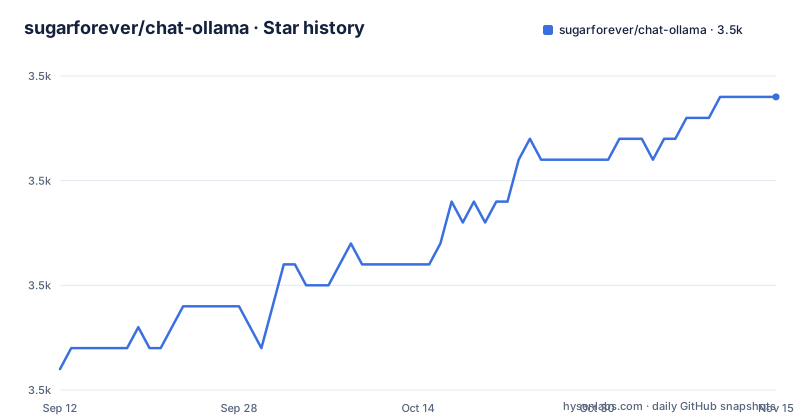
Star history
- sugarforever/chat-ollama3,524 ★ · +13
| Repository | 2026-09-12 | 2026-11-15 |
|---|---|---|
| sugarforever/chat-ollama | 3.5k | 3.5k |
13 Stars in the last 64 days, measured from the daily GitHub snapshot. Compare with other projects
Editorial analysis
The README is the command line app's manual and says nothing about the web app beside it
Start with what this README is about. The second sentence says the primary user entry point today is the installable chatollama-agent command-line app. Everything after that is the CLI: a provider table, five startup overrides, a prompt reference, two slash commands, and two demo commands.
Now look at what the repository contains. The top level has an application entry component, a Nuxt configuration file and an app configuration file. It has a pages directory, layouts, components, composables, middleware, plugins, a locales directory and a translation config. It has a server directory, a Prisma directory, an assets directory, a stylesheet framework config, a docs directory, a blogs directory, a tests directory, and a Chinese translation of the README.
It also has three compose files: a default one, an ARM one and a GPU one.
None of that appears in the README. The word Nuxt does not appear. Neither does the hosted site the repository's homepage field points at, nor the database, nor the vector store, nor the access control layer, nor the Chinese README that sits in the same directory. The README's only forward pointer is to a package directory, and it says that for configuration precedence, saved preference locations, plain-mode behaviour and provider-specific examples, see the agent CLI guide.
So the front door documents one component and the building behind it contains a different product. That is the single most important thing to know before you spend an afternoon on this repository, and no amount of reading the README will tell you.
Ollama's key defaults to the string ollama, and the default model may not be on your machine
Install it and you are running this:
npm install --global chatollama-agent
chatollama-agent
Node.js 24 or newer, one global install, one command. Everything the CLI knows comes from environment variables, and the first of them decides how it talks to a model.
The provider table has six rows. Five require a real credential: an OpenAI key, an Anthropic key, a Google Gemini key with a documented fallback to an older variable name, a DeepSeek key and an OpenRouter key.
The sixth row is different. Ollama, described as OpenAI-compatible, takes an API key that is marked optional and given a default: the non-secret value ollama. So a local Ollama endpoint needs no credential at all, and a placeholder is baked into the tool rather than left undefined. That is the right call for a keyless local server.
The compatibility note underneath is where the sharp edge is. The CLI still falls back to a specific Ollama model identifier when no model is available, and AGENT_MODEL without AGENT_PROVIDER is treated as an Ollama model. Then the README says the fallback keeps the command loop available but does not mean that model is installed or reachable, and tells you to select Ollama explicitly with the provider variable and, when needed, the base URL variable.
So a fresh install with no credentials at all still starts, still shows a prompt, and is pointed at a named model that a first-time user has almost certainly not pulled. Discovery failures do not stop it either: the README says they produce warnings without preventing the CLI from opening.
The result is a first run that looks healthy and is not. Nothing errors, the loop is available, and the failure appears later as an unhelpful message from the model you never asked for.
The default step budget is four, and one turn can read, search and write
Five startup overrides sit in a table under the provider table, and one of them is a number: AGENT_MAX_STEPS sets the positive-integer step budget for each prompt, and the default is 4.
Two more overrides pick a specific model at startup, and they are used together:
AGENT_PROVIDER=openai AGENT_MODEL=gpt-5-mini chatollama-agentThe precedence rule matters more than the syntax. Either of those two takes precedence over a saved selection, while the base URL and key overrides change the endpoint and the credential without changing which provider and model you are talking to. And a provider's own credential is still required for its built-in models to appear in discovery, so the key override alone does not add them.
That number is the whole safety envelope of a turn, and the runtime section says what a turn can do. There are six workspace tools. Four of them are read-only: read a file, list a directory, grep, and find files. Two of them write: write a file, and edit a file with either a single exact replacement or a batch of up to a hundred.
So the worst case inside one prompt is four tool calls, and nothing in the default configuration stops two of those four from being writes.
What the project does about that is worth reading carefully, because it is unusually thorough. The startup directory is the workspace root. Tool paths must be relative to it. Absolute paths, parent-directory escapes, prefix-confusion paths and symlinks that resolve outside are all rejected. Read and search results are capped and report when they were truncated. Writes and edits use atomic replacement, serialise changes to the same path, and reject content over about a megabyte. The three file operations that return content attach a content hash, the write and edit tools accept an expected version, and a stale one returns a version conflict without touching the file. Batch edits require every literal match to appear exactly once, require non-overlapping ranges, and apply atomically. Matching is never fuzzy, and the tools do not expose shell commands.
That is a well-drawn boundary. The gap is that the default step budget is four, and nothing in the default configuration distinguishes a turn that will only look at things from a turn that will also change them.
The compose file publishes Postgres on the host with the password in the connection string twice
The default compose file defines four services: postgres, a vector database, the application itself, and redis.
The database service runs a versioned Postgres Alpine image, sets a database name, a user and a password, publishes port 5432 to the host, mounts a named volume, and has a health check that probes for readiness. The password is written in the file as a literal, and the default is the obvious one.
The application service then receives a connection string that contains that same password, and it receives it twice. There is a database URL variable and a direct URL variable, both pointing at the same host, port, database, user and password.
So the compose file publishes a database port on every host interface with a guessable credential, and hands the credential to the application in two separate variables. For a file that people copy out of a repository, that is the default you get.
Two things make it a little less bad and one thing does not. The database volume is named rather than anonymous, so it survives a redeploy. The health check is real, so the application waits for the database rather than racing it. And the application service does require a secret to boot, which we will come to. But none of those three addresses the published port or the password, and someone deploying this on a shared host with a port forward gets a database they did not mean to expose.
The vector database has the same shape: an untagged image, port 8000 published to the host, a named volume, and no credentials at all.
SECRET will stop the boot if you forget it and ACL_ENABLED will not
The application service in the compose file guards one variable and defaults another.
The guard is the compound-colon-question form, applied to the secret. If the variable is unset or empty, the substitution fails and compose refuses to start. The comment says to set it to a random value of at least 32 characters, and the example environment file shows the command that generates one. So the one secret whose absence would break authentication is also the one that cannot be forgotten by accident.
The default is the opposite. Access control is set to false, with a comment that says setting it to true enables admin-only management and that false provides better experience for development and personal deployments. The example environment file repeats the choice and gives it a name: backward compatible. And the guidance is to set it to true for production deployments.
So the file's position is that a production operator is expected to change the default, and the enforcement is a comment. Meanwhile the feature behind the flag is the ability to create, modify and delete MCP servers, and the default lets every user of the instance do that.
Put the two side by side and the asymmetry is the finding. The project made the cheap decision easy for the secret, where a mistake breaks the boot and you cannot miss it. For the flag that decides who administers the instance, the cheap decision is the default and the safe one is opt-in. Both are documented clearly. Only one is enforced.
The default secret in the example file is a sentence asking you to replace it
The authentication block of the example environment file has three variables and they behave three different ways.
One is empty, with a comment saying to generate it with a specific command and keep it private.
One is empty and has no guidance at all.
The third is not empty. It is filled with a sentence that reads like an instruction, telling you it is a long random secret key and that you should change it in production. It is the kind of placeholder that appears in a code block and gets pasted wholesale into a deployment.
The difference matters because of what each variable is for. The compose file's guard applies to the secret that signs things, and that one you cannot leave unset. The one with the instruction sitting in it is the authentication secret used by the Nuxt auth module, and there is no guard on it anywhere in the compose file. So the file ships with a plausible-looking value that will start the application, and the only thing standing between that value and a production deployment is a reader noticing that the value is a sentence.
Two other defaults in the same file are worth pairing with it. Ver analytics are disabled by default, which is a considerate choice and one that persists regardless of what a deployment wants. And the application base URL defaults to plain HTTP on localhost, which is fine on a laptop and wrong the moment the deployment is anywhere else.
The proxy section below them is more careful: the comment enumerates four supported schemes and shows examples for plain HTTP, SOCKS5, and both of those with a username and password inline.
The container defaults to SQLite while the compose file hands it Postgres
There are two different default databases in this repository and they are in different files.
The container image sets a database URL environment variable to a SQLite file path inside the app directory. The comment above it says the variable takes precedence over configuration in an environment file. So running the image as built gives you a SQLite database.
The compose file gives the same application two connection strings pointing at the Postgres service. So running the compose stack gives you Postgres.
The project ships a script for exactly the gap between them: a migrate-sqlite-to-postgres script, alongside the Prisma commands for deploying migrations, creating them, generating the client and pushing the schema.
That is a reasonable arrangement, and the presence of the migration script shows the author knows both databases are real. The gap is discoverability. The compose file and the image are two different entry points to the same application with different storage backends, the default database differs between them, and the README documents neither, because the README documents only the command line agent and that agent has no database at all.
The image also installs the native toolchain for both: a C++ compiler, make, the SQLite command line, and a Postgres client, alongside openssl, a ping utility and net tools. So a single image carries build tools for two database engines and a web framework, and the image also runs a migration step and a build step before its command runs. It is a development-shaped image doing double duty as the deployment image.
A hosted homepage, a Chinese README and a blogs directory that the README never mentions
Three things sit in this repository describing things the README does not acknowledge.
The first is the homepage field, which points at a hosted site. The README is entirely about running the agent locally from your own terminal, and never mentions that a hosted version exists. So the metadata and the manual are answering different questions.
The second is the Chinese README, in the same directory as the English one, and the English one opens with a language switch that points at it. That much is wired up correctly. What is missing is any indication of how much of the project the translation covers, or whether it tracks the English one.
The third is a blogs directory. A repository with a blogs directory at the top level is a project that publishes, not just ships. The README, which runs to twelve code blocks and six tables and closes with an instruction that it should be updated with every release that changes user-visible behaviour, says nothing about published writing.
That last line is the one to keep. The README states that it should be updated with every release that changes user-visible behaviour, which is a self-imposed contract. Set against the release record, it is holding: there are two releases on record, both from a single day, and the README documents the behaviour of both in detail.
The gap is not accuracy within its scope. It is scope. The file is careful and current about the agent command line and silent about the application that makes up most of the repository.
Editorial conclusion
Use the agent CLI on its own terms, and read it as well specified: the workspace root is enforced, writes are atomic and versioned, shell access is absent, and the tool count is documented. Two things to settle first. The default step budget is four and nothing separates a read-only turn from a writing one, so decide that before you point it at anything you care about. And the compose stack is a different product with a different default database, a published Postgres port, and an access-control flag that defaults to off, so read the compose file and the example environment file rather than the README before you deploy it.
Frequently asked questions
How do I install chatollama-agent?
Run npm install --global chatollama-agent and then chatollama-agent. It requires Node.js 24 or newer. The two releases on record are tagged agent-v0.3.0 and agent-v0.4.0, both published on 2026-09-09.
Which providers can chatollama-agent use?
Six: OpenAI, Anthropic, Google Gemini, DeepSeek, OpenRouter, and Ollama as an OpenAI-compatible endpoint. Each has its own environment variable, and the Ollama one is marked optional because it defaults to the non-secret value ollama.
What can the chatollama-agent runtime do to my files?
Six workspace tools: read_file, list_directory, grep, find_files, write_file and edit_file. Paths must be relative to the directory the CLI was started in; absolute paths, parent escapes, prefix-confusion paths and symlinks resolving outside are rejected. Writes and edits are atomic and versioned, and the tools do not expose shell commands.
Does chatollama-agent save my conversations?
No. Follow-up messages continue the same in-memory conversation, and the README states that conversations and API keys are not saved. A successful model selection is saved as the next startup default, so that much persists.
What happens if no model is available to chatollama-agent?
The CLI still falls back to a named Ollama model, which the README says keeps the command loop available but does not mean that model is installed or reachable. Discovery failures produce warnings without preventing the CLI from opening.
How do I run the ChatOllama server instead of the agent CLI?
The default compose file defines postgres, a vector database, the application and redis. It requires SECRET to be set to a random value of at least 32 characters or the stack will not start, and it sets ACL_ENABLED to false, which the comments describe as letting all users manage MCP servers for a better development experience.
Official sources
Add this badge to your README
If you maintain this project, the badge below links readers to this analysis and shows its maintenance status from the daily GitHub snapshot. Paste the markdown into your README; add ?metric=license or ?metric=stars to the image URL for a different field.

[](https://hysenlabs.com/projects/sugarforever-chat-ollama)Star history chart for your README
[](https://hysenlabs.com/projects/sugarforever-chat-ollama)Was this useful?