The Supermemory OpenClaw plugin injects context before every turn and ships its own TypeScript sources
OpenClaw Supermemory lets to have long-term memory and recall for your openclaw agent.
At a glance
- What is it?
- A memory plugin for OpenClaw agents that runs on a paid Supermemory cloud plan, with eleven configuration keys, four agent tools and three slash commands. The published package ships index.ts alongside dist, and its build step for one library file is an existence check.
- Who is it for?
- Read this as a paid integration rather than an infrastructure choice. Everything the plugin does, extraction, deduplication, profile building, storage, runs in someone else's cloud, and the project states it needs a Pro plan or above before it will do any of it.
- Can I use it commercially?
- Not without permission. GitHub finds no licence file in the repository, and without a licence all rights are reserved by default: you may read the code but not reuse it. Check the README, or ask the authors, before using it.
- Is it still maintained?
- Yes. The repository last received commits 2 days ago.
- What is it written in?
- Mainly TypeScript, according to GitHub's language statistics.
Answers come from the project's GitHub data, last synced on November 15, 2026, and from our analysis. They are not legal advice.
Star history
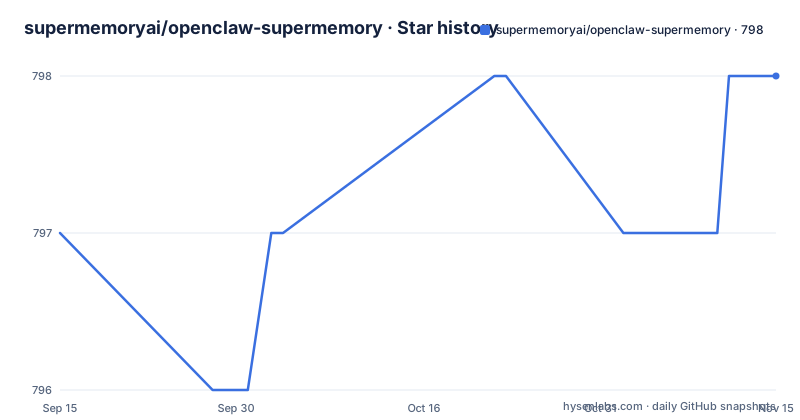
- supermemoryai/openclaw-supermemory798 ★ · +1
| Repository | 2026-09-15 | 2026-11-15 |
|---|---|---|
| supermemoryai/openclaw-supermemory | 797 | 798 |
1 Stars in the last 61 days, measured from the daily GitHub snapshot. Compare with other projects
Editorial analysis
Memory is injected before every turn and captured after every one
Two hooks do the work, and both default to on. Auto-Recall runs before every AI turn: it queries Supermemory for relevant memories and injects them as context, so the model sees the user profile plus semantically similar past conversations. Auto-Capture runs after every AI turn and sends the conversation to Supermemory for extraction and long-term storage.
Everything else happens on the other side of the wire. Supermemory handles extraction, deduplication and profile building, and the project states that no local infrastructure is required.
Two numbers bound the context cost. `maxRecallResults` defaults to 10, the maximum number of memories injected per turn, and `profileFrequency` defaults to 50, meaning the full profile is injected every fiftieth turn rather than every turn. The first is a ceiling on what comes back; the second is a throttle on the most persistent slice of it.
The capture side has its own switch. `captureMode` defaults to "all", and the description of that value is that it filters short texts, while the alternative "everything" captures all. So the default is not what its name suggests, and the name that means what it says is not the default.
The shipped example enables prompt injection and conversation access
The full configuration example is the place to look for what the plugin does with your conversations, and it opens two doors by default.
"hooks": {
  "allowPromptInjection": true,
  "allowConversationAccess": true
}
Both are true in the example, and neither appears in the options table. allowPromptInjection is the one to think about longest: memories recalled before a turn are text that came from earlier turns, and text injected into a prompt is text the model treats as instructions. allowConversationAccess is the other: it is what lets the capture hook read the conversation at all.
The rest of the example is the plugin slot wiring, with the memory slot set to openclaw-supermemory, an enabled entry, and a config block whose apiKey is written as an interpolation of the environment variable rather than a literal, so the key does not sit in the JSON. containerTag is set to my_memory, and the block runs through autoRecall, autoCapture, maxRecallResults, profileFrequency and captureMode before it stops.
It stops there. The example ends after captureMode, in the middle of the object, so the fields below it in the options table, debug, enableCustomContainerTags, customContainers and customContainerInstructions, have no example values to copy.
containerTag defaults to your hostname, and custom routing defaults to off
The root namespace is derived from the machine. `containerTag` defaults to `openclaw_{hostname}`, so two machines with different hostnames write to different containers by default, and two with the same hostname share one.
Custom routing is the opposite: `enableCustomContainerTags` defaults to false and `customContainers` defaults to an empty array. With it off, everything lands under the single root tag. With it on, you define containers such as work, personal or bookmarks, each an entry with a `tag` and a `description`, and `customContainerInstructions` holds the text that tells the AI which to pick. All four tools then accept a `containerTag` parameter for direct routing.
The interesting part is who chooses. The project says the AI automatically picks the right container based on your instructions when using memory tools, which means the routing decision is made by a model reading prose you wrote, not by a rule. Descriptions are not documentation; they are part of the control surface.
The other defaults are conservative in the usual way: `apiKey` has no default and must be supplied, `baseUrl` defaults to https://api.supermemory.ai and can be pointed at a self-hosted instance, and `debug` is false.
The old tool names still work and are scheduled for removal in 3.0
The four agent tools have hyphenated names: `supermemory-save`, `supermemory-search`, `supermemory-forget` and `supermemory-profile`, the last of which returns persistent facts plus recent context. Those are the names the project calls standard across all its plugins.
The older forms, `supermemory_store`, `supermemory_search`, `supermemory_forget` and `supermemory_profile`, still work and resolve to the same tools. They are deprecated and will be removed in 3.0, and the instruction to update any tool allowlists is the practical part. A permission list written against the old names keeps working today and breaks at the next major, with no warning at the call site.
The package version is 2.1.18, so the removal is one major away and the deprecation notice is the only warning you get.
Deletion comes in two strengths. `supermemory-forget` removes a memory by query or by ID, which is targeted, and the CLI has `openclaw supermemory wipe`, which deletes all memories and requires confirmation. One is a tool an agent can call; the other is a command a person types.
The package ships its TypeScript sources, and one build step only checks that a file exists
The published file list is unusual. Alongside dist, the package includes README.md, openclaw.plugin.json, index.ts, client.ts, config.ts, logger.ts, memory.ts, runtime.ts, the commands, hooks, skills, tools and types directories, and three files from lib: version-check.ts, validate.d.ts and validate.js.
So a consumer gets the sources and the bundle. The manifest explains why: the OpenClaw block registers the extension as `./index.ts` and the runtime extension as `./dist/index.js`, meaning the TypeScript entry is used when the host loads an extension directly and the bundled file is used at runtime. That is a reasonable design for a plugin host, and it also means the artifact you inspect is not necessarily the artifact that runs.
The build script is where it gets odd. Two steps run for real: esbuild bundles index.ts into dist/index.js as an ES module targeting es2022 with openclaw and supermemory marked external, and `tsc --noEmit` checks types. The third step is named build:lib and its entire body is a node one-liner that calls `fs.accessSync` on lib/validate.js and lib/validate.d.ts.
That step asserts two committed files are present. It does not compile them, so lib/validate.js ships as a checked-in artifact, and the failure mode it guards against is a file being missing rather than a file being wrong.
A Bun lockfile with Biome, while the scripts run through npm
The toolchain is a mix of three. The lockfile is bun.lock, the linter is Biome through `bunx @biomejs/biome ci .` with biome.json at the root, and the package scripts are written as npm run calls, including build:runtime invoking esbuild and check-types invoking tsc.
None of that breaks anything by itself. It does mean there is no test script: the scripts block has build, build:runtime, check-types, lint, lint:fix, build:lib and prepack, and nothing that runs tests. For a plugin whose job is deciding what text goes into a prompt, that is the gap worth noting, along with the fact that lib/validate.js is the one piece of hand-written JavaScript shipped in the package.
Version compatibility is declared rather than discovered. The peer dependency is openclaw at 2026.5.7 or later, the compat block asks for pluginApi 2026.5.7 and a minimum gateway version of 2026.5.7, and the build block pins the same openclaw version. A host older than that is outside the declared range in three places at once.
The top level is small and readable for a plugin: client.ts, config.ts, logger.ts, memory.ts, runtime.ts, index.ts, plus commands, hooks, skills, tools, types and lib directories.
Pro or above, and the documentation URL still says clawdbot
The gate is stated at the top, before the install line: the plugin requires Supermemory Pro or above, linked to the integrations page in the Supermemory app. There is no free tier path in what the project describes, and the install step is a plugin command rather than a package manager call.
openclaw plugins install @supermemory/openclaw-supermemorySetup is two commands, an interactive `openclaw supermemory setup` to enter the key from app.supermemory.ai, and `openclaw gateway restart`, which is required after both the simple and the advanced setup. For a self-hosted instance, the base URL moves through SUPERMEMORY_BASE_URL or the baseUrl key, which otherwise defaults to https://api.supermemory.ai.
Two smaller things. The homepage points at a documentation path under integrations named clawdbot, an earlier name for the host, so the URL and the product name do not match. And the repository itself names no license in its metadata while the package.json declares MIT, with no license file in the top-level entries, so which text governs is decided by which file you read.
The last commit is dated 2026-09-17 and there are no GitHub releases, so the published 2.1.18 version has no tag history to compare it against.
Editorial conclusion
Read this as a paid integration rather than an infrastructure choice. Everything the plugin does, extraction, deduplication, profile building, storage, runs in someone else's cloud, and the project states it needs a Pro plan or above before it will do any of it. If that fits, the configuration is unusually well specified: captureMode, profileFrequency and maxRecallResults are the three knobs that decide how much text leaves your machine and how much comes back into context. Two things to check before enabling it on real conversations: the shipped example sets allowPromptInjection and allowConversationAccess to true, and every turn is captured by default. Turn those off or scope them first.
Frequently asked questions
What does the OpenClaw Supermemory plugin do?
It gives an OpenClaw agent long-term memory. Auto-Recall queries Supermemory before every AI turn and injects relevant memories plus the user profile as context, and Auto-Capture sends each conversation for extraction and storage afterwards. Extraction, deduplication and profile building all run in the cloud.
Which Supermemory plan does the OpenClaw plugin need?
The project states it requires Supermemory Pro or above. You enter an API key from app.supermemory.ai, and a self-hosted instance can be pointed at with SUPERMEMORY_BASE_URL or the baseUrl key, which defaults to https://api.supermemory.ai.
What configuration options does the OpenClaw plugin expose?
Eleven keys: apiKey, baseUrl, containerTag defaulting to openclaw_{hostname}, autoRecall, autoCapture, maxRecallResults at 10, profileFrequency at 50, captureMode, debug, enableCustomContainerTags, customContainers and customContainerInstructions.
Which tools and slash commands does the plugin provide?
The slash commands are /remember, /recall and /supermemory-index, which indexes the current project by exploring the codebase and saving focused memories. The agent tools are supermemory-save, supermemory-search, supermemory-forget and supermemory-profile. The older tool names still resolve but are deprecated for removal in 3.0.
How much of a conversation does the plugin store?
Auto-Capture is on by default and sends each turn after the model answers. captureMode defaults to "all", which filters short texts, while "everything" captures all, and maxRecallResults caps how many memories come back into a turn at 10.
Official sources
Add this badge to your README
If you maintain this project, the badge below links readers to this analysis and shows its maintenance status from the daily GitHub snapshot. Paste the markdown into your README; add ?metric=license or ?metric=stars to the image URL for a different field.

[](https://hysenlabs.com/projects/supermemoryai-openclaw-supermemory)Star history chart for your README
[](https://hysenlabs.com/projects/supermemoryai-openclaw-supermemory)Was this useful?