MuseDashTOOL imports mods, edits their configs and searches three chart sources at once
A game management tool for Muse Dash, for managing and viewing mods, charts and any other game-related content.
At a glance
- What is it?
- A Windows-only companion tool for Muse Dash, built as an Avalonia desktop application with mod import and enable/disable, a configuration editor, an online lobby browser and a unified search across MDMC, Euterpe and QQ group charts. Requirements are narrow and stated plainly: the Steam build of the game, MelonLoader, and a directory that is not the game's own.
- Who is it for?
- Adopt MuseDashTOOL if you play Muse Dash on Windows through Steam with MelonLoader already in place, because all three are hard prerequisites rather than things the tool installs for you, though it will walk you through adding MelonLoader. Do not expect a cross-platform or non-Steam story: the requirements name Windows on x64 and the Steam build specifically.
- Can I use it commercially?
- Yes, with conditions. GPL-3.0 is a copyleft licence: if you distribute software that includes it, you must release that software's source code under the same licence. Running it internally without distributing it does not trigger that obligation.
- Is it still maintained?
- Yes. The repository received new commits within the last day.
- What is it written in?
- Mainly C#, according to GitHub's language statistics.
Answers come from the project's GitHub data, last synced on October 22, 2026, and from our analysis. They are not legal advice.
Star history
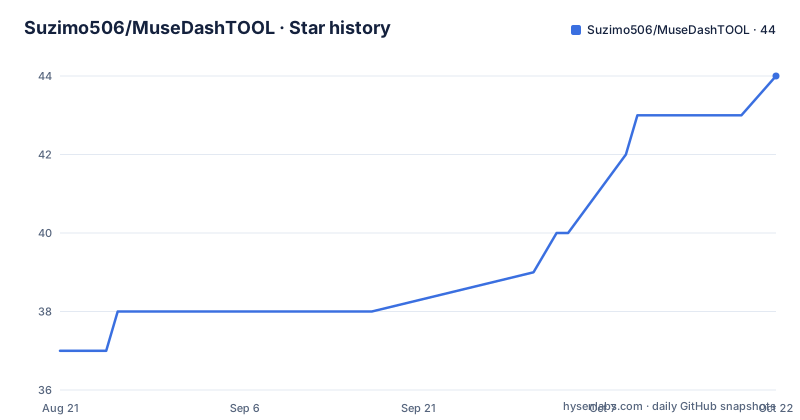
- Suzimo506/MuseDashTOOL44 ★ · +7
| Repository | 2026-08-21 | 2026-10-22 |
|---|---|---|
| Suzimo506/MuseDashTOOL | 37 | 44 |
7 Stars in the last 62 days, measured from the daily GitHub snapshot. Compare with other projects
Editorial analysis
Three prerequisites, and only one of them the tool will help with
The environment section lists three requirements and they are not negotiable as written. The first is the operating system: Windows 10 or 11 on x64. There is no Linux or macOS path listed, which makes sense for a tool that manages mods for a Windows release of the game. The second is a specific build of the game: the Steam version. Not a copy from another storefront, not a standalone build. The third is a mod loader, and that is MelonLoader, which has to be installed before the tool is useful. The tool is willing to help with that one, offering to install the loader for you, which is a deliberate convenience because a loader is the one prerequisite that is genuinely fiddly. The other two are things you either have or you do not, and there is no fallback path described for either.
Extract anywhere, with one exception stated in bold
Installation is three steps: fetch the latest archive from the releases page, extract it somewhere, and run the executable. The second step carries the only warning on the page, and it is emphasised rather than buried: do not extract into the game's own root directory. The stated reason is not spelled out, but the reasoning is not hard to reconstruct. The tool manages mods, and mods for this game live under MelonLoader's plugin directory inside the game installation, so a copy of the tool sitting beside them risks confusing the two, overwriting paths, and making an uninstall ambiguous. Step three is the first launch, which prompts you to point at the directory the game is installed in. That choice is written somewhere on first run and everything else in the tool is scoped against it, so getting it right at that prompt saves a class of problems later.
Three chart sources sit behind one search box
The chart side is where the tool does the most work, and it is organised around sources rather than around files. The MDMC community charts are supported for quick download and preview. The Euterpe community charts add a like action alongside preview and download. And the tool integrates QQ group charts plus song packs from domestic chart makers, which is the part that reflects a regional scene rather than a global registry. On top of those three sits a global search that queries MDMC, Euterpe and the QQ group charts simultaneously, so you type a title once instead of visiting three sites. There is also an online lobby view that lists Ensemble multiplayer nodes and room state, lets you browse room members and spectator chat, surfaces in-game responses, and offers a jump to download the mods a session needs.
Charts can be grouped, and new downloads land in a staging area
Chart organisation gets its own feature rather than being left to folders on disk. You can create and manage chart groups freely, which the page describes as multi-dimensional organisation, so a chart can belong to more than one bucket depending on whether you are grouping by difficulty, by pack, or by something you invent. That is the difference between this and a plain folder structure, and it matters once a collection runs to hundreds of files. There is a second, smaller behaviour that is easy to miss and easy to get wrong: new charts can be configured to download into a candidate area by default rather than straight into your library. In practice that means the tool stages something for you to accept rather than mutating your collection on a download click, which is the behaviour you want when you are browsing and the behaviour you do not want when you are installing.
Config editing is built in, and translation calls a remote service
Two features exist to remove a step rather than to add capability. The configuration editor is described as built in and intuitive, with the explicit benefit that you no longer have to dig through JSON or cfg files by hand to change a mod's settings. For a modding tool that already knows where every mod lives, that is a natural fit. The translation feature is different in kind, and the wording is worth reading closely: it works by automatically calling an online translation service so you can read mod descriptions in other languages. That is a network dependency rather than a local model, which means descriptions can be translated without a large download but also that the feature reaches a third party whenever you use it. Neither feature is documented further on the page, so the exact settings the editor exposes and the service used are things to confirm by trying them.
Personalisation covers background, blur, font and theme colour
The interface customisation list is short and specific, which usually means the options actually exist rather than that they are aspirational. You can set your own background image, control the blur applied to it, choose a font, and pick a theme colour. Language support is separate and native rather than bolted on: the interface ships in Chinese and English and switches between them from settings, which is consistent with the tool's audience given that it indexes QQ group charts and domestic chart-maker packs. The screenshot section on the page is worth noting for a different reason: it is an unfilled placeholder, with a comment inviting a screenshot rather than showing one. So the feature descriptions are your only picture of the interface. Combined with the open-source initiative line at the bottom, the overall posture is a community tool with an explicitly non-commercial funding model.
The donation page names its running costs in public
The funding section is unusual enough to be worth quoting closely. The stated costs that donations would cover are cloud storage for the QQ group charts, rental of an acceleration domain, a content delivery network, and further development. Those are real recurring expenses, not vague overhead, and naming them is the kind of transparency that tells you something about how the project is run. The commitment attached to it is explicit: the author states the tool will remain free and maintained for the long term whether or not anyone donates. The mechanics are handled manually, because the page notes that the two payment platforms do not support automatic retrieval of the donor's name, so anyone who notes their name in the transfer is added to the sponsor list by hand. The release history supports the maintenance claim: three tagged builds between August and September 2026.
An Avalonia app with four remote JSON files and a mirror config
The repository layout tells you it is a desktop application rather than a script collection, and specifically a cross-platform UI framework one: an application XAML file and its code behind, a view locator, separate view model and view directories, and a converters directory for binding value transforms. Entry points are a bootstrapper and a program file, with the project and solution files beside them, and a package source configuration for restoring dependencies. What is more telling is the set of loose JSON files at the root: an announcements feed, a news feed, a sponsors list, and a mirror domains file. Paired with a worker scripts directory, the mirror file strongly suggests the tool reaches its own endpoints or a content delivery layer rather than hitting origin services directly, which is consistent with the acceleration domain mentioned in the funding section. The English readme is a separate file rather than a translation toggle in one document.
Editorial conclusion
Adopt MuseDashTOOL if you play Muse Dash on Windows through Steam with MelonLoader already in place, because all three are hard prerequisites rather than things the tool installs for you, though it will walk you through adding MelonLoader. Do not expect a cross-platform or non-Steam story: the requirements name Windows on x64 and the Steam build specifically. Two things to check before you rely on it. That you extract it somewhere other than the game directory, which the instructions call out twice in effect. And that you accept the network dependencies, since the mirror configuration, worker scripts and several JSON feeds at the repository root mean chart search, mod market access and translation all reach out to remote services.
Frequently asked questions
Is Muse Dash a Gooner game?
The repository says nothing about game genres or content. What it describes is a third party companion tool for the game: a mod and chart manager that imports mods, toggles them, edits their configuration files, and indexes charts from MDMC, Euterpe and QQ group sources.
Is Muse Dash worth buying, and what does MuseDashTOOL need?
The page takes no position on the game's value and states no price. It does state what the tool needs: Windows 10 or 11 on x64, the Steam version of the game, and MelonLoader installed, with the tool offering to install the loader for you on first run.
How much does Muse Dash cost?
Nothing about the game's price appears here. The only pricing in the repository is the tool's own, and it is stated as free: the author commits to the tool remaining free and maintained for the long term regardless of donations, with donations optional and used for chart storage, a domain and content delivery.
Is Muse Dash a Chinese game?
The repository does not say where the game is made. What it does show is a regional modding scene: the tool indexes QQ group charts and song packs from domestic chart makers alongside the MDMC and Euterpe communities, and its interface ships in Chinese and English with switching between them in settings.
Official sources
Add this badge to your README
If you maintain this project, the badge below links readers to this analysis and shows its maintenance status from the daily GitHub snapshot. Paste the markdown into your README; add ?metric=license or ?metric=stars to the image URL for a different field.

[](https://hysenlabs.com/projects/suzimo506-musedashtool)Star history chart for your README
[](https://hysenlabs.com/projects/suzimo506-musedashtool)