Tilt automates the rebuild loop for Kubernetes microservices, and vendors everything to keep it reproducible
Define your dev environment as code. For microservice apps on Kubernetes.
At a glance
- What is it?
- Tilt watches files, builds images and updates a microservice dev environment on Kubernetes from a Tiltfile, in place of hand-run docker build and kubectl apply steps. Its costs are an unpinned install script, vendored dependencies, and anonymized usage data that Tilt sends.
- Who is it for?
- Adopt Tilt when a team edits one of several services that all talk to a Kubernetes cluster and the rebuild cycle is what slows them down, because the file watch, the image build and the resource update happen without anyone remembering to run them. Leave it for a single service, for a target that is not Kubernetes, or for a team that will not maintain a Tiltfile, since the extra loop costs more than it saves there.
- Can I use it commercially?
- Yes. Apache-2.0 is a permissive licence: you can use, modify and sell software built on it, as long as you keep its copyright and licence notices.
- Is it still maintained?
- Yes. The repository received new commits within the last day.
- What is it written in?
- Mainly Go, according to GitHub's language statistics.
Answers come from the project's GitHub data, last synced on November 14, 2026, and from our analysis. They are not legal advice.
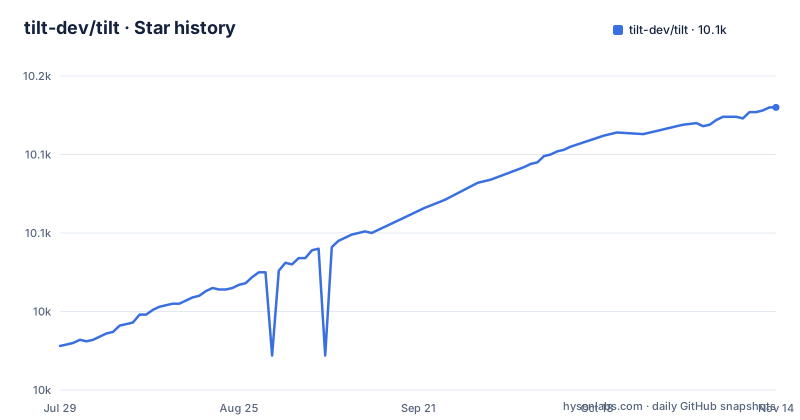
Star history
- tilt-dev/tilt10,130 ★ · +152
| Repository | 2026-07-29 | 2026-11-14 |
|---|---|---|
| tilt-dev/tilt | 10k | 10.1k |
152 Stars in the last 108 days, measured from the daily GitHub snapshot. Compare with other projects
Editorial analysis
A file change becomes a rebuilt image and an updated resource
Tilt's whole loop fits in one command:
tilt upThat brings up a complete dev environment configured for your team, because the environment is defined as code rather than assembled from shell history. The README names the three steps Tilt automates: watching files, building container images, and bringing your environment up to date. The hand-run equivalents it points at are docker build && kubectl apply, or docker-compose up, and the difference between those and Tilt is a loop rather than a feature list. Doing it by hand means remembering to rebuild, working out which of several services changed, and re-running the apply against the right resource. Tilt holds that open: change a file, the image is rebuilt, the resource is updated. What you get in exchange is a new component sitting between your editor and the cluster, plus a Tiltfile that has to be correct before anything renders at all. Break the file and the loop you wanted turns into a debugging session, which is why the per-language guides are worth reading before the first run rather than after it.
Install pipes a script out of the master branch into your shell
On macOS and Linux the install is one line:
curl -fsSL https://raw.githubusercontent.com/tilt-dev/tilt/master/scripts/install.sh | bashWindows gets a PowerShell equivalent:
iex ((new-object net.webclient).DownloadString('https://raw.githubusercontent.com/tilt-dev/tilt/master/scripts/install.ps1'))Both read from the master branch of the repository rather than from a release tag, and the README prints no version and no checksum beside either line. Two engineers installing a week apart can end up with different binaries and nothing in the README to compare them with. Teams that pin versions are sent elsewhere: the Installation Guide at docs.tilt.dev/install.html covers Homebrew, Scoop, Conda and asdf. Building from source is the third route, and the Makefile's install target compiles the CLI with a commit SHA baked into the binary:
go install -mod vendor -ldflags "-X 'github.com/tilt-dev/tilt/internal/cli.commitSHA=$$(git merge-base master HEAD)'" ./cmd/tilt/...The doubled dollar sign is make's own escaping, so the command a contributor types is make install, not the line above it.
Vendored dependencies and a go 1.27.0 floor decide what you can build
Dependencies are vendored, and that choice shows up everywhere. go.mod declares module github.com/tilt-dev/tilt and pins the toolchain at go 1.27.0. A vendor/ directory sits in the tree, and every Go target in the Makefile passes -mod vendor, including build, test-go and shorttest. What that buys is reproducible and offline builds: the same commit compiles the same binary on a laptop with no network. What it costs lands in review. A dependency bump arrives as a large vendor/ diff that nobody reads line by line, and moving to a newer buildkit means updating the vendored tree rather than editing one line in go.mod. The pinned versions are recognisable ones: docker/buildx, docker/cli v29.3.0, moby/buildkit v0.28.1, moby/moby/api v1.54.0 and compose-spec/compose-go/v2 v2.10.1, beside smaller ones such as looplab/tarjan for cycle detection and rivo/tview with gdamore/tcell behind the terminal interface. The JavaScript side is vendored too, with node_modules/ committed at the top level next to web/, so the webview's dependencies are pinned in the repository as well.
Generated Starlark and TypeScript artefacts stand between a change and a green build
Two generated-code workflows sit in the way of an ordinary edit. tygo.yaml at the top level configures tygo, and the Makefile carries update-codegen, update-codegen-go, update-codegen-starlark and update-codegen-ts targets. The effect is that the Tiltfile language has Starlark-side artefacts and the web UI has TypeScript-side artefacts produced from the Go types, so adding or changing a builtin is not a one-file change. Alongside that, dependency injection is wired with google/wire and verified by the wire-check target, and the ensure target runs goimports, vendor and shellcheck. Linting is golangci-lint configured through .golangci.yml, with lintfix taking LINT_FLAGS=--fix. The consequence for a contributor is a short checklist before review: regenerate the types, then run make ensure and make wire-check, or CI finds it after you have waited for the run.
The Go suite is skipped when the helper script sees no Go change
CI does not always run Tilt's Go tests. The test-go-ci target wraps the same command the local test-go target runs:
go test -mod vendor -timeout 100s ./...The CI version asks scripts/ci-has-go-changes.sh first whether anything Go-related moved, and in the branch where the answer is no it echoes "No Go changes, skipping tests" and stops. A second narrowing sits next to it: shorttest runs the same suite with -short and the build tags skipcontainertests and skiplargetiltfiletests, and the comment above that target admits the tags currently skip only the tiltfile DC and Helm cases.
Anonymized usage data leaves the machine, with no flag printed beside it
Tilt sends anonymized usage data, and the README says so in its community section rather than leaving it for you to find in a settings page. The detail lives in a separate document, "What does Tilt send?", at docs.tilt.dev/telemetry_faq.html, and the README prints no switch for turning it off. For most developers that is a footnote. Inside a locked-down network it is an outbound call your egress policy has to allow, and the answer to how to disable it is not on the page that mentions it. The same section is where the project routes its help: the Kubernetes Slack in the #tilt channel, or an issue on the tracker. Community Tiltfile snippets live in a separate repository, tilt-dev/tilt-extensions, which is where to look before writing your own Tiltfile functions, with the Extensions documentation covering how to extend Tilt with new Tiltfile functionality. CODE_OF_CONDUCT.md sets the behaviour expected of users, contributors, followers and employees alike, and the pull request path runs through CONTRIBUTING.md rather than through an issue template nobody reads.
Copyright and security intake both sit with Docker, and there is no bounty
The governance is not a secret, but it is easy to miss. The license is Apache License Version 2.0 with Copyright 2022 Docker, Inc., and a NOTICE file sits beside it at the top level. Security issues do not go to the issue tracker: the README asks you not to file a public issue and to mail [email protected] instead, and it states plainly that no paid security bounty program is offered at present. Two consequences follow, neither of them a legal opinion. First, Apache-2.0 with a NOTICE file is what a team inherits if it forks the CLI: keep the notice, keep the license terms, and note that the grant covers patents as well as use. Second, disclosure runs through Docker's process rather than a Tilt-specific one, so the response timeline is Docker's timeline. The tree also carries SECURITY.md, which is where a policy reader should look for the current wording rather than trusting a paragraph in the README. The repository itself is not archived and the last push to master was on 2026-10-26, and the newest release, v0.37.8, was published on 2026-10-01.
The guides are per language, while the product is per deployment shape
Documentation is organised by language rather than by target. There are best practice guides for HTML, NodeJS, Python, Go, Java and C#, a tutorial meant to get a newcomer started, and a complete API reference to search when you are tuning a Tiltfile. All of it assumes the shape of the project's own description: microservice apps on Kubernetes, framed as Kubernetes for Prod, Tilt for Dev. If your dev target is a single process, a VM, or a compose project that never reaches a cluster, none of those guides describes your situation, and the honest alternative is the docker-compose up the README already names as a mental model. Tilt's advantage over that is narrow and specific: it keeps the rebuild-and-update loop open across several services at once. Outside that case it adds a binary, a Tiltfile to maintain, and a cluster dependency to a setup that worked with neither. The API reference is where you go once a Tiltfile works. Before that, the tutorial and the guide for your language are the only two documents that matter.
Editorial conclusion
Adopt Tilt when a team edits one of several services that all talk to a Kubernetes cluster and the rebuild cycle is what slows them down, because the file watch, the image build and the resource update happen without anyone remembering to run them. Leave it for a single service, for a target that is not Kubernetes, or for a team that will not maintain a Tiltfile, since the extra loop costs more than it saves there. Verify three things before you commit: which install path the team will pin, given that the curl and PowerShell lines both fetch a script from master with no version or checksum printed; whether the egress policy already allows the anonymized usage data the README says Tilt sends; and whether your pipeline runs the Go suite, since test-go-ci skips it when scripts/ci-has-go-changes.sh reports no Go changes.
Frequently asked questions
What is tilt in devops?
Tilt presents itself as Kubernetes for Prod, Tilt for Dev, and automates the steps between a code change and a running process: watching files, building container images, and bringing the environment up to date. The manual equivalent it offers is docker build && kubectl apply, or docker-compose up, run by hand.
What is tilt used for?
Microservice development on Kubernetes, with the dev environment defined as code. Running tilt up brings up a complete dev environment configured for your team instead of assembling services one at a time.
What kind of companies use Tilt?
The README targets teams whose apps consist of many services in constant communication and run on Kubernetes, and it opens by saying modern apps are made of too many services. It gives no breakdown by company size, industry or headcount.
What is a tilt file?
A Tiltfile is the file where the dev environment is defined as code. For its functions the README points to a complete API reference, and best practice guides exist for HTML, NodeJS, Python, Go, Java and C#.
Official sources
Add this badge to your README
If you maintain this project, the badge below links readers to this analysis and shows its maintenance status from the daily GitHub snapshot. Paste the markdown into your README; add ?metric=license or ?metric=stars to the image URL for a different field.

[](https://hysenlabs.com/projects/tilt-dev-tilt)Star history chart for your README
[](https://hysenlabs.com/projects/tilt-dev-tilt)Was this useful?