SyncLounge keeps Plex playback in step across rooms and countries
Enjoy Plex with your friends. In Sync. Together.
At a glance
- What is it?
- SyncLounge, formerly PlexTogether, is a Node and Vue tool that keeps several Plex viewing sessions in sync through a middle man server, with a host model, a choice of seek strategies and an embedded player built for the job. It is MIT licensed, runs from Docker in one command, and its own documentation is candid about which clients work and which do not.
- Who is it for?
- SyncLounge is worth adopting if your Plex library is shared with people in different places and you want one person to drive playback for everyone, because the host model plus a relay server handles the case where the same file is served by different media servers, which is the situation that makes naive screen sharing fall apart.
- Can I use it commercially?
- Yes. MIT is a permissive licence: you can use, modify and sell software built on it, as long as you keep its copyright and licence notices.
- Is it still maintained?
- Yes. The repository last received commits 4 days ago.
- What is it written in?
- Mainly JavaScript, according to GitHub's language statistics.
Answers come from the project's GitHub data, last synced on November 7, 2026, and from our analysis. They are not legal advice.
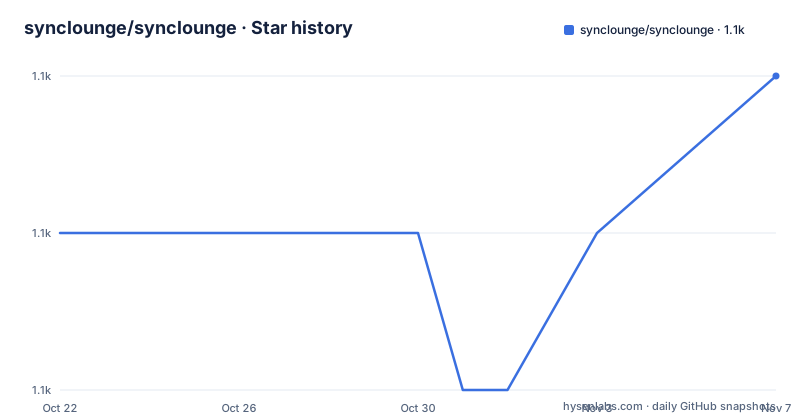
Star history
- synclounge/synclounge1,136 ★ · +1
| Repository | 2026-10-22 | 2026-11-07 |
|---|---|---|
| synclounge/synclounge | 1.1k | 1.1k |
1 Stars in the last 16 days, measured from the daily GitHub snapshot. Compare with other projects
Editorial analysis
A host, a room, and a relay in the middle
SyncLounge is a tool to sync Plex content across multiple players in multiple locations, and the model it uses is small enough to describe in one sentence.
Users choose their Plex client, decide on a SyncLounge Server and a Room name, and join up. The middle man server is what makes it work, communicating between each of the SyncLounge clients. Whoever joins the room first becomes the host, and the host has complete control over the room. Commands they send to their own client, play, pause, seek, are sent through to the other people in the room.
Then there is the detail that makes the tool more than a remote control. If the host starts playing something different, SyncLounge searches all of your available Plex Media Servers for an equivalent copy, even if it is not from the same Plex Media Server as the host. That is the hard part of watching together over the internet, because two people rarely have the same library on the same server, and a shared timestamp on two different copies of a file is not the same as a shared timestamp on one file.
So SyncLounge solves two problems at once. It relays the commands, and it resolves the content. The first is a messaging problem, and the second is a library matching problem, and the second is why the tool exists at all.
The audience is a group with a shared Plex library who watch together and are not in the same room, and the project was previously called PlexTogether, which is a good description of the goal.
Clean seek, skip ahead, and how far off sync you tolerate
Synchronising two players is not a single problem, and the settings section is where SyncLounge exposes the choices.
There is the client polling interval, which sets how frequently SyncLounge polls the client for new information. There is sync flexibility, which sets the acceptable distance away from the host in milliseconds. And there is the sync method itself, with three options.
Clean seek seeks straight to where the host is. Skip ahead seeks 10 seconds ahead, pauses, and then resumes 10 seconds later. And Plex Media Server blocking allows you to restrict the servers SyncLounge searches for content.
The three options reveal the trade-off the tool is negotiating. Clean seek is exact and obvious, and on a client with a slow seek it produces a visible stall. Skip ahead is the compromise, and it is worth understanding what it does: rather than jumping the whole distance, both players move 10 seconds ahead and pause, which hides the latency of a slow seek by overlapping it with a jump, at the cost of a 10 second offset that then resolves. The flexibility setting is the tolerance band, and it is measured in milliseconds, so a setting of a few hundred means the players are allowed to be that far apart before the tool intervenes.
The Media Server blocking option is the one that looks administrative and is actually a correctness control. Because SyncLounge searches your other servers for an equivalent copy, the set of servers it is allowed to search changes what content is reachable, and restricting it is how a deployment keeps a shared session inside the library you intend to share.
There is also autoplay, which searches all of your available Plex Media Servers for content similar to what the host is playing, and the built in SyncLounge Player, which plays content directly inside SyncLounge and is, in the documentation's words, built specifically for syncing.
The client support list is the honest part of the readme
There is a section of the readme that most projects of this type would leave out, and it is the section that decides whether the tool works for you.
The theory stated first is that all Plex Clients that implement the Plex Client Protocol will work, but that as some clients implement it slightly differently, compatibility with SyncLounge may vary.
Then the lists. The unsupported client is the Plex Web Player in Chrome, Safari and Firefox. The supported clients are Plex Media Player, Plex Home Theater, OpenPHT, Rasplex, Roku, Android, Nvidia Shield, iOS for iPhone and iPad, and AppleTV. And the broken list is the consoles: Xbox One, Xbox 360, PS3 and PS4.
The browser exclusion is the one to internalise, because the browser is where a lot of people watch, and the console list is the other, because a living room television is exactly the case people want to solve. It also explains why SyncLounge ships its own player, because the web player cannot be controlled, so a browser user has to switch to the SyncLounge Player to participate.
There is one more caveat, and it is a hardware one. Some low powered clients may be hard to achieve a perfect sync with, and the example given is Raspberry Pi clients. That is a direct consequence of the design, since the tolerance band and the seek method exist to absorb exactly that kind of latency, but a device that cannot keep up will still drift.
The readme also invites reports about untested clients, with a request to let the maintainers know so the list can be updated, which is the kind of invitation that only makes sense if the list is meant to change.
One port, and a web app and socket server in the same process
The deployment story is short, and the readme is explicit about the operational detail that matters.
By default SyncLounge listens on port 8088. All the paths are relative, so you can put it behind a reverse proxy at any subdirectory or subdomain without any additional configuration. And in this version the webapp and the socket server are combined, so you only need to proxy that one port.
The Docker path is the easiest one, because it works out of the box:
docker pull synclounge/synclounge
docker run -p 8088:8088 synclounge/synclounge:latest
The Linux path without Docker needs Node installed, and is a global npm install followed by running the binary:
sudo npm install -g syncloungesyncloungeThe repository carries a Dockerfile and a separate Dockerfile.web, and the Dockerfile is a three stage build on node:22.2.0-alpine3.18. The build stage compiles the Vue frontend with a SKIP_BUILD=true install first so the dependency layer is cached separately, the dependency stage prunes to production, and the production stage copies in server.js, the config directory and the built dist, with tini as the init process and the command /app/server.js. There is also a docker-compose file, and the project publishes images to Docker Hub and the npm package to the registry, with a live instance at app.synclounge.tv and the site at synclounge.tv.
The Nginx example in the documentation is there for the socket upgrade, with the map block for $http_upgrade and $connection_upgrade, which is the part people copy and get wrong when they proxy a websocket application by hand.
Configuration through environment variables, including nested ones
The default configuration lives in config/defaults.js, and the readme gives three ways to change it. You can use environment variables with the same name, you can use command line arguments, or you can use a config file and run the server with the --config_file flag:
synclounge --config_file /path/to/config.jsonThe environment variable route is the one worth understanding, because it can carry structured values. The readme notes that nested objects and arrays can be passed as environment variables in a particular way, and gives two examples:
AUTHENTICATION='{"mechanism":"plex","type":["server"],"authorized":["MACHINE_ID"]}'

SERVERS='[{"name":"My Server","location":"Mothership","url":"https://myserver.com","image":"https://myserver.com/myimage.jpg"]'
The first is the authentication configuration, which says the mechanism is plex, the type is server, and authorises a specific machine id. The second is the list of media servers, each with a name, a location label, a url and an image.
The configuration format itself is JSON, and the server side uses nconf for it, with the syncloungeserver package carrying the room and sync logic. The web client is a Vue application built with the Vue CLI, with shaka-player for video playback in the embedded player, socket.io-client for the connection, mux.js and string-similarity for the media handling and for the equivalent content matching, and detect-browser for client detection.
The full feature list is worth reading for the parts that are not about sync. There is Plex Media Server browsing, so you can find, search and fling content to Plex clients from inside SyncLounge, and metadata fetching from the media server. There is chat to others in your room. There are password locked rooms, and invitations via a generated short link. And the content scope is stated exactly: movies and TV shows, with music not supported.
Releases stop in 2024, the repository keeps moving
The maintenance picture needs the two facts side by side.
The repository is not archived, and the last push was on 2026-10-13. The release history, on the other hand, is v5.2.33 on 2024-09-13, v5.2.34 on 2024-10-23 and v5.2.35 on 2024-12-26. So the code has been touched within the last week, and the last tagged release is close to two years old.
Part of that is explained by the versioning. The package version in the manifest reads 0.0.0-semantically-released, which is the placeholder semantic-release uses, and there is a .releaserc file in the repository along with commitlint and the conventional commit configuration, so the published version is generated from commit messages at release time rather than maintained by hand. The npm and Docker badges in the readme show the 5.2.x line.
The release process is also visible in the tooling. There is a release workflow badge linked to the release action, a commitlint configuration with the conventional preset, husky with lint-staged, and a prepare script that skips the build when the SKIP_BUILD environment variable is set, which is what lets the Docker dependency layer be installed without compiling the frontend twice.
So the pattern is a project that still ships releases, on a semantically released line, whose most recent tag is from the end of 2024. For a self hosted tool that is acceptable, because the upgrade path is pulling a newer image. For anyone who cares about the pace of upstream fixes, the tag list is the thing to watch.
The licence is MIT, linked in the readme to the MIT licence text with the LICENSE file at the repository root.
Editorial conclusion
SyncLounge is worth adopting if your Plex library is shared with people in different places and you want one person to drive playback for everyone, because the host model plus a relay server handles the case where the same file is served by different media servers, which is the situation that makes naive screen sharing fall apart. It is the wrong choice if your group watches on browsers, since the Plex Web Player is listed as unsupported, or if the players are consoles, which are listed as broken. Before you deploy it, decide whether you need the embedded player at all, and note that the current release line is 5.2.x with v5.2.35 from 2024-12-26 while the repository was pushed to on 2026-10-13.
Frequently asked questions
What does SyncLounge do?
It syncs Plex content across multiple players in multiple locations using a middle man server that communicates between the clients. Users choose a Plex client, a SyncLounge Server and a Room name, the first person in the room becomes the host, and their play, pause and seek commands are sent through to everyone else.
How do I run SyncLounge with Docker?
Pull the image and run it with the default port published, using docker pull synclounge/synclounge followed by docker run -p 8088:8088 synclounge/synclounge:latest. The webapp and the socket server are combined in this version, so only port 8088 needs to be proxied.
Which Plex clients work with SyncLounge?
The readme lists Plex Media Player, Plex Home Theater, OpenPHT, Rasplex, Roku, Android, Nvidia Shield, iOS and AppleTV as supported, the Plex Web Player as unsupported, and Xbox One, Xbox 360, PS3 and PS4 as broken. It also notes that low powered clients such as Raspberry Pi clients may be hard to sync perfectly.
What sync methods does SyncLounge offer?
Clean seek, which seeks straight to where the host is, and skip ahead, which seeks 10 seconds ahead, pauses and then resumes 10 seconds later. The acceptable distance from the host is set in milliseconds by the sync flexibility setting, and Plex Media Server blocking restricts which servers are searched for content.
Can I change the SyncLounge configuration without editing files?
Yes. You can use environment variables with the same names as the defaults in config/defaults.js, including nested objects and arrays passed as JSON strings, or use command line arguments, or point at a config file with synclounge --config_file /path/to/config.json.
Official sources
Add this badge to your README
If you maintain this project, the badge below links readers to this analysis and shows its maintenance status from the daily GitHub snapshot. Paste the markdown into your README; add ?metric=license or ?metric=stars to the image URL for a different field.

[](https://hysenlabs.com/projects/synclounge-synclounge)Star history chart for your README
[](https://hysenlabs.com/projects/synclounge-synclounge)Was this useful?