OpenCut for Premiere Pro: what runs locally and what the installer leaves to you
OpenCut for Premiere Pro. Local AI video editing automation for Adobe Premiere Pro: silence and filler cuts, captions, audio repair, and social export. Runs on your own machine, no subscription and no API keys for the core features.
At a glance
- What is it?
- OpenCut automates silence cuts, captions, audio repair and social export inside Premiere Pro from a local Python backend. Its README is unusually explicit about verification, because the shipped installer is unsigned and the package name is disambiguated with a -ppro suffix.
- Who is it for?
- OpenCut suits an editor on Windows, macOS or Linux who wants repeatable silence and filler cuts, captions and audio repair driven from Premiere Pro without a subscription, and who is willing to read a release page before running an installer. It does not suit someone who needs a signed binary, a published PyPI or Homebrew package, or a GPU container.
- Can I use it commercially?
- Yes. MIT is a permissive licence: you can use, modify and sell software built on it, as long as you keep its copyright and licence notices.
- Is it still maintained?
- Yes. The repository last received commits 26 days ago.
- What is it written in?
- Mainly Python, according to GitHub's language statistics.
Answers come from the project's GitHub data, last synced on October 22, 2026, and from our analysis. They are not legal advice.
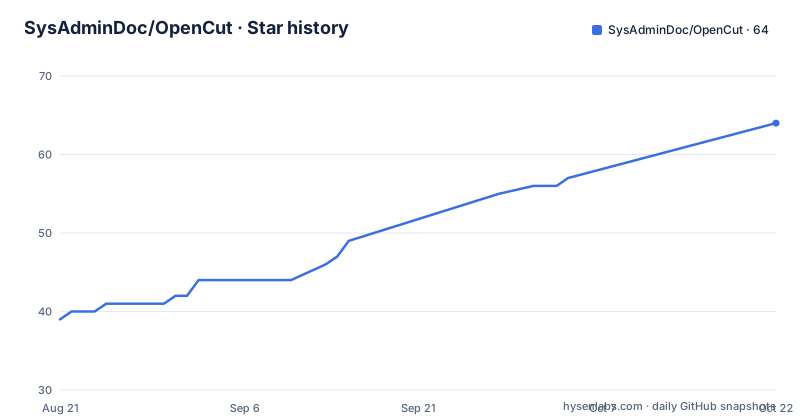
Star history
- SysAdminDoc/OpenCut64 ★ · +25
| Repository | 2026-08-21 | 2026-10-22 |
|---|---|---|
| SysAdminDoc/OpenCut | 39 | 64 |
25 Stars in the last 62 days, measured from the daily GitHub snapshot. Compare with other projects
Editorial analysis
Runtime work happens in a local backend, not in the panel
OpenCut is a Premiere Pro extension with a Python backend that runs on the machine doing the editing. The feature list is concrete: unlimited reviewable silence-cut passes that go straight to the timeline, cross-project media search, stem separation, voice cloning, 55-style animated captions with exportable artifacts, local LLM highlights, and multi-platform social export. Everything in that core list runs without subscriptions, without usage caps and without API keys. What does reach the network is separated on purpose: cloud providers, Edge-TTS, downloads, telemetry and social uploads are described as optional, explicit network features. The backend exposes a large surface, and the project counts it honestly: 310 shipped routes carry first-party panel, palette, CLI and curated MCP references, while 1,254 more are integration-only surfaces rather than advertised workflows.
The route count is generated, tagged and verifiable
The advertised route count is not typed by hand. It is generated from opencut/_generated/route_manifest.json and reflects shipped routes only, with every route tagged implemented, dependency-gated or stub, and strategic 501 stubs excluded from the number. Two commands check that claim. The offline one compares the manifest against the live Flask app:
python -m opencut.tools.dump_route_manifest --checkThe online one returns the live shipped count and the stub list from `GET /system/route-readiness`. For deliberate route-level work the project keeps a generic `opencut route` command and an opt-in extended MCP surface rather than promoting every integration route into a panel workflow. For a user this matters in a narrow way: the tags tell you in advance which parts of the tool are finished, which are waiting on an optional dependency such as demucs or edge-tts, and which are placeholders.
opencut-ppro exists because another OpenCut owns the name
A distribution decision dated 2026-06-14 keeps the product name OpenCut but changes the package token to opencut-ppro. The reason is a collision: an unrelated browser-based editor also called OpenCut had around 85K stars as of 2026-08-20, merged a ground-up rewrite in July 2026, and is moving toward a plugin store, headless rendering and an MCP server, so it will keep dominating searches for the bare word. The -ppro suffix marks the Premiere Pro integration. What deliberately stays the same matters more for anyone automating this: the import package is still `import opencut`, the CLI commands are still `opencut`, `opencut-server` and `opencut-mcp-server`, and the extension IDs are still com.opencut.panel and com.opencut.uxp. Where the name has to stand alone, the project asks for OpenCut for Premiere Pro.
Two Windows paths: a packaged installer or Install.bat
Option A is the published Windows installer, currently OpenCut v1.55.1, with artifacts named OpenCut-Setup-<version>.exe. It handles the server, FFmpeg, the CEP extension, registry entries and optional model downloads, and it bundles its own runtime so no Python is needed. Option B is source. The checkout is two commands:
git clone https://github.com/SysAdminDoc/OpenCut.git
cd OpenCut
Then Install.bat is right-clicked and run as administrator, and it takes on FFmpeg, Python dependencies, the CEP extension, registry keys and launcher creation. Its steps are specific enough to plan around: FFmpeg is installed or upgraded and releases below 8.1.3 are rejected, as are snapshots dated before 2026-07-06; Python 3.11 to 3.14 is verified on PATH before anything is installed; dependencies such as Flask, click and rich are installed; the OpenCut package is installed; Whisper is offered for caption generation; the CEP extension is copied into Adobe's extensions folder; the PlayerDebugMode registry key is set so unsigned extensions load; and Start-OpenCut.bat appears on the desktop.
Unsigned installers and the digest check that replaces signing
OpenCut ships unsigned, and the project says so without hedging. Windows shows a SmartScreen warning the first time an installer runs and again after every update, because an unsigned file builds no reputation, and the note adds that signing no longer guarantees the prompt disappears either. This is a permanent part of installing, not a queue for a certificate. The path past the warning is More info, then Run anyway. The compensating control is arithmetic: check what you downloaded against the digest published on the release page.
sha256sum OpenCut-Setup-<version>.exeGet-FileHash .\OpenCut-Setup-<version>.exe -Algorithm SHA256Every release publishes release-digests.json with the SHA-256 of each artifact, and the instruction is blunt: if the value you compute is not in that file, do not run the installer.
Provenance records ship beside the installed application
Each assembled installer carries five records next to the application itself: release-composition.json, opencut-artifact-sbom.cyclonedx.json in CycloneDX form, THIRD-PARTY-NOTICES.txt, ffmpeg-provenance.json, and embedded-media-provenance.json, which inventories the FFmpeg libraries carried by OpenCV and PyAV. These files bind the dependency set, the packaged payloads and the media decoders to SHA-256 hashes, and they record the source and build evidence needed to reproduce the GPL-covered component. The repository keeps the licensing side of the same trail in release-license-evidence.json and a release_licenses/ directory. This is a different posture from a typical desktop utility: an unsigned binary is paired with a machine-checkable description of what went into it, so the trust decision moves from the vendor's signature to your own comparison.
The container is CPU only and refuses to start without a token
The Compose file runs one service, opencut-server, on port 5679 with a healthcheck against /health every 30 seconds, a 4.0 CPU limit, 4G of memory, and json-file logging capped at 50 megabytes across three files. The image bakes OPENCUT_ALLOW_REMOTE=1, so the server requires a mounted auth token file and exits without one, which the Dockerfile calls fail-closed. FFmpeg is not taken from the Debian package: the build pins a version, an upstream commit and a SHA-256, because the distro package can lag the patched commits. GPU work is explicitly absent, since the locked image has no CUDA or NVENC runtime and the project points GPU users at a native lane instead. The MCP sidecar is opt-in through a profile:
docker compose --profile mcp up opencut-mcpIt listens on 5681, shares the opencut-data volume and trusts the Compose service names on loopback.
Dependency floors are pinned to named advisories
requirements.txt reads like a security ledger, and the comments name the advisory behind each floor. click is held at 8.3.3 or newer for a command injection issue in click.edit; Werkzeug at 3.1.6 and Jinja2 at 3.1.6 for their published fixes; cryptography at 50.0.0 for Ed25519 publisher signatures used by staged plugin installation, including fixes for a PKCS#7 oracle, a certificate chain denial of service and DNS constraint advisories; huggingface-hub at 1.26 for a local_dir containment issue; requests at 2.33.0 and urllib3 at 2.7.0. Lock files back this up: pylock.toml, requirements-lock.txt, requirements-build-lock.txt and requirements-release-lock.txt sit next to the loose requirements. Optional extras are commented out and cost real space, with demucs alone around 1.5GB once models are counted.
Four planning documents and a branch ahead of its tags
Work tracking is unusually disciplined for a project of this size. ROADMAP.md is stated to be the only active open-work tracker, CHANGELOG.md records shipped release-facing changes, RESEARCH.md summarises the current research direction and points at archived inputs, and docs/RESEARCH_COMPETITIVE_TEARDOWN_2026-06-10.md preserves the June 2026 competitive teardown evidence. ROADMAP-COMPLETED.md, SECURITY.md, CONTRIBUTING.md and DEVELOPMENT.md sit beside them. Packaging is spread across the same top level: OpenCut.iss for the Windows installer, flathub.json and io.github.sysadmindoc.opencut.yml for Linux, OpenCut-Server.sh, .command, .bat and .vbs launchers, OpenCut-Launcher.vbs, Uninstall.bat and install.py. Version 1.55.1 in pyproject.toml matches the newest tag, dated 2026-08-25, while the last push to main is 2026-09-26.
Editorial conclusion
OpenCut suits an editor on Windows, macOS or Linux who wants repeatable silence and filler cuts, captions and audio repair driven from Premiere Pro without a subscription, and who is willing to read a release page before running an installer. It does not suit someone who needs a signed binary, a published PyPI or Homebrew package, or a GPU container. Before installing, confirm Premiere Pro 2019 or later for the CEP panel or 25.6 or later for the UXP panel, put FFmpeg on PATH for source installs, and verify the installer against release-digests.json, because nothing in the file vouches for it. The newest tag is v1.55.1 from 2026-08-25 while the last push to main is dated 2026-09-26.
Frequently asked questions
What is OpenCut?
OpenCut for Premiere Pro is a free, MIT-licensed extension that automates editing work inside Adobe Premiere Pro: silence and filler cuts, captions, audio repair and social export. It runs on your own machine, and the core local features need no subscription and no API keys.
Is OpenCut free?
Yes. The project describes itself as a free, MIT-licensed Premiere Pro extension that replaces roughly $1,400 a year of video-editing subscriptions, with no subscriptions, no usage caps and no API keys required for core local features. Cloud providers, Edge-TTS, downloads, telemetry and social uploads are optional network features.
How do I install OpenCut on Windows?
Use the published Windows installer OpenCut v1.55.1, whose artifacts are named OpenCut-Setup-<version>.exe and which bundles its own runtime, so no Python is needed. It ships unsigned, so Windows shows a SmartScreen warning that returns after every update; check the file against release-digests.json before running it.
How do I install OpenCut from GitHub?
Clone the repository and run Install.bat as administrator. The script installs or upgrades FFmpeg, rejecting releases below 8.1.3 and snapshots before 2026-07-06, verifies Python 3.11 to 3.14 on PATH, installs the dependencies and the OpenCut package, copies the CEP extension into Adobe's extensions folder, sets the PlayerDebugMode registry key, and creates Start-OpenCut.bat.
How do I use OpenCut once it is installed?
The extension loads in Premiere Pro as the com.opencut.panel CEP panel or the com.opencut.uxp UXP panel, which needs Premiere Pro 25.6 or later while the CEP path supports 2019 or later. The backend is started with opencut or opencut-server, FFmpeg must be on PATH for source installs, and the opencut-mcp-server command serves the MCP surface.
Official sources
Add this badge to your README
If you maintain this project, the badge below links readers to this analysis and shows its maintenance status from the daily GitHub snapshot. Paste the markdown into your README; add ?metric=license or ?metric=stars to the image URL for a different field.

[](https://hysenlabs.com/projects/sysadmindoc-opencut)Star history chart for your README
[](https://hysenlabs.com/projects/sysadmindoc-opencut)