Pynsist builds a Windows installer that carries its own copy of Python
Build Windows installers for Python applications
At a glance
- What is it?
- Pynsist is a Python tool that turns an installer.cfg file into an NSIS based Windows installer with Python, your application and its wheel dependencies bundled inside. It suits developers who ship a Python desktop tool to people who will never install Python themselves.
- Who is it for?
- Pynsist fits a developer shipping a Python desktop application to Windows users who have no interpreter of their own, and who want a normal installer with an uninstaller rather than a zip of wheels. It does not fit a project whose dependencies are not published as wheels, a team that needs macOS or Linux packages, or a build that requires code signing without further work.
- Can I use it commercially?
- Check first. The repository uses a licence we do not classify automatically, so read its LICENSE file before any commercial use.
- Is it still maintained?
- Yes. The repository last received commits 80 days ago.
- What is it written in?
- Mainly Python, according to GitHub's language statistics.
Answers come from the project's GitHub data, last synced on November 7, 2026, and from our analysis. They are not legal advice.
Star history
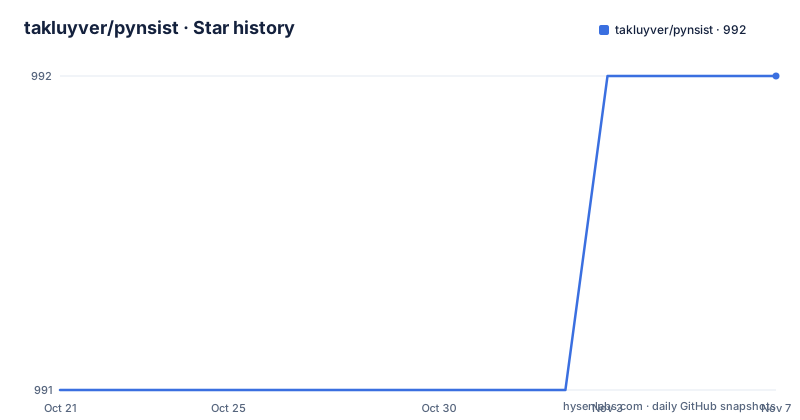
- takluyver/pynsist992 ★ · +1
| Repository | 2026-10-21 | 2026-11-07 |
|---|---|---|
| takluyver/pynsist | 991 | 992 |
1 Stars in the last 17 days, measured from the daily GitHub snapshot. Compare with other projects
Editorial analysis
What Pynsist produces and who the target user is
Pynsist builds Windows installers for Python applications. The installers bundle Python itself, so the application can be distributed to people who do not have Python installed. That sentence is the whole product in one line, and everything else in the tool exists to serve it.
The audience is a developer with a Python application that has to run on someone else's Windows machine. That person might be a colleague, a customer, or a member of the public. The usual alternative is to ask them to install Python first, pick the right version, and deal with the pip situation afterwards, and Pynsist removes that step from their side rather than from yours.
What you get at the end is an installer built with NSIS, which means it is a standard Windows installer with the behaviour users already know, including an uninstaller. The project classifies itself for the Win32 environment and for software distribution, and it lists the Windows installer toolchain as a prerequisite, so this is deliberately a Windows-only path.
The tool is also more than a command you run once. The documentation states that there are other options which make it easier to integrate as a step in a more complex build process, and the package exposes a Python entry point, so it can be driven from your own build script.
installer.cfg: three sections that describe the whole package
The configuration is an INI style file with three sections that matter. The Application section names the app and, crucially, says how to launch it. The Python section pins the interpreter version to bundle. The Include section lists what goes in.
[Application]
name=My App
version=1.0
# How to launch the app - this calls the 'main' function from the 'myapp' package:
entry_point=myapp:main
icon=myapp.ico

[Python]
version=3.6.3
The entry_point key is the piece that makes this more than a repackaging tool. By naming a callable, Pynsist can create the launcher that starts your application, so the end user gets a shortcut that opens the right thing rather than a Python prompt.
The Include section is where the dependencies and the extra files go.
[Include]
# Packages from PyPI that your application requires, one per line
# These must have wheels on PyPI:
pypi_wheels = requests==2.18.4
    beautifulsoup4==4.6.0
    html5lib==0.999999999
Extra files and folders are listed separately in the same section, and the documentation points at the config file reference for the full set of options.
files = LICENSE
    data_files/
Every key here is a decision you have to make and get right, because the generated installer silently does whatever the file says.
Wheels only, which rules out a lot of perfectly good dependencies
The constraint that will bite people most often is stated in the configuration file itself: the packages listed under pypi_wheels must have wheels on PyPI. The documentation repeats it in slightly different words, saying that to bundle packages which do not publish wheels, or to include wheel files directly from a directory, you need to look at the docs on the config file.
So the mechanism is straightforward. Pynsist resolves your pinned requirements, downloads the wheel files, and puts them in the bundle, where pip can install them at install time into the bundled interpreter. That is why the wheels requirement exists: a wheel is a prebuilt archive that can be unpacked, while a source distribution would need a compiler and a build step on the target machine.
The practical consequence is that your dependency tree has to be wheel-clean. A package that only publishes an sdist, or a package with compiled extensions that has no wheel for the Python version you bundled, will not come along by default. The escape hatches are documented in the config reference rather than in the quickstart, which means the quickstart understates the work involved for a project with awkward dependencies.
The dependencies of Pynsist itself reflect what it does. requests and requests_download fetch the Python installer and the wheels, jinja2 renders the templates for the generated installer script, distlib handles the distribution work, and yarg parses the command line.
The build itself: install NSIS, install Pynsist, run one command
The quickstart is three steps. First the tools: install NSIS, then install Pynsist from PyPI.
pip install pynsistSecond, write the installer.cfg file described above. Third, run Pynsist on it.
pynsist installer.cfgIf the pynsist command is not on your path, the documentation gives the module form as the fallback.
python -m nsist installer.cfgThat fallback is not just a convenience, it is a clue about how the package is built. The project metadata declares the console script pynsist pointing at nsist:main, and the module itself is named nsist rather than pynsist. Pynsist is the product name, nsist is the importable package.
The packaging is done with flit, with the module name declared explicitly in the build configuration, and the project metadata requires Python 3.8 or later for running Pynsist itself. The build output is a single installer executable, and the quickstart states plainly that this example illustrates using Pynsist by itself for simple projects, with other options for integrating it into a more complex build process.
The examples directory shows the application shapes this handles
The repository carries an examples directory with one directory per kind of project, and a script that builds them all. The list is more informative than it looks, because it is effectively the project's answer to what kinds of applications this is expected to package.
There is a console example, which is the simple case the quickstart already covers. There are pygame and pyglet examples for windowed games, and two PyQt5 examples, one of them combining PyQt5 with OpenCV and another with QML. There is a pygi example that combines PyGObject with matplotlib and numpy, which is a good stress test because it mixes native GUI bindings with scientific libraries that often need compiled wheels. There is a pywebview example and a streamlit example.
Two scripts sit alongside them: build_all_examples.py, which presumably drives the build for each of them, and clean.py, which removes the artefacts.
The spread tells you the tool expects real desktop applications with real dependencies, not scripts. That also means the wheel constraint is felt: several of these example stacks include packages where wheel availability and platform tags decide whether the build works at all.
If your application resembles one of these, you can compare notes with the corresponding config file rather than starting from an empty file.
Version support, licensing and the gaps in the visible documentation
The version story in the project description is explicit. Pynsist 2.7 requires Python 3.6 or above, Pynsist 2.6 can be used on Python 3.5, and Pynsist 1.x works on Python 2.7 and Python 3.3 or above, but those older versions will not get further updates. The packaging metadata, meanwhile, declares that running Pynsist itself needs Python 3.8 or later, which is a newer floor than the 3.6 stated for the 2.7 line. Treat the metadata in pyproject.toml as the authoritative requirement for a fresh install, and check the documentation for the version of Pynsist you actually pin.
The licence needs care. The repository metadata reports a custom licence that GitHub cannot classify, and the classifier list in pyproject.toml claims MIT. Those two statements do not agree, so the file to read is LICENSE in the repository root, not the classifier. Have whoever owns licensing in your organisation read it before you ship a bundle containing it, and treat this paragraph as a pointer to that file rather than as legal advice.
There are no GitHub releases for the project, so versions come from PyPI rather than from tags on the site, and the last push to the repository was on 2026-08-20.
Two things the visible documentation does not cover are worth naming. Code signing of the resulting installer is not mentioned anywhere, so assume you are producing an unsigned executable unless you handle that yourself. And the uninstall behaviour, the upgrade path over an existing installation, and the file layout inside the installed directory are not described in the quickstart, only implied by the reference to the configuration documentation.
Editorial conclusion
Pynsist fits a developer shipping a Python desktop application to Windows users who have no interpreter of their own, and who want a normal installer with an uninstaller rather than a zip of wheels. It does not fit a project whose dependencies are not published as wheels, a team that needs macOS or Linux packages, or a build that requires code signing without further work. Before using it, confirm that every dependency has a wheel on PyPI, install NSIS on the build machine, and read the documentation on integrating Pynsist as a library call if your release pipeline already owns the installer step.
Frequently asked questions
How do I install Pynsist and build my first Windows installer?
Install NSIS, then install Pynsist with pip install pynsist, write an installer.cfg file, and run pynsist installer.cfg. If the command is not found you can run python -m nsist installer.cfg instead.
Does the Pynsist installer include Python for the end user?
Yes. The installers bundle Python itself, which is the point of the tool, since the application can be distributed to people who do not have Python installed. The Python section of the config file pins which version is bundled.
Can Pynsist bundle dependencies that do not publish wheels?
Not through the pypi_wheels list, whose packages must have wheels on PyPI. The documentation points to the config file reference for bundling packages without wheels or including wheel files directly from a directory.
Which Python version do I need to run Pynsist?
The packaging metadata requires Python 3.8 or later for running Pynsist, while the project description states that Pynsist 2.7 requires Python 3.6 or above. Older Pynsist lines cover Python 3.5 and Python 2.7 but will not receive further updates.
Can I use Pynsist inside a larger build pipeline?
Yes. The project states that there are other options which make it easier to integrate as a step in a more complex build process, and the package exposes a Python entry point alongside the pynsist command.
Official sources
Add this badge to your README
If you maintain this project, the badge below links readers to this analysis and shows its maintenance status from the daily GitHub snapshot. Paste the markdown into your README; add ?metric=license or ?metric=stars to the image URL for a different field.

[](https://hysenlabs.com/projects/takluyver-pynsist)Star history chart for your README
[](https://hysenlabs.com/projects/takluyver-pynsist)Was this useful?