PhotoDemon's stable build is ten months old, its source archive is larger than its compiled application, and its AI policy carves out one exemption and admits it cannot guarantee anything
A free portable photo editor focused on pro-grade features, high performance, and maximum usability.
At a glance
- What is it?
- tannerhelland/PhotoDemon is a portable Windows photo editor that installs nothing and leaves no trace, where the release channel is a calendar-versioned stable build from December 2025 alongside an unversioned nightly from August 2026, where portability is credited for a 32-bit limit that caps images at about two gigabytes, and where the author's written policy against model-generated contributions exempts volunteer translations and states the uncertainty that creates.
- Who is it for?
- This is worth trying if you want a photo editor that leaves nothing on the machine, because that constraint is real and unusual and the page backs it with a specific claim about what it writes to disk. The batch macro recorder and the format list are the two features that make it more than a viewer.
- Can I use it commercially?
- Check first. The repository uses a licence we do not classify automatically, so read its LICENSE file before any commercial use.
- Is it still maintained?
- Yes. The repository received new commits within the last day.
- What is it written in?
- Mainly Visual Basic 6.0, according to GitHub's language statistics.
Answers come from the project's GitHub data, last synced on November 24, 2026, and from our analysis. They are not legal advice.
Star history
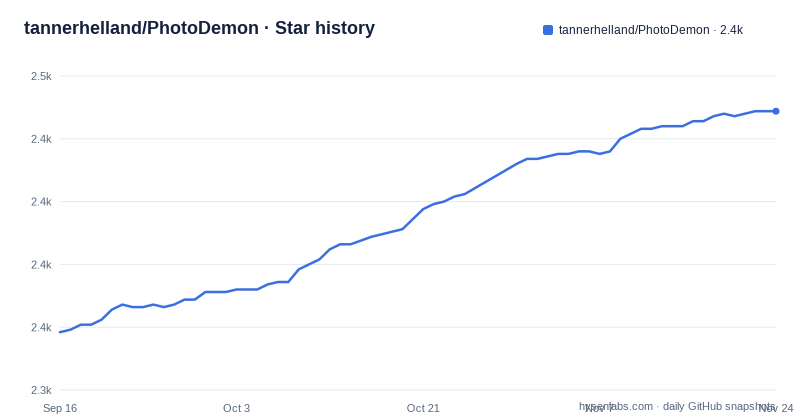
- tannerhelland/PhotoDemon2,436 ★ · +88
| Repository | 2026-09-16 | 2026-11-24 |
|---|---|---|
| tannerhelland/PhotoDemon | 2.3k | 2.4k |
88 Stars in the last 69 days, measured from the daily GitHub snapshot. Compare with other projects
Editorial analysis
The stable build is from December and the nightly is the current one
There are two channels and the release list makes the difference awkward to miss.
The newest named release is a calendar version from December 2025, numbered by year and month rather than by a semantic version. The next release in the list is a nightly, dated August 2026. The one before the December stable is an April 2025 calendar version.
So the last settled build is about ten months old while the unversioned nightly is roughly eight months newer than it. The version scheme itself explains part of the confusion: there is no minor or patch number to compare, only a year and a month, and the nightly has no version at all.
There is a related detail in the dates. The nightly is dated one day after the most recent push to the default branch. That is consistent with a nightly pipeline that builds whatever landed, which is what you want from the channel, and it means the nightly is the artefact that actually corresponds to the current tree while the stable corresponds to an old one.
The page's own guidance reflects this split. It sends you to the project site for the latest stable release and to a different download page for the nightly.
The source archive is larger than the compiled application
The download table has three cells and one of them is backwards from what you would expect.
The stable build and the nightly are both a 22 megabyte zip. The source code zip is 26 megabytes.
A source archive that outweighs its own compiled output is unusual, and it happens for a reason the page does not discuss: this is a project whose deliverable is a directory of forms, classes, modules and bundled libraries rather than a compact binary, and the source column is a plain archive of the default branch rather than a release artefact.
That last point is a real difference in kind, not just size. The stable and nightly links point at named files attached to specific releases, so the bytes you get are the bytes the maintainer published for that version. The source column points at the branch archive, so it is whatever the default branch held at the moment you clicked.
For a project that calls itself the most recent thing on that branch elsewhere, that distinction is worth holding on to: one link is versioned and the other is not.
The three columns also differ in what they promise. Two are binaries you can run; one is a tree you cannot run without following the installation document at the repository root.
Portability is credited for a 32-bit limit that caps images at two gigabytes
The limitations section has two entries and the first is about operating systems and the second is about the address space.
The second one is the interesting one. The page says that due to the portable nature of the application, it is only available as a 32-bit build, and it puts the consequence in parentheses: it cannot load or save images larger than about two gigabytes.
So the project's defining feature, running from a USB stick with no installer, is given as the cause of a hard ceiling on file size. That is a coherent trade for a hobby project that values not touching the machine over working with very large images, and the page states it plainly rather than leaving you to discover it with a file that will not open.
The repository tree is consistent with the shape of the thing and worth reading alongside that. The root holds a Visual Basic project file, and then folders named for the classic project layout: the application directory, classes, controls, forms, interfaces, modules, resources and support. That is a form-and-class-based codebase rather than a library with a build script, and it explains why the distribution is a directory of files that you unzip and run.
The first limitation is the platform one. Windows is the only supported operating system, and the page says a compatibility layer might allow it to run elsewhere while being explicit that those configurations are not supported.
There is no change log, only a commit log
The page sends you to the project's commit log for the full list of recent improvements. That is the whole of it: no release notes, no curated change log, nothing between the README and the history.
The repository tree agrees. There is no change log file at the root. What is there is an installation document, a licence, a code of conduct, a contributors file, a project file, and the source folders.
For a project on a calendar version scheme with a ten-month gap between its last stable and its current nightly, that is the wrong place to look for what changed. A user deciding between the two channels has to read commit history to find out, and a user checking whether a bug they reported got fixed has the same problem.
There is one other root entry that says something about the project's priorities. A Windows internet shortcut file, with spaces in its filename, sits next to the project file, and it points at the donation page.
The feature list itself is where the substance is. More than two hundred tools in the current build, on-canvas brushes and clone tools, levels and curves and highlight recovery, perspective correction, content-aware fill and resize, editable text layers, colour management with embedded profiles, and format support for three named commercial and open paint formats plus camera raw. The README also claims unlimited undo and redo, and macro recording that a batch processor can then apply to whole folders of images, which is the feature that makes it more than a viewer.
The licence is stated in prose while the project metadata records none
The licensing section is unusually explicit about what the grant requires, and the metadata says something different from the prose.
The page states that the project is BSD licensed and that this allows you to use its source in any application, commercial or otherwise, provided you supply proper attribution, which it defines as a notice of copyright and a disclaimer of warranty. Those are the two obligations of a permissive licence, spelled out for someone about to paste the code into a commercial product.
The project metadata attached to the repository records no licence value at all, which in practice means it was never determined there rather than that a particular licence was chosen. A licence file is present at the root, so the terms exist on disk.
The page also does the thing most projects skip. It says third-party libraries are used, that they live in a named folder inside the application directory, and that those libraries carry their own licences separate from the project's. So redistributing the application means redistributing a plugin folder whose contents are licensed independently, and the page tells you where to look rather than leaving you to find it.
That is the whole licensing story in three sentences, and it is more complete than most projects of this size manage.
A file at the repository root is a shortcut to the donation page
One entry in the repository tree is worth naming because it tells you what the project is optimising for.
The root contains a Windows internet shortcut file, with a space in its name, sitting alongside the project file, the licence and the installation document. A shortcut file is a binary that Windows uses to open a web address, and it is tracked in version control.
Put next to a README whose funding section names a subscription platform and a one-time donation page, and a contributing section that opens by saying ongoing development is made possible by donations, the shape of the repository makes its priorities fairly plain.
The rest of that section is short. It asks for translations, bug reports and pull requests through the issue tracker, and it links a contributors file for the full list. There is no build instruction here; a contributor who wants to compile the project has to find the installation document at the root instead, which is where the build story actually lives.
One claim in the overview is worth repeating because it is easy to skim: the program has been translated by contributors into more than a dozen languages. That number is the concrete reason for the exemption in the next section.
The AI policy has one reasoned exemption and admits what it cannot guarantee
Added in June 2026, this is the most interesting paragraph on the page, and it is four moves rather than a slogan.
The first is scope. The author, describing the project as a solo free hobby project, states a policy with no model-generated content, and the scope is everything he has created for it over more than twenty-five years: all source code including comments, all documentation, everything written about the project including the website, bug-fixing and brainstorming. The documentation is noted as coming later in the year, which is also why there is no change log.
The second is a single exception, and it is translations. The reasoning is given rather than asserted: the language files are contributed by unpaid volunteers, and he says he has neither the time nor the knowledge to audit them, nor does he believe in keeping the program away from non-English users.
The third is what follows from the exception, and it is the part that makes the policy honest. Because he cannot audit the files, he says he cannot guarantee that no such tools were used to produce them. He also declines to require translators to accept the policy, while still asking them to think about the trade-offs first.
The fourth is why it exists, stated in the closing paragraph: to provide Windows users with free, open-source tools that do not advertise and do not spy, written for and by people who make art.
Editorial conclusion
This is worth trying if you want a photo editor that leaves nothing on the machine, because that constraint is real and unusual and the page backs it with a specific claim about what it writes to disk. The batch macro recorder and the format list are the two features that make it more than a viewer. Three things to check before you rely on it. The 32-bit build caps images at about two gigabytes, which rules out large panoramas and panoramas stitched from many frames. The stable channel is ten months behind the nightly, so you are choosing between a settled build and a current one. And the plugin folder ships third-party code under its own licences, so read those if you are redistributing.
Frequently asked questions
what is photo demon
PhotoDemon is a portable photo editor for Windows that needs no installation and can be run from a USB stick or SD card. It is described as free and open source, distributed as a 22 MB download, and running on any Windows PC from XP through Win 11.
is photodemon safe
The page states that no installer is provided or required, and that aside from a temporary folder whose location you can set in the options menu, the program leaves no trace on your hard drive. It is BSD licensed, ships some third-party libraries in a plugins folder with their own separate licences, and the author describes the project as non-advertising and non-spyware.
Why is PhotoDemon limited to 32-bit?
The page attributes it to the program's portable nature and states the consequence directly: as a 32-bit application it cannot load or save images larger than about 2 GB.
Does PhotoDemon run on macOS or Linux?
Not officially. The page says it is designed only for Windows, and that a compatibility layer like Wine may allow it to run on macOS, Linux or BSD systems, but that those configurations are not supported.
Can I contribute a translation to PhotoDemon?
Yes, and translations are the one exemption in the author's policy against model-generated contributions. He says he cannot audit the volunteer language files, does not require translators to accept the policy, and asks them to consider the trade-offs first. The program has been translated into more than a dozen languages.
Where can I see what changed in a new PhotoDemon release?
The page directs you to the project's commit log rather than to release notes, and the repository root has no change log file. That matters because the newest stable build is from December 2025 while the nightly channel is from August 2026.
Official sources
Add this badge to your README
If you maintain this project, the badge below links readers to this analysis and shows its maintenance status from the daily GitHub snapshot. Paste the markdown into your README; add ?metric=license or ?metric=stars to the image URL for a different field.

[](https://hysenlabs.com/projects/tannerhelland-photodemon)Star history chart for your README
[](https://hysenlabs.com/projects/tannerhelland-photodemon)Was this useful?