PromptFill packs 244 AI painting prompts into fill-in-the-blank forms
PromptFill is designed specifically for AI painting (GPT, Midjourney, Nano Banana, etc.), helping users quickly build, manage and iterate complex prompts through a visual fill-in-the-blank interaction.
At a glance
- What is it?
- PromptFill is a browser app that stores AI painting prompts as templates with marked variable slots, so a recurring scene becomes a form instead of a paragraph to retype. It writes text for other tools to consume, and its sharing and AI expansion features lean on parts of the stack the README leaves open.
- Who is it for?
- PromptFill earns its place for anyone who keeps a library of recurring AI painting scenes, because turning a recipe into a form removes the retype-and-drift problem a notes file cannot. Pass on it if you write one prompt per session, or if AI expansion is the reason you came, since its endpoint and credentials are undocumented.
- Can I use it commercially?
- Yes. MIT is a permissive licence: you can use, modify and sell software built on it, as long as you keep its copyright and licence notices.
- Is it still maintained?
- Yes. The repository last received commits 41 days ago.
- What is it written in?
- Mainly JavaScript, according to GitHub's language statistics.
Answers come from the project's GitHub data, last synced on October 23, 2026, and from our analysis. They are not legal advice.
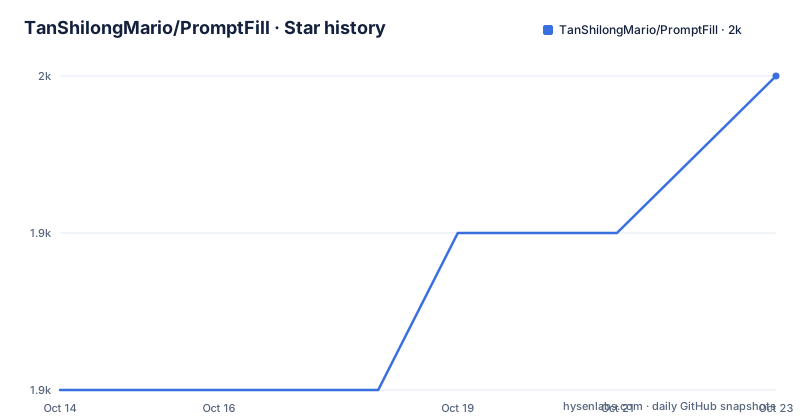
Star history
- TanShilongMario/PromptFill1,950 ★ · +2
| Repository | 2026-10-14 | 2026-10-23 |
|---|---|---|
| TanShilongMario/PromptFill | 1.9k | 2k |
2 Stars in the last 9 days, measured from the daily GitHub snapshot. Compare with other projects
Editorial analysis
Clone, npm install and a dev server fixed to port 1420
Getting a copy running takes Node.js v18 or newer, which is what the project recommends, and three commands. The clone step brings down the repository and moves into its directory.
git clone https://github.com/TanShilongMario/PromptFill.git
cd PromptFill
Then the dependency install, which is a plain npm install with no extra flags.
npm installAfter that the dev server, which is where the actual work happens since this is a pure frontend project with no application server.
npm run devThat script is `vite --host 0.0.0.0 --port 1420` in package.json, so the dev server binds every network interface on a fixed port rather than the usual Vite default. Expect the app on http://localhost:1420, and expect it reachable from other machines on the network too, which matters if you ever run this on a shared host. A second script, `dev:open`, lets Vite open the browser itself. Windows and macOS users also get launcher files in the repository root, `start.bat` and `start.command`, and a first real use is short: open a preset, click into the template editor, fill the variables, switch to preview, copy the generated text and paste it into whichever image model you actually use.
Structured prompts as fill-in-the-blank forms for AI painting
Image models want long prompts, and most of that length repeats between attempts. Change the lighting on a portrait recipe and every other word of the prompt is unchanged, yet a plain text file gives you no way to prove that the rest stayed put. PromptFill stores each recipe as a template string whose changeable parts are marked, then turns those marks into controls you click. It targets image work across GPT, Midjourney and Nano Banana, and the preset library holds 244 bilingual entries. Of those, 160 are community adaptations, and 100 of them are GPT Image 2.5 templates built around four key variables each, with creator and source credits kept inside the preset. Nothing in that loop touches a model. The output is text for someone else's interface, which is why template structure, not image quality, is the ground this project competes on. Each template also keeps its own variable selections, so several recipes sit side by side without bleeding into each other, and a clone button duplicates one for A/B comparison.
How the double-brace variable turns a template into a form
A variable is written as `{{variable}}` inside template text, and the editor converts that automatically into an interactive control, so you build the prompt by filling a form. Typing a left curly brace in edit mode opens the autocomplete panel, with variables listed on the left, their options on the right, and full keyboard navigation between them. The feature list also claims that a forward slash opens the same panel, while the usage walkthrough mentions only the curly brace, so if the panel refuses to appear that slash trigger is the detail to check. To give a variable a value inside the template, write `{{key: value}}` and the value previews inline with real-time highlighting. Repetition is the part worth understanding. By default, several occurrences of the same variable are independent, so editing a color word in one clause leaves the identical word elsewhere alone. Linkage groups invert that choice: `{{color}}_1` is the example given for a group whose members update together across the whole prompt. Preview mode turns every variable into a clickable dropdown, categories are color coded through an editor holding 12 preset colors, and any custom option added there flows back into the variable bank, so the library grows from your own corrections rather than from a fixed list.
LocalStorage, IndexedDB and local folders are promised together
Two bullets in the feature list disagree about where your data lives. One promises browser IndexedDB plus local folder storage, with switching between the two never losing templates. The next says private data sits in browser LocalStorage, and the persistence section repeats LocalStorage, promising no data loss on refresh or browser close. Two different browser stores, each named as the answer, is a contradiction you hit rather than merely read. What the README does not document is which store a given template lands in, or how existing templates migrate when the mode changes. The local folder half also needs something beyond a browser tab. The repository ships `start.command` for macOS and `start.bat` for Windows, a `tauri` npm script, and `@tauri-apps/plugin-fs` with `@tauri-apps/plugin-http` as runtime dependencies, and those are the only filesystem and network capabilities visible in package.json. Nothing in the README explains how to launch that desktop shell, so anyone depending on folder storage has to read the repository instead of the instructions.
The build runs a data sync before Vite even starts
Producing a build is not a plain Vite bundle. Five consecutive scripts in package.json set the shape of the toolchain, and four of them are not the Vite defaults you would expect.
"dev": "vite --host 0.0.0.0 --port 1420",
"dev:open": "vite --host --open",
"build": "npm run sync-data && vite build",
"sync-data": "node scripts/sync-data.js",
"import": "node scripts/import-template.mjs",
Data regeneration sits on the critical path of every production build, and calling Vite directly skips it. Preset content lives in JavaScript modules, `src/data/templates.js` and `src/data/banks.js`, with a `prompt_fill_data.json` file at the top level and the sync step moving between them. Versioning splits in two. The package version is 1.1.5 and the README badge agrees, but the data badge reads 1.2.2, and that second counter is the `SYSTEM_DATA_VERSION` constant you bump by hand after a batch import. A preset import can therefore land in the data modules while the version telling running clients to refresh stays where it was, and no script checks that for you. Converting your own template into a built-in preset is the documented contributor path: export the template JSON from the app, pass the file path to the import script, and it writes into both data modules.
npm run import -- ~/Downloads/xxx_template.jsonNote also that the npm package name is `concept-art-prompt-generator` and is marked private, which is not what the repository or the hosted site at aipromptfill.com call it.
Short-link sharing needs a backend, long URLs are the fallback
Sharing is the only part of the app with a server component. Short links come from a private backend written in Node.js with SQLite that you host yourself, and the frontend is pointed at it through one environment variable.
VITE_SHARE_API_URL=https://your-api.com/api/shareWith nothing configured, the app skips the API and generates long URLs instead, which work offline and need no server at all. No endpoint other than that single `/api/share` path is documented, so the backend contract is narrow by design. Here is the contradiction in the configuration docs: the README tells you to create a `.env` file at the repository root, while `.env.example` tells you to copy that file to `.env.local`. The same example file carries a second variable for a toolchain this project does not use.
REACT_APP_SHARE_API_URL=
VITE_SHARE_API_URL=
VITE_DEBUG_SPLIT=
That first line sits under a comment naming Create React App and standard Webpack. Vite only exposes variables prefixed `VITE_`, so a `REACT_APP_` prefix cannot reach this build. Copy `.env.example`, fill in the inherited line, and you get a config file where the documented variable still does nothing and sharing silently stays on the long URL path.
Docker, Vercel and long URLs are three different deployments
The container path is short and entirely static. The image builds with node:20, installs, runs the build step that includes the data sync, and hands `/app/dist` to nginx:alpine on port 80.
FROM node:20 AS builder
WORKDIR /app
COPY . .
RUN npm install
RUN npm run build
Because that Dockerfile copies the whole repository, the image carries `prompt_fill_data.json` along with any local `.env` file you built it beside. No share endpoint is baked into the image, since the API is a separate process you host. A second target exists at the other extreme: `vercel.json` at the top level plus `@vercel/analytics` as a runtime dependency point at static hosting with the same no-server sharing fallback. Choosing between them is easy, because both serve the same static bundle. Choosing between those two and the self-hosted backend is a different question, and it trades link length against operations: the fallback needs nothing and puts the template in the link itself, while your own Node.js and SQLite service needs a running process, a database file to back up and a public hostname to keep alive. No maximum URL length is documented for the fallback, and long links are the kind that chat clients and proxies rewrite. The backend is described as available for private deployment, yet its dependencies, schema and authentication are not listed, so judging it means reading someone else's service first. Alongside all of this sits an undocumented desktop path: `@tauri-apps/cli` and the fs, http and opener plugins are production dependencies and `tauri` is a package script, but no Tauri build, no Rust toolchain step and no Tauri project directory appear anywhere in the documentation or the repository listing.
Where the documentation stops: cloud sync and AI expansion
Two announced features have no mechanism an outside reader can check. Cloud awareness promises real-time sync for official templates and features, with no endpoint, protocol or failure behaviour described. Official AI support says AI-powered prompt expansion is live, naming neither a model nor a credential. The only credential path described anywhere is `VITE_DEBUG_SPLIT`, a local development switch that puts a debug button in the toolbar so you can edit the system prompt and call the GLM API from the browser, with the key kept in that browser's localStorage; the example file says explicitly not to set it in production. The shipped expansion feature therefore has no documented authentication, and that is the first thing to confirm before depending on it. Upgrade cost otherwise stays low: `npm install`, then `npm run dev` or a build, with preset content living in two JavaScript modules that the sync script regenerates. Top-level files such as `CHANGELOG.md` and `Prompt Template Skills.md` are shipped but never explained, and a publish checklist sits beside them with the same silence. The last push was on 2026-09-12, the MIT licence covers the code, and the repository publishes no GitHub releases, so version tracking runs through those files rather than through tags.
Editorial conclusion
PromptFill earns its place for anyone who keeps a library of recurring AI painting scenes, because turning a recipe into a form removes the retype-and-drift problem a notes file cannot. Pass on it if you write one prompt per session, or if AI expansion is the reason you came, since its endpoint and credentials are undocumented. Check three things first: `VITE_DEBUG_SPLIT` stays unset in production, long share links survive your host's URL length limits, and you accept editing `SYSTEM_DATA_VERSION` by hand when preset data changes.
Frequently asked questions
Does PromptFill need a server or an API key to build prompts?
No. The core loop runs in the browser, with templates and variable banks stored client side, and the generated text is pasted into whichever image tool you use. Short links are the exception, since they need the optional backend, and without one the app falls back to long URL sharing that requires no server.
How do I share a PromptFill template with someone else?
Either way works. With `VITE_SHARE_API_URL` pointing at a private Node.js and SQLite backend you get short links, and with no value set the app produces long URLs that work offline. A template can also be exported as JSON from the app.
What does running npm run build actually do in PromptFill?
It is two commands in one. The build script runs `npm run sync-data && vite build`, and the sync step executes `node scripts/sync-data.js` before Vite bundles the app, so regenerating preset data is not optional.
What is the difference between LocalStorage and IndexedDB in PromptFill?
The feature list names both, one bullet promising browser IndexedDB plus local folders and another stating that private data sits in browser LocalStorage. The README does not say which store a template uses or how data moves when the mode changes.
How do I turn my own template into an official PromptFill preset?
Export the template JSON from the app, then pass its path to `npm run import`, which runs `node scripts/import-template.mjs` and writes into `src/data/templates.js` and `src/data/banks.js`. After a batch import, `SYSTEM_DATA_VERSION` has to be updated by hand.
Official sources
Add this badge to your README
If you maintain this project, the badge below links readers to this analysis and shows its maintenance status from the daily GitHub snapshot. Paste the markdown into your README; add ?metric=license or ?metric=stars to the image URL for a different field.

[](https://hysenlabs.com/projects/tanshilongmario-promptfill)Star history chart for your README
[](https://hysenlabs.com/projects/tanshilongmario-promptfill)Was this useful?