TavernAI v1: the legacy frontend whose install links resolve elsewhere
Atmospheric adventure chat for AI language models (KoboldAI, NovelAI, Pygmalion, OpenAI chatgpt, gpt-4)
At a glance
- What is it?
- TavernAI v1 is a self-hosted Node.js frontend for chat and storywriting backends, and its readme says outright that it is legacy. What is worth knowing before you deploy it is where it points: the download, the wiki and the Colab notebook each resolve to a different repository, the last release predates the last commit by two years, and the compose file publishes port 8000 with nothing documented in front of it.
- Who is it for?
- TavernAI v1 still does one job well for someone who wants a local chat UI over a model they already run, and for anyone starting fresh it loses to the successor its own readme names. Decide between the two repositories before you install anything, because following this page's download link hands you the other one.
- Can I use it commercially?
- Yes. MIT is a permissive licence: you can use, modify and sell software built on it, as long as you keep its copyright and licence notices.
- Is it still maintained?
- Yes. The repository last received commits 162 days ago.
- What is it written in?
- Mainly JavaScript, according to GitHub's language statistics.
Answers come from the project's GitHub data, last synced on November 25, 2026, and from our analysis. They are not legal advice.
Star history
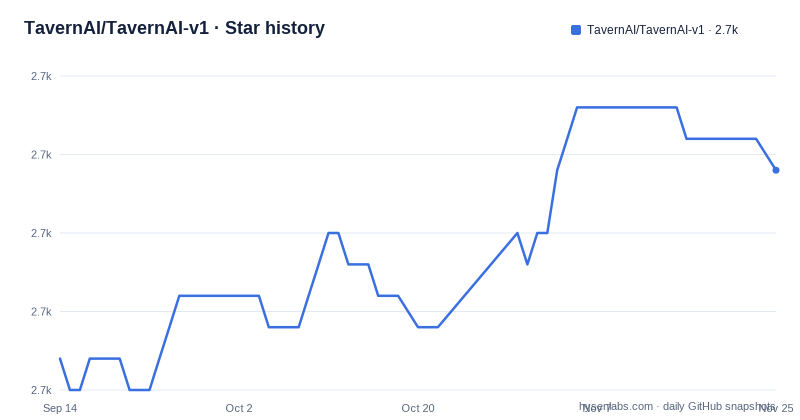
- TavernAI/TavernAI-v12,702 ★ · +6
| Repository | 2026-09-14 | 2026-11-25 |
|---|---|---|
| TavernAI/TavernAI-v1 | 2.7k | 2.7k |
6 Stars in the last 72 days, measured from the daily GitHub snapshot. Compare with other projects
Editorial analysis
The download link in the legacy readme serves the successor
The opening line calls this repository legacy and points at TavernAI 2 elsewhere. Every install link then follows the successor. The Download bullet resolves to an archive of the main branch of TavernAI/TavernAI, and both wiki entries for setting up KoboldAI and NovelAI point at that same repository's wiki. Following the v1 instructions verbatim downloads v2. The Colab entry adds a third repository, because the notebook path names vrihatgan/TavernAI rather than either repository under the TavernAI organization, even though a colab/ directory sits in this tree. So one page sends you to three different places, and the only page that tells you it is legacy is the one you land on after downloading the wrong code.
Two years of commits with no release since March 2024
The release line stops at 1.5.4 on 2024-03-05, preceded by 1.5.3 in January 2024 and 1.5.2 in November 2023, and package.json still carries version 1.5.4. The default branch is not archived and took a commit on 2026-06-16, so what you get from a branch checkout runs far ahead of the newest tag while the version string it reports still says 1.5.4. Nothing on the page reconciles the two, and that version string is exactly what a support thread will quote. Before comparing behaviour against anything written about 1.5.4, find out which commit you are actually running.
Windows gets a launcher script, macOS gets npm install
The start instructions are three short lines and they are not equivalent. Windows runs Start.bat, Linux runs start-linux.sh, and everything else is expected to run npm install followed by node server.js. macOS therefore falls into the manual branch, on a page that elsewhere offers a .pkg build of Node for it. The repository also holds Start.ps1 and three Windows shortcut files, CONSOLE.lnk, TAVERN_CONSOLE.lnk and FIX_EXEC-POL-ERROR.lnk, and none of them appears in the install section. That last filename names a PowerShell execution policy failure, which is the one situation where a Windows user genuinely needs a step to follow and the page gives none.
Node 21.3.0 in the docs, 21.5.0 in the image
The install step links Node.js builds by exact version and they do not agree with each other. Windows 10 and later, macOS, the Linux source archive and the Debian and Ubuntu binaries all point at 21.3.0, while the Windows 7 SP1 link points back at 20.2.0. The container takes a third version: the Dockerfile builds on node:21.5.0-alpine3.19, which the page never mentions. The same step asks you to tick Additional Build-Tools in the Node installer and answer Yes to All, and that box exists for the sharp dependency, since the packaging assets in package.json reach into node_modules/sharp/build/Release and node_modules/sharp/vendor/lib for its compiled pieces.
The compose file publishes 8000 on every interface
version: "3"
services:
  tavernai:
    build: .
    container_name: tavernai
    hostname: tavernai
    image: tavernai/tavernai:latest
    ports:
      - "8000:8000"
    volumes:
      - "./public:/home/node/app/public"
      - "./config.conf:/home/node/app/config.conf"
    restart: unless-stopped
Two lines carry more weight than the image tag. The port mapping names no host address, so the service is published on every interface the machine has, and the README describes no login, account or other access control in front of it. Configuration arrives as a mounted file from the host rather than through an environment section, which also means there is no compose level place for secrets. Keep the published port off untrusted networks, and note that both host paths are relative, so where your characters and uploads land depends on the directory you run compose from.
The image installs with npm install and runs as root
FROM node:21.5.0-alpine3.19

ARG APP_HOME=/home/node/app

WORKDIR ${APP_HOME}

COPY package*.json ./
RUN \
  echo "*** Install npm packages ***" && \
  npm install
The build copies package-lock.json along with package.json and then runs npm install rather than npm ci, so the lock file is available to be rewritten instead of enforced, and that step asks for no integrity verification. There is no USER instruction anywhere in the file, so the server process runs as uid 0 for its entire life. One cleanup is deliberate and worth copying into your own image: the source copy is followed by rm -rf ./.git, so nothing inside the container has the repository history to read.
A reserved placeholder version sits in the dependency list
package.json lists http at ^0.0.1-security, the placeholder version npm reserves for a name that must not resolve to real code, so one entry in the dependency list is never meant to land on disk. Next to it is a stack aimed at images rather than chat: png-chunk-text with png-chunks-encode and png-chunks-extract, the packages that read and write text carried inside PNG chunks, sharp and webp-converter for the image work, and exifreader for metadata. The pkg assets block confirms the shape of the intended artifact by collecting public, public/cardeditor/** and uploads beside the sharp and open directories, and bin maps the name TavernAI to server.js.
The backend list and the project description disagree about Pygmalion
The repository description names KoboldAI, NovelAI, Pygmalion, ChatGPT and gpt-4. The supported backend section lists the Kobold series with KoboldAI, KoboldCpp and Horde, Oobabooga's Text Generation Web UI, OpenAI including ChatGPT, GPT-4 and reverse proxies, NovelAI, Claude and Ollama. Pygmalion is in one list and not the other, so any conclusion about local model support drawn from the description alone is a guess. The same section shows the project's real scope: an OpenAI compatible endpoint, including a reverse proxy of your own, is a supported target, and the page says nothing about what a hosted backend should expect from the conversation data you hand it.
Editorial conclusion
TavernAI v1 still does one job well for someone who wants a local chat UI over a model they already run, and for anyone starting fresh it loses to the successor its own readme names. Decide between the two repositories before you install anything, because following this page's download link hands you the other one. If you do run this version, pin the commit rather than the 1.5.4 version string inside it, keep the published port off untrusted networks since no access control is documented, decide yourself what conversation data a hosted backend receives, and expect to read the source for the Windows execution policy fix that three undocumented shortcut files appear to address.
Frequently asked questions
Which backends can TavernAI v1 talk to?
The Kobold series (KoboldAI, KoboldCpp and Horde), Oobabooga's Text Generation Web UI, OpenAI including ChatGPT, GPT-4 and reverse proxies, NovelAI, Claude, and Ollama. The repository description additionally names Pygmalion, which does not appear in that list.
How do I start TavernAI v1 on macOS?
The start instructions cover Windows with Start.bat and Linux with start-linux.sh. On other systems, macOS included, the README asks you to run npm install to install dependencies and then node server.js to start the server.
Does TavernAI v1 run in Docker?
A Dockerfile on node:21.5.0-alpine3.19 and a compose file are both in the repository. The compose file publishes port 8000, mounts ./public and ./config.conf from the host, and sets restart to unless-stopped.
Which TavernAI version should I install?
This repository names itself legacy and points to TavernAI 2 at github.com/TavernAI/TavernAI. Its own download link serves an archive of that successor's main branch, and its newest release is 1.5.4 from 2024-03-05.
Does TavernAI v1 need an account or a hosted service?
It is a Node.js server you start yourself, started by Start.bat on Windows, start-linux.sh on Linux, or node server.js elsewhere. The compose file mounts config.conf from the host, and the README documents no login or access control in front of the published port.
Official sources
Add this badge to your README
If you maintain this project, the badge below links readers to this analysis and shows its maintenance status from the daily GitHub snapshot. Paste the markdown into your README; add ?metric=license or ?metric=stars to the image URL for a different field.

[](https://hysenlabs.com/projects/tavernai-tavernai-v1)Star history chart for your README
[](https://hysenlabs.com/projects/tavernai-tavernai-v1)Was this useful?