eli5 separates explanation from rendering, and drops prediction support for CatBoost
A library for debugging/inspecting machine learning classifiers and explaining their predictions
At a glance
- What is it?
- A Python package for inspecting machine learning classifiers and explaining their predictions, covering scikit-learn, Keras, xgboost, LightGBM, CatBoost, lightning and sklearn-crfsuite, plus LIME for black boxes. Its output contract is four formats, its install list and its requirements file disagree, and its metadata still declares Python 2.7.
- Who is it for?
- Adopt eli5 if you need to inspect a scikit-learn pipeline, print a decision tree as SVG, or hand a prediction explanation to a client that renders it itself, because the split between explanation and formatting is the part that ages best. Do not adopt it expecting even coverage across gradient boosting libraries: CatBoost is listed for feature importances only, sklearn-crfsuite for weights only, and the two workhorse backends are scikit-learn and xgboost.
- Can I use it commercially?
- Yes. MIT is a permissive licence: you can use, modify and sell software built on it, as long as you keep its copyright and licence notices.
- Is it still maintained?
- Activity is slowing. The repository last received commits 7 months ago.
- What is it written in?
- Mainly Jupyter Notebook, according to GitHub's language statistics.
Answers come from the project's GitHub data, last synced on November 24, 2026, and from our analysis. They are not legal advice.
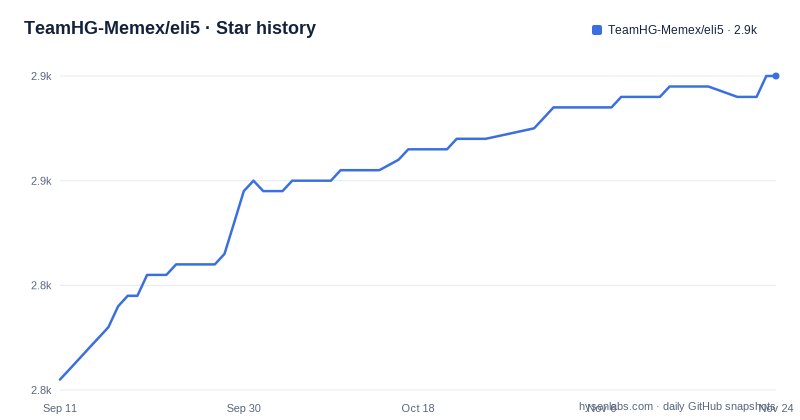
Star history
- TeamHG-Memex/eli52,860 ★ · +29
| Repository | 2026-09-11 | 2026-11-24 |
|---|---|---|
| TeamHG-Memex/eli5 | 2.8k | 2.9k |
29 Stars in the last 74 days, measured from the daily GitHub snapshot. Compare with other projects
Editorial analysis
CatBoost gets feature importances, the other boosters get explanations
The framework list is seven entries, and they are not equivalent.
scikit-learn gets the most: weights and predictions for linear classifiers and regressors, decision trees printed as text or as SVG, feature importances, and explanations for decision trees and tree-based ensembles. It also understands scikit-learn's text processing utilities and can highlight text data accordingly, supports Pipeline and FeatureUnion, and can debug pipelines containing a HashingVectorizer by undoing the hashing.
xgboost gets feature importances plus explanations for XGBClassifier, XGBRegressor and xgboost.Booster. LightGBM gets the same pair for LGBMClassifier and LGBMRegressor. lightning gets weights and predictions.
CatBoost gets feature importances only, for CatBoostClassifier, CatBoostRegressor and catboost.CatBoost. There is no prediction explanation in its entry, which makes it the odd one out among the gradient boosting libraries the project supports.
The remaining two are narrower by design. Keras gets Grad-CAM visualisations for image classifiers, and sklearn-crfsuite gets weight checks for CRF models. So the practical answer to which backend has full support is scikit-learn, with xgboost a close second.
Explanation and formatting are four separate things
One sentence in the README describes the most useful property of the library: explanation and formatting are separated.
From one computation you can get four outputs. A text-based explanation to display in a console. An HTML version embeddable in an IPython notebook or a web dashboard. A `pandas.DataFrame` object if you want to process the results further. And a JSON version, which the README says allows you to implement custom rendering and formatting on a client.
That is the design decision an adopter should care about, because it moves the presentation decision out of the library. The console and HTML forms are the batteries-included path; the DataFrame is the escape hatch for your own analysis; and JSON is the one that lets a web front end render an explanation without the server templating it.
The dependency list backs this up. `jinja2` is there for the HTML templates, `tabulate` for the text tables, and `graphviz` for the SVG decision trees. Each output mode has a library behind it, which is why a dependency set this small can produce four different renderings.
LIME covers any text classifier, and the non-text path is experimental
Black-box models are handled separately from the framework-specific code, under a heading for inspecting black-box estimators.
`TextExplainer` explains predictions of any text classifier using the LIME algorithm, cited as Ribeiro et al., 2016. The scope of that claim is broad on the type side and narrow on the confidence side: the README says there are utilities for using LIME with non-text data and with arbitrary black-box classifiers as well, but that this feature is currently experimental.
So there are two tiers. Any text classifier is the supported case for LIME. Anything else goes through the same machinery with an explicit experimental label attached.
The other black-box tool is the permutation importance method, which computes feature importances for black box estimators. That is a different operation from what TextExplainer does: it ranks features by how much removing them disturbs the model, rather than producing a local explanation of one prediction.
Between the two, a black-box user gets per-prediction local explanations for text and global feature rankings for anything. Neither substitutes for the tree and weight inspection the framework-specific code does.
six, graphviz, tabulate and attrs explain the output story
The install requirements are eight entries and each one tells you something:
    install_requires=[
        'attrs > 16.0.0',
        'jinja2',
        'numpy >= 1.9.0',
        'scipy',
        'six',
        'scikit-learn >= 0.20',
        'graphviz',
        'tabulate>=0.7.7',
    ],
`graphviz` is why a decision tree can be printed as SVG rather than as indented text. `tabulate` is why the text output aligns into tables instead of running together. `jinja2` renders the HTML form. `attrs` is the data model for the explanation objects, which is what makes the DataFrame and JSON forms possible. numpy, scipy and scikit-learn are the numerical and model layer.
Then there is `six`, the Python 2 and 3 compatibility library, listed as a hard runtime requirement rather than an extra. That is the single most telling line in the manifest, because it implies the codebase still carries a compatibility shim rather than having dropped one of the two languages.
The floors are also visible here: numpy 1.9.0, scikit-learn 0.20, attrs above 16.0.0, tabulate 0.7.7. None of them has an upper bound.
The classifiers still declare Python 2.7 and 3.4
The trove classifiers list Python 2, Python 2.7, Python 3 and Python 3.4, alongside a Development Status of 4 - Beta and an OS Independent marker. The visible list is cut off partway through an entry, after `Programming Language :: `.
The conditional dependencies line up with those versions exactly:
    extras_require={
        ":python_version<'3.5.6'": [
            'singledispatch >= 3.4.0.3',
        ],
        ":python_version<'3.5'": ['typing'],
    },
A singledispatch backport for anything below 3.5.6, and the typing backport for anything below 3.5. Those thresholds place the metadata in the 2016 era, which is consistent with `six` in the install requirements and with numpy 1.9.0 as a floor.
Two other packaging details are worth knowing. The version is not in setup.py at all; it is read out of `eli5/__init__.py` with a regular expression matching a `__version__` assignment. And the long description handed to PyPI is the README with the changelog appended to it, with `:func:` and `:ref:` roles stripped out by a string replacement.
That second one means a change to CHANGES.rst alters the package description on the index page, which is a reasonable way to keep release notes visible and an unusual one to discover in a manifest.
requirements.txt is not install_requires
The root requirements file lists numpy 1.9.0 or newer, scipy, singledispatch 3.4.0.3 or newer, scikit-learn 0.20 or newer, attrs above 16.0.0, jinja2, pip 8.1 or newer and setuptools 20.7 or newer.
Compare that with the install list in setup.py and the two are different sets. The file adds singledispatch, pip and setuptools, and it omits three entries the package actually requires: six, graphviz and tabulate.
The additions explain what the file is for. pip and setuptools are not libraries the package imports, and singledispatch is conditional on Python version, so this reads as a bootstrap or development requirements file rather than an install specification. Nothing on the page says so, and the name suggests otherwise.
The omission side is the part that bites. graphviz and tabulate are what produce the SVG trees and the aligned text tables, so an environment built from requirements.txt alone will not render those two output forms even though the package imports them.
Around that, the test setup is thorough for its size: a tox.ini, a requirements-test.txt, a constraints-test.txt for dependency matrix pinning, a `_ci/` directory, a .coveragerc and a codecov.yml.
Travis is the build badge, and a search index sits in the root
The README carries four badges: the PyPI version, a Travis CI build status for the master branch, a Codecov coverage badge also for master, and a Read the Docs latest build. The tree matches, with a `.travis.yml` and `.coveragerc` and `codecov.yml` at the root alongside a `.github/` directory.
So the visible test signal comes from Travis and Codecov, with GitHub Actions present in the tree but not represented in the README.
Then there are three root entries nothing explains. `.bish-index` and `.bish.sqlite` are committed to the repository, and both are named after a code search index rather than after anything in this package. `rules.json` sits beside them with no reference from the README, the package or any of the requirement files.
The rest of the root is conventional: `setup.py` with a `setup.cfg`, `MANIFEST.in`, `LICENSE.txt`, `CHANGES.rst`, `docs/`, `eli5/`, `tests/` and a `notebooks/` directory. That notebooks directory is also why the repository's primary language is recorded as Jupyter Notebook rather than Python. The page closes with a sponsor credit for Hyperion Gray.
On maintenance, the last push was on 2026-04-08 and there are no GitHub releases, so the version history a user can see is whatever is on PyPI.
Editorial conclusion
Adopt eli5 if you need to inspect a scikit-learn pipeline, print a decision tree as SVG, or hand a prediction explanation to a client that renders it itself, because the split between explanation and formatting is the part that ages best. Do not adopt it expecting even coverage across gradient boosting libraries: CatBoost is listed for feature importances only, sklearn-crfsuite for weights only, and the two workhorse backends are scikit-learn and xgboost. Verify first which of the four output forms your consumer actually needs, then check the version floors, since the metadata still carries Python 2.7 and 3.4 classifiers and requirements.txt is a different list from install_requires.
Frequently asked questions
What does eli5 do?
It is a Python package that helps debug machine learning classifiers and explain their predictions, with support for scikit-learn, Keras, xgboost, LightGBM, CatBoost, lightning and sklearn-crfsuite. Black-box models are handled with LIME through TextExplainer and with the permutation importance method.
What output formats can eli5 produce?
Explanation and formatting are separated, so one computation can yield a text explanation for a console, an HTML version embeddable in an IPython notebook or a web dashboard, a pandas.DataFrame for further processing, or JSON for custom rendering and formatting on a client.
Which Python versions does eli5 support?
The setup.py classifiers list Python 2, Python 2.7, Python 3 and Python 3.4, with conditional extras for Python versions below 3.5.6 and below 3.5, and six is a runtime dependency. The install requirements are numpy 1.9.0 or newer, scipy, scikit-learn 0.20 or newer, attrs above 16.0.0, jinja2, graphviz and tabulate.
Can eli5 explain a black-box classifier?
Yes. TextExplainer explains predictions of any text classifier using the LIME algorithm, and the permutation importance method computes feature importances for black box estimators. The README notes that using LIME with non-text data and arbitrary black-box classifiers works too, but is currently experimental.
Official sources
Add this badge to your README
If you maintain this project, the badge below links readers to this analysis and shows its maintenance status from the daily GitHub snapshot. Paste the markdown into your README; add ?metric=license or ?metric=stars to the image URL for a different field.

[](https://hysenlabs.com/projects/teamhg-memex-eli5)Star history chart for your README
[](https://hysenlabs.com/projects/teamhg-memex-eli5)Was this useful?