TeaQL Agent Kit: one prompt that sends a coding agent through model, evaluate, generate and verify
Deterministic execution for non-deterministic AI. It provides tasks, prompts, guides, and reports for observing how coding agents behave when working with TEAQL-based business software.
At a glance
- What is it?
- TeaQL Agent Kit packages a model-first build workflow and an agent context toolkit for coding agents working on TeaQL business software. This piece looks at what the single prompt actually triggers, what leaves your machine, and which governance features depend on the agent you use.
- Who is it for?
- TeaQL Agent Kit fits teams that already use a coding agent and are willing to send business requirements to TeaQL services in exchange for a typed, evidence-reporting workflow. It is a poor fit for offline work, for private requirements that cannot leave the organization, and for anyone expecting every governance feature to switch on in every agent.
- Can I use it commercially?
- Yes. MIT is a permissive licence: you can use, modify and sell software built on it, as long as you keep its copyright and licence notices.
- Is it still maintained?
- Yes. The repository last received commits 5 days ago.
- What is it written in?
- Mainly Python, according to GitHub's language statistics.
Answers come from the project's GitHub data, last synced on November 15, 2026, and from our analysis. They are not legal advice.
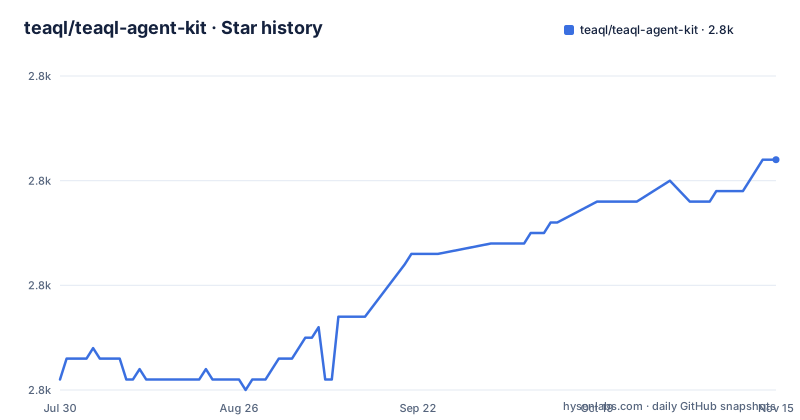
Star history
- teaql/teaql-agent-kit2,822 ★ · +21
| Repository | 2026-07-30 | 2026-11-15 |
|---|---|---|
| teaql/teaql-agent-kit | 2.8k | 2.8k |
21 Stars in the last 108 days, measured from the daily GitHub snapshot. Compare with other projects
Editorial analysis
The whole kit is a prompt pasted into your agent's chat, not your terminal
The entry point is a prompt, not an installer. You open a project folder in your coding agent and paste a request into its chat window. The first line points the agent at the repository.
Follow the instructions from https://github.com/teaql/teaql-agent-kitThe rest of the example asks for a small order-management application with customers, products and orders, built with Rust and SQLite. It requires evaluating and repairing the business model, generating a runnable console application, exercising Q queries and E expressions in tests and in a runtime smoke test, and finishing with a development report in work-complete.md.
The agent needs access to the repository instructions, permission to work in your project folder, and the ability to run development commands. The project is explicit that one prompt starts the workflow but does not mean zero setup, no follow-up questions or guaranteed success. If the agent stalls on a permission request, that is the workflow behaving as designed rather than a bug.
Default runs need network access and send model content to a configured service
The workflow calls TeaQL services for model evaluation, generation and API guidance. Network access is therefore required for the default path, and model content is sent to the configured service. That sentence is the main privacy fact about the kit, and it applies to the business requirements you put in the prompt.
The agent may also install or update TeaQL clients and language build tools and download dependencies. Review each permission request, and check your organization's data-sharing policy before using private business requirements.
A local checkout does not remove the dependency. You can replace the first prompt line with a path.
Follow the instructions from ~/teaql-agent-kitThat only changes where the instructions are read. Evaluation and generation still go through the service, so a local clone is not an offline mode. Use the real checkout path on the machine where the agent runs, not on the machine where you read the docs.
Model, evaluate, generate, implement, verify: a loop that only advances on zero errors
The Build TeaQL App Skill walks the agent through a fixed sequence. The agent saves a complete KSML model, evaluates it and repairs the errors. Generation happens only for advertised targets and only after the model has zero errors. The agent then reads the generated guide and the current entity, action and field Assist before writing application code, and finally compiles, tests, repairs locally and exercises the requested runtime behavior.
A zero-error model triggers a Model Ready notice with the saved model path and evaluation counts. The agent keeps working while a person reviews the model or the application. If feedback changes the domain contract, the change goes back through evaluation and regeneration, and human review can run in parallel.
The verify stage is where the kit insists on evidence: actual results, counts and blockers must be recorded before the agent claims completion. The consequence for you is a gate you can inspect, but it is only as good as the agent's honesty about what it ran.
Q and E give the reviewer a small surface, but business rules stay in your hands
Q describes what to load: filters, selected fields, related objects, ordering, limits and facets. Requests compose, so a child query or facet can be pulled into a named helper and reused inside another query. Typed field methods let the compiler reject invalid API calls before execution. The README's Rust example, adapted from the Robot Task Board demo, shows the shape.
let task = Q::tasks()
    .with_id_is(id)
    .comment("Load task for status transition")
    .purpose("Move a task on the board")
    .execute_for_one(&ctx)
    .await?;
The comment and purpose calls are part of the review story: the table of stages says to preserve query purpose and comment and to write audit reasons. E provides typed paths through fields and related objects and distinguishes an absent value from data that was never loaded.
The limit is stated plainly. You still review business rules and verify results. The generated library and runtime take over query-building and data-access plumbing, not the question of whether the logic is correct.
Agent logos are not a promise that governance is switched on
The README lists Claude Code, Codex, Cursor, GitHub Copilot, Gemini CLI, Pi, Qoder, DeepSeek Harness, ZCode, TRAE and OpenCode. It then qualifies the row: a coding agent that can read Skill instructions can follow the TeaQL workflow, but runtime enforcement depends on its specific adapter and entry point, and the logos do not imply that every governance feature is active.
That splits the kit into two parts you can use separately. The Build TeaQL App Skill is plain instructions, so any agent that reads them can follow the loop. The Agent Context Kit, published as @teaql/agent-context-kit, covers context lifetimes, marker-aware file policy, controlled tools and host adapters, and those controls need an adapter for your host.
If your agent has no adapter, you get the workflow without enforcement. Treat the model, evaluate and verify steps as guidance the agent can skip, and check the report in work-complete.md yourself.
A Node 22.19 workspace with Python tests sits behind the Agent Context Kit
The repository is a small workspace. Its root package.json is private, version 0.0.0, requires Node 22.19.0 or newer and lists a single workspace, packages/agent-context-kit. The top-level entries include skills, packages, integrations, docs, examples, tests and tools, plus AGENTS.md and a .claude-plugin directory.
The npm scripts show how the project checks itself. test runs test:context, test:contracts and test:python in sequence. test:contracts runs node --test --experimental-strip-types over the tests in tests/context-runtime. test:python uses python3 with unittest discovery over test_ files and then the package's own Python tests. pack:context runs npm pack for the workspace so the context package can be published on its own.
Two example files, teaql-workspace.release.yaml and teaql-workspace.workspace.yaml, sit under examples. The practical consequence is that contributing or hacking on the context package needs both a recent Node and Python 3, even though the repository's primary language is Python.
Maintenance: one tagged release from July and a push at the end of October
The only release in the recent list is v2.0.0, titled TeaQL Agent Kit v2.0.0 and dated 31 July 2026. The last push to the main branch was on 27 October 2026, so the repository is moving, but the tagged release is three months older than the latest work. If you follow the main branch you may see instructions that differ from the v2.0.0 tag.
The repository is not archived, the license is MIT, and the homepage is teaql.io. The Python label on the repository comes from the tooling and tests; the kit's output in the example prompt is Rust, and the workflow is aimed at any language the TeaQL generator advertises as a target.
Because the prompt points an agent at the live repository URL, every run reads whatever is on the default branch at that moment. For repeatable results, use a local checkout at a known commit, remembering that it still calls the remote services.
Editorial conclusion
TeaQL Agent Kit fits teams that already use a coding agent and are willing to send business requirements to TeaQL services in exchange for a typed, evidence-reporting workflow. It is a poor fit for offline work, for private requirements that cannot leave the organization, and for anyone expecting every governance feature to switch on in every agent. Check your agent's adapter and your data-sharing policy before the first run.
Frequently asked questions
How do I start using TeaQL Agent Kit with my coding agent?
Open your project folder in the agent and paste a prompt into its chat, not your terminal. The first line is Follow the instructions from https://github.com/teaql/teaql-agent-kit, followed by your requirement.
Does TeaQL Agent Kit work offline?
No. The default workflow needs network access, calls TeaQL services for evaluation, generation and API guidance, and sends model content to the configured service. A local checkout only changes where instructions are read.
Does TeaQL Agent Kit enforce its governance features in every supported agent?
No. Any agent that can read Skill instructions can follow the workflow, but runtime enforcement depends on the specific adapter and entry point. The agent logos do not imply every feature is active.
Official sources
Add this badge to your README
If you maintain this project, the badge below links readers to this analysis and shows its maintenance status from the daily GitHub snapshot. Paste the markdown into your README; add ?metric=license or ?metric=stars to the image URL for a different field.

[](https://hysenlabs.com/projects/teaql-teaql-agent-kit)Star history chart for your README
[](https://hysenlabs.com/projects/teaql-teaql-agent-kit)Was this useful?