HY-WorldPlay: Real-Time Interactive World Modeling with Python
HY-World 1.5: A Systematic Framework for Interactive World Modeling with Real-Time Latency and Geometric Consistency
At a glance
- What is it?
- HY-WorldPlay, associated with HY-World 1.5, is a Python research project for interactive 3D world modeling from streamed video generation. It targets long-horizon consistency and keyboard and mouse control, but its published workflow depends on substantial model downloads and GPU-oriented inference code.
- Who is it for?
- HY-WorldPlay is suitable for research teams and engineers evaluating long-horizon interactive world models, especially when they already have suitable GPU hardware and can accept model downloads. It is a poor fit for lightweight local demos or applications requiring a documented production API.
- Can I use it commercially?
- Check first. The repository uses a licence we do not classify automatically, so read its LICENSE file before any commercial use.
- Is it still maintained?
- Yes. The repository last received commits 151 days ago.
- What is it written in?
- Mainly Python, according to GitHub's language statistics.
Answers come from the project's GitHub data, last synced on November 6, 2026, and from our analysis. They are not legal advice.
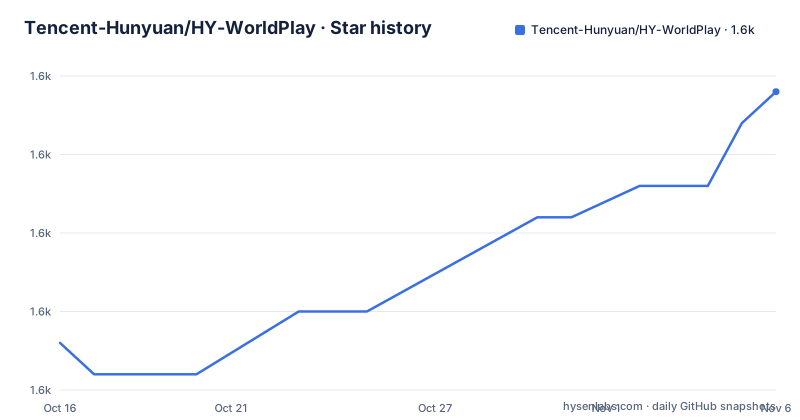
Star history
- Tencent-Hunyuan/HY-WorldPlay1,627 ★ · +8
| Repository | 2026-10-16 | 2026-11-06 |
|---|---|---|
| Tencent-Hunyuan/HY-WorldPlay | 1.6k | 1.6k |
8 Stars in the last 21 days, measured from the daily GitHub snapshot. Compare with other projects
Editorial analysis
What HY-WorldPlay is designed to solve
HY-WorldPlay is the repository associated with HY-World 1.5, a framework for interactive 3D world modeling. The project addresses a specific limitation of HY-World 1.0, which the README describes as capable of generating immersive 3D worlds through a lengthy offline process without real-time interaction. HY-WorldPlay changes the target from generating a finished world in one offline batch to producing a streaming video representation that can respond during an interaction session.
The intended audience is research and engineering teams working on world models, video generation, embodied environments, first-person interaction, and third-person scene exploration. The README states that the model supports first-person and third-person perspectives across real-world and stylized scenes. It also presents keyboard and mouse input as an interaction path, which makes the project relevant to experiments that require movement through a scene rather than only producing a short video from a fixed prompt.
This is not a conventional 3D asset converter. The repository topics include image-to-3d and world-model concepts, but the documented focus is interactive world modeling through a streaming video diffusion model. That distinction matters for adoption. Teams looking for a mesh, texture set, or conventional scene graph should not assume that this repository provides that kind of output.
Dual actions and camera control in HY-WorldPlay
The documented design uses a Dual Action Representation to connect user input with video generation. The README names keyboard and mouse inputs as the action sources and presents camera trajectory control as an inference feature. This gives the project a concrete interaction model rather than leaving generation entirely dependent on a text prompt.
Camera movement can be selected through a pose string or through custom JSON files. The README labels the pose string as the recommended option for quick testing. A pose string is useful for reproducing a simple camera path without constructing a separate control file first. Custom JSON files are the more explicit option when a test needs a longer or more structured trajectory. The repository also includes prompt rewriting as an optional feature, which can modify the generation instruction before inference. The presence of an optional prompt path does not mean that prompt rewriting is required for basic camera-controlled generation.
The model can therefore be viewed as a pipeline with two kinds of conditioning. Text describes the world or desired scene, while camera actions determine how the viewpoint evolves through that scene. The README does not provide enough detail in the published extract to state the exact pose schema, action normalization rules, or permitted trajectory length, so those details should be taken from the repository files before implementation work begins.
Reconstituted Context Memory and streaming consistency
Long-running autoregressive video generation can accumulate errors because each newly generated segment depends on earlier context. HY-WorldPlay addresses that issue with Reconstituted Context Memory. According to the README, the mechanism dynamically rebuilds context from past frames instead of relying only on a fixed recent history. It also uses temporal reframing to keep geometrically important frames from the distant past accessible.
This design matters because a model that repeatedly forgets structure may keep changing the layout of the scene as the camera moves. In a first-person walkthrough, changing wall positions or object shapes undermines the basic premise of a persistent world. The project reports long-term geometric consistency as a central objective, and its streaming design is intended to balance interaction latency with the memory required to maintain that consistency.
The README also identifies Context Forcing, a distillation method for memory-aware models. It aligns memory context between a teacher and student so that the student retains access to long-range information while moving toward real-time operation. The stated purpose is to reduce error drift while preserving the ability to use information from earlier frames. The repository also contains WorldCompass, an optional reinforcement learning post-training path for the WorldPlay-8B model, while the README says that a WorldPlay-5B model based on WAN fits smaller GPUs but accepts a quality compromise.
These are model and training design choices rather than a general-purpose database or game-engine memory system. They are most relevant to teams evaluating autoregressive video generation and willing to work with model checkpoints and inference code.
Installation and first real use
The repository contains `requirements.txt`, `download_models.py`, `run.sh`, `hyvideo/`, and model-related directories. The dependency file specifies Python packages including `torch>=2.6.0`, `diffusers==0.35.0`, `transformers[accelerate,tiktoken]==4.56.0`, `huggingface-hub==0.34.0`, `safetensors==0.4.5`, `einops==0.8.0`, and `omegaconf>=2.3.0`. It also lists `modelscope`, `moviepy==1.0.3`, `ninja`, `scipy`, and other packages needed by the broader project.
The README has an installation section. The first practical step should be to inspect the installation section in `README.md`, create an environment using the project’s documented Python and PyTorch setup, install the entries in `requirements.txt`, and then use the documented model download procedure. `download_models.py` is the repository file associated with obtaining required models.
For the first real use, configure the model paths, select a model checkpoint, choose a camera trajectory, and run inference using the repository’s documented command. The README says to start with the pose-string option for quick testing, then compare it with custom JSON camera files if the first output is stable. It also lists prompt rewriting as optional, so the first test should avoid changing several variables at once.
Performance claims and practical limits
The README states that HY-World 1.5 generates long-horizon streaming video at 24 FPS. It also describes engineering optimization and quantization updates in the project news. Those statements describe the project’s intended or reported behavior, but the repository excerpt does not provide the GPU model, resolution, frame count, precision settings, batch size, or measurement conditions behind the figure. A prospective user should therefore not treat 24 FPS as a hardware-independent promise.
The project is clearly oriented toward substantial model inference rather than a small utility. The repository requires multiple large machine-learning dependencies, model download tooling, checkpoint configuration, and GPU-oriented packages such as `torch`, `torchaudio`, `torchvision`, `ninja`, and `diffusers`. The README presents WorldPlay-5B as a smaller-VRAM option, but it explicitly associates that option with compromised quality. This is a direct trade-off between hardware fit and output quality.
Another limitation is the gap between research code and a stable product interface. The repository has no GitHub releases listed, and the README does not document a production API, deployment service, rollback procedure, or compatibility matrix for common hardware. The project is best evaluated as a research implementation, not as a turnkey interactive-world platform.
HY-WorldPlay compared with offline world generation
The most relevant alternative is an offline 3D world-generation workflow such as HY-World 1.0. Its approach is to generate a complete world through a lengthy offline process. HY-WorldPlay instead uses streaming video diffusion, action conditioning, and memory mechanisms to support interaction while generation is progressing.
The difference is not simply a faster version of the same pipeline. Offline generation can devote more time to constructing a coherent scene before presenting it to the user. Interactive generation must produce frames while accepting movement input and must retain enough information to avoid drift across a long session. HY-WorldPlay addresses that stricter requirement with Reconstituted Context Memory, temporal reframing, and Context Forcing.
A smaller model or conventional video-generation model may be easier to operate, but the repository does not claim that those alternatives offer the same long-term geometric consistency or dual-action control. Conversely, HY-WorldPlay may be unnecessary for workflows that only need a fixed camera path and a finished clip. The decision depends on whether real-time input and persistent scene structure are core requirements.
Maintenance, licence, and adoption boundaries
The repository is not archived, and its last push was on 2026-06-10. That date provides a concrete maintenance signal, but the repository has no GitHub releases listed, so release cadence and upgrade packaging are not established by the available record. The repository includes `License.txt` rather than a standard GitHub-classified licence, and the README does not reproduce its terms. Any team considering commercial or redistributed use must read that file directly.
The implementation also changes across model variants. The README distinguishes WorldPlay-8B, based on HY Video, from WorldPlay-5B, based on WAN, and says the 5B model targets smaller-VRAM GPUs with a quality compromise. It also links separate training and post-training material for WorldPlay-8B. This suggests that model selection, checkpoint availability, and optimization options should be treated as separate adoption decisions.
For a research team, the useful first verification is local: check the required checkpoint files, inspect the documented GPU and memory assumptions, and confirm that the chosen trajectory format matches the repository code. For an application team, add a separate review of `License.txt`, model distribution terms, and whether a release or deployment path exists.
Editorial conclusion
HY-WorldPlay is suitable for research teams and engineers evaluating long-horizon interactive world models, especially when they already have suitable GPU hardware and can accept model downloads. It is a poor fit for lightweight local demos or applications requiring a documented production API. Before adoption, verify the exact checkpoint size, available GPU memory, required model files, and whether the custom licence permits your intended use.
Frequently asked questions
What is HY-WorldPlay used for?
HY-WorldPlay is used for interactive 3D world modeling with streaming video generation, keyboard and mouse action control, and long-term geometric consistency. It is aimed at research and development workflows involving first-person or third-person scene exploration.
Does HY-WorldPlay run in real time?
The README states that HY-World 1.5 generates long-horizon streaming video at 24 FPS. It does not specify the hardware, resolution, or measurement conditions behind that figure, so actual performance depends on the deployment setup.
How do I choose a model for HY-WorldPlay?
The README describes WorldPlay-8B and WorldPlay-5B as distinct model choices. WorldPlay-5B is presented as suitable for smaller-VRAM GPUs but with compromised quality, while WorldPlay-8B is associated with separate training and WorldCompass post-training code.
Official sources
Add this badge to your README
If you maintain this project, the badge below links readers to this analysis and shows its maintenance status from the daily GitHub snapshot. Paste the markdown into your README; add ?metric=license or ?metric=stars to the image URL for a different field.

[](https://hysenlabs.com/projects/tencent-hunyuan-hy-worldplay)Star history chart for your README
[](https://hysenlabs.com/projects/tencent-hunyuan-hy-worldplay)Was this useful?