MENA Mobile: twenty-four feature modules behind one Kotlin Multiplatform super-app
MENA-mobile
At a glance
- What is it?
- MENA Mobile is the Android and iOS client of a regional super-app, built as six feature families split across api, data, domain and presentation modules, with chat, a Silver wallet, a Dukan marketplace, a short video feed and Quran tools on top. It reads as a code reference rather than a turnkey product, because no release and no build instructions ship with it.
- Who is it for?
- MENA Mobile is worth reading if you are building one Kotlin Multiplatform app that carries several products at once, since the api, data, domain and presentation split per feature is laid out plainly and the cross feature wiring between chat, wallet, Dukan and Faith is visible in the code.
- Can I use it commercially?
- Yes. Apache-2.0 is a permissive licence: you can use, modify and sell software built on it, as long as you keep its copyright and licence notices.
- Is it still maintained?
- Activity is slowing. The repository last received commits 9 months ago.
- What is it written in?
- Mainly Kotlin, according to GitHub's language statistics.
Answers come from the project's GitHub data, last synced on October 4, 2026, and from our analysis. They are not legal advice.
Star history
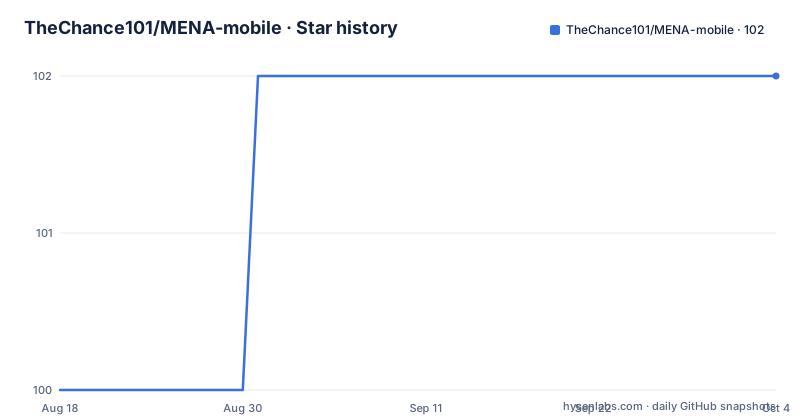
- TheChance101/MENA-mobile102 ★ · +2
| Repository | 2026-08-18 | 2026-10-04 |
|---|---|---|
| TheChance101/MENA-mobile | 100 | 102 |
2 Stars in the last 47 days, measured from the daily GitHub snapshot. Compare with other projects
Editorial analysis
Twenty-four feature modules behind one Gradle tree
The client is a Gradle multi-module project, and the module names say how it is divided. Six feature families each appear four times: `core_chat_api`, `core_chat_data`, `core_chat_domain`, `core_chat_presentation`, then the same quartet for `dukan`, `faith`, `identity`, `trends` and `wallet`. Each family therefore keeps its service contract, its storage and remote sources, its use cases and its Compose screens in four separate modules, which is the usual way to stop a feature from depending on another feature's screens. A shared `design_system/` module holds the visual pieces used across all six. `composeApp/` is the Android entry point, `iosApp/` is the iOS target, and `admin_panel/` sits beside them for the operator side. The default branch is `develop`, and the tree also carries `gradle.properties`, `settings.gradle.kts`, `build.gradle.kts`, `gradlew`, `gradlew.bat`, `codecov.yml` and a `.run/` directory of IDE run configurations.
Chat carries money, order state and scripture at once
Chat is the module where the rest of the app plugs in. A conversation starts with any contact synced from the device address book, and messages carry text, photos and voice messages, with reactions possible on all three. Two other features reach directly into the thread. Any selected Ayah from any Surah can be sent inside the chat, so the Faith reader hands a verse to a conversation instead of making the user leave the screen. Wallet balances are usable from the same place: sending money inside a chat needs enough balance in the wallet, and for a Dukan conversation the order detail is shown in the chat itself. Management is blunt by comparison, since an entire conversation can be deleted, while the chat list marks which threads hold recent or unread messages.
Wallet statements end up in a local PDF manager
The money side concentrates here. The current available balance is not kept on the device for display, it is fetched from the backend. Transfers are peer to peer between registered users, and Dukan orders are paid out of the same balance. Every incoming and outgoing transaction lands in a log that can be filtered by type, by status and by date range. A receipt for a single transaction can be exported through the native sharing sheet, and statements can be generated with custom filters, rendered as PDF and downloaded. Those downloaded files are then managed on the device, where they can be deleted. That local store is the part to watch: the README does not document any way to revoke or roll back a transfer, and it names Silver as a blockchain based digital currency without saying which chain it runs on.
Trends refuses anything past one minute or 100MB
The short video module has a hard ceiling on uploads: one minute of runtime and 100MB, with validation that runs before the upload starts. Publishing is not free form either, since every trend has to carry one to three categories and can add a description for discoverability. The feed is personalised from first launch, where the user picks interests, the categories are fetched dynamically, and changing those interests refreshes the Trend immediately. Playback analytics feed back into the recommendations. Own posts are gathered under My Trends, where they can be viewed or deleted, with a jump to the author's profile available from the same place. Liking is also a filing decision: liked trends are saved into Favorites automatically, while other people's trends are for reactions and creator support.
Dukan keeps a separate cart for every store
The marketplace half is described from the store owner's side first. An owner designs the storefront with custom styles and colors, builds shelves to group products, adds items with full details, marks anything unavailable as out of stock, applies discounts to push sales, and removes products once they stop selling them. On the buying side, location decides what surfaces first, with nearby Dukans and the Dukans carrying the highest discounts both reachable from the front, plus category browsing and a name search for a specific Dukan or product. Recommendations come from purchase history, each Dukan exposes its best selling products, and checkout delivers to the location the user currently has active. The unusual constraint is the cart: each Dukan keeps its own, so items from two stores never sit in one basket.
Faith pairs a Hijri schedule with a calibrated compass
The Faith section is built around three instruments. Prayer times arrive with a notification and a countdown to the next prayer, and the schedule is displayed in a Hijri calendar where past and upcoming entries can both be browsed, with calculations done worldwide from the device location. The Qiblah direction comes from a real time compass that asks for calibration before it will point. Quran reading covers all Surahs, each labelled Makki or Madani, in one reading interface. Ayah sharing from that reader is the same mechanism that pushes a verse into a chat, which is one of the few points in the repository where two of the app's areas are visibly joined rather than merely coexisting.
No release, no build steps, backend in another repository
What the repository withholds matters as much as what it holds. There are no GitHub releases, and the README gives no build, install or run instructions and no Gradle command examples, so a reader has to infer the toolchain from the module names and the Kotlin Multiplatform plus Compose Multiplatform stack it names. The service side is a Spring Boot application in a separate repository, TheChance101/MENA-backend, which the client needs for balances, chat sync and content, and nothing here explains how the two are pointed at each other or what a developer must configure to make that work. The visual specification is public through a Figma link, and the Apache-2.0 licence covers the client only, leaving the backend to its own terms. The last push to this repository was on 2026-01-03.
Editorial conclusion
MENA Mobile is worth reading if you are building one Kotlin Multiplatform app that carries several products at once, since the api, data, domain and presentation split per feature is laid out plainly and the cross feature wiring between chat, wallet, Dukan and Faith is visible in the code. It is a poor foundation to adopt as is: the last push to this repository was on 2026-01-03, there are no GitHub releases, no Gradle command examples, and the Spring Boot service the client depends on lives in a different repository with its own state. Before building on it, check whether TheChance101/MENA-backend is still reachable, what Silver is actually implemented on, and whether the backend behind wallet balances is one you can run yourself.
Frequently asked questions
What tech stack does the MENA Mobile app use?
The client is Kotlin Multiplatform with Compose Multiplatform, targeting Android through composeApp/ and iOS through iosApp/. The Spring Boot service is a separate project in the TheChance101/MENA-backend repository.
What is Silver in MENA Mobile?
Silver is the blockchain based digital currency the app uses for gifts, peer to peer transfers between registered users, and paying for Dukan orders from the wallet balance. The README does not say which blockchain it runs on.
How is the MENA Mobile codebase organised?
Six feature families, core_chat, dukan, faith, identity, trends and wallet, each have api, data, domain and presentation modules. A shared design_system/ module sits beside composeApp/, iosApp/ and admin_panel/.
When was the MENA Mobile repository last updated?
The last push to TheChance101/MENA-mobile was on 2026-01-03 and the repository has no GitHub releases. The default branch is develop and the licence is Apache-2.0.
Can I run the MENA backend from this repository?
No. The backend is a Spring Boot service kept in its own repository at TheChance101/MENA-backend, and this repository ships no run or build instructions of its own, so the client cannot be pointed at a server from anything documented here.
Official sources
Add this badge to your README
If you maintain this project, the badge below links readers to this analysis and shows its maintenance status from the daily GitHub snapshot. Paste the markdown into your README; add ?metric=license or ?metric=stars to the image URL for a different field.

[](https://hysenlabs.com/projects/thechance101-mena-mobile)Star history chart for your README
[](https://hysenlabs.com/projects/thechance101-mena-mobile)