FusionFix for GTA IV is single-player only, and its download links are never pinned
This project aims to fix or address some issues in Grand Theft Auto IV: The Complete Edition
At a glance
- What is it?
- A GPL-3.0 C++ project that fixes and extends Grand Theft Auto IV: The Complete Edition. Multiplayer is explicitly out of scope, only one edition is fully supported, the Wine and Proton instructions require a dinput8 override, and the premake build tool binary is committed to the repository.
- Who is it for?
- FusionFix is for one situation: you own a copy of Grand Theft Auto IV: The Complete Edition, you play it single-player, and you want the older console behaviour options and the modern display toggles back. On that basis it does what it says, with releases arriving every few weeks and an in-game menu that needs no external configuration for the common settings.
- Can I use it commercially?
- Yes, with conditions. GPL-3.0 is a copyleft licence: if you distribute software that includes it, you must release that software's source code under the same licence. Running it internally without distributing it does not trigger that obligation.
- Is it still maintained?
- Yes. The repository received new commits within the last day.
- What is it written in?
- Mainly C++, according to GitHub's language statistics.
Answers come from the project's GitHub data, last synced on November 15, 2026, and from our analysis. They are not legal advice.
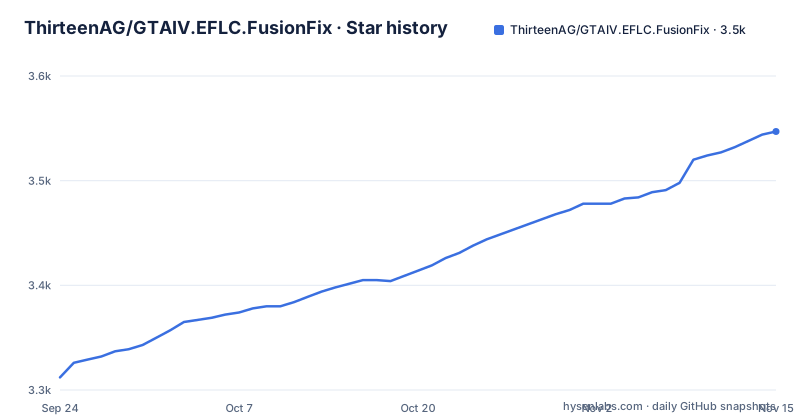
Star history
- ThirteenAG/GTAIV.EFLC.FusionFix3,547 ★ · +235
| Repository | 2026-09-24 | 2026-11-15 |
|---|---|---|
| ThirteenAG/GTAIV.EFLC.FusionFix | 3.3k | 3.5k |
235 Stars in the last 52 days, measured from the daily GitHub snapshot. Compare with other projects
Editorial analysis
Multiplayer is excluded, and the publisher's position is quoted
The project states its own boundary before anything else. Multiplayer is not supported, and forking the project or creating derivative software intended for multiplayer use of any kind is forbidden, with anyone doing so stated to be unaffiliated. Behind that sits a quoted policy: Take-Two has agreed it generally will not take legal action against third-party projects involving Rockstar's PC games that are single-player and non-commercial and respect third-party intellectual property. The quoted exceptions matter as much as the agreement, and they cover tools that could impact multiplayer or online services, use or importation of other intellectual property including other Rockstar property, and making new games, stories, missions or maps. The project also states it provides no support for illegal copies and points readers to Steam or the Rockstar Games Launcher. That framing is why this is a fix rather than an advantage: the agreement quoted covers single-player work, and the exceptions listed are exactly the ones that would turn a project of this kind into something that touches an online service.
Only The Complete Edition is fully supported
The supported target is Grand Theft Auto IV: The Complete Edition, and the documentation is explicit that legacy versions of the game are a second case. Versions 1.0.7.0 and 1.0.8.0 additionally require a separate archive, named GTAIV.EFLC.FusionFixLegacyAddon.zip, unpacked into the game's root directory in addition to the main payload. So an install for an older copy is two archives rather than one, and forgetting the second produces a partial install that the documentation does not describe as an error state. The naming convention is consistent throughout: the repository name, every asset filename, every tag and every release title all carry the game, the edition and the fix in one string, so an artifact sitting in your downloads folder is self-identifying.
Three assets, and an install error that means missing write permission
Installation starts from a copy of the game in your library, then splits into two routes. The first is a zip, GTAIV.EFLC.FusionFix.zip, unpacked into the game's root directory, the place where the executable sits. The second is one of two installers, a web installer or an offline installer, where you point the program at the game's directory and wait. Both installers carry the same failure note, which is the most useful line in the section: if the installer errors during installation, the likely cause is that it has no write access, and the fix is to open the properties of the game directory, change your system's users to have write permission, apply, and run it again. Note that the instruction is to change permissions on the game directory itself, which is a real consequence to think about before doing it. The zip route asks for neither an installer nor a permission change, which is the argument for it on a machine where writing to a game directory under Program Files is not something you want to arrange.
The download URLs resolve to whatever the newest release is
Each of those three assets is linked through the releases page at its latest download path, so the URL never points at a specific version. A browser or script fetching the zip filename gets the newest release artifact at the moment of the request, and a saved link silently changes what it delivers. The project publishes named tags, with v5.1.1 and v5.1.0 released on consecutive days in late September and October 2026 and v5.0.1 four months earlier, so this is a project that ships often. Pinning a specific tag's asset path rather than the latest path is the only way to keep a given install reproducible, and the documentation does not mention the distinction. The sibling projects, covering Max Payne 3 and other titles, follow the same pattern under a wider catalogue reachable from the same author's page, and this project's own site sits at fusionfix.io/iv. Knowing that a broader family exists is useful context for whether this approach is a one-off or a maintained pattern.
Wine and Proton need an explicit dinput8 override
Non-Windows users are told they must tell Wine explicitly to use the dinput8 file, with the note that Proton Experimental already loads it by default so the step may be skippable. Two methods are given. The first sets an environment variable for the session, either prepended to the start command on a command line or placed in the Steam launch options as WINEDLLOVERRIDES="dinput8=n,b" %command%. The second makes the override permanent for a prefix, by pointing winecfg at the prefix Steam created for this title:
WINEPREFIX="$HOME/.steam/steam/steamapps/compatdata/12210/pfx" winecfgIn that dialog you add the library from the Libraries tab and confirm it appears with a native, builtin suffix. There is a third dependency beyond the override: install and run Protontricks, select the title, choose to select the default Wineprefix, use the option to install a Windows DLL or component, search for d3dx9_43 and confirm.
premake5.exe is committed to the repository
The top level of the repository contains premake5.exe alongside premake5.bat, premake5.lua and a build directory of Windows batch scripts. A compiled Windows binary checked into version control is the notable item here: everyone building gets the same generator, which removes a bootstrapping step, and in exchange the binary is now part of the repository's history and its review surface. The build entry points around it are also all batch files, so the documented build path is native Windows. Signing has its own script, a PowerShell file, which is consistent with a project that distributes executables rather than source alone. Two continuous integration systems advertise themselves in the header, a GitHub Actions workflow and an AppVeyor project, which is a familiar pairing for a Windows-built project. Funding is spread across six destinations in the header, from Patreon and GitHub Sponsors through Ko-fi, PayPal and Boosty, and the sponsor progress graphics are served from a different domain belonging to a wider legacy-patching umbrella.
Build scripts cover the game's own resource formats
Four batch scripts sit alongside the generator, and their names describe what they rebuild: one for images, one for shaders, one for wtd files and one for gxt files. Those are the resource containers of the game itself, which tells you the project is not patching an installer alone but compiling and replacing game assets. The repository is laid out to match: source, shaders, textures, text, data, tools, external and installer directories, with external held as a submodule rather than vendored. A directory named license sits at the root next to the lowercase readme, while the licence recorded for the repository is GPL version 3, which is the licence for this project's own code rather than anything about the game assets it ships.
The menu documentation stops partway through an entry
The last visible part of the documentation is the list of new in-game menu options, which is described as added to the game's own menu, easy to toggle and customisable in real time, with a config file for further customisation by advanced users. The Display group that follows names a field of view control, in-game language switching, a Definition toggle described as restoring the old fuzzy look from consoles, and a console gamma control described as restoring the contrasted look from consoles. The list then stops partway through the next entry, which begins with Console Au and does not finish, so the remaining display options exist in the menu but are not described in the text available here. Worth knowing before you compare a settings list against the documentation and conclude an option is missing. The purpose behind those entries is console parity, since the fuzzy look and the gamma control are both described as restoring what consoles had, which implies the Complete Edition defaults to the softened modern look. The config file is the second half of that interface: the menu is for real-time toggles and the file is what an advanced user edits.
Editorial conclusion
FusionFix is for one situation: you own a copy of Grand Theft Auto IV: The Complete Edition, you play it single-player, and you want the older console behaviour options and the modern display toggles back. On that basis it does what it says, with releases arriving every few weeks and an in-game menu that needs no external configuration for the common settings. Three things to check before you install anything. Multiplayer is excluded by the project's own terms and by the publisher's stated position, so treat anything claiming otherwise as not this project. Only The Complete Edition is fully supported, and the two legacy game versions need a second archive unpacked as well. And if you are not on native Windows, the Wine or Proton path is not a single click: it needs a DLL override for dinput8, a Protontricks step for one Direct3D component, and a write-permission change on the game directory when the installer refuses to run.
Frequently asked questions
What is GTA IV Fusionfix?
A GPL-licensed C++ project that fixes some issues in Grand Theft Auto IV: The Complete Edition and adds features for modern systems, including new options in the in-game menu that can be toggled in real time. Related projects exist for Max Payne 3 and other games.
How do I install FusionFix in GTA IV?
With your own copy of the Complete Edition installed, either unpack GTAIV.EFLC.FusionFix.zip into the game root directory where the executable is, or run the web or offline installer and point it at the game directory. If the installer errors, the documented cause is missing write permission on the game directory.
Can I use FusionFix with GTA IV multiplayer?
No. Multiplayer is not supported, forking or deriving the project for multiplayer is forbidden, and the publisher's stated position covers single-player, non-commercial projects only. Nothing is provided for illegal copies of the game.
What does the Complete Edition requirement mean for older game versions?
Only The Complete Edition is fully supported. Versions 1.0.7.0 and 1.0.8.0 additionally need GTAIV.EFLC.FusionFixLegacyAddon.zip unpacked into the same game root directory, so those installs use two archives rather than one.
What extra steps does running FusionFix through Wine or Proton need?
An explicit override so Wine loads dinput8, either through the WINEDLLOVERRIDES variable or through winecfg on the game's prefix, plus a Protontricks step that installs the d3dx9_43 component. Proton Experimental already loads dinput8 by default, so the override can be skipped there.
Official sources
Add this badge to your README
If you maintain this project, the badge below links readers to this analysis and shows its maintenance status from the daily GitHub snapshot. Paste the markdown into your README; add ?metric=license or ?metric=stars to the image URL for a different field.

[](https://hysenlabs.com/projects/thirteenag-gtaiv-eflc-fusionfix)Star history chart for your README
[](https://hysenlabs.com/projects/thirteenag-gtaiv-eflc-fusionfix)Was this useful?