TABAnimated: your index is the subview order, and two similar methods mean different things
GitHub describes it as A skeleton screen loading framework based on native components for iOS, with easy integration, low coupling and compatibility with complex views; supports mainstream domestic skeleton-screen loading styles, pull-up load-more, and custom animations. The repository metadata lists Objective-C as its primary language. The metadata lists the MIT license. This article stays within the project description and details documented in the GitHub repository README.
At a glance
- What is it?
- An Objective-C framework that generates a skeleton screen from a view you have already built, by walking the view hierarchy and mapping each element. It addresses those elements either by their recursive subview order or by variable name, and one of its own documentation files is titled after the delegate and data source hooks it stopped installing.
- Who is it for?
- This is a reasonable way to get a loading placeholder that matches a layout you have already committed, rather than drawing a second mock, and the two ways of addressing elements cover both the quick case and the fiddly one. Three things to weigh.
- Can I use it commercially?
- Yes. MIT is a permissive licence: you can use, modify and sell software built on it, as long as you keep its copyright and licence notices.
- Is it still maintained?
- Probably not. The repository last received commits 25 months ago, on September 19, 2024.
- What is it written in?
- Mainly Objective-C, according to GitHub's language statistics.
Answers come from the project's GitHub data, last synced on October 21, 2026, and from our analysis. They are not legal advice.
Star history
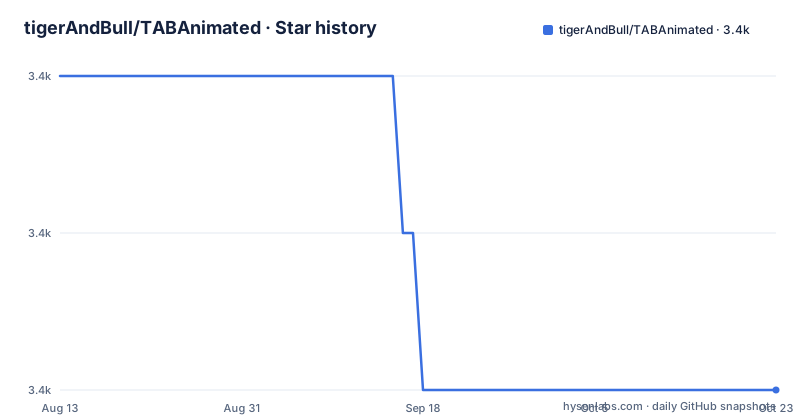
- tigerAndBull/TABAnimated3,400 ★ · -2
| Repository | 2026-08-13 | 2026-10-21 |
|---|---|---|
| tigerAndBull/TABAnimated | 3.4k | 3.4k |
-2 Stars in the last 69 days, measured from the daily GitHub snapshot. Compare with other projects
Editorial analysis
The skeleton is derived from a view you already have
The premise is that a skeleton screen should look like the screen it stands in for, and the cheapest way to guarantee that is to generate it from the real layout rather than to draw it twice. You hand the framework a view you have already built, set a few global and local parameters, and it produces a placeholder whose structure matches. The stated benefit is development cost: a small amount of configuration rather than a second hand-built view that has to be kept in step. The feature list adds the parts that usually make skeleton screens painful. Automation with low coupling to your existing code, list views and nested views, pull-to-load-more, dark mode, custom animations with serialisation so they can be persisted, and live preview. The effect gallery in the file names five animation styles, two dark mode cases and the preview mode, which is a reasonable catalogue for a screen-space effect.
The install line installs an older release than the newest one
There are three install routes and they do not agree with each other. The Cocoa Pod line pins a specific version, and that version is the one from November 2021:
pod 'TABAnimated', '2.6.3'The Carthage line names the repository with no version at all, so it tracks whatever the tool resolves. The third route is to drag the framework folder into the project by hand. The release record explains the gap: the newest release is 2.6.5 from March 2024, preceded by 2.6.4 in January 2022 and 2.6.3 in November 2021. So the pod instructions are two releases behind and about two and a half years old, the Carthage instructions are unpinned, and the newest tag is newer than anything the README tells you to install. The most recent commit on the default branch is dated 2024-09-19, so the source has also moved past the newest release.
An element's index is its position in the subview recursion
Once a skeleton exists you need to adjust individual elements, and there are two ways to name them. The first is an index, and the first frequently asked question answers exactly what that index means: it is the recursive ordering of the view's subviews. That is a real property of your layout rather than an identifier, so inserting a label above an image renumbers everything below it. The framework offers a mitigation in the same answer: a global switch set once at launch makes the framework label the elements for you, so you can see which index is which while you work it out. The second way is by variable name, and the same answer closes with a limitation worth remembering, because it is the one people trip over: the named form does not support local variables, so a label declared inside a method cannot be addressed by name.
Two chain methods that look alike take a range and a list
The adjustment examples are the clearest part of the documentation and the easiest to get wrong. One method takes two indices and applies to everything between them, so passing one and three sets a width on elements one, two and three. A second method, whose name differs only by a suffix, takes a list of indices, so passing one, five and seven moves those three and nothing between them. Both are in the same example block, described in the same style, and they are one letter apart in the middle of the name. Nothing in the documentation warns you. If an adjustment silently affects elements you did not name, that is almost always the difference between a range and a list rather than a bug.
The Swift binding turns every step of the chain into an optional call
The integration path is five steps: optional global parameters set at launch, initialising the control view against a cell class and a cell size, starting and stopping the animation on demand, and then attaching an adjustment block whose chained calls set position offsets, sizes, corner radius and placeholder images. The block exists in three spellings, by variable name, by index, and in Swift. The Swift one is worth reading on its own because the syntax is visibly more fragile: each step in the chain is written as an optional call, so a property access becomes a call that returns an optional, and the chain reads as a row of question marks. That is what bridging a nullability-annotated Objective-C chain into Swift produces, and it is a fair summary of what it costs to use this framework from a Swift codebase.
Three list shapes, and a document titled after removed hooks
The third frequently asked question is really a decision tree. Before integrating, you classify your list: sections as the unit with a one to one section and cell style mapping, or a single section mapping to several cell types, or a section count that arrives from the network. Then you choose whether every section and row animates or only some, and find the initialisation and start method that matches. The last answer is a list of deeper documents, and the filenames are percent-encoded Chinese. Two are worth naming. One covers caching strategy and threading, which tells you the framework's concurrency model is documented rather than implicit. The other is titled around no longer hooking the delegate and data source setters, which means the framework used to intercept those on the control view and has since stopped, with a document explaining what it does instead.
Support happens in a chat account and a group
The tips section is short and it is the honest part. Questions are answered first by the issue tracker and the document folder, the demo is described as showing integration schemes for different view structures rather than finished designs, and developers are told to customise from there. Then support moves to a WeChat public account and a group chat. That is a common pattern in Chinese iOS development and it has a practical consequence for anyone outside that ecosystem: the searchable record is the issue tracker and the document folder, and the people who answer quickly are not reachable through them. The root of the repository is correspondingly thin, with a licence file, two readmes in two languages, a pod specification, the document folder and the demo, and no contributing guide.
Editorial conclusion
This is a reasonable way to get a loading placeholder that matches a layout you have already committed, rather than drawing a second mock, and the two ways of addressing elements cover both the quick case and the fiddly one. Three things to weigh. The element index is derived from subview order, so any view restructuring silently renumbers your adjustments, and the framework can label the elements for you while you work that out. The chain has two methods whose names differ by a few letters and whose arguments mean different things, a range and a list, which is the single most likely source of a silent mistake here. And the documented pod install pins a release more than two years older than the newest one, so decide deliberately which you are taking.
Frequently asked questions
What is TABAnimated?
An iOS framework written in Objective-C that generates a skeleton screen from a view you have already built, mapping the native components so the placeholder matches the real layout. It supports chained adjustment of individual skeleton elements, dark mode, custom animations and pull-to-load-more.
How do I install TABAnimated?
Three documented routes: a Cocoa Pod line that pins a specific version, a Carthage line that names the repository with no version, or dragging the framework folder into the project by hand.
How do I address a single skeleton element in TABAnimated?
Either by index, where the index is the recursive order of the view's subviews, or by variable name, which does not support local variables. A global switch makes the framework label the elements so you can work out which index is which.
Can TABAnimated be used from Swift?
Yes, and the README shows the adjustment chain written in Swift, where every step is an optional call, so the syntax is visibly different from the Objective-C form with its row of question marks.
When was the last TABAnimated release?
Version 2.6.5 in March 2024, after 2.6.4 in January 2022 and 2.6.3 in November 2021. The Cocoa Pod line in the README still installs 2.6.3, and the most recent commit is dated 2024-09-19.
Official sources
Add this badge to your README
If you maintain this project, the badge below links readers to this analysis and shows its maintenance status from the daily GitHub snapshot. Paste the markdown into your README; add ?metric=license or ?metric=stars to the image URL for a different field.

[](https://hysenlabs.com/projects/tigerandbull-tabanimated)Star history chart for your README
[](https://hysenlabs.com/projects/tigerandbull-tabanimated)