TikHub Python SDK: 1048 social media endpoints behind one client
High-performance asynchronous Douyin(抖音) TikTok Xiaohongshu(小红书) Kuaishou(快手) Weibo(微博) Instagram YouTube(油管) Twitter(X) Captcha Solver(验证码解决器) Temp Mail(临时邮箱) API(接口).
At a glance
- What is it?
- The TikHub Python SDK is a mechanically generated client for a hosted REST API that exposes over a thousand endpoints across sixteen social media platforms, with synchronous and asynchronous clients that share an API, flat keyword configuration and pydantic models. The trade is that you are calling somebody else's server and paying for the access, and the SDK does nothing to change the terms of the platforms it scrapes.
- Who is it for?
- Adopt the TikHub SDK when you need structured data from Chinese and global social platforms and you would rather not maintain scrapers for sixteen of them, since the client covers every endpoint in the published OpenAPI spec and the sync and async variants have identical APIs.
- Can I use it commercially?
- Yes. Apache-2.0 is a permissive licence: you can use, modify and sell software built on it, as long as you keep its copyright and licence notices.
- Is it still maintained?
- Yes. The repository last received commits 36 days ago.
- What is it written in?
- Mainly Python, according to GitHub's language statistics.
Answers come from the project's GitHub data, last synced on November 7, 2026, and from our analysis. They are not legal advice.
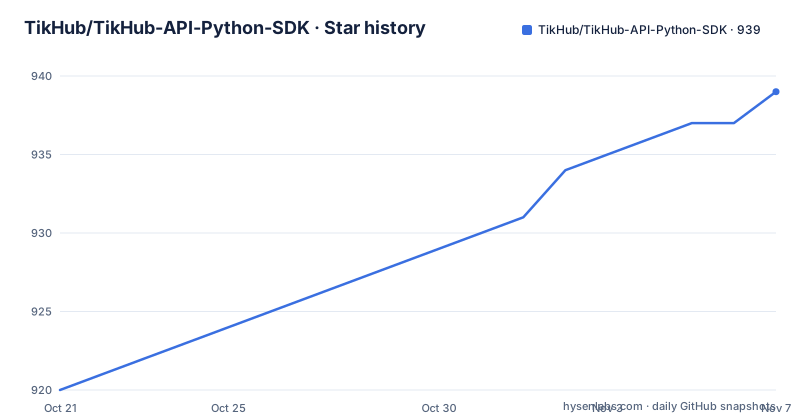
Star history
- TikHub/TikHub-API-Python-SDK939 ★ · +19
| Repository | 2026-10-21 | 2026-11-07 |
|---|---|---|
| TikHub/TikHub-API-Python-SDK | 920 | 939 |
19 Stars in the last 17 days, measured from the daily GitHub snapshot. Compare with other projects
Editorial analysis
A generated client, not a hand written convenience wrapper
The defining property of this SDK is that it is derived mechanically from the API specification rather than written by hand, and the README is explicit about the rules that derivation follows.
The first rule governs the resource attribute. It equals the OpenAPI tag, lowercased, with dashes turned into underscores and -API stripped. Douyin-Web-API becomes client.douyin_web, and TikTok-App-V3-API becomes client.tiktok_app_v3.
The second rule governs the method name. It is the last segment of the API path, verbatim, so /api/v1/douyin/web/fetch_one_video maps to client.douyin_web.fetch_one_video.
Parameter names match the OpenAPI spec verbatim as well. The practical consequence stated in the documentation is that if you can read the TikHub API docs, you already know how to use the SDK, and there is no second layer of naming conventions to memorise.
That approach has an obvious cost. If the upstream spec renames a tag or changes a path segment, the SDK surface changes with it. The benefit is that coverage cannot drift: the status table claims 1048 out of 1048 endpoints against spec version V5.3.2, with deprecated endpoints excluded, and describes them as mechanically generated and verified.
There are 51 resources, one per OpenAPI tag, and the type checking is mypy strict clean across 70 source files, with ruff clean as the linter.
The same API in sync and async form
Two client classes ship in the package, TikHub and AsyncTikHub, and they are described as having identical APIs. That is the design decision that matters most for adoption, because it means the choice between blocking and asynchronous is a change of class name and of await, not a rewrite.
The synchronous quickstart constructs a client and calls a method.
from tikhub import TikHub

client = TikHub(api_key="YOUR_API_KEY")

# 1:1 with the OpenAPI spec — resource = tag, method = path basename
video = client.douyin_web.fetch_one_video(aweme_id="7251234567890123456")
print(video.aweme_detail.desc)

client.close()
The context manager form is the one the documentation recommends.
with TikHub(api_key="YOUR_API_KEY") as client:
    health = client.health_check.check()
    print(health.status)
The asynchronous version uses the async context manager and awaits the call.
import asyncio
from tikhub import AsyncTikHub

async def main():
    async with AsyncTikHub(api_key="YOUR_API_KEY") as client:
        video = await client.douyin_web.fetch_one_video(aweme_id="...")
        print(video.aweme_detail.desc)

asyncio.run(main())
The response objects are typed models, so video.aweme_detail.desc is a real attribute rather than a dictionary lookup, and the repository carries example scripts per platform family under examples/, including files for douyin_web, douyin_search, bilibili_web, instagram_v1 and others.
Flat keyword configuration with no client object
The constructor takes one required argument and a handful of optional keyword arguments, and they are listed in full.
TikHub(
    api_key=None,        # str | None — defaults to $TIKHUB_API_KEY
    timeout=30,          # float | None — total request timeout in seconds
    base_url=None,       # str | None — only override for a private mirror

    # Advanced (rare):
    max_retries=3,
    proxy=None,
    user_agent=None,
    parse_response=True,
    http_client=None,    # bring your own httpx.Client
)
The documentation is blunt about the philosophy: that is the entire configuration surface, there is no ClientConfig object, and the knobs are flat keyword arguments. The stated principle is zero config, set one environment variable and go, and the api_key argument defaults to the TIKHUB_API_KEY environment variable.
Two of those options are worth understanding. parse_response controls whether the response is turned into the typed pydantic model, and turning it off is the escape hatch when you want the raw payload. http_client lets you bring your own httpx.Client, which is how you would inject a custom transport, a mock, or a client you have already configured with connection pooling.
base_url exists mainly for a private mirror, and proxy and user_agent are marked as rarely needed.
The dependency list in the project file is short and tells you the shape of the implementation: httpx for the transport, pydantic v2 for the models, anyio for the async layer, and typer for the command line interface. There is a console script entry point registered as tikhub, so the package also ships a CLI.
Retries, rate limits and the error hierarchy
The production behaviour list is short: automatic retries with exponential backoff, rate limit handling, and a structured error hierarchy with full debugging context.
Automatic retries matter more than they sound for this kind of API, because the upstream behaviour is a scrape of someone else's private interface and therefore degrades without warning. A retry with exponential backoff turns a transient failure into a delay instead of an exception. The default is three retries, and the timeout defaults to thirty seconds for the whole request.
Rate limit handling is the other half. Because the service fronts many platforms, the limits are likely to be per account rather than per endpoint, and a structured error that tells you whether you were throttled is what lets a caller back off correctly rather than treating a 429 like any other failure.
The error hierarchy is described as carrying full debugging context, which in practice means you get the request and the response rather than a bare exception type. For an API that wraps a third party scrape, being able to see what the upstream actually returned is often the difference between debugging in an hour and debugging in a day.
The base transport is httpx with a sync or async client under the hood, and anyio provides the async primitives, which is why the same code shape works in both modes.
Where the data comes from and what it costs you
It is worth being clear about the architecture, because it determines the constraints. This SDK is a client. It does not scrape anything itself. Every response comes from the hosted TikHub service, which does the scraping, and your API key grants you access to that service.
That has a long list of consequences. You need an account, and you need it funded, since the endpoints are metered by the service. If the service is down or changes its behaviour, your code is affected even though your code did not change. The data you receive is only as fresh and as complete as the upstream platforms let the service see, and the SDK does not change that.
The API also covers categories beyond social media content, including a captcha solving service and a temporary email service, and the SDK exposes them as more resources in the same namespace. That is convenient mechanically and worth flagging on its own terms, because those categories carry different expectations about the platforms involved and about how the resulting data may be used.
The README frames the intended users as developers, data scientists and AI engineers, with use cases including AI training, influencer analytics, trend monitoring, sentiment analysis, market research and competitive intelligence. It also advertises pre-collected datasets of more than a billion structured records for training and research, and an MCP integration so that agents can reach the same endpoints through the Model Context Protocol.
None of this changes the licence and terms of the platforms whose data you are reading, and the SDK is a convenience layer rather than a legal position.
Version confusion, licences and the state of the project
The version numbers in this repository need care, because three of them disagree.
The release list shows v2.2.0 published on 2026-10-03, preceded by V1.13.0 from 2024-12-05 and V1.12.9 from 2024-09-29. The project file declares version 2.2.0. The README, however, states the version as 2.1.1 in its own callout block. The package therefore publishes as 2.2.0 while the README describes 2.1.1, which suggests the README was not updated in the same commit as the release, and it means you should check the installed version rather than the README when you file an issue.
The licences disagree too. The licence field on the repository says Apache-2.0, while the project file declares MIT and includes a classifier for the MIT License. If the licence matters to your organisation, read the LICENSE file rather than trusting either field.
The version requirement is Python 3.9 or newer, and the classifiers list 3.9 through 3.13. Note that this floor sits under pydantic v2 and httpx 0.27, which is worth knowing if you are on an older interpreter and tempted to pin back.
The project is not archived and the last push was on 2026-10-03, matching the newest release. The status table describes a phased plan in which phase 0, the foundation covering the client, transport, errors, retries and pagination, is done, and later phases extend the codegen pipeline. The tests are reported as 108 passing, and the development extras include pytest, pytest-asyncio, respx for HTTP mocking, ruff and mypy.
Editorial conclusion
Adopt the TikHub SDK when you need structured data from Chinese and global social platforms and you would rather not maintain scrapers for sixteen of them, since the client covers every endpoint in the published OpenAPI spec and the sync and async variants have identical APIs. Do not adopt it if you need data you can keep, because every response depends on the hosted service staying up and your key staying funded, and check the platform terms before building a product on top of it. Verify first that your account is provisioned for the endpoints you need, that the resource and method names match your API documentation version, that Python 3.9 or newer is available given the pydantic v2 and httpx requirements, and that you read the CHANGELOG, since the endpoint count and the spec version move with each platform release.
Frequently asked questions
How do I install and start using the TikHub Python SDK?
Run pip install tikhub, which needs Python 3.9 or newer, set the key with export TIKHUB_API_KEY, then construct a client with TikHub or use the AsyncTikHub variant. From source, clone the repository and run pip install -e ".[dev]" followed by pytest -q.
How are TikHub SDK method names derived from the API?
The resource attribute is the OpenAPI tag lowercased with dashes turned into underscores and -API stripped, and the method name is the last segment of the API path verbatim. Parameter names also match the spec, so an endpoint path of /api/v1/douyin/web/fetch_one_video becomes client.douyin_web.fetch_one_video.
What does the TikHub SDK do when a request is rate limited or fails?
The client applies automatic retries with exponential backoff, with a default of three retries and a default timeout of thirty seconds, and it handles rate limits as part of a structured error hierarchy that carries debugging context. You can also pass your own httpx.Client to take over the transport.
Does the TikHub SDK scrape social media platforms itself?
No, it is a client for the hosted TikHub REST API. The service performs the collection and your API key grants access to it, which means responses depend on that service being available and on the upstream platforms, and the SDK does not change the terms of the platforms whose data you read.
Official sources
Add this badge to your README
If you maintain this project, the badge below links readers to this analysis and shows its maintenance status from the daily GitHub snapshot. Paste the markdown into your README; add ?metric=license or ?metric=stars to the image URL for a different field.

[](https://hysenlabs.com/projects/tikhub-tikhub-api-python-sdk)Star history chart for your README
[](https://hysenlabs.com/projects/tikhub-tikhub-api-python-sdk)Was this useful?