TinyFish Cookbook: Fetch is free even when it fails, and the Makefile includes a missing directory
A collection of sample apps and recipes built with the TinyFish web agent. Open-source examples for you to learn & build!
At a glance
- What is it?
- This repository is a set of sample applications built against a commercial web agent service, where two of the four endpoints are free and two are metered. Reading the page and the build file closely shows a billing policy that refunds its own failures, a speed column that answers in four different kinds of unit, six access surfaces sharing one key under two different package names, and a Makefile whose wildcard include points at a directory the repository does not contain.
- Who is it for?
- This cookbook suits a developer who wants to see how a commercial browser agent is wired into a real application rather than read about it, because the featured recipes each stand alone and eight of them have a deployed demo you can open. It is a poor place to evaluate the service itself, since the free tier covers only retrieval and the two endpoints that do the multi-step work are metered with no figures published.
- Can I use it commercially?
- Yes. MIT is a permissive licence: you can use, modify and sell software built on it, as long as you keep its copyright and licence notices.
- Is it still maintained?
- Yes. The repository last received commits 2 days ago.
- What is it written in?
- Mainly TypeScript, according to GitHub's language statistics.
Answers come from the project's GitHub data, last synced on November 22, 2026, and from our analysis. They are not legal advice.
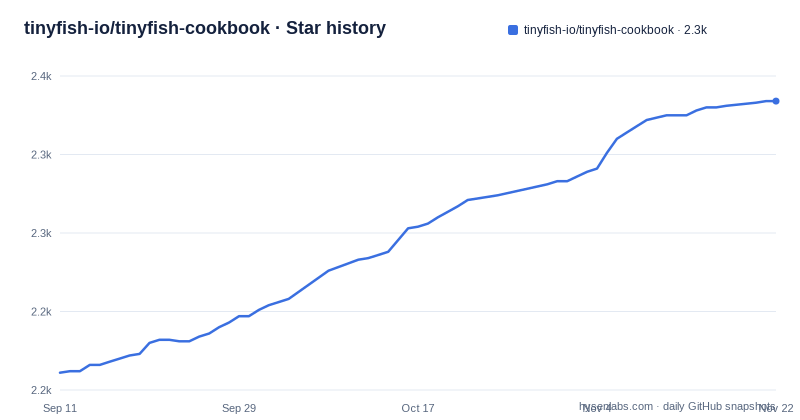
Star history
- tinyfish-io/tinyfish-cookbook2,334 ★ · +173
| Repository | 2026-09-11 | 2026-11-22 |
|---|---|---|
| tinyfish-io/tinyfish-cookbook | 2.2k | 2.3k |
173 Stars in the last 72 days, measured from the daily GitHub snapshot. Compare with other projects
Editorial analysis
Fetch is free even when the URL fails
The pricing table has four rows and two columns that matter, and the Fetch row contains the detail that decides whether the free tier is worth anything to you. The table describes the endpoint as taking any URL to clean markdown, JSON or HTML with real full-browser rendering, and then adds six words that no other row has: failed URLs are free. That inverts the usual arrangement. A metered scraping endpoint normally bills per request regardless of outcome, so a bad URL, a timeout or a block costs you anyway and shows up in your bill as indistinguishable from a success. Here the failure is absorbed. The practical consequence is that this endpoint is unconditionally free in both directions, which is generous, and that its invoice carries no information about your hit rate. If you are reconciling spend against volume, the fetch line will not tell you how much of your traffic is failing, and you would have to count that yourself from the response bodies. The announcement above the table makes the wider claim, that search and fetch are free for everyone with generous rate limits and no credit card required, and adds that these are the same endpoints powering production workloads.
The speed column answers in four different kinds of unit
Read the speed column down the table and you get four different forms of answer, none of which is comparable to the others. The search endpoint is given a bound, under half a second. The fetch endpoint is given an indefinite article, a few seconds. The agent endpoint is given a range spanning two orders of magnitude, roughly ten seconds to minutes, which is an honest admission that the duration depends entirely on how many steps the goal takes. The browser endpoint is not given a duration at all, but the word real-time. So one row has a ceiling, one row has a gesture at a magnitude, one row has an honest range, and one row has a category of latency rather than a measurement. The same table then describes search results as rank-stable across calls, which is the more consequential claim for anyone building a reproducible pipeline: a search that reorders between identical queries is hard to cache, hard to diff and hard to test against. Everything else in that row is aimed at machine consumption rather than at a person browsing, and the page is explicit that it is not designed for clicking through blue links.
One key, six surfaces, and two spellings of the package name
The page's organising claim is one API key, use it from wherever you build, and then it offers six ways to do that. There is a REST interface with three worked invocations, a search request, a fetch post and a streaming agent call. There is a hosted MCP server you add by pasting two lines of configuration:
{
  "mcpServers": {
    "tinyfish": { "url": "https://mcp.tinyfish.ai" }
  }
}
There is a command line tool:
npm install -g @tiny-fish/cli
tinyfish auth login
tinyfish search query "web automation tools"
tinyfish fetch content get https://example.com
There is an agent skill installed with one line, which the page says works with several named coding agents. There is a script section, currently holding one Raycast extension. And there are two SDKs:
pip install tinyfish              # Python
npm install @tiny-fish/sdk        # TypeScript
Note the naming. The two npm packages use a hyphen in the scope, while the Python package and every host address drop it, and the skill install points at a different repository path again. Four surfaces, two spellings. The command line tool is given one distinguishing rationale, that it writes results to the filesystem instead of piping them through your model's context window, which is the same token-economics argument the feature list makes about stripping navigation, scripts and cookie banners out of fetched pages.
The metered endpoint is the one an agent actually needs
Two of the four endpoints are priced as metered, and they are not the two a beginner reaches for. Search and fetch are free. The agent endpoint, which takes a URL and a natural-language goal and returns structured JSON after navigating and acting, is metered, as is the browser endpoint for renting a managed cloud browser with your own Playwright or Selenium attached. So the free tier covers retrieval and nothing more. Anyone whose agent needs to log in, fill a form, paginate through results or hold a multi-step flow is on the metered side from the first request, and the page publishes no price for either. The one worked example of the agent call on the page points at a different company's site and asks it to find subscription plans and prices, streamed over a server-sent events endpoint at a third host. It is the only free-to-try illustration of the surface you will actually pay for, and it is a curl invocation rather than something you can click. For a service whose pitch is that you send a goal and get JSON back, that is the one row you cannot evaluate before signing up.
The build file includes a directory the repository does not have
The repository ships a Makefile with three targets, and it opens like this:
SHELL := /usr/bin/env bash

include $(wildcard makefiles/*)
That include is a wildcard over a directory that is not in the repository. The top level holds about thirty recipe directories plus configuration files, and there is no makefiles directory among them. Because the pattern is expanded by a wildcard rather than named directly, the include does not fail when the directory is absent; it expands to nothing and the build continues. That is the useful property of the construct and also the trap: a target you expect to inherit from an included file simply will not be there, with no diagnostic. If this repository previously had a makefiles directory of shared targets, or intends to grow one, the Makefile gives no sign either way. The other two targets are more careful. One checks for a secret scanner and exits with an error that tells you how to install it, offering a package manager route on macOS and a curl-piped-to-shell route on Linux. The other creates the pre-commit configuration if it is missing, by copying a template out of the repository's own configuration directory. That template is why no pre-commit file appears in the tree, and it means a fresh clone has no hooks until you run the target.
A cookbook of examples carries scanner and lint configuration
The top level of a repository whose stated purpose is sample applications contains a scanner ignore file, a tags file, a YAML lint configuration, a vulnerability scanner configuration and a dependency update configuration. That is more supply chain tooling than most application repositories carry, and it makes sense here for a specific reason: almost every directory in this repository is a small project that installs its own dependencies and talks to a third-party API, so the aggregate risk surface is many projects deep rather than one. The two directories named for skills and plugins, plus the one for skill sources, and the directory named for a competitive AI coding tool, indicate that part of the collection is aimed at agents rather than at applications, which is consistent with the agent skill install line and with one of the featured recipes whose stated job is to scrape documentation, code hosts and blogs into a single skill file. The security posture of the repository is therefore not incidental. It is the most consistent thing about a collection that otherwise has no shared code at all, since the page states that each folder is a standalone project.
Eight demos for about thirty directories, and one link breaks the pattern
The featured table lists eight recipes with deployed demos. The repository holds roughly thirty directories, so the live deployments are a quarter of the collection and are chosen for being on the latest SDK. What is in them is consistent: price comparison across cities using parallel browser agents, tutor discovery for competitive exams, an aggregator across eight retailers for open-box and refurbished goods, a semiconductor supply chain tracker, summer school programmes, a skill file generator, happy hour deals in one city, and football highlight reels. Two of them name a second external service, which is worth noticing in a collection that otherwise sells a single key: one compiles clips with a separate video database, and one uses the search endpoint to discover footage before doing anything else. The demo links mostly follow one convention, a prefixed subdomain per recipe. The football one does not, using a bare subdomain with no prefix and no trailing slash, where the other seven have both. It is the sort of inconsistency that survives because the link works. Below the featured table the page starts describing hackathon samples built for a week-long event in Ho Chi Minh City in July 2026 and then stops mid-link.
The credential vault is described in one line
The feature list has seven bullets and six of them are about reach and cost: turning sites without interfaces into data sources, sending a goal in plain English, real browser automation with forms and dynamic content, built-in stealth with rotating proxies and profiles at no extra cost, full logs and debugging on every run, and token efficiency from stripping navigation and cookie banners. The seventh is different in kind. The vault is described as agent-grade credentials and session memory for authenticated workflows, with two parentheticals that carry the weight: one is a password manager's just-in-time integration, and the other is encrypted session reuse. That means the service is designed to hold the credentials that let an agent act as you on sites that require login, and to reuse sessions across runs so it does not have to authenticate every time. Neither the page nor the repository says how a vault entry is scoped, how long a reused session lives, how revocation works, or what a run's logs contain. For a feature aimed at authenticated workflows, that is the detail to ask the vendor for before pointing an agent at anything with a real account behind it, and it is the one item in the list that would change your answer about the product.
Editorial conclusion
This cookbook suits a developer who wants to see how a commercial browser agent is wired into a real application rather than read about it, because the featured recipes each stand alone and eight of them have a deployed demo you can open. It is a poor place to evaluate the service itself, since the free tier covers only retrieval and the two endpoints that do the multi-step work are metered with no figures published. Before you build on it, read the pricing table rather than the announcement, because the free claim covers search and fetch and nothing else, and note that failed fetch requests are free, so your bill tells you nothing about your success rate. If you clone the repository, run the setup target rather than expecting hooks to be configured, because the pre-commit file is generated from a template that is not committed. And treat the credential vault feature as the part to investigate first, since it holds secrets for authenticated workflows and the page describes it in a single line.
Frequently asked questions
Which TinyFish endpoints are free?
Search and Fetch. The page announces both as free for everyone with generous rate limits and no credit card required, on the same endpoints said to power production workloads. The Agent and Browser endpoints are listed as metered, and no price is published for either.
Do I pay for a TinyFish Fetch request that fails?
No. The pricing table states that failed URLs are free for the Fetch endpoint. That means a fetch invoice carries no information about your failure rate, since a request that fails costs the same as nothing and costs nothing, so success has to be counted from the responses themselves.
How do I add the TinyFish MCP server to a coding agent?
Add the hosted server URL to your MCP client configuration as a server named tinyfish pointing at https://mcp.tinyfish.ai. The page says this works with Claude Code, Cursor, Codex, ChatGPT desktop or any MCP-aware client, and that it uses the same key as the other surfaces.
What client libraries does TinyFish ship?
A Python package installed with pip install tinyfish and a TypeScript package installed with npm install @tiny-fish/sdk. The page states both SDKs cover Search, Fetch, Browser, Agent and Vault with full parity. Note the npm packages use a hyphen in the scope while the Python package and the service hosts do not.
Do the TinyFish cookbook recipes have live demos?
Eight of them do, listed in a featured table and described as using the latest SDK. The repository holds roughly thirty directories in total and the page states that each folder is a standalone project. The football highlight recipe is the one demo link that departs from the prefixed subdomain convention the other seven follow.
Official sources
Add this badge to your README
If you maintain this project, the badge below links readers to this analysis and shows its maintenance status from the daily GitHub snapshot. Paste the markdown into your README; add ?metric=license or ?metric=stars to the image URL for a different field.

[](https://hysenlabs.com/projects/tinyfish-io-tinyfish-cookbook)Star history chart for your README
[](https://hysenlabs.com/projects/tinyfish-io-tinyfish-cookbook)Was this useful?