TinyMCE: no GitHub releases, an interactive release Makefile, and a license field that disagrees with its own README
The world's #1 JavaScript library for rich text editing. Available for React, Vue and Angular
At a glance
- What is it?
- tinymce/tinymce is the TypeScript rich text editor monorepo behind the React, Vue and Angular wrappers. The editor version lives in a workspace manifest rather than a release page, both release targets stop for a keypress, and the machine-readable license field says NOASSERTION while the README states GPL v2 or later.
- Who is it for?
- TinyMCE fits teams that want an established rich text editor with wrappers for React, Vue and Angular and a wide set of customization points, and the GPL v2 or later terms make self-hosting straightforward. It does not serve as a repository you can learn from, because every getting-started route leaves for tiny.cloud, the contribution link points at a branch other than the default, and the release automation needs a human at the keyboard.
- Can I use it commercially?
- Check first. The repository uses a licence we do not classify automatically, so read its LICENSE file before any commercial use.
- Is it still maintained?
- Yes. The repository last received commits 4 days ago.
- What is it written in?
- Mainly TypeScript, according to GitHub's language statistics.
Answers come from the project's GitHub data, last synced on November 15, 2026, and from our analysis. They are not legal advice.
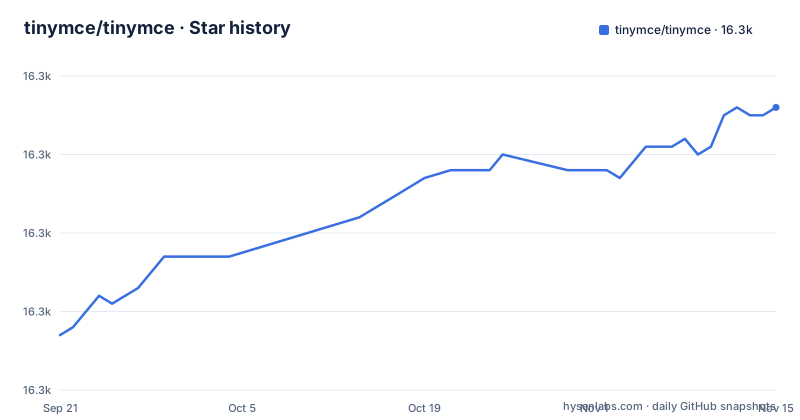
Star history
- tinymce/tinymce16,326 ★ · +29
| Repository | 2026-09-21 | 2026-11-15 |
|---|---|---|
| tinymce/tinymce | 16.3k | 16.3k |
29 Stars in the last 55 days, measured from the daily GitHub snapshot. Compare with other projects
Editorial analysis
Checking versions and release information
GitHub Releases and Git tags are separate, so the absence of a release page does not establish whether repository tags exist. Check the tags, package registry and official release notes when identifying published versions. The Makefile reads the editor version from the workspace manifest and other workspace versions from the top-level versions file. The README recommends upgrading older installations to TinyMCE 8 for security updates; check the official release notes and support information for the version you deploy.
VERSION_FILE := versions.txt

get_tiny_version = $(shell jq -r '.version' modules/tinymce/package.json)
get_version = $(shell grep '^$(call extract_first_word,$1)@' $(VERSION_FILE) | cut -d '@' -f 2)
Both release targets stop for a keypress, so make cannot run unattended
Every package target runs the batch twice, and the first run is a dry run. After printing the dry run banner, the recipe echoes Press Enter to continue with actual changie batch or Ctrl+C to cancel..., then calls read to consume one line from standard input, and only then does the real batch execute. There is no flag that skips the pause and no non-interactive variant of the target in the file. The consequence is that make tiny and make other cannot be dropped into a continuous integration job or an unattended release script as they stand, and anyone automating a release has to invoke changie batch directly instead of going through the Makefile. The target also fails closed in a specific, documented way: when the version lookup returns nothing, it prints Version not found for package and Please add it to versions.txt, then exits 1 rather than guessing a number.
	@version=$(call get_version,$@); \
	if [ -z "$$version" ]; then \
		echo "Version not found for package $@"; \
		echo "Please add it to $(VERSION_FILE)"; \
		exit 1; \
	else \
		changie batch $$version --project $@ --dry-run; \
		echo "Press Enter to continue with actual changie batch or Ctrl+C to cancel..."; \
		read; \
		changie batch $$version --project $@; \
	fi
Which packages get released is parsed out of changelog fragment filenames
The set of packages to release is not configured anywhere. The Makefile globs whatever files sit in the unreleased changes directory, strips the directory prefix off each filename, takes the first word of the remainder after replacing dashes with spaces, then sorts the unique results. Names that begin with tinymce take the editor path, which resolves a single version from the workspace manifest. Everything else takes the per-package path, which greps the version out of versions.txt. A changelog fragment's filename therefore decides both which release path executes and which versions.txt entry must already exist. Renaming or misprefixing a fragment silently changes which batch command runs, and no validation sits between the filename and the release. The tree does carry .changie.yaml and a changie-merge script targeting the Unreleased heading, so the tooling exists, but the naming contract holds only by convention.
UNRELEASED_FILES := $(wildcard .changes/unreleased/*)
PACKAGES := $(patsubst .changes/unreleased/%,%,$(UNRELEASED_FILES))

extract_first_word = $(word 1, $(subst -, ,$1))

PACKAGE_NAMES := $(sort $(foreach proj,$(PACKAGES),$(call extract_first_word,$(proj))))
TINY_PACKAGES := $(filter tinymce%,$(PACKAGE_NAMES))
OTHER_PACKAGES := $(filter-out tinymce%,$(PACKAGE_NAMES))
The license field says NOASSERTION while the README states GPL v2 or later
The license field on this project reads NOASSERTION, the marker that package indexes and automated scanners use when they cannot classify a license at all. The README states something different and much more specific: licensed under the terms of GNU General Public License Version 2 or later, with a pointer to the LICENSE.md file for full details. The top level does carry LICENSE.md and a separate NOTICES.txt, so the terms are present in the tree. The two records simply do not agree, and the cost lands on tooling rather than on comprehension. Any inventory, license report or automated compliance check that trusts the machine-readable field will record this project as having no recognized license, while a person reading the README draws the opposite conclusion. Resolve it against LICENSE.md before relying on either, and remember that a copyleft license places obligations on the code you redistribute.
The contribution link points at master while the default branch is main
The default branch for this repository is main. The README's compile and contribute instruction reaches CONTRIBUTING.md through a path containing /blob/master/. That is the only pointer the project offers to its own contribution process, and the branch name in it does not match the branch a default clone lands you on. Nothing else in the README fills the gap. It records that in 2019 the decision was made to transition the codebase to a monorepo, links the contribution guidelines, and moves on. The consequence is that the file describing how to build and test may hand you a tree that does not match your working copy, which matters more here than for a typical project because the build already depends on several tools agreeing on versions. Check the file on main before following any toolchain step it gives you.
Every getting-started path leaves the repository for tiny.cloud
Read the Get started section and each route out of it exits the repository. There is a Cloud Deployment Quick Start Guide, a Self-hosted Deployment Guide and a basic setup page, all hosted on tiny.cloud under the version 8 path. Integration follows the same pattern: tinymce-react, tinymce-vue and tinymce-angular are separate repositories, and the scale is given as over 29 integrations with 400+ APIs. Customization points at a docs page, and the 50+ plugins are catalogued on the vendor's feature site rather than in the tree. So a clone of this repository gives you a private monorepo of TypeScript packages whose editor setup is documented on tiny.cloud. The consequence for a reader who simply wants to see how the pieces are wired is that the wiring lives in external documentation, and the one comparison that matters to a new user, cloud deployment against self-hosted, cannot be settled from anything inside the checkout.
Contributing means assembling grunt, lerna, nx, bun and npm-run-all together
The workspace is named tinymce-monorepo, is marked private, and globs modules/* as its workspaces. Its scripts reach for several orchestrators at the same time. The oxide design packages are built with bun run using a scoped filter, and one build fans out further with bun lerna run. Linting goes through lerna exec. The editor itself is driven by grunt through an explicit gruntfile path into modules/tinymce, and the TypeScript projects are built and watched with tsc -b. Layered over all of that sit npm-run-all and run-s to sequence steps, changie for changelogs, jq for version lookups, and a rollup pass. The top level carries the matching config files: lerna.json, nx.json, bun.lock, bunfig.toml, Gruntfile.js, rspack.shared.config.js, a Jenkinsfile and a Makefile. A contributor needs a specific set of these installed and mutually compatible, and the README names none of them.
    "tinymce-grunt": "grunt --gruntfile modules/tinymce/Gruntfile.js",
    "oxide-icons-build": "bun run -F @tinymce/oxide-icons-default build",
    "oxide-components-build": "bun lerna run build --scope @tinymce/oxide-components --include-dependencies",
    "tsc": "tsc -b",
    "watch": "tsc -b -w",
    "browser-test": "grunt browser-auto",
Five CI scripts differ mainly in whether their steps run in parallel
There are five ways to drive the same pipeline. ci runs the three oxide tasks in parallel with -p, then chains the TypeScript build and the grunt dev step behind a second -p. ci-seq performs the same work in order with run-s and inserts agar-sw-build in front. ci-all runs changie-merge, eslint and ci in parallel, then runs tinymce-rollup after them with -s, while ci-all-seq substitutes ci-seq and drops the merge step. local-ci runs ci-all and then test. The test script is itself two targets, headless-test and browser-test, with browser-test resolving to grunt browser-auto. The lint step deserves a close read because of how it is invoked: lerna exec with --no-bail and --max-warnings=0, so linting continues past the first failing file while a single warning still counts as a failure. Picking the wrong entry point either races independent builds or serializes work meant to be concurrent, and the README names none of the five.
    "ci-all": "npm-run-all -p changie-merge eslint ci -s tinymce-rollup",
    "local-ci": "run-s -s ci-all test",
    "test": "run-s headless-test browser-test",
    "oxide-components-ci": "bun run -F @tinymce/oxide-components ci",
Editorial conclusion
TinyMCE fits teams that want an established rich text editor with wrappers for React, Vue and Angular and a wide set of customization points, and the GPL v2 or later terms make self-hosting straightforward. It does not serve as a repository you can learn from, because every getting-started route leaves for tiny.cloud, the contribution link points at a branch other than the default, and the release automation needs a human at the keyboard. Before you commit, check three things. Read LICENSE.md rather than the license field, since the two disagree. Read modules/tinymce/package.json rather than hunting for a release page, because there is none. And if you are contributing, confirm the branch you are on matches the instructions before running any of the five CI scripts.
Frequently asked questions
what is tinymce
TinyMCE is a rich text editor written in TypeScript. The project states it is open source under the GNU General Public License Version 2 or later, and it offers three editing modes: classic, inline and distraction-free. Framework wrappers exist for React, Vue and Angular.
how to install tinymce
The README offers two deployment routes and sends you off the repository for both: a Cloud Deployment Quick Start Guide and a Self-hosted Deployment Guide, plus a basic setup page. All three are hosted on tiny.cloud under the version 8 path, so the README itself does not document installation steps.
Is TinyMCE free to use?
The README states the project is open source under the GNU General Public License Version 2 or later and points to LICENSE.md for details, though the repository's own license field reads NOASSERTION. For in-depth efficiency, compliance or collaborative features it directs professional software teams to contact the vendor, which also offers dedicated SLAs and support.
how to use tinymce without api key
The self-hosted route is the one intended for working from the open source project rather than from a cloud deployment, and the README states the open source terms are GPL v2 or later. It names no key requirement for that path. The Self-hosted Deployment Guide is a separate page from the Cloud Deployment Quick Start Guide.
how to use tinymce in react js
React support ships as its own repository, tinymce-react, sitting alongside tinymce-vue and tinymce-angular. The project counts over 29 integrations and 400+ APIs in total. The integration details live in the online documentation rather than in this repository.
Does TinyMCE detect AI?
The README does not address AI detection. What it covers is three editing modes, framework wrappers for React, Vue and Angular, UI configuration, 50+ plugins, and an exposed API for writing custom functionality within the existing UI components.
Official sources
Add this badge to your README
If you maintain this project, the badge below links readers to this analysis and shows its maintenance status from the daily GitHub snapshot. Paste the markdown into your README; add ?metric=license or ?metric=stars to the image URL for a different field.

[](https://hysenlabs.com/projects/tinymce-tinymce)Star history chart for your README
[](https://hysenlabs.com/projects/tinymce-tinymce)Was this useful?