AutoSubs: five installers, three host applications, and a command line kept in another file
On-device subtitle generation that connects directly to DaVinci Resolve, Premiere, and After Effects.
At a glance
- What is it?
- AutoSubs is a TypeScript desktop application that pulls platform binaries from a single moving release URL and then runs six families of transcription models on the local machine. Its three host integrations are entered from opposite directions, its headline 1,000+ language count is not matched by the Whisper, Moonshine, Parakeet, SenseVoice or Canary tables, and its command line never appears on the front page.
- Who is it for?
- AutoSubs fits editors who already run Resolve from blackmagicdesign.com, or Premiere and After Effects, and who would rather not hand audio to a service. Treat the install step as the weak point rather than the code: all five artifacts come from a releases/latest URL with no checksum printed beside them, and the Linux packages are x86_64 only.
- Can I use it commercially?
- Yes. MIT is a permissive licence: you can use, modify and sell software built on it, as long as you keep its copyright and licence notices.
- Is it still maintained?
- Yes. The repository last received commits 4 days ago.
- What is it written in?
- Mainly TypeScript, according to GitHub's language statistics.
Answers come from the project's GitHub data, last synced on November 15, 2026, and from our analysis. They are not legal advice.
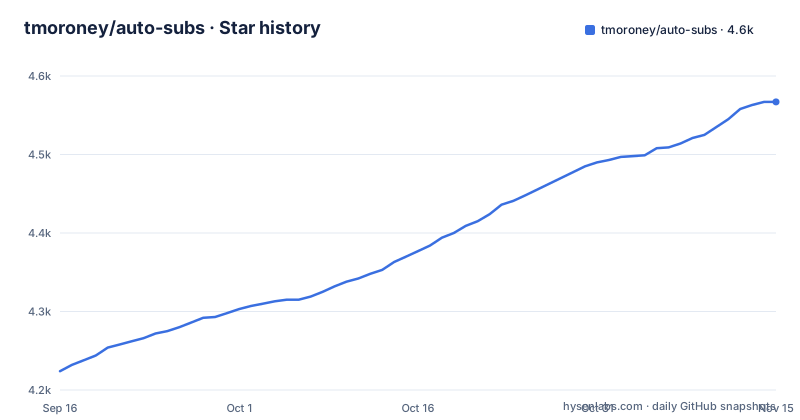
Star history
- tmoroney/auto-subs4,567 ★ · +343
| Repository | 2026-09-16 | 2026-11-15 |
|---|---|---|
| tmoroney/auto-subs | 4.2k | 4.6k |
343 Stars in the last 60 days, measured from the daily GitHub snapshot. Compare with other projects
Editorial analysis
The Linux download row is the only one with no release URL
The five rows of the download table do not point at the same kind of target. Windows, macOS Apple Silicon, macOS Intel and the Fedora RPM each resolve to a full address under `https://github.com/tmoroney/auto-subs/releases/latest/download/`. The Debian and Ubuntu row is the exception: its link is `#linux-install`, an anchor inside the page, so the file address has to be read out of the section printed below the table.
macOS has two separate pkg files, one for Apple Silicon and one for Intel, plus a second route through a package manager:
brew install --cask auto-subsLinux gets no package manager entry at all, only a fetch step followed by a local install:
wget https://github.com/tmoroney/auto-subs/releases/latest/download/AutoSubs-linux-x86_64.deb
sudo apt install ./AutoSubs-linux-x86_64.deb
The Fedora instruction is different in kind again: it asks you to fetch `AutoSubs-linux-x86_64.rpm` from the same release directory and open it with your package manager, without naming a single command. Nothing in the table or in the install section names a distribution version, a glibc floor or a dependency list, so the two Linux paths depend on whatever the image already carries.
Every artifact link tracks whatever tag is newest
All five download addresses end in `/releases/latest/download/`. That path is written to follow the newest published tag rather than a version you choose, which means the bytes behind a URL saved in a bookmark change whenever a release is cut. The tag list gives a sense of the interval: v3.10.0 on 2026-09-18, v3.10.1 on 2026-09-19, v3.11.0 on 2026-09-29, and a further push to the default branch on 2026-10-30.
No checksum, detached signature or hash line sits beside any of the five files on this page, and nothing pins a version number into the install command. macOS is the only platform with two documented routes, the pkg files and the Homebrew cask.
Architecture coverage is uneven in a way the table makes plain. macOS is split into an Apple Silicon and an Intel build, while the Debian, Fedora and Windows entries are all x86_64 only. There is no arm64 Linux package in this list, so an arm64 workstation with no x86_64 translation layer has nothing listed to install.
Resolve is driven from inside Resolve, the Adobe apps from inside AutoSubs
The two host integrations are entered from opposite ends. For DaVinci Resolve the sequence begins inside the editor: Workspace, then Scripts, then AutoSubs, then a choice of timeline or audio source plus settings, then Transcribe, then edits to speakers and subtitles, and finally styled subtitles sent back to Resolve. For Premiere Pro and After Effects the sequence begins inside AutoSubs, which has to be running with the host application already open, because the CEP extension loads automatically at launch.
What reaches the host differs three ways as well. Standalone mode exports SRT, plain text, or a copy on the clipboard. Resolve receives styled subtitles. Premiere Pro receives caption tracks, and After Effects receives SRT entries turned into text layers. One transcription pass therefore feeds three different downstream structures, and the standalone path is the only one with an export format named on the page that something else could read.
One limitation is stated as a warning rather than left to be discovered: the Mac App Store edition of DaVinci Resolve is not supported, and the page sends readers to the build at blackmagicdesign.com instead.
The 1,000+ language headline is not backed by any catalogue table
The feature list leads with 1,000+ Languages, and none of the Whisper, Moonshine, Parakeet, SenseVoice or Canary tables supports that figure. The largest count among them is 25, given to parakeet, orukeet and canary and described as 25 European languages plus Russian and Ukrainian. Moonshine is laid out one row per language: English, Arabic, Chinese, Japanese, Korean, Ukrainian and Vietnamese across the tiny variants, plus a base row for English, seven named languages in all. SenseVoice covers five, namely Chinese, English, Japanese, Korean and Cantonese. Cohere is introduced as the highest-accuracy option for a focused set of 14 widely-spoken languages. The Whisper rows print Multilingual and English in the Languages column without a number, so that family's reach is never stated as a count either.
A second claim sits oddly beside the first. The page says everything runs offline, yet the model files are not part of the application: they are pulled on demand from the in-app Model Manager. The size column runs from 60 MB for the smallest Moonshine build to 3.1 GB for Whisper large-v3, so the first run of each family is a download, and the catalogue is a list of what the application can reach rather than what an installer carries.
Four stars for orukeet, four stars for parakeet, one star for the smallest Moonshine
The accuracy column is defined on the page as a relative 1 to 4 rating inside AutoSubs, with sizes and RAM marked approximate, so it can only be read inside this table. Read that way it still produces some uneven pairings. Orukeet is described in prose as faster and more accurate than Parakeet, an engine the two share, and both rows carry four stars, so the distinction the sentence draws never reaches the rating.
Moonshine is split by quantization. The English `moonshine-tiny` is quantized, 60 MB, and rated one star, while the Arabic, Chinese, Japanese, Korean, Ukrainian and Vietnamese tiny variants are float-precision at 120 MB each and rated two or three stars. The float English `moonshine-base` costs 200 MB and earns two stars, below the 120 MB Arabic, Chinese, Japanese, Korean and Vietnamese builds, which are rated three. Storage and rating point in opposite directions on that family, so size is not a usable proxy for quality even inside a single table.
The top rated Whisper row has no English-only variant
Whisper is described as having a multilingual and an `.en` English-only variant at each size, with the English-only models slightly more accurate on English audio. The table lists `.en` beside tiny, base, small and medium only. The two largest rows, large-v3-turbo at 1.6 GB and large-v3 at 3.1 GB, are multilingual with no English-only counterpart, so the build carrying the highest Whisper rating is also the one that note does not apply to. An editor working only in English who wants that rating has to take the multilingual download.
The RAM column decides the choice before the stars do. Large-v3 is marked at about 10 GB, large-v3-turbo at about 6 GB, medium at 5 GB, and those figures are the same ones the page calls approximate. The rest of the catalogue stays under that: parakeet is marked at 2 GB, orukeet at 4 GB, canary at 3 GB, and everything in the Moonshine and SenseVoice rows sits at 1 GB.
MIT at the root, CC BY-SA 4.0 on one set of weights
The repository licence is MIT, and one of the weights the application can download is not. Orukeet, the community variant built on the Parakeet engine, is stated to use weights under CC BY-SA 4.0, a share-alike licence carrying redistribution conditions that MIT does not. The other families' descriptions name no weight licence: the Whisper builds arrive through `whisper-rs` in GGML form, Moonshine runs on ONNX Runtime, and Parakeet, SenseVoice, Canary and Cohere are described as int8 or int4 ONNX builds.
The codebase is split along the same lines as the integrations. The root carries `CLI.md`, `CONTRIBUTING.md`, `release-notes.md`, `plans/` and `.luarc.json` beside directories for `AutoSubs-App/`, `Resolve-Integration/`, `Adobe-Extension/` and `Mac-Package/`, and the front page adds `docs/arch-linux.md` for Wayland compositing and Resolve paths on Arch. The command line itself appears nowhere on that page. There is no flag, no config file, no exit code, only a pointer to `CLI.md` and a suggestion to ask DeepWiki about the code instead.
Editorial conclusion
AutoSubs fits editors who already run Resolve from blackmagicdesign.com, or Premiere and After Effects, and who would rather not hand audio to a service. Treat the install step as the weak point rather than the code: all five artifacts come from a releases/latest URL with no checksum printed beside them, and the Linux packages are x86_64 only. Before installing on a work machine, open the release page yourself and check whether a hash or signature has been published there, and pick a model family by matching its language column instead of trusting the 1,000+ figure. Anyone expecting the Mac App Store edition of Resolve to work will find it unsupported, and anyone needing a pinned version should pick a tagged release such as v3.11.0 rather than the latest link.
Frequently asked questions
how to use auto subs in davinci resolve
Inside DaVinci Resolve, open Workspace, then Scripts, then AutoSubs, pick the timeline or audio source together with the settings, click Transcribe, edit the speakers and subtitles, and send the styled subtitles back to Resolve. The Mac App Store edition of Resolve is not supported.
how to install auto subs davinci resolve
Install AutoSubs from the download table (Windows .exe, macOS .pkg, Linux .deb or .rpm) or on macOS with `brew install --cask auto-subs`, then open it in Resolve from Workspace, Scripts, AutoSubs. Resolve has to come from blackmagicdesign.com rather than the Mac App Store.
Can AutoSubs transcribe without an internet connection?
The transcription runs on the local machine with nothing sent away, but the model files are not bundled with the application. They are downloaded on demand from the in-app Model Manager, so the first run of each family needs a connection.
What licence covers AutoSubs and the model weights it downloads?
The repository itself is MIT. Orukeet, the community Parakeet variant, is stated to use weights under CC BY-SA 4.0. No licence line is given for the Whisper, Moonshine, Parakeet, SenseVoice or Canary weights in their README sections.
Which AutoSubs model is the most accurate for English?
Four stars is the top of the scale, given to Whisper large-v3 at 3.1 GB and about 10 GB of RAM, plus orukeet, parakeet and canary across 25 languages. The rating is a relative 1 to 4 scale defined inside AutoSubs, and large-v3 has no `.en` variant despite the note that English-only Whisper models are slightly better on English audio.
Official sources
Add this badge to your README
If you maintain this project, the badge below links readers to this analysis and shows its maintenance status from the daily GitHub snapshot. Paste the markdown into your README; add ?metric=license or ?metric=stars to the image URL for a different field.

[](https://hysenlabs.com/projects/tmoroney-auto-subs)Star history chart for your README
[](https://hysenlabs.com/projects/tmoroney-auto-subs)Was this useful?