todo-for-ai: an MCP task server split across three submodules
🤖 A comprehensive task management system specifically designed for AI assistants. Supports project management, task tracking, team collaboration, and seamless AI integration through MCP (Model Context Protocol). Built with modern tech stack including React, Flask, and Docker. Try it now at https://todo4ai.org/
At a glance
- What is it?
- todo-for-ai is a Flask, React and Docker task manager whose reason to exist is an MCP server that lets an assistant write tasks, not just read them. The interesting parts are what the setup leaves out: the parent repository holds no application code, the compose file the quick start invokes is not at the root, and the shipped env template lands in production mode with placeholder secrets.
- Who is it for?
- Adopt todo-for-ai when an MCP capable assistant has to write tasks rather than only read them, and your team already keeps a MySQL instance. Leave it aside when a shared human board is the real requirement, since the web side earns its keep only next to an agent.
- Can I use it commercially?
- Yes. Apache-2.0 is a permissive licence: you can use, modify and sell software built on it, as long as you keep its copyright and licence notices.
- Is it still maintained?
- Yes. The repository last received commits 34 days ago.
- What is it written in?
- Mainly Python, according to GitHub's language statistics.
Answers come from the project's GitHub data, last synced on October 22, 2026, and from our analysis. They are not legal advice.
Star history
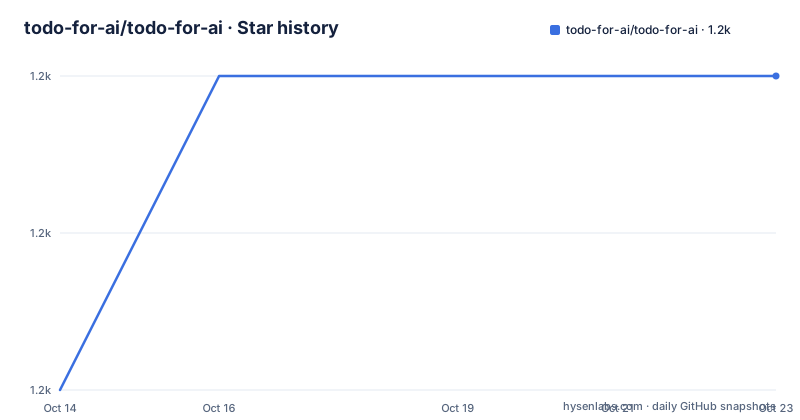
- todo-for-ai/todo-for-ai1,187 ★ · +2
| Repository | 2026-10-14 | 2026-10-22 |
|---|---|---|
| todo-for-ai/todo-for-ai | 1.2k | 1.2k |
2 Stars in the last 8 days, measured from the daily GitHub snapshot. Compare with other projects
Editorial analysis
A parent repository that holds only submodules and a Dockerfile
Todo for AI has no application code of its own. What you clone is a superproject: todo-for-ai-api-server for the Flask backend, todo-for-ai-webpage for the frontend and todo-for-ai-mcp for the Model Context Protocol server, three separate repositories wired together through .gitmodules. The rest of the root listing is packaging or evidence of past runs, a Dockerfile, start.sh, nginx/, docker/, scripts/, docs/, a Chinese README in README_zh.md, and a process management cluster of ecosystem.config.js, .pm2/ and .todo-for-ai-pm2/.
That arrangement dictates the build. The image builds from the parent directory, so the line that copies todo-for-ai-webpage/package*.json has nothing to copy on a plain clone, which makes the --recursive flag in the documented clone command a build requirement rather than a convenience. Nothing in the listing says how often the superproject changes; the last push was on 2026-09-19 and the release list still shows a single v1.0 entry dated 2025-08-02. Two of the four documented install paths never mention the env file at all, and that omission is where the placeholder secrets come from.
The MCP server ships alone, and its config file is never shown
The agent-facing half is distributed on its own: the server that lives in the third submodule is also on npm as @todo-for-ai/mcp, and the setup instructions give a path for installing only that piece.
# Install via npm
npm install -g @todo-for-ai/mcp

# Or install locally
npm install @todo-for-ai/mcp

# Configure and start
todo-for-ai-mcp --config config.json
What that block does not show is config.json. No contents, no schema, no sample. The filename sits on the command line and is explained nowhere else, and no base URL or token flag is documented for pointing the server at a backend. Take this path on its own and you end up with an agent-facing task surface and no task server behind it, because the Flask API lives in the other submodule.
Compatibility is described in two registers at once. The prose names Claude, GPT and other assistants through the standardized MCP protocol, while the repository topics are ai-coding-tools, cursor, kiro, trae and windsurf. Four editors on one side of that fence, two model providers on the other, and no configuration example that reconciles them.
Port 50111 is nginx in front, 50110 is Flask behind it
One image, two published ports:
# Pull and run the latest image
docker run -d --name todo-for-ai \
  -p 50111:80 \
  -p 50110:50110 \
  -e DATABASE_URL="mysql+pymysql://username:[email protected]:3306/todo_for_ai" \
  -e GMAIL_USER="[email protected]" \
  -e GMAIL_PASSWORD="your-app-password" \
  -e GITHUB_TOKEN="your-github-token" \
  -e SECRET_KEY="your-secret-key-here" \
  -e JWT_SECRET_KEY="your-jwt-secret-key-here" \
  --add-host=host.docker.internal:host-gateway \
  todoforai/todo-for-ai:latest

# Access the application
# Frontend: http://localhost:50111/todo-for-ai/pages/projects
# API: http://localhost:50110/todo-for-ai/api/v1/
Inside the image, nginx sits beside supervisor, which is why the frontend lands on container port 80 while the Flask app keeps PORT=50110. What trips people up is the frontend build argument instead: VITE_API_BASE_URL defaults to the relative path /todo-for-ai/api/v1, so a browser pointed at localhost:50111 asks the frontend origin for the API rather than the port 50110 that the second mapping publishes. That path only resolves if the nginx configuration under nginx/ proxies the /todo-for-ai/api/v1 prefix through to Flask, and whether it does is the first file to read before anyone deploys this. A related loose end is ARG VITE_MCP_SERVER_URL, declared with an empty default and never assigned a value in the build.
The env template copies production mode with 2024 placeholders
The development path tells you to run cp .env.example .env and then edit the result. Copied verbatim, that file already sets FLASK_ENV=production and FLASK_DEBUG=0, and both signing keys are still literal placeholder strings ending in 2024:
FLASK_ENV=production
FLASK_DEBUG=0
PORT=50110
HOST=0.0.0.0
DATABASE_URL=mysql+pymysql://root:[email protected]:3306/todo_for_ai
SECRET_KEY=CHANGE-THIS-SECRET-KEY-IN-PRODUCTION-2024
JWT_SECRET_KEY=CHANGE-THIS-JWT-SECRET-KEY-IN-PRODUCTION-2024
So the documented copy step hands you a production-configured Flask process whose session and JWT secrets are printed in the repository. Further down, the visible part of the template stops at GOOGLE_CLIENT_ID, which means the GITHUB_TOKEN, GMAIL_USER and GMAIL_PASSWORD that the Docker command passes sit in no documented variable block. GitHub OAuth is optional, and its callback is pinned to http://localhost:50110/todo-for-ai/api/v1/auth/github/callback, so any other host or port needs that value rewritten before login works at all. Exposure is a separate concern: HOST=0.0.0.0 binds every network interface by the template's own comment, and with FLASK_DEBUG=0 off you get no interactive traceback to diagnose a wrong DATABASE_URL.
MySQL is not optional on any documented path
Nothing in the documented setup avoids MySQL. DATABASE_URL is marked required, its format is mysql+pymysql, and the sample value reaches host.docker.internal:3306/todo_for_ai. Client support is compiled into the image, which installs default-libmysqlclient-dev with gcc and pkg-config ahead of pip install --no-cache-dir -r requirements.txt, so the driver is baked into the Python runtime rather than swapped at deploy time. Reaching a database on the host also needs --add-host=host.docker.internal:host-gateway, and the same container behaves differently on a Linux host where that mapping is absent.
TEST_DATABASE_URL sits in the template commented out and marked optional for the test environment, and no SQLite or file-backed fallback appears anywhere in the documentation. For a developer on a laptop, standing up MySQL is step zero, before the three-process stack the source install path asks for: a Flask process, a built frontend and a Node MCP server, each started by hand in its own terminal.
docker-compose up -d with no compose file at the root
Developers are given four steps:
# 1. Clone the project (including submodules)
git clone --recursive https://github.com/todo-for-ai/todo-for-ai.git
cd todo-for-ai

# 2. Initialize submodules (if not using --recursive)
git submodule update --init --recursive

# 3. Set up environment variables
cp .env.example .env
# Edit .env with your configuration

# 4. Start with Docker Compose
docker-compose up -d
Step 4 is where it breaks. That command reads a file named docker-compose.yml unless told otherwise, and the top level listing has no such entry: it carries docker-compose.private.yml, a docker/ directory and start.sh, none of which Compose loads under that name. The command also uses the hyphenated docker-compose binary rather than the docker compose subcommand shipped with current Docker. Manual build lines follow in the README, and they are the fallback that works, handing the same environment variables to docker run as the pull command does. Nothing in the documentation explains which compose file you are meant to copy where.
The runtime check creates a task and waits for DONE
Validation is built in, described as a one-shot run from the repository root:
# auto-create one AI task and verify commit -> DONE
./scripts/runtime_e2e_once.sh

# strict mode: first observed commit must match the target task
TARGET_TASK_ID=123456 STRICT_TARGET_ONLY=true ./scripts/runtime_e2e_once.sh
That wrapper creates one AI task and waits for it to reach DONE, and strict mode refuses to pass unless the first commit it observes matches the task id you name. Introducing it, the README is cut off after the token agent-r, so the runner the wrapper calls is never fully named, even though the root listing does contain a directory called agent-runtime. Expected output is not described either, so a passing run tells you little about which service handled the task.
Wider test coverage is committed rather than explained. FULL_TEST_REPORT.json, api-test-report.json and frontend-test-results.json sit at the top level next to about a dozen test-*.py scripts and generate-final-report.py, alongside start.sh.backup.20260326014456 and a dump.rdb, which is a Redis snapshot file left in the repository root. Private deployment material under private-deploy and .playwright-cli/ appears in the same listing. All of it helps when auditing one commit, and none of it helps a fresh clone looking for a documented test command.
Where a server-side task record beats a checklist file
Choosing this over a markdown checklist in the repository is an architectural decision, not a feature comparison. Here the task record lives on the server: an agent reaches it over the Model Context Protocol, the backend owns the project and task hierarchy, the frontend reads the same API, and three documents describe the contract, docs/AGENT_PLATFORM_SPEC.md, docs/API.md and docs/database-design.md. A checklist file has none of those properties, no authentication, no shared state and no analytics. In exchange, this one wants MySQL, three running processes and a proxy rule before it does anything at all.
It is the wrong tool when a team wants a shared human board with no assistant in the loop, since the web side earns its keep only beside an agent. The claims about real-time synchronisation between agents and people also have no mechanism described beyond the protocol and the web app. Read docs/API.md for the task lifecycle and docs/database-design.md for the schema before committing to either path, and decide first who owns the MySQL instance.
Editorial conclusion
Adopt todo-for-ai when an MCP capable assistant has to write tasks rather than only read them, and your team already keeps a MySQL instance. Leave it aside when a shared human board is the real requirement, since the web side earns its keep only next to an agent. Apache-2.0 keeps the licensing question simple, but you inherit three submodule repositories instead of one. Before the first clone, check what config.json holds for todo-for-ai-mcp and whether nginx/ proxies /todo-for-ai/api/v1 from 50111 to 50110.
Frequently asked questions
What database does todo-for-ai need?
MySQL, reached through a mysql+pymysql connection string, with the template pointing DATABASE_URL at host.docker.internal:3306/todo_for_ai. The image installs default-libmysqlclient-dev and its build argument defaults PYTHON_VERSION to 3.11. No SQLite or file-backed option is documented.
Can I run todo-for-ai without Docker?
The source install path clones with --recursive, then runs pip install -r requirements.txt and python app.py for the backend, npm run build and npm run preview for the frontend, and npm start for the MCP server in three separate directories. That path never mentions the .env file, so DATABASE_URL has to be supplied another way.
How does todo-for-ai connect to Claude, GPT, Cursor or Windsurf?
Through the MCP server published as @todo-for-ai/mcp and started with todo-for-ai-mcp --config config.json. The prose names Claude and GPT, while the repository topics list cursor, kiro, trae and windsurf, and the contents of config.json are never shown.
What licence and release history does todo-for-ai have?
It is published under Apache-2.0 with a LICENSE file at the root and a CHANGELOG.md beside it. The release list carries a single v1.0 entry dated 2025-08-02, and the last push to the parent repository was on 2026-09-19.
How can I verify that an assistant actually commits a task?
Run ./scripts/runtime_e2e_once.sh from the repository root, which auto-creates one AI task and checks the commit reaches DONE. Setting TARGET_TASK_ID with STRICT_TARGET_ONLY=true makes the script fail unless the first observed commit matches that task, though the README sentence describing what the wrapper calls is cut off after agent-r.
Official sources
Add this badge to your README
If you maintain this project, the badge below links readers to this analysis and shows its maintenance status from the daily GitHub snapshot. Paste the markdown into your README; add ?metric=license or ?metric=stars to the image URL for a different field.

[](https://hysenlabs.com/projects/todo-for-ai-todo-for-ai)Star history chart for your README
[](https://hysenlabs.com/projects/todo-for-ai-todo-for-ai)Was this useful?